iTunes and download speed
-
Comments:
- here.
I remember reading somewhere about a trick to view how fast iTunes is downloading a file. Click on the Downloads source item, and then click on the time remaining text for a downloading file. It changes to display a speed: 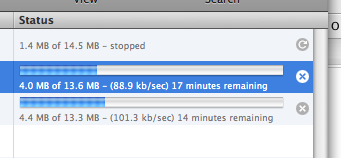 However, the savvy amongst you may realise this is pretty fast. Especially since my connection is a sloppy 256kbps (kilobits per second) - the fastest I can really download at is around 26 kilo_bytes_ per second. iTunes must really be measuring the speed in kilobits per second.