At times, it’s annoying to have to go into the Dashboard, just to delete a Comment that has appeared, or to Edit a comment I have made (or fix the text of someone else’s comment). Luckily, you can create links or buttons to allow you to do these two jobs while viewing a Post page: ✍ Edit ✗ Delete In your Comments.html template, find the location you want to put the links. To just have the Edit Comment link (you can delete a comment from it’s editing page), insert the following:
1
{edit_comment_link}
To have both an Edit and a Delete link, try the following:
It’s a neato feature to be able to show a reader the comment they have just posted, but which is awaiting moderation before it it displayed to everyone else. Newer versions of Wordpress can do this, and many templates also have this feature built in, but it does not work on Blogsome. The code that grabs the Comment data is found, in Blogsome, in wp-inst/wp-comments.php:
1
2
$query="SELECT * FROM $wpdb->comments WHERE comment_post_ID = '$post->ID' AND comment_approved = '1' ORDER BY comment_date";$comments=$wpdb->get_results($query);
This code was fairly easy to find, but the equivalent code in Wordpress was a bit tricker. Eventually, I found it in wp-includes/comment-functions.php:
 1
 2
 3
 4
 5
 6
 7
 8
 9
10
11
12
if(is_single()||is_page()||$withcomments):$req=get_settings('require_name_email');$comment_author=isset($_COOKIE['comment_author_'.COOKIEHASH])?trim(stripslashes($_COOKIE['comment_author_'.COOKIEHASH])):'';$comment_author_email=isset($_COOKIE['comment_author_email_'.COOKIEHASH])?trim(stripslashes($_COOKIE['comment_author_email_'.COOKIEHASH])):'';$comment_author_url=isset($_COOKIE['comment_author_url_'.COOKIEHASH])?trim(stripslashes($_COOKIE['comment_author_url_'.COOKIEHASH])):'';if(empty($comment_author)){$comments=$wpdb->get_results("SELECT * FROM $wpdb->comments WHERE comment_post_ID = '$post->ID' AND comment_approved = '1' ORDER BY comment_date");}else{$author_db=addslashes($comment_author);$email_db=addslashes($comment_author_email);$comments=$wpdb->get_results("SELECT * FROM $wpdb->comments WHERE comment_post_ID = '$post->ID' AND ( comment_approved = '1' OR ( comment_author = '$author_db' AND comment_author_email = '$email_db' AND comment_approved = '0' ) ) ORDER BY comment_date");}
I had to modify the code somewhat, but here is the code I have put on the private Blogsome test server:
 1
 2
 3
 4
 5
 6
 7
 8
 9
10
11
$comment_author=isset($_COOKIE['comment_author_'.COOKIEHASH])?trim(stripslashes($_COOKIE['comment_author_'.COOKIEHASH])):'';$comment_author_email=isset($_COOKIE['comment_author_email_'.COOKIEHASH])?trim(stripslashes($_COOKIE['comment_author_email_'.COOKIEHASH])):'';$author_db=addslashes($comment_author);$email_db=addslashes($comment_author_email);if(empty($comment_author)){$query="SELECT * FROM $wpdb->comments WHERE comment_post_ID = '$post->ID' AND comment_approved = '1' ORDER BY comment_date";$comments=$wpdb->get_results($query);}else{$comments=$wpdb->get_results("SELECT * FROM $wpdb->comments WHERE comment_post_ID = '$post->ID' AND ( comment_approved = '1' OR ( comment_author = '$author_db' AND comment_author_email = '$email_db' AND comment_approved = '0' ) ) ORDER BY comment_date");$comments=$wpdb->get_results($query);}
It could probably be tweaked (for instance, moving the addslashes() calls to within the else block would save a couple of CPU cycles when no author is set), but it works!. You need to have the following in your Comments Template:
    {if $comment->comment_approved == "0"}
        <p>Your Comment is awaiting Moderation.</p>
    {/if}
I’m also going to style the comment box a little differently for unmoderated comments.
It seems like the ABC is having some sort of an issue with media files: no new files have been added to the server, nor have podcast feeds been updated. The old media files are still there, but even in cases where the links to the files have been put on pages, the media files themselves aren’t available. Saturday’s programs were all updated (All In The Mind, By Design, Radio Eye and The Science Show, for instance), as was Ockham’s Razor at around lunchtime, but nothing since them has been. The feeds that should be there are: Background Briefing, National Interest, Rear Vision, Street Stories and The Night Air.
Ages ago, I wrote about how to (a) pass Pages through the Post template, and (b) use Smarty Tags in special Pages. I had an Archives page, that had a list of every Post I’d ever made. It’s getting kind of long, so I wrote a script that parses this list, and creates a structured list, dividing the posts up according to the month they were published. It then makes this list so that you can hide/show a whole month’s worth of posts in one go. In the Posts Template, I have the following lines:
Note that this is out of context: see my whole Posts template file for details. This is in the actual Page:
    <script type="text/javascript">
    var months = new Array("","January","February","March","April","May","June","July","August","September","October","November","December")
    function getYear(li){
        return li.innerHTML.split("/")[3]*1;
    }
    function getMonth(li){
        return li.innerHTML.split("/")[4]*1;
    }

    function showKids(id){
        var unit = getById(id);
        for (var i=1;i<unit.childNodes.length;i++){
            unit.childNodes[i].style.display="block";
        }
    }
    function hideKids(id){
        var unit = getById(id);
        for (var i=1;i<unit.childNodes.length;i++){
            unit.childNodes[i].style.display="none";
        }
    }
    function toggleKids(id){
        var unit = getById(id);
        if (unit.childNodes[1].style.display == "none")
            showKids(id)
        else
            hideKids(id)
    }

    function Restructure(){
        var pc = getByClass("post-content")[0];
        var items = pc.getElementsByTagName("li");
        var list = items[0].parentNode;
        var month_nodes = document.createElement("ul");

        var month_node = document.createElement("li");
        month_node.className = "month";
        month_node.innerHTML = months[getMonth(items[0])] + " " + getYear(items[0]);
        month_node.id = month_node.innerHTML.replace(" ","_");
        month_node.innerHTML = "<h3><a onclick='toggleKids(\""+ month_node.id +"\");'>" + month_node.innerHTML + "</a></h3>";
        month_nodes.appendChild(month_node);

        var this_month;
        var next_month;

        while (items.length) {
            this_month = items[0];
            next_month = items[1];
            month_node.appendChild(this_month);
            if (next_month && (getMonth(this_month) != getMonth(next_month))){
                month_node = document.createElement("li");
                month_node.className = "month";
                month_node.innerHTML = months[getMonth(next_month)] + " " + getYear(next_month);
                month_node.id = month_node.innerHTML.replace(" ","_");
                month_node.innerHTML = "<h3><a onclick='toggleKids(\""+ month_node.id +"\");'>" + month_node.innerHTML + "</a></h3>";
                month_nodes.appendChild(month_node);
            }
        }

        pc.replaceChild(month_nodes,list);

        var all = getByClass("month")
        for (var i=0;i<all.length;i++) hideKids(all[i].id);
    }

    Restructure();
    </script>
You’ll notice a couple of strange comments, and what looks to be a closing all tag: these are because the Blogsome post editor kindly closes tags for me, even when they aren’t tags!
I spent hours last night working on this, and a fair bit of time today. I think I’ve got it pretty good, now. See my Templates page for an example. Now, instead of trying to get the data to appear immediately, which I could not do, I have four buttons that the user can select between the various template files, and it shows them in the <textarea> underneath.
<scripttype="text/javascript">varreq1=newXMLHttpRequest();req1.open("GET","/templates/index.html",true);req1.send("");varreq2=newXMLHttpRequest();req2.open("GET","/templates/post.html",true);req2.send("");varreq3=newXMLHttpRequest();req3.open("GET","/templates/comments.html",true);req3.send("");varreq4=newXMLHttpRequest();req4.open("GET","/templates/wp-layout.css",true);req4.send("");functionDisplay(text){document.getElementById('template').innerHTML=text;}</script><p>This is the current, up to date version of my conversion of Patricia Müller's Connections Template for Blogsome.</p><p>There are four files that Blogsome uses, you need to ensure that the correct data goes into each. Each one also has, by default some features enabled. There is commenting throughout that will enable you to disable that which you do not want.</p><p><aclass="button"onclick="Display(req1.responseText);">Main Page</a><aclass="button"onclick="Display(req2.responseText);">Post</a><aclass="button"onclick="Display(req3.responseText);">Comments</a><aclass="button"onclick="Display(req4.responseText);">Style Sheet</a></p><p><textareaid="template"wrap="off"style='width:95%;height:500px;'>Click on a button above to display the template contents.</textarea></p>
I probably could have saved the data to variables, and reused the XMLHttpRequest item, but then I would have had to find some way to wait for the response code, and that kept failing for me.
I bought Missing Sync for PalmOS - probably a bad decision as it’s not really that much better than the standard Palm Syncing software. Oh, it claims to be heaps better, but there are just too many things that don’t quite work right. For instance, it makes duplicate entries on my Palm of Read-Only calendars. I use but one of these, that has all of the Australian Public Holidays in it. However, I’ve stopped syncing, as by the end of a month I have 30 copies of each holiday in the database. Not cool. So, surely there’s a way (a-la iTunes/iPod syncing) to only choose some of the items. As it turns out, there is. If you select the Conduit (Events) and then Choose Settings…, you can choose to only sync selected calendars. Except you can’t get at anything other than the first 4 calendars. The scroll bar in this window is broken. Makes it pretty hard to deselect the ones you don’t want. I got around this by renaming my Holidays calendar to Aus Holidays, but I shouldn’t have to do this.
Now, I’m not talking here about using the “Show Source” feature of a Web Browser. Anyone worth even a quarter of a pinch of salt knows how to do that. What I’m trying to do is display the source of a web page as text/plain within another web page. This is so I can have a current version of my template available on a page of my blog. I’ve put a version up that I need to update, and I make so many changes to the template this is unsustainable.
Under Blogsome, the template files can be found in the /templates/ directory, and there are four of them: index.html, wp-layout.css, post.html and comments.html. Of these, only wp-layout.css is a plain text document, the rest are (naturally) text/html.
Now, HTML has a nice little feature called <object>, which should be able to display anything the browser can render. For example:
<object data="/templates/index.html"> </object>
Will display a rendering of the Main Page template. It looks somewhat ugly, since it’s not been pre-processed by the Smarty Templating engine, so is somewhat useless - it’s neither the source nor the full result:
This element also has an attribute that should allow you to choose the content type: codetype.
I fiddled around with this for about an hour or so last night, trying to get it to work. The DOM tells me it’s text/plain, but the browser won’t render it as such.
So, after much more rooting around, I finally figured out a way to get the source to display: use XMLHttpRequest() to grab the data, and DOM manipulation to put it into the required location. This is what my page looks like:
It’s not quite perfect: there are still some issues with the timings, but I’ll get there. At least it works, now. You may need to type javascript:Source() into the address bar to get it to work.
Don’t even get me started on the inanity of young people these days. The latest, and stupidest thing I just heard during an ad break in Video Hits (I despise their latest look, btw):
Get your personal Chinese symbol sent directly to your phone! Just SMS “c” plus your year of birth, for example 1980, to 19 XX XX.
This is just wrong on so many levels. For christ’s sake, every person born in the same year as you, which is probably most of your stupid little friends from school, has the same symbol as you. That’s hardly a personal symbol. Secondly, is the company seriously suggesting that it’s customers are so stupid as to require an example of what a year looks like? But then, these people will quite happily pay $4 to send a text message, and receive in return a sampled down version of a song on their mobile phone, rather than pay $1 to download it legally, and then use some simple software to convert it to a format suitable for use on said phone. And then probably only use it as their ringtone for about a week, before repeating the process.
I’ve got some serious JavaScript_age_ going on with my site: I sometimes wonder if it’s too much. One thing I have noticed is that on my iMac I get occasional “There is a script taking a long time to finish. Continue/Stop Script” errors, but never see these on the PC. I also don’t see them under IE/Win, the platform I am forced to use at work. I also get errors with Camino, but I’m not sure about Safari. I’ve gone into about:config, and changed dom.max_script_run_time from the default of 5 to 20, just to see if that makes a difference.
I had a standard Smarty function, {list_cats}, that under certain circumstances generates invalid XHTML. Specifically, when a feed_image is supplied, not alt tag is generated. This annoys me, as I have worked hard to make my template generate “nice” code. Smarty to the rescue. Whilst you cannot pass the results of a Smarty function through a Smarty filter, like replace, you can capture the results, and then pass this through the filter:
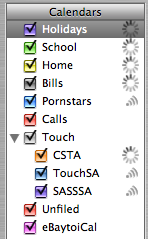
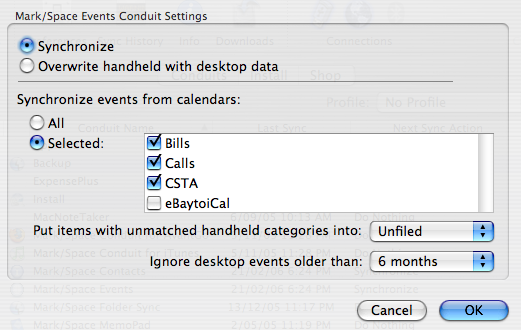 I got around this by renaming my Holidays calendar to Aus Holidays, but I shouldn’t have to do this.
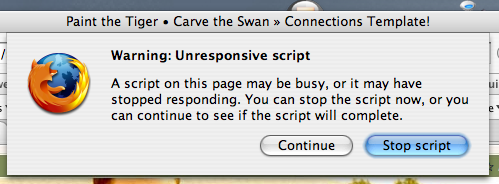 I also get errors with Camino, but I’m not sure about Safari. I’ve gone into