Collecting Javascript Coverage in Django

Over the past years, I’ve worked really hard to get code coverage of my work project up to a reasonable level. I’m not attempting to get 100% coverage (although, I have made it there in some smaller projects), nor do I mistakenly believe that 100% coverage is a panacea. I’m aware that even 100% coverage doesn’t mean there are no bugs.

But there are a lot of reasons to have high test coverage. Having less than 100% coverage mean that the code not being covered is not automatically tested.

In a django project, there are several different types of code. Python code, HTML, CSS and Javascript. In my case, there’s also a lot of SQL. Some of it is doing things like defining views and functions - but I’m not going to deal with that now…

What I am going to look at is Javascript.

It would be awesome to write unit tests for all of our JS code, but we’ve also been writing Robot Framework tests for a lot of our functionality: what would be great is to capture the coverage that is already happening due to this. It would be even better if it was possible to get this coverage information for JS that is embedded in HTML templates, but that seems like it might be a harder job.

There are really only two things we need to do in order to capture the coverage data:

  • Modify the scripts so they generate coverage data when they are executed
  • Capture the coverage data before any navigation away from any page

The first one could be done in a number of different ways. You might be able to use a staticfiles backend to modify the files when running collectstatic, or perhaps a middleware that modified the files as they are served. That could possibly modify the inline script tags as well, although ideally you’d want to be doing that in the template rendering phase, as I think that could be the last point you get access to the template file names and locations.

There is a tool that you can use for the actual modification of the script files: nyc. This used to be called Istanbul, I believe, and it can “instrument” files. Then, when the script is executed by the browser, it stores the coverage inforamtion in window.__coverage__.

This then allows for capture of the coverage information, but how do we ensure this information is not lost when the page is navigated away from?

To do that in Django requires a small amount of JS, and a django view to capture it:

window.addEventListener('beforeunload', () => {
  if (window.__coverage__) {
    navigator.sendBeacon("{ % url 'collect-coverage' % }", JSON.stringify(window.__coverage__));
  }
})

Okay, that was easier than expected…what about the matching view?

import json
import uuid
from pathlib import Path

from django.http import HttpResponse

@csrf_exempt
def collect_coverage(request):
    coverage_dir = Path('js-coverage')
    if not coverage_dir.exists():
        coverage_dir.mkdir()

    try:
        json.dump(
            json.loads(request.data),
            (coverage_dir / 'coverage.{uuid.uuid4()}.json').open('w')
        )
    except ValueError:
        pass

    return HttpResponse('')

Oh, that wasn’t too bad either. It just checks that the incoming data is valid JSON, and then dumps it out to a uniquely named JSON file in js-coverage/.

We’ll need to install that in our urls.py:

if settings.DEBUG or settings.TESTING:
    path('coverage/', collect_coverage, name='collect-coverage')

Note well that you will need to ensure you don’t expose this view when not running your Selenium/Robot tests, else someone could very quickly fill up your disk with JSON files…

The last bit of the puzzle is to merge the various files together to generate the report:

nyc report --reporter lcov -t .js-coverage --report-dir .

This generates an lcov.info file that could be uploaded to a coverage analysis tool, and an lcov-report/ directory that contains an HTML report.


So, what about the tricky part, the bit that actually handles running the nyc instrument command on the files?

There are two types of scripts we need to be able to mutate: standalone files (ie, collectstatic), and inline scripts (within HTML templates).

Static files storage backends are relatively well-known, here’s some code that might work:

class InstrumentJSBackend(django.contrib.staticfiles.storage.StaticFilesStorage):
    def post_process(self, paths, dry_run=False, **options):
        if dry_run:
            return

        for path in paths:
            if path.endswith('.js'):
                # We need the original path name, not the one we have just copied...

            yield path, path, True

The latter can be done by using a custom template loader; it’s quite similar in construct to the supplied caching loader:

class Loader(BaseLoader):
    def __init__(self, engine, loaders):
        self.loaders = engine.get_template_loaders()
        super().__init__(engine)

    def get_dirs(self):
      for loader in self.loaders:
          if hasattr(loader, 'get_dirs'):
              yield from loader.get_dirs()

    def get_contents(self, origin):
        # Rewrite any script tags using `nyc instrument`
        contents = origin.loader.get_contents(origin)
        return self.rewrite(origin, contents)

    def get_template_sources(self, template_name):
        for loader in self.loaders:
            yield from loader.get_template_sources(template_name)

    def rewrite(self, origin, contents):

        return subprocess.check_output(['nyc', 'instrument', origin])

Wireguard and Dynamic Hostnames

We use Wireguard at work for our VPN: this allows us to limit who can access our administration interface based on being on our company VPN.

I’ve set up Wireguard on my router so that I don’t need to connect to the VPN on each of my devices, but I also use a split tunnel so that only the IP addresses that are required go through there. I discuss in a previous post how I use VPN Policy Based Routing to ensure that the IP addresses are updated there.

However, I also run a different Wireguard interface allowing me to connect back to my LAN. This sits behind a dynamic IP address (even though it doesn’t change much). In most cases that’s okay - if my IP address happens to have changed, I can just reconnect my VPN, and in reality it’s very unlikely that I’d be actually using the VPN when the IP address changed.

However, I also have a device I’m going to put into the beachhouse, allowing me to manage the network from there. It would be nice not to have to maintain a seperate set of dynamic hostnames, but instead set up Wireguard to keep a connection between those two devices.

After a bunch of mucking around (turns out the OpenWRT UI page is misleading about the purpose of the AllowedIPs field. Pro tip: don’t have overlapping network ranges in the “server” configuration, else only one of them will work at a time), I finally got this working, and my old Raspberry Pi (which is still at my house) is all ready to go for a long holiday at the beach.

But, I’m still worried about losing the VPN when my IP address changes. There’s not always someone at the beachhouse, although there could be tenants at the other beachhouse (which shares the network, although it’s all segmented using VLANs). So, I may need to do stuff at any time.

There are a couple of tools out there that refresh the connection on a Wireguard peer, but I thought I’d have a go at writing my own script.

#! /bin/bash

update_endpoint() {
  local IFACE=$1
  local ENDPOINT=$(cat /etc/wireguard/${IFACE}.conf | grep '^Endpoint' | cut -d '=' -f 2)
  # No need to refresh if ne endpoint.
  [ -z ${ENDPOINT} ] && return 0;
  local HOSTNAME=$(echo ${ENDPOINT} | cut -d : -f 1)
  local PORT=$(echo ${ENDPOINT} | cut -d : -f 2)
  local PUBLIC_KEY="$(wg show ${IFACE} peers)"
  # No need to refresh if no handshake
  [ -z $(wg show ${IFACE} latest-handshakes | grep ${PUBLIC_KEY} | awk '{print $2}') ] && return 0;
  local ADDRESS=$(host -4 ${HOSTNAME} | grep 'has address' | awk '{print $4}')
  # Return if we find any matching lines here - that means our IP address has not changed.
  [ -z "$(wg show ${IFACE} endpoints | grep ${PUBLIC_KEY} | grep ${ADDRESS})" ] || return 0;
  wg set ${IFACE} peer ${PUBLIC_KEY} endpoint "${HOSTNAME}:${PORT}"
}


WG_IFS=$(wg show interfaces)

for WG_IF in $WG_IFS ; do
  update_endpoint $WG_IF
done

This sweet little number iterates through each wireguard interface, and checks to see if the current IP address matches the hostname’s IP address. If not, it updates the running configuration.

Airport Express/Extreme and IoT Devices

At some point (I think it was when I needed to track down what device on my network was consuming multi-gigabytes of data daily), I moved to OpenWRT on my gateway router. Prior to that, I’d just used an Airport Express, and several other Extreme and Express units around my house.

I still use the Express (and Extreme) units for WiFi. Until yesterday, I’d repurposed a couple of older Airport Express units that were running the IoT network themselves. I could have had those as an isolated network, but it’s convenient to be able to have some connection between the two. I do use a set of firewall rules to allow devices on LAN to access IOT, but not vice-versa. This allows me to update the firmware on my esphome devices without having to switch WiFi networks.

So, I had used a VLAN (and made it untagged on one port of the switch in the gateway router) for IOT. Then I had this connected to an older AirPort Express, which created the network. Then, and additional (only linked wirelessly) Airport Express extended this network.

I had thought that it would be neat to have the regular WiFi access points also creating the IOT WiFi network: indeed I nearly bought more Ubiquiti APs to install here just to do that (I put them in the beach houses).

I’m glad I didn’t: it turns out the the Guest Network functionality on the Airport devices can be repurposed for what I needed.

The magic bit of information is that the Airport base stations uses VLAN untagged ethernet frames for the main WiFi network, and VLAN 1003 tagged ethernet frames for the “Guest” network.

So all I needed to do was change the VLAN id I was using for IOT, and ensure that my router (and managed switch(es)) were passing through tagged frames for VLAN 1003 to all relevant devices. And then configure the IOT network on the existing Airport base stations. Oh, and unplug the two standalone Airport Express units.


The other thing I was able to do is add virtual Ethernet Adapters on some devices so they also exist on the IOT VLAN. This turned out to be much easier on a Mac than I thought it would be thanks to Apple Support than it was on Raspberry Pi, although not by much.

VPN Policy Based Routing for Hostnames

I need to route traffic to our staging server (and the production server, so I can access our administration interface) through a VPN. But I don’t want to have to connect to the VPN all of the time, it should automatically stay up, but only route traffic that goes to the specific sites.

I’ve had limited success with using domain-name based VPN policy routing on OpenWRT. It feels like it doesn’t really work. It could be that it doesn’t add all of the IP addresses for each domain name, and if the IP address changes, then it stops working.

Turns out these are distinct problems, but it is possible to solve both of them.

Instead of trying to configure it using the UI, you can add a new “Custom User File Include” at the bottom. I have /etc/vpn-policy-routing.<name>.user, with the following:

#!/bin/sh

TARGET_IPSET='wg'
HOSTS='<production-server> <staging-server>'

for host in $HOSTS
do
  host $host | grep -v 'IPv6' | awk -v ipset="$TARGET_IPSET" '{print "add " ipset " " $(NF)}' | ipset restore
  host $host | grep 'IPv6' | awk -v ipset="$TARGET_IPSET" '{print "add " ipset "6 " $(NF)}' | ipset restore
done

Because the two ipset targets need to be different (wg for IPv4, and wg6 for IPv6), then we need to deal with them differently.

In this case, we just iterate through each hostname, and extract each matching IP address. We then create a string that looks like add wg 1.1.1.1 (or the IPv6 version), and pass these to ipset restore.

You will want to make sure that your IP addresses are only added using this method, as ipset restore will complain about duplicates.

You can execute this file directly, to see that it works.

Then, the other part of the problem is making sure this is kept up to date. I use a cron job to /etc/init.d/vpn-policy-routing reload every 10 minutes.

*/10 * * * * /etc/init.d/vpn-policy-routing reload

You will need to put this file back after updating OpenWRT, which is a bit annoying. Took me a while to figure out why my VPN connection was not routing correctly.

Automatically expire rows in Postgres

Here’s a fun idea: how to make a database table where the data is kept only for a certain period of time?

One solution could be to have a column updated_at, which is set to the current timestamp each time a row is updated. Then you need a scheduled task that periodically clears out rows older than the threshold.

We can do this in a single trigger function:

CREATE OR REPLACE FUNCTION keep_for() RETURNS TRIGGER AS $$
  DECLARE
    primary_key_name TEXT = (
        SELECT attname
        FROM pg_index
        JOIN pg_attribute ON
            attrelid = indrelid
            AND attnum = ANY(indkey)
        WHERE indrelid = TG_RELID AND indisprimary
    );
    primary_key_value TEXT;
  BEGIN
    IF TG_WHEN <> 'BEFORE' THEN
      RAISE EXCEPTION 'keep_for() may only run as a BEFORE trigger';
    END IF ;

    IF TG_ARGV[0]::INTERVAL IS NULL THEN
      RAISE EXCEPTION 'keep_for() must be installed with an INTERVAL to keep data for';
    END IF;

    NEW.updated_at = now();

    IF TG_OP = 'INSERT' THEN
      EXECUTE 'DELETE FROM ' || quote_ident(TG_TABLE_NAME) || ' WHERE updated_at < now() - INTERVAL ' || quote_literal(TG_ARGV[0]::TEXT) || ';';
    ELSIF TG_OP = 'UPDATE' THEN

      EXECUTE 'DELETE FROM ' || quote_ident(TG_TABLE_NAME)
                             || ' WHERE updated_at < now() - INTERVAL ' || quote_literal(TG_ARGV[0]::TEXT)
                             || ' AND ' || quote_ident(primary_key_name) || ' <> ' || quote_literal(row_to_json(NEW) ->> primary_key_name) || ';';
    END IF;

    RETURN NEW;
  END;
$$ LANGUAGE plpgsql;

Now, we can install this on a table (that has a single primary key column):

CREATE TRIGGER keep_for_one_week
BEFORE UPDATE OR INSERT ON <target_table>
FOR EACH ROW
EXECUTE PROCEDURE keep_for('1 week');

This only works on tables that are updated somewhat regularly, and that are not too big. You’ll also want an index on that updated_by column.

This was a thought experiment (which I did implement), until my co-worker pointed out that there was no reason to actually store this data in the database to begin with, since we already use Redis we can just set the TTL on the key when we set it, and it will automatically expire without us having to do extra work.

Django Implied Relationship

[This post was updated on 2021-07-28].

A little while ago, Alec McGavin put up a post on the Kogan blog about Custom Relationships in Django. This is a really cool way to get a relationship in Django that exists in the database, but cannot be modelled correctly in Django. For instance, this could be data in the database that does not have a Foreign Key, either because it’s legacy data, or because it’s possible either side of the relationship might be added to the database before the other, rather than the normal order in a database where the target table of the FK is always added to first.

However, I have another slighly different situation where an implied relationship exists, but should not be stored directly.

Consider the following data structures:

class Employee(models.Model):
    name = models.TextField()


class EmploymentPeriod(models.Model):
    employee = models.ForeignKey(
        Employee,
        related_name='employment_periods',
        on_delete=models.CASCADE,
    )
    valid_period = DateRangeField()

    class Meta:
        constraints = [
            ExclusionConstraint(
                name='employment_overlap',
                expressions=[
                    ('employee', RangeOperators.EQUAL),
                    ('valid_period', RangeOperators.OVERLAPS),
                ]
            )
        ]


class Shift(models.Model):
    employee = models.ForeignKey(
        Employee,
        related_name='shifts',
        on_delete=models.CASCADE,
    )
    date = models.DateField()
    start_time = models.TimeField()
    duration = models.DurationField()
    employment_period = Relationship(
        EmploymentPeriod,
        from_fields=['employee', 'date'],
        to_fields=['employee', 'valid_period'],
    )

    @property
    def start(self):
        return datetime.datetime.combine(self.date, self.start_time)

    @property
    def finish(self):
        return self.start + self.duration

Now, there is a direct relationship between Shift and Employee, and also between EmploymentPeriod and Employee, but there could be an inferred relatonship between Shift and EmploymentPeriod. Because of the exclusion constraint, we know there will only be one EmploymentPeriod for a given Shift.

It would be really nice to be able to create this relationship, so we can reference the employment period (or lack thereof) directly. The Relationship class above goes close, but tries to use an equality check between the date and date_range fields.

It turns out, we can add a bit to that class, and teach it how to handle the various ways this relationship can be accessed:

  • Shift().employment_period
  • EmploymentPeriod().shifts
  • Shift.objects.select_related(’employment_period')
  • EmploymentPeriod.objects.prefetch_related(‘shifts’)
  • Shift.objects.filter(employment_period=emp)
  • Shift.objects.filter(employment_period__in_=[emp1, emp2])
  • Shift.objects.filter(employment_period__isnull=True)
  • Shift.objects.filter(employment_period=None)
  • Shift.objects.filter(employment_period__isnull=False)
  • EmploymentPeriod.objects.filter(shifts__contains=shift)
  • EmploymentPeriod.objects.filter(shifts__contains=[shift1, shift2])
  • EmploymentPeriod.objects.filter(shifts__isnull=True)
  • EmploymentPeriod.objects.filter(shifts__isnull=False)

…plus there is also the inverse of a bunch of these - ie Shift.objects.exclude(employment_period=emp). In some cases these are equivalent, but that’s not always possible to determine.

Let’s have a look at the original class, and a new subclass for these non-direct relationships:

from django.db import models
from django.db.models.lookups import Lookup


class Relationship(models.ForeignObject):
    """
    Create a django link between models on a field where a foreign key isn't used.
    This class allows that link to be realised through a proper relationship,
    allowing prefetches and select_related.

    https://devblog.kogan.com/blog/custom-relationships-in-django
    """

    def __init__(self, model, from_fields, to_fields, **kwargs):
        super().__init__(
            model,
            on_delete=models.DO_NOTHING,
            from_fields=from_fields,
            to_fields=to_fields,
            null=True,
            blank=True,
            **kwargs,
        )

    def contribute_to_class(self, cls, name, private_only=False, **kwargs):
        # override the default to always make it private
        # this ensures that no additional columns are created
        super().contribute_to_class(cls, name, private_only=True, **kwargs)

There’s not much to this, which is part of the beauty of it. Django pretty-much handles composite-key relationships, it just won’t create actual ForeignKeys based on them. There have been noises about implementing this for years, and maybe eventually it will happen.

But what about a subclass that allows the implicit relationship described above?

class ImplicitRelationship(Relationship):
    """
    Create a django link between two models where at least one of the fields
    uses a containment (or other type of non-direct) relationship.

    Relationship should be used if this is just a composite key (or a single
    key that is not a real ForeignKey in the database).

    """

    def get_path_info(self, filtered_relation=None):
        """Get path from this field to the related model."""
        opts = self.remote_field.model._meta
        from_opts = self.model._meta
        self.related_fields
        return [
            PathInfo(
                from_opts=from_opts,
                to_opts=opts,
                target_fields=[rhs for lhs, rhs in self.other_related_fields],
                join_field=self,
                m2m=False,
                direct=False,
                filtered_relation=filtered_relation,
            )
        ]

    def get_reverse_path_info(self, filtered_relation=None):
        """Get path from the related model to this field's model."""
        opts = self.model._meta
        from_opts = self.remote_field.model._meta
        self.related_fields
        return [
            PathInfo(
                from_opts=from_opts,
                to_opts=opts,
                target_fields=[lhs for lhs, rhs in self.other_related_fields],
                join_field=self.remote_field,
                m2m=False,
                direct=False,
                filtered_relation=filtered_relation,
            )
        ]

    @cached_property
    def other_related_fields(self):
        return self.resolve_related_fields()

    @cached_property
    def related_fields(self):
        return []

    def get_local_related_value(self, instance):
        """
        Given an instance, determine the value that will be used as
        the key for this value in a dict of related items.

        This is where it starts to get tricky. Django only really expects
        keys to match exactly, but we may have a value that contains a
        date, that needs to be checked for inclusion in a DateRange.

        Whilst psycopg2 does not normalise Range values, it will handle
        <date> in <DateRange> correctly, so we can use that as the
        comparison.
        """
        parts = self.get_instance_value_for_fields(
            instance,
            [lhs for lhs, rhs in self.other_related_fields],
        )

        if not hasattr(self, '_known_instance_keys'):
            return parts

        if parts in self._known_instance_keys:
            return parts

        for keys in self._known_instance_keys:
            for part, key in zip(parts, keys):
                if part == key or getattr(key, '__contains__', None) and part in key:
                    return keys

    @property
    def get_foreign_related_value(self):
        """
        Because we need to use non-exact matching, we need to set up to store
        instances based on known keys. The Django code that uses this builds up
        a dict of keys/values, but since we need to do containment testing in
        get_local_related_value(instance), we have to store a local set of
        key values, which will be used for that containment checking.

        This is implemented as a property that returns a function, after clearing
        out the cache of known instances so that each queryset will have it's own
        cache. Otherwise, instances from the last run through would be matched
        in the next run.

        This uses knowledge of the Django internals, where this method is called
        before get_local_related_value, which really is not ideal, but there does
        not seem to be a better way to handle this.
        """
        self._known_instance_keys = set()

        def get_foreign_related_value(instance):
            values = self.get_instance_value_for_fields(
                instance, 
                [rhs for lhs, rhs in self.other_related_fields]
            )

            self._known_instance_keys.add(values)
            return values

        return get_foreign_related_value

    def get_extra_restriction(self, where_class, alias, remote_alias):
        """
        This method is used to get extra JOIN conditions.

        We don't need to include the exact conditions, only those
        that we filtered out from the regular related_fields.
        The exact conditinos will be already applied to the JOIN
        by the regular handling.
        """
        if not alias or not remote_alias:
            return

        if self.other_related_fields:
            cond = where_class()

            for local, remote in self.other_related_fields:
                local, remote = local.get_col(remote_alias), remote.get_col(alias)
                lookup_name = JOIN_LOOKUPS.get(get_key(local, remote), 'exact')
                lookup = local.get_lookup(lookup_name)(local, remote)
                cond.add(lookup, 'AND')

            return cond

    def get_extra_descriptor_filter(self, instance):
        """
        The sibling to get_extra_restriction, this one is used to get the extra
        filters that are required to limit to the correct objects.
        """
        extra_filter = {}
        for lhs, rhs in self.other_related_fields:
            lookup = JOIN_LOOKUPS.get(get_key(rhs.cached_col, lhs.cached_col), 'exact')
            extra_filter[f'{rhs.name}__{lookup}'] = getattr(instance, lhs.attname)
        return extra_filter

    def get_where(self, value, alias=None):
        constraint = WhereNode(connector=AND)

        values = self.get_instance_value_for_fields(
            value, 
            [remote for local, remote in self.other_related_fields]
        )

        for (source, target), value in zip(self.other_related_fields, values):
            key = (source.get_internal_type(), target.get_internal_type())
            lookup_type = JOIN_LOOKUPS.get(key, 'exact')
            lookup_class = source.get_lookup(lookup_type)
            lookup = lookup_class(target.get_col(alias or self.model._meta.db_table, source), value)
            constraint.add(lookup, AND)

        return constraint

    def get_exists_subquery_filters(self, inverted=False):
        filters = {}
        for source, target in self.other_related_fields:
            if inverted:
                source, target = target, source
            key = (target.get_internal_type(), source.get_internal_type())
            lookup = JOIN_LOOKUPS.get(key, 'exact')
            filters[f'{target.attname}__{lookup}'] = OuterRef(source.attname)
        return filters

    def exists_subquery(self, negated=False, inverted=False, **filters):
        if inverted:
            exists = Exists(
                self.model.objects.filter(
                    **self.get_exists_subquery_filters(inverted=True), 
                    **filters
                ).values('pk')
            )
        else:
            exists = Exists(
                self.related_model.objects.filter(
                    **self.get_exists_subquery_filters(), 
                    **filters
                ).values('pk')
            )
        return ~exists if negated else exists

    @property
    def target_field(self):
        raise FieldError()


# We should be able to add more pairs here as we need to handle them.
JOIN_LOOKUPS = {
    ('DateField', 'DateRangeField'): 'contained_by',
    ('DateRangeField', 'DateField'): 'contains',
}

def get_key(lhs, rhs):
    return (lhs.output_field.get_internal_type(), rhs.output_field.get_internal_type())

There’s actually a lot more code there than I really wanted, however it seems mostly to be necessary.

But wait, there’s more. We also need to teach Django how to handle the various lookups that can be performed on these relationships:

@ImplicitRelationship.register_lookup
class RelatedMultipleExact(Lookup):
    lookup_name = 'exact'
    """
    Apply each lookup type from each of the fields in an ImplicitRelationship.

    This is for querysets of the form:

    >>> Foo.objects.filter(relationship=instance)

    This gets the relevant operator for each of the lookups, based on
    the field type of the pair of (to/from) fields.
    """

    def as_sql(self, compiler, connection):
        field = self.lhs.field

        # If we only have a primary key here, and not an instance, then we
        # will need to push the querying back into the database - normally
        # a diroct lookup just uses the value as a PK, but here we need to
        # get the database to do a subquery to get the other values.
        if self.rhs_is_direct_value() and not isinstance(self.rhs, models.Model):
            # We can't unref the alias here, because Django will have also put in a IS NOT NULL
            # on the thing, which is referencing the wrong table.
            compiler.query.alias_map[self.lhs.alias] = compiler.query.alias_map[self.lhs.alias].promote()
            return field.exists_subquery(pk=self.rhs).resolve_expression(compiler.query).as_sql(compiler, connection)

        return field.get_where(self.rhs, alias=self.lhs.alias).as_sql(compiler, connection)


@ImplicitRelationship.register_lookup
class RelatedMultipleIn(Lookup):
    """
    Apply each lookup from each of the fields in an ImplicitRelationship.

    This is for querysets of the form:

    >>> Foo.objects.filter(relationship__in=[instance1, instance2])
    >>> Foo.objects.filter(relationship__not_in=[instance1, instance2])

    This builds an EXISTS() clause that uses a subquery to find
    if each instance matches - this is usually better than a bunch
    of clauses that would use OR, because that would preclude the
    use of indexes.
    """

    lookup_name = 'in'
    negated = False

    def as_sql(self, compiler, connection):
        field = self.lhs.field
        if self.negated:
            # We remove one reference to the joined table, so that if we only
            # have this reference, ie no columns, then we don't even join the
            # table in (as we'll be using an EXISTS in WHERE)
            compiler.query.unref_alias(self.lhs.alias)
        return (
            field.exists_subquery(
                negated=self.negated,
                pk__in=[getattr(x, 'pk', x) for x in self.rhs],
            )
            .resolve_expression(compiler.query)
            .as_sql(compiler, connection)
        )


@ImplicitRelationship.register_lookup
class RelatedMultipleNotIn(RelatedMultipleIn):
    negated = True
    lookup_name = 'not_in'


@ImplicitRelationship.register_lookup
class RelatedMultipleNull(Lookup):
    """
    Apply each lookup from each of the fields in an ImplicitRelationship.

    This is for querysets of the form:

    >>> Foo.objects.filter(relationship=None)
    >>> Foo.objects.exclude(relationship=None)
    >>> Foo.objects.filter(relationship__isnull=True)
    >>> Foo.objects.filter(relationship__isnull=False)

    """

    lookup_name = 'isnull'

    def as_sql(self, compiler, connection):
        field = self.lhs.field

        if not isinstance(field, Relationship):
            pk = field.related_model._meta.pk
            lookup = pk.get_lookup('isnull')(pk.get_col(self.lhs.alias), self.rhs)
            return lookup.as_sql(compiler, connection)

        # We remove one reference to the joined table, so that if we only
        # have this reference, ie no columns, then we don't even join the
        # table in (as we'll be using an EXISTS in WHERE)
        compiler.query.unref_alias(self.lhs.alias)
        return field.exists_subquery(negated=self.rhs).resolve_expression(compiler.query).as_sql(compiler, connection)


@ImplicitRelationship.register_lookup
class RelatedMultipleContains(Lookup):
    """
    Apply each lookup from each of the fields in an ImplicitRelationship.

    This is for querysets of the form:

    >>> Foo.objects.filter(reverse_relationship__contains=[x, y])
    >>> Foo.objects.filter(reverse_relationship__contains=x)

    """

    lookup_name = 'contains'
    negated = False

    def as_sql(self, compiler, connection):
        if isinstance(self.lhs.field, Relationship):
            raise TypeError(f'Unable to perform __{self.lookup_name} queries on Relationship, only on reversed')

        field = self.lhs.field.remote_field

        try:
            iter(self.rhs)
        except TypeError:
            value = getattr(self.rhs, 'pk', self.rhs)
            lookup = 'pk'
        else:
            if self.negated:
                raise ValueError('Unable to perform not_contains=list')
            value = [getattr(x, 'pk', x) for x in self.rhs]
            lookup = 'pk__in'

        # We remove one reference to the joined table, so that if we only
        # have this reference, ie no columns, then we don't even join the
        # table in (as we'll be using an EXISTS in WHERE)
        compiler.query.unref_alias(self.lhs.alias)

        return (
            field.exists_subquery(negated=self.negated, inverted=True, **{lookup: value})
            .resolve_expression(compiler.query)
            .as_sql(compiler, connection)
        )


@ImplicitRelationship.register_lookup
class RelatedMultipleNotContains(RelatedMultipleContains):
    lookup_name = 'not_contains'
    negated = True
    

There is one caveat to this - these lookups (under certain conditions) will change the list of FROM tables that are required to be joined into the query. In some cases this adds a required JOIN, in others it actually removes the need for a JOIN because the WHERE clause is all within a subquery, and should not contain a join to the original table.

However, until [https://github.com/django/django/pull/14683](PR 14683) is merged, these lookups will not always work - if the list of tables is mutated by the lookup, the SQL query that is generated will not contain this required mutation. Hopefully I can get that PR merged, but it is possible to use patchy to patch your local installation until that is done.
Optus Billing Misleading Chart

I really hate when people use charts or graphs in a misleading manner. It’s even worse when it’s big companies, and in my latest bill from Optus, I noticed a particularly egregious chart.

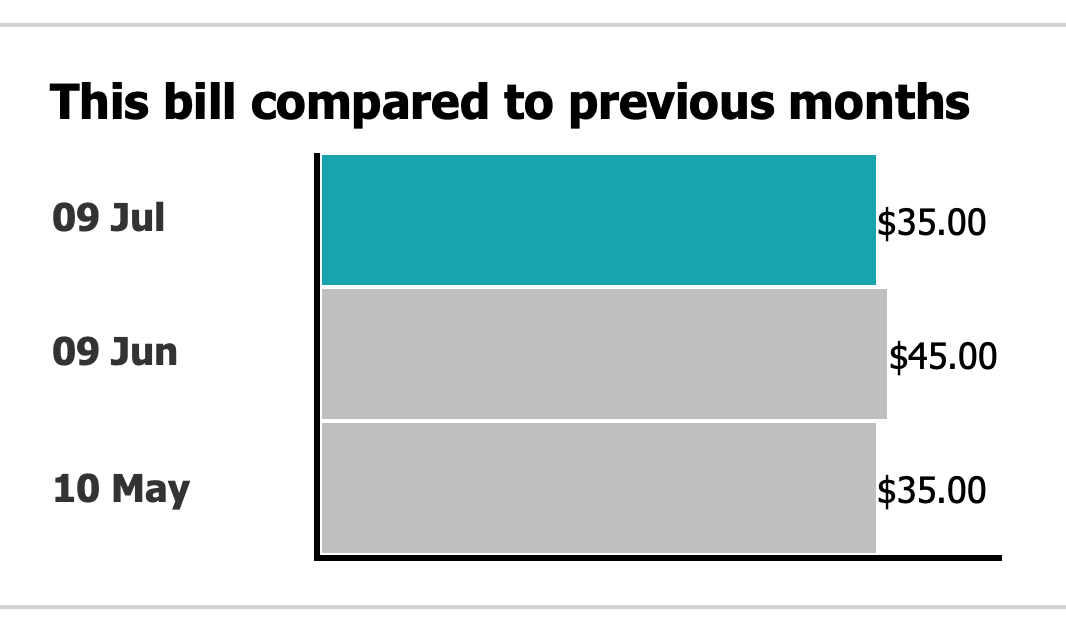
Chart with really misleading scaling on the axis

For those that don’t notice at first (it’s taken me a bunch of billing months to notice, actually), the middle line is slightly longer than the other two. In that week, I went over my data plan, and had to pay an extra $10 to get more data.

I don’t have a problem with this, but I do have a problem with the scaling on the axis.

The shorter ones are months where I was billed $35. The longer one is where I was billed $45.

That’s a difference of $10, which is ~30%. However, the middle bar in the chart is not even close to 20% longer. It looks to me to be around 20 pixels longer, or around 3.5%

So, when you overspend on your bill, it looks like you are only paying a small amound extra, when in fact I am paying a significant amount more on that given bill.

The only way you could have scaling like this would be if you had a logarithmic scale. Which, granted, many more people are familiar with now than before the pandemic, but you don’t use a logarithmic scale when your values are all of the same order of magnitude, unless you want to mislead people.

I find it pretty unlikely that a high proportion of Optus’s customers have a monthly billing variance that differs by orders of magnitude. I also find it pretty unlikely that this is a mistake - someone at Optus (and I suspect not someone in their tech department, great work dumping on them chat support person) has decided that their charts should be tweaked so that overspends look like they are “not that big”.

Who wants to bet Optus never get back to me about my complaint?

KnockoutJS Watchdog

I first discovered KnockoutJS many years ago. It’s a really neat way of managing dependencies between values, and also updating HTML accordingly. Recently, I rewrote my fronius-dashboard to use a Quart app and KnockoutJS instead of a Phoenix LiveView, as the latter was much harder to build (and dependency changes seem to break that fairly frequently).

One thing I did notice is that from time to time I’ll come back to a pinned tab version of the app and it will no longer be updating. I’m not sure exactly why that is, but it seems to be connected still (the EventSource object says it is still connected, anyway).

So, I thought maybe a watchdog process would be in order.

Basically, if there are no updates for a certain period of time, then it should just reload the page.

KnockoutJS doesn’t have anything like this built in, but it does have the facility to throttle updates, and and specifically, to use the “only update when changes stop” facility. As such, we can build a watchdog fairly easily using just that:

let watchdog = ko.computed(() => viewModel.grid()).extend({
  rateLimit: {
    timeout: 10000,
    method: "notifyWhenChangesStop"
  }
});
watchdog.subscribe(() => {
  document.location.reload();
});

In this case, I have one value that will almost certainly update every second (or more frequently than this), called grid.

If there are no updates for 10 seconds, then it will reload the page.


I’m not sure that this will actually solve my problem though - I suspect that the stoppage happens because the browser tab is not frontmost, and the JS is suspended, and doesn’t un-suspend properly. Time will tell, I guess.

Extending Django Wizards

I quite like the wizard pattern. Most people are somewhat familiar with the concept of having to complete a logically grouped set of form elements before moving onto the next one, with a final confirmation step, after which the operation is committed.

Howver, there are some perceieved problems within the Django formtools implementation, at least from the perspective of our use case.

The big one my team have identified: when you reload the page with a GET request, it clears out the data from the current run of the wizard. This is problematic when something happens to your internet, and you have to reload a page manually, for instance. Or if you just happen to reload it through another means.

Related to this, if you don’t have all of the information you require, there’s no way to “stash” your current iteration, and return to it later. This later could be after a logout and login (or even on a different computer).

Additionally, there’s no way to have “extra” steps inserted based on the selections made in a previous step. You could take the other approach, and define all of the steps initially (and then skip those that aren’t required), but in our case, we need a repeatable step (I call them a sub-step), where we perform an operation on a bunch of items that were selected in a previous step.

Let’s look at each of these in turn.


The default implementation automatically clears the storage whenever a GET request is handled:

class WizardView(TemplateView):

    def get(self, request, *args, **kwargs):
        self.storage.reset()
        self.storage.current_step = self.steps.first
        return self.render(self.get_form())

We can replace this with an implementation that will only reset when it detects a special GET parameter:

    def get(self, request, *args, **kwargs):
        if not request.GET.get('reset'):
            self.storage.reset()
            self.storage.current_step = self.steps.first
        
        step = self.storage.current_step or self.steps.first
        return self.render(self.get_form(
            step,
            data=self.storage.get_step_data(step),
            files=self.storage.get_step_files(step),
        ))

Not that we need to build up the form data to provide to the view - otherwise when you load up the wizard, it will render the first page as empty, but if you then use the navigation to select the first page it will correctly render it with data.

You’ll need to have an explicit link or button in your wizard template(s) to enable the user to restart the wizard if they need to.


Next up is persistent storage. For this we will need somewhere to store the data. The formtools implementation makes this easy to swap out - you can define the storage backend you want to use.

class MyWizard(WizardView):
    form_list = [...]
    storage_name = 'storage.wizard.DatabaseStorage'

That’s all you need to do to make your wizard use it - but now we need to build the storage class.

Let’s begin with a model to store the data in.

class WizardStorage(models.Model):
    user = models.ForeignKey('auth.User', related_name='wizard_storage', on_delete=models.CASCADE)
    prefix = models.TextField()
    data = models.JSONField()

We could use extra fields for the various parts, but that just complicates things.

Now let’s see a storage implementation:

class DatabaseStorage(BaseStorage):
    def __init__(self, prefix, request=None, file_storage=None):
        super().__init__(prefix, request, file_storage)
        self.init_data()
    
    def init_data(self):
        self.instance, _create = WizardStorage.objects.get_or_create(
            user=self.request.user,
            prefix=self.prefix,
            defaults={
                'data': {
                    self.step_key: None,
                    self.step_data_key: {},
                    self.step_files_key: {},
                    self.extra_data_key: {},
                }
            }
        )
    
    @property
    def data(self):
        return self.instance.data
    
    def update_response(self, response):
        if hasattr(self, 'instance'):
            self.instance.save()
      
    def reset(self):
        if hasattr(self, 'instance'):
            self.instance.delete()
            del self.instance

You can make it a bit more configurable so that the model could be swapped quite easily.

From here, we can use this in a wizard, and it will persist the step data to the database. I’ve still got a bit to do to ensure it can handle files, but this has not been a requirement of mine as yet.

There could be a bit of fun around having multiple stashes for a given wizard, and allowing the user to select which one they want to work on. As it stands, it just uses the user id and wizard prefix to determine where the data is stored.


The third improvement, allowing sub-steps, is a bit more complicated. To do that, you need to replace a bit more of the internal formtools code, rather than just subclassing/extending it. This involves a bunch of patching of the StepsHelper class from formtools - although you could replace this class by overriding WizardView.dispatch.

That’s beyond the scope of this post.

Django modify_settings and receivers

Sometimes, tests expose weird behaviour.

In this instance, I have a Makefile command that calls a cookiecutter command to create a new integration with a payroll system. We’d noticed that over time, this infrequntly used code had become slightly less than perfect.

So, I wrote a test that runs this code. Not directly using the make new-payroll-system command, but rather using a test case from within Django.

This worked great in development. I was able to have code that was generated, some tests on that code were run (including generating migrations for the new app), and then the code was removed.

def test_cookie_cutter(self):
    from cookiecutter.main import cookiecutter
    
    try:
        cookiecutter(
            'integrations/__template__', 
            extra_context={'system_name': 'new_thing'}, 
            output_dir='integrations/systems',
            no_input=True,
        )
        with modify_settings(INSTALLED_APPS={'append': 'integrations.systems.new_thing'}):
            call_command('makemigrations', 'new_thing', no_input=True, verbosity=0)
    finally:
        shutil.rmtree('integrations/systems/new_thing')

But this failed in CI.

Turns out that our Codeship-based testing infrastructure doesn’t allow for writing the files in the expected location.

Never mind, we can use tempfile.TemporaryDirectory() instead. That will handle the cleanup for us, which is better than removing files ourselves:

def test_cookie_cutter(self):
    from cookiecutter.main import cookiecutter
    
    with tempfile.TemporaryDirectory() as dirname:
        # Put our new temporary directory on the PYTHONPATH.
        sys.path.insert(0, dirname)
        
        cookiecutter(
            'integrations/__template__', 
            extra_context={'system_name': 'new_thing'}, 
            output_dir=dirname,
            no_input=True,
        )
        with modify_settings(INSTALLED_APPS={'append': 'integrations.systems.new_thing'}):
            call_command('makemigrations', 'new_thing', no_input=True, verbosity=0)

There’s a little more to my code, but it’s not really relevant.

What is revelant is that, whilst this test was working fine, there is a subsequent test that was failing. Because, as part of the cookie-cutter template, we install a signal handler by default, and this signal handler was still connected even after the app was removed by the end of the modify_settings context manager.

So, how can we remove the signal handler when we are done? It should be possible to, in the context manager, look at which signals exist before we run, and then compare that to the ones that are connected when we are exiting…

Turns out, we don’t need to. In this context, because we aren’t really running the code from the new django app, we can just prevent the signal handlers being connected in the first place:

@patch('django.dispatch.receiver')
def test_cookie_cutter(self, _receiver):
    from cookiecutter.main import cookiecutter
    
    with tempfile.TemporaryDirectory() as dirname:
        # Put our new temporary directory on the PYTHONPATH.
        sys.path.insert(0, dirname)
        
        cookiecutter(
            'integrations/__template__', 
            extra_context={'system_name': 'new_thing'}, 
            output_dir=dirname,
            no_input=True,
        )
        with modify_settings(INSTALLED_APPS={'append': 'integrations.systems.new_thing'}):
            call_command('makemigrations', 'new_thing', no_input=True, verbosity=0)

That one change of mocking out the @receiver decorator means that it won’t attach the signals that it comes across when doing the modify_settings, which is exactly what I want to happen in this case.