I’ve made some changes on my blog template so Trackbacks are handled a little bit nicer: specifically, Trackbacks/Pingbacks now also get the “owner” class. I’ve also turned off Gravatars for Trackbacks/Pingbacks, since they don’t make that much sense. I’d like to use a favicon or something in their place, but I’m not yet sure how to do this. At this stage, I’ve left in code so that the Gravatar for the Author Email will appear for owner trackbacks/pingbacks. Here is the code I am using as of now for my Comment Loop:
{* Variables that don't change (post/blog) *}
{capture name=author_email}{the_author_email}{/capture}
{capture name=author}{the_author echo=false}{/capture}
{capture name=blog_title}{bloginfo show='title'}{/capture}
{if $comments != ''}
<ol id="commentlist">
{foreach from=$comments key=key item=comment}
{globalvar var='comment' value=$comment}
{* Setup for Owner Comments, including Pingbacks & Trackbacks *}
{capture name=comment_type}{comment_type}{/capture}
{capture name=self_ping}{comment_type}@{bloginfo show='url'}{/capture}
{if $comment->comment_author_email == $smarty.capture.author_email or $comment->comment_author_email == $smarty.capture.self_ping|lower|replace:"http://":"" or $comment->comment_author == $smarty.capture.blog_title}
{assign var=owner value=owner}
{assign var=comment_author_email value=$smarty.capture.author_email}
{elseif $smarty.capture.comment_type == "Comment"}
{assign var=comment_author_email value=$comment->comment_author_email}
{else}
{* Off-site Trackback/Pingback. Get an image from their site? *}
{/if}
{* Gravatar Allocation. Uses variable $comment_author_email from above. *}
{if $comment_author_email != ""}
{assign var=gravatar value=$comment_author_email|gravatar:"http://schinckel.net/images/NoGravatar.gif":"40":"":"0"}
{assign var=comment_author_email value=""} {*Reset for next comment*}
{/if}
{* Set up for Alternating Comment Styles *}
{if $alt != 'altcomment'}
{assign var='alt' value='altcomment'}
{else}
{assign var='alt' value=''}
{/if}
<li class="{$owner} {comment_type} {$alt}" id="comment-{comment_ID}">
<div class="right">{$gravatar}</div>
{comment_author_link} said:
{if $comment->comment_approved == "0"}{*Not implemented yet.*}
<p><em>Your Comment is awaiting Moderation.</em></p>
{/if}
{comment_text}
<!-- Admin Tools -->
{capture name=edit_comment}{edit_comment_link link="✍ Edit" before='<span class="button">' after="</span>"}{/capture}
{if $smarty.capture.edit_comment != ""}
<div class="right">
{$smarty.capture.edit_comment}
<span class="button"><a href="http://schinckel.net/wp-admin/post.php?action=confirmdeletecomment&comment={comment_ID}">✗ Delete</a></span>
</div>
{/if}
<a href="#comment-{comment_ID}"><span class="timesince" id="c{the_time d="U"}-{comment_date d='U'}">on {comment_date} at {comment_time}.</span></a>
</li>
{/foreach}</ol>
{else} <!-- this is displayed if there are no comments so far -->
<p class='indented'>{_e text="No responses yet."}</p>
{/if}
Cosmic Girl • Jamiroquai • Travelling Without Moving ★★★
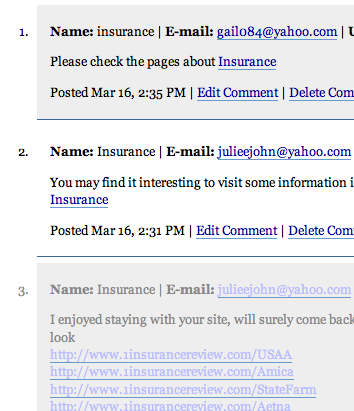 But obviously a whole lot more links.
 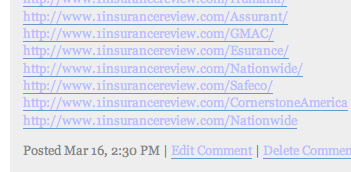 If you look at the times, the one with heaps of links was posted first, and then it looks like the poster realised it wasn’t working, and posted comments without heaps of links, which made it into the comments stream. Needless to say, 1insurancereview has made it into my blacklist. And the word insurance is very close to making my moderate list. These are real comments, not trackbacks. I am finding a few Comment Spams now, I wonder if my JavaScript isn’t working?