More eBay Phishing: sphzion is a fucker.

Yet another eBay phishing site. This time located at (line broken deliberately): http://hyper6.amuser-net.ne.jp/~sphzion/dzb/random_msg/ws/ signin.ebay/eBayISAPI.dll/SignIn&pUserId;/index.html Again, looks very convincing. However, the start of the URL is always a dead giveaway. The interesting thing about this scam is that when you try to login, it fails (naturally, as the site doesn’t know your real password), but then passes you through to the real site, so that if you try again, you’ll succeed. Naturally, I entered a few fake details in, just to let him know he’s been caught. What this loser doesn’t realise is that he’s hosted this on his homepage. http://hyper6.amuser-net.ne.jp/~sphzion/dzb/index2.htm Which also has a couple of email addresses:
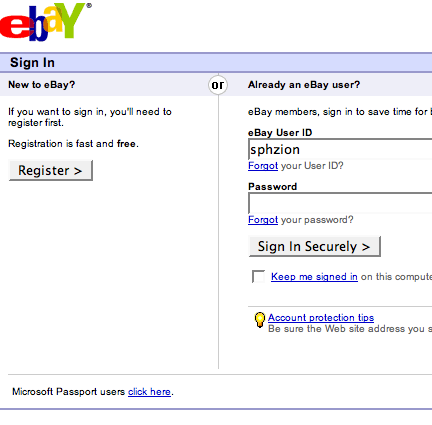
Make no mistake. This guy is a scammer! As per usual, this is being forwarded to spoof@ebay.com as we speak.

Highlight Search Terms

I’m trying to get Search terms from within the Blog’s search engine to be highlighted. I’ve got the following code:

    {if $smarty.request.s == ""}
        {$content}
    {else}
        {assign var=hilite value="<span class='hilite'>"|cat:$smarty.request.s|cat:"</span>"}
        {$content|replace:$smarty.request.s:$hilite}
    {/if}

This works fine, as long as the search term isn’t in a URL, or something like that. In that case, it breaks the URL. To get around this, I need to only replace if it’s not inside an HTML tag. regex_replace to the rescue. This took me about 30 minutes to eventually figure out, a tipoff to wfinn at yakasha dot net, and the comment he made on the PHP documentation pages:

    {if $smarty.request.s == ""}
        {$content}
    {else}
        {assign var=hilite value="<span class='hilite'>"|cat:$smarty.request.s|cat:"</span>"}
        {assign var=regex value="/(?![^< ]*?>)"|cat:$smarty.request.s|cat:"/"}
        {$content|regex_replace:$regex:$hilite}
    {/if}

Obviously, you’ll need to have some sort of CSS styling for the search term.

1
    .hilite {color:red; border:1px dashed; padding:0 3px; 0 3px;}

Bug in {wp_title}

This is actually a bug I’ve come across in other contexts, but the tag {wp_title} has a bit of a bug. When a category is selected, it returns a reasonable value (the title of the category). Ditto for an individual post. However, with a date archive, the value is not as expected. A daily archive is fine, although I don’t like the format: Captain Obvious » 2005 » October » 16.10.05 It doesn’t seem to be possible to alter this, other than the separator: {wp_title sep="•"} But it gets worse. If a monthly or yearly archive is chosen, the date of the last post to be displayed will also be presented: Captain Obvious » 2005 » 13.08.05 Note that this is the last post on the page, not the first post. IIRC, normal Wordpress would be the other way around. Instead, what I use is:

    <title>
        {bloginfo show="name"}
        {single_post_title prefix=" &raquo; "}
        {single_cat_title prefix=" &raquo; Category: "}
        {if $smarty.request.name == ""}
            {single_month_title prefix=" &raquo; "}
        {/if}
        {if $smarty.request.s != ""}
             &raquo; Search: {$smarty.request.s}
        {/if}
    </title>

This has the bonus of also noting when it’s a Search.

Make your Blogsome Blog Private

It’s possible to create a private post within Blogsome, but not a whole private blog. However, if you turn off allowing registration, you can make your blog private. In your Main Page template, find the line that has {$content} on it. Just before the line, insert the following lines: {capture name=loginout}{wp_loginout}{/capture} {if $smarty.capture.loginout|strip_tags:'0' == "Logout"} And then, after it, insert the following lines: {else}     <p>This Blog is Private. Please {wp_loginout} before continuing</p> {/if} This will then prevent non logged-in users from viewing your posts.

XMLRPC not completely fixed.

There are still a couple of issues with the XMLRPC interface.

  • ecto seems to work nearly fine. It publishes posts without escaping, and allows for the setting of categories. This is with MetaWeblog API as the account type.
  • Performancing publishes wrong unless using MetaWeblog API, but even when doing this, categories are not set.
  • Flock appears to be the same as Performancing, when set to Wordpress, or MetaWeblog API.
  • Qumana is the same - it autodetects it’s a Wordpress blog.
  • MarsEdit - works, but presents an error message.

Thanks to kreaper, who’s been a big help in the testing. Anyone with any other results can leave a comment.

Test Post Using Performancing.

This is a test post using Performancing for Firefox editor.

This is a single quote ’
This is a double quote "