Django and Collection+JSON

Recently, I have been reading (and re-reading) Building Hypermedia APIs with HTML5 and Node. There’s lots to like about this book, especially after reading (and mostly discarding) REST API Design Rulebook.

There is one thing that bugs me, and that is the way that templates are used to generate the JSON. As I said to Mike Amundsen:

His response was that he sometimes used JSON.stringify, at other times templates. But it got me thinking. I have written lots of code that serialises Django models, or more recently forms into JSON and other formats. Getting a nice Collection+JSON representation actually maps quite nicely onto these django constructs, as we often have the metadata that is required for the fields.

Consider the following (simple) django model:

class Article(models.Model):
    title = models.CharField('Title of Article', max_length=128)
    content = models.TextField('Content of Article')
    author = models.ForeignKey('auth.User', verbose_name='Author of Article')
    
    @permalink
    def get_absolute_url(self):
        return reverse('article_detail', kwargs={'pk', self.pk})

I don’t normally supply verbose_names, but I have in this case. We’ll see why in a minute.

Now, what I would declare is the obvious JSON representation of this is something like:

{
  "title": "Title goes here",
  "content": "Content goes here",
  "author": 1,
  "href": "…"
}

But, I’m quite interested in Collection+JSON. We might see something like:

{
  "collection": {
    "version": "1.0",
    "href": "…",
    "links": [
      {"href":"…", "rel":"…", "prompt":"…", "name":"…", "render":"string"}
    ],
    "items": [
      {
        "href": "…",
        "data": [
          {"name":"title", "value":"Title goes here", "prompt":"Title of Article"},
          {"name":"content", "value":"Content goes here", "prompt":"Content of Article"},
          {"name":"author", "value":"1", "prompt":"Author of Article"},
        ],
        "links": []
      }
    ]
  }
}

From a django ModelForm, we should be able to easily generate each member of items:

links = getattr(form, 'links', [])
return {
    "data": [
        {"name":f.name, "prompt":f.label, "value":f.value()} for f in form
    ],
    "href": ,
    "links": links
}

The only bit that we are missing out of the form/field data is data type, or more specifically in this case, the available choices that are permitted for the author field. Now, this is missing from the Collection+JSON spec, so I’m not sure how to handle that.

I think this is actually an important problem: if we have a discoverable/hypermedia API, how do we indicate to the client what are valid values that can be entered for a given field?

For those not familiar with django: the verbose_name on a model field is used for the default label on a form field. If you were not using a model, you could just supply a label in the form class.

The other part that is a little hard to think about now are the other attributes: href, and links. Now, these may actually coalesce into one, as links.self.href should give us href. Perhaps we have to look on the form object for a links property. But, in django, it’s not really the domain of the form to contain information about that. For now, I’m going to have a links property on my forms, but that feels dirty too.
Steve Jobs, Enid Blyton and my mother

We watched the movie Enid the other week. I read lots of Enid Blyton books as a child, and really enjoyed them. This movie really pushed home how, whilst she had an amazing impact on, and connection with, millions of children, she really didn’t have a very good connection with her own. My tip is, if you don’t know much about her life, but enjoyed her work, don’t watch the movie. Whilst it was excellent, it really sours the memory of her books.

Similarly, I read Walter Isaacson’s biography Steve Jobs recently. Unlike what seems like everyone else, I actually quite enjoyed it. Sure, there may have been some factual errors, and maybe it could have been a much better book, but I felt it did give me a lot of insight into the man that I never had up until that point. I would like to have known more about the NeXT years, but it still contained a lot of what was to me new information.

Interestingly, my mind drew a lot of parallels between these two people, lots of them coming after the fact as I finally got around to listening to all of the 5by5 podcasts discussing the book. The main similarity for me was that these two people had huge impacts on lots of people, but failed to connect effectively with their own children.

Which brings me to my mother. It was her 60th birthday on the weekend, and I gave a short, crappy speech. What I really wanted to say really only crystalised in my mind after a couple of other people had spoken, and I had some time to think about it.

My mum worked for many years running the child day care centre in Naracoorte, and whilst she didn’t touch quite as many childrens’ lives as Jobs and Blyton, the number of children she had a significant impact on was by no means small.

The difference was, she still managed to have a great connection with her children.

Adding data to admin templates

It came up in the #django IRC channel the other day about how to extend a django admin template to show other information, possibly related to an object, but not necessarily editable.

I use this in production: we have a Company object, which has Location objects associated with it. The django validation is stricter than the data may have been created for these objects, so from time to time a field is missing, and the django admin will not allow saving it.

So, I wanted to be able to display some information about each related object, with links to various bits and pieces. Having the inline Location data is great, except for when it is missing something, that we may not have received from the customer yet.

The trick is that you’ll need to override the admin template for that model.

In this case, our class is in app_name.ModelName, so we need to put the following structure into our template directory:

    templates/
      admin/
        app_name/
          modelname/
            change_form.html

Within that file, I have the content (spaces between % and {,} are there because I can’t remember how to escape them in Liquid Templates…):

{ % extends "admin/change_form.html" % }
{ % block after_related_objects % }
  ... the extra stuff is here ...
{ % endblock % }

In my case, I have the following html structure, and it looks nice:

<div class="inline-group">
  <h2>Units</h2>
  <table width="100%">
    <thead>
      <tr>
        <th>Name</th>
        ...
      </tr>
    </thead>
    <tbody>
      ... loop through stuff here ...
    </tbody>
  </table>
</div>

The other trick is that the admin change view gives us an object, called original, which we can use to do lookups on related objects and the like.

The django admin is awesomesauce, and does most of what I need an administration interface to do. There are lots of places where you do need to extend it, and this is just one way of doing that.

Bing Boy website deployed

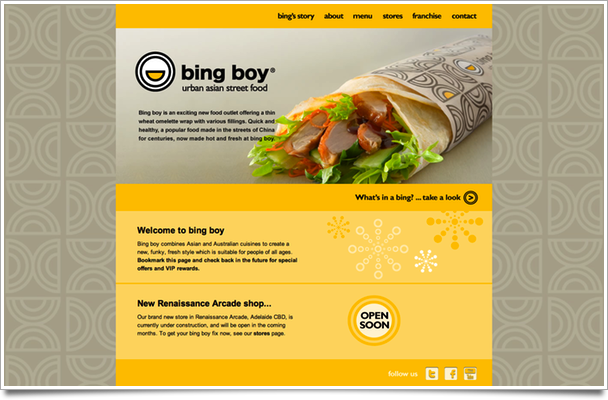
Just deployed the Bing Boy website: www.bingboy.com.au. This is actually something that I’ve been working on for a long time.

Jaq did the design, and I put together the site using jekyll. Actually, Jaq did the design for everything, right from the logo and all of the print materials, right up to the shop layout and fitout. I believe she even named some of the menu items!

So, pop along, have a look. If you live here in Adelaide, then make sure you check them out, they are super tasty. My favourite is Pretty n Peking. There are two stores so far, and more opening soon: Myer Centre and Southern Cross.

In case the site has changed, here is what it looked like when deployed:

bing boy website

Pre-validating Many to Many fields.

Django’s form validation is great. You can rely on it to parse data that you got from the user, and ensure that the rules you have implemented are all applied. Model validation is similar, and I tend to use that in preference, as I often make changes from outside of the request-response cycle. Indeed, I’ve started to rewrite my API framework around using forms for serialisation as well as parsing.

One aspect of validation that is a little hard to grok is changes to many-to-many fields. For instance, the part of the system I am working on right now has Tags that are applied to Units, but a change to business requirements is that these tags need to be grouped, and a unit may only have one tag from a given TagGroup.

Preventing units from being saved with an invalid combination of Tags is simple if you use the django.db.models.signals.m2m_changed signal.

from django.db.models.signals import m2m_changed
from django.dispatch import receiver

@receiver(m2m_changed, sender=Tag.units.through)
def prevent_duplicate_tags_from_group(sender, instance, action, reverse, model, pk_set, **kwargs):
  if action != 'pre_add':
    return

  if reverse:
    # At this point, we know we are adding Tags to a Unit.
    tags = Tag.objects.filter(pk__in=pk_set).select_related('group')
    existing_groups = TagGroup.objects.filter(tags__units=instance).distinct()
    invalid_tags = set()
    for tag in tags:
      if tag.group in existing_groups:
        invalid_tags.add(tag)
      group_count = 0
      for other_tag in tags:
        if other_tag.group == tag.group:
          group_count += 1
      if group_count > 1:
        invalid_tags.add(tag)
    if invalid_tags:
      raise ValidationError(_(u'A unit may only have one Tag from a given Tag Group'))
  else:
    # At this point, we know we are adding Units to a Tag.
    units = Unit.objects.filter(pk__in=pk_set)
    group = instance.group
    invalid_units = []
    for unit in units:
      if unit.tags.exclude(pk=instance.pk).filter(group=group).exists():
        invalid_units.append(unit.name)
    if invalid_units:
      raise ValidationError(_(u'The unit%s "%s" already ha%s a Tag from group "%s"' % (
        "s" if len(invalid_units) > 1 else "",
        ", ".join(invalid_units),
        "ve" if len(invalid_units) > 1 else "s",
        group.name
      )))

Now, this on it’s own is nice enough. However, if you try to save invalid data from within the admin interface, then you will get an ugly trackback. If only there was a way to get this validation code to run during the validation phase of a form. i.e., when you are cleaning it…

So, we can create a form:

from django import forms
from .models import Tag
from .receivers import prevent_duplicate_tags_from_group


class TagForm(forms.ModelForm):
  class Meta:
    model = Tag

  def clean_units(self):
    units = self.cleaned_data.get('units', [])
    if units:
      prevent_duplicate_tags_from_group(
        sender=Tag.units.through,
        instance=self.instance,
        action="pre_add",
        reverse=False,
        model=Unit,
        pk_set={x.pk for x in units}
      )
    return units

You can create a complementary form on the other end (or, if you already have one, then just hook this into the field validator). The bonus here is that the validation errors will be put on the field with errors, in this case units.

Modular django settings

A recurring feature of #django is that someone asks about settings.py, and using a local_settings.py file. The standard advice is to have the following in your settings.py:

# More settings are above here.

try:
  from local_settings import *
except ImportError:
  pass

This is usually the last (or one of the last) things in the file. This can be used to override settings with sane values for the local environment.

However, this means that local_settings.py must be not in your source control system, or must not be deployed to other servers.

I like keeping everything in my source control system of choice (mercurial), and currently use an hg-based deployment. In my fabfile.py, instead of archiving up the current structure, I use hg to push the main repo, and any sub-repos, and update them to the version that is displayed locally.

This means I want to be able to control the content of production’s local_settings.py equivalent.

The other issue, and this was the one that came up today and gave me the idea of this post, is that someone wanted to add an app to settings.INSTALLED_APPS but only locally. I too have done this (still do, with django-devserver, amongst others).

I came up with the following solution. Instead of having a settings.py and local_settings.py, I have a settings module:

settings/
    __init__.py
    base.py
    development.py
    production.py
    testing.py

base.py contains what was normally in your main settings.py file. That is, settings that are common to all environments.

In development.py, production.py and testing.py, I have the following line at the top:

from base import *

Then, in each of those files, where I need to override or alter a setting, including appending to a list or tuple, I can just modify away. Some things that I do in development.py, for instance:

from base import *

DEBUG = True

DATABASES['default']['HOST'] = '127.0.0.1'

INSTALLED_APPS += (
  'devserver',
  'test_extensions',
  'test_utils' # really only for makfixture.
)

import getpass
EMAIL_BACKEND = 'django.core.mail.backends.filebased.EmailBackend'
EMAIL_FILE_PATH =  PROJECT_ROOT / 'log' / 'email-messages-%s' % getpass.getuser()

This shows how you can set a value, alter a value of a dict given a specific key, and append to a tuple. I also have a nice little setup where I use a value set in the base.py file (PROJECT_ROOT) to determine where I want to log email messages to.

Finally, you need some way to say which of these files should be used. This is all done in __init__.py:

servers = {
  'development': [
    'darwin', 'boyd', 'arne'
  ],
  'testing': [
    'testing', 'debian'
  ],
  'production': [
    'staging', 'vps1', 'vps2', 'vps3'
  ]
}

def get_server_type():
  from socket import gethostname
  server_name = gethostname()
  for server_type, names in servers.items():
    if server_name in names:
      return server_type
  
  return 'production' # Or whatever you want the default to be.
                      # I usually have 'testing' here, because I tend to
                      # spin up test servers. If you spun up production
                      # servers lots, you'd use that.

exec("from %s import *" % get_server_type())

This method does require a little bit of maintainence: when you have a new server name, you need to add an entry to this file. If you are often creating testing servers (like I am) then you might want to use testing as the default server type.

Alternatively, you could use some sort of prefix to mean a particular server type.

Anyway, that’s how I do it. The only drawback is that it does mean that your SECRET_KEY, and any passwords you might have defined in settings.py are stored in your repository. We aren’t that fussed about that right now: our project is closed source, and only trusted people have access to the repository.

Re: HTML is not XAML

This is a response to MVVM on MVC: HTML is not XAML. I attempted to post a comment, first from my iPad, but after a few characters the textarea became unresponsive. Then, from my iMac, I was able to enter a comment, but not post it. It seems like something weird is happening when it shows me the CAPTCHA, and it dismisses the dialog before I can do anything. Disabling JavaScript prevents me from commenting. (But to be honest, using DISQUS does the same).

I’ll start by saying that I’m not a Silverlight developer, indeed, I do nothing with any part of the Microsoft development stack. I don’t think I even have any Microsoft software installed on either my work or home machines. I have been doing a lot of stuff with KnockoutJS lately, though.

Jeremy makes some valid points about designer ↔ developer interactions. Maybe I’m (un)lucky, but my interactions with a designer seem to be that (s)he provides me with an image, and I make the HTML match. Either that, or I do the design work myself. In that case, I design in the browser. Safari’s inspector allows you to alter CSS rules and view their impact live. This also means that my HTML is always as sparse as I can possibly make it.

Before I get to the main point, regarding using bindings inside the HTML, there is one thing I just need to point out. Jeremy has the code:

<div id="menuContainer">
  <ul id="menu">
    <li data-bind="foreach: menuItem">
      <span data-bind="text: name">Name</span>
    </li>
  </ul>
</div>

This would only create one <li> element, with multiple <span> elements. In addition, the Name text is superfluous, and would be replaced when the bindings were applied. To match the intent of the previously listed code, I think he meant (and I’m spelling some stuff differently):

<nav class="main-menu">
  <ul data-bind="foreach: menuItems">
    <li>
      <a data-bind="text: name, attr: {href: url}"></a>
    </li>
  </ul>
</nav>

Jeremy then goes on to discuss a way to have all of these bindings applied using code.

Personally, being able to bind the data declaratively is one thing that really draws me to KnockoutJS. It’s easy to see the HTML structure, and what data is bound to them. In fact, in some ways it reminds me lots of Cocoa Bindings.

One of his beefs is that designers may muck with the code. I think this could be easily remedied by a little education: don’t touch anything that has data-bind="...". This really isn’t that different to don’t touch anything’s id.

But a deeper problem is that by adding the bindings in code means that you can’t see from the HTML what flow control will be used to handle the layout. Assuming you are still able to apply the foreach binding to the ul in the example above if it had an id instead, it’s not obvious that there may be multiple items. Maybe that’s not the greatest example, as it is a list, so there probably will, but foreach can be used anywhere.

And there are more, too: if allows you to have bits that are not rendered (significantly different to just making them invisible). Plus, if you use the with binding, then you would need to keep in your head the nested structure of what you are accessing inside the with block. Do it in HTML, and you can see (assuming you have reasonable indenting).

Jeremy seems to come to the agreement (in one of his comments), that having the application of the bindings in the code makes things even more complicated, but I propose that it even makes them more brittle. No longer are you relying just on the names of the ViewModel’s attributes, but you are also relying on the ids of the HTML elements. And this is the kicker: a binding to a name that no longer exists in the ViewModel will fail when you try to view the page, meaning nothing will work (and you’ll see a nice red message in your console). What will the following code do if there is no matching HTML element?

$('#spelled-this-id-worng').attr('data-bind', 'value: theValue');

It does nothing.

But it does it silently.

Styling radio buttons like a <del>boss</del> segmented button

I quite like the concept of segmented buttons, where you have a list of related buttons, and can select one or more of them. In MacOS X, and iOS, the ones that are selected have a nice indented look.

I’m currently working on a GUI framework for KnockoutJS, and today I had reason to use this type of control. Initially, I had the following markup that I intended to style:

<nav>
  <ul class="segmented">
    <li><a>Organisation</a></li>
    <li><a>Users</a></li>
    <li><a>Units</a></li>
    <li><a>Tags</a></li>
  </ul>
</nav>

But, then it occurred to me that HTML radio buttons are a good fit for this use case. They can be set so that only one of them will be selected, which means you can actually get them to work without using any JavaScript to keep selected status in sync. And the bonus is that the labels will be clickable, so we don’t need JavaScript for associating them with the radio buttons.

<nav class="segmented">
  <input type="radio" name="seg-1" value="Organisation" id="seg-Organisation">
  <label for="seg-Organisation">Organisation</label>
  <input type="radio" name="seg-1" value="Users" id="seg-Users">
  <label for="seg-Users">Users</label>
  <input type="radio" name="seg-1" value="Units" id="seg-Units">
  <label for="seg-Units">Units</label>
  <input type="radio" name="seg-1" value="Tags" id="seg-Tags">
  <label for="seg-Tags">Tags</label>
</nav>

Now, there’s slightly more markup, but that’s okay. So, what does that look like?

Hmm, not quite what we want. We’ll actually want to hide the radio button widgets, and style the labels. Rather than try to have this in the page, here’s one I prepared earlier:

As you can see, this is with no JavaScript.

Obviously, this is fairly crappy styling: it just looks like some Windows buttons. Let’s tart it up a bit. This is the default styling for koui:

As a bonus, I’ve disabled one of the elements.

From the perspective of KnockoutJS, we can use the checked binding applied to the radio buttons to see which one is selected. If you were submitting this inside a form, you may want to not use display: none; on them, as they may not submit under certain browsers. For ko, however, it’s fine.

I’m going to be using this technique within koui: for segmented buttons, which I haven’t worked out a nice way to define bindings for, and for the tab_view binding, which associates these buttons with a view below, containing a choice of data based on the selection.

Update: There is one drawback with the technique I used here. It is detailed at How to fix the broken iPad form label issue.

It’s actually a rather simple solution: All you need to do is stop the propagation of the event. I had played around with re-firing the event onto the input element, but that might fire twice in some browsers, which might be bad (especially if you were using checkboxes, rather than radio buttons!)

jQuery long-poll for CouchDB changes.

I spent a bit of time this weekend playing with CouchDB. I think I have almost figured out how to do some stuff that had been bugging me. Coming to a document-based store after so much time and effort on relational DBMS does mean you really need to approach things from a different direction.

Our project is basically a multi-tenanted hosted application. Each customer has their own data, and within a relational model you basically have a field in each table that references the customer the data belongs to. Either that, or you have a seperate database and installation per-customer, but that doesn’t scale well on a system like ours that get intermittent use throughout the week.

I’m going to talk more about CouchDB and segmenting the data later, but the best solution is to have a single database per-customer. This makes more sense when you know how CouchDB works: a CouchDB database is a container for documents. Grouping these by customer means you can easily replicate one customer’s data, or move it to a different node.

One really nice feature of CouchDB is the changes feed. From this, you can subscribe to all of the changes that occur in a database, and this could be filtered (so a user would only be notified of changes to documents that they have read-access on, for instance).

This could potentially solve lots of problems that we have with different users from the same company working on the same roster at the same time, and those changes automatically appearing in everyone’s browser.

There are three types of change feeds that are interesting:

  1. The list of changes since I last checked (I send in a sequence number).
  2. The same, but handled using long-polling (I keep the request open until a change occurs).
  3. A continuous polling approach, where changes are sent to my open connection as they occur.

I really liked the sound of the last one, but $.stream, the only library I could find that did that for jQuery had some issues: like the fact is sent the request by POST, and that I couldn’t actually get it to see any data that was coming back in.

To solve the problem using #1, you could write some code that keeps track of the sequence number, and runs a request every X seconds. But I liked the idea of long-polling.

The idea I had was to run a request, and in the success handler, recursively call the function. To actually handle the incoming data, I thought that it might be a good solution to use jQuery events. I’m having them triggered on $(document), as I haven’t seen a standard way to do this. The other option might be on $(window), or a passed-in object.

Fetching iTunes Store Data

Or, quite possible the best AppleScript I have ever written.

So, I have a new iMac, and I was moving over a heap of ’legacy’ media from another machine, and some of it was DVD rips of Scrubs, Mad Men and Big Love. Now, these were mostly well tagged, but often I didn’t have all of the nice descriptions that were in iTunes.

Typing in all of this data is fairly annoying.

AppleScript, jQuery to the rescue:

tell application "iTunes"
	repeat with theTrack in selection
		tell theTrack
			set trackNo to episode number
		end tell
		tell application "Safari"
			set theDesc to do JavaScript "$('span.index span').filter(function() { return parseInt($(this).text(),10) == " & trackNo & "; }).closest('tr').find('.description .text').text();" in document 1
			set theName to do JavaScript "$('span.index span').filter(function() { return parseInt($(this).text(),10) == " & trackNo & "; }).closest('tr').find('.name .text').text();" in document 1
		end tell
		tell theTrack
			set description to theDesc
			set name to theName
			set episode ID to (my replace(show, " ", ".")) & ".S" & my zero_pad(season number, 2) & "E" & my zero_pad(episode number, 2)
		end tell
	end repeat
end tell

on zero_pad(value, string_length)
	set tmp_string to "000000000" & (value as string)
	set padded_value to characters ((length of tmp_string) - string_length + 1) thru -1 of tmp_string as string
	return padded_value
end zero_pad

on replace(content, sub, repl)
	set delims to AppleScript's text item delimiters
	set AppleScript's text item delimiters to sub
	set content to every word of content
	set AppleScript's text item delimiters to repl
	set content to content as text
	set AppleScript's text item delimiters to delims
	return content
end replace

You just need to have the relevant TV Series Season page in the frontmost window in Safari, and select all of the episodes for that season in iTunes. Then, run the script, and watch the magic.