HOWTO: TortoiseSVN with lofty.

You need two items of software, TortoiseSVN and Putty. Make sure you get the Putty that has all of the extra tools, you’ll need puttygen at the very least.

Once you have installed Putty, open up the main putty.exe program. The installer put a shortcut on my desktop, yours may not have:

putty_exe.png

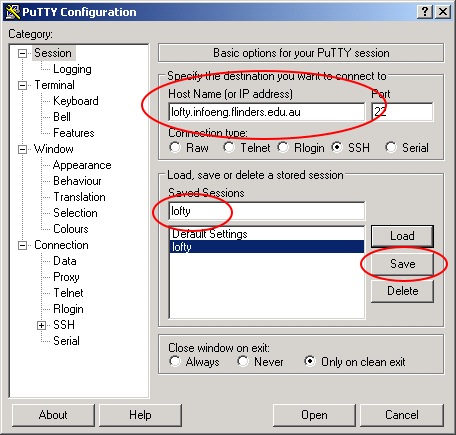
In the window that appears, enter lofty.infoeng.flinders.edu.au into the Host Name box:
putty_session.png

Then, enter lofty into the Saved Sessions box, and click Save. This will save you a little bit of typing later on.

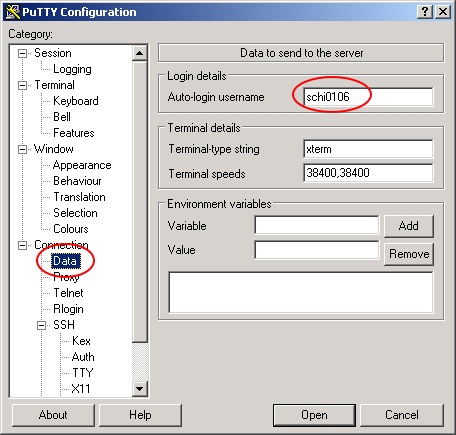
Now, select the Data item from the left tree-view (you may need to expand Connection first). Enter your Flinders CSEM/InfoEng password into the indicated box.
putty_Connection_Data.png

Click back into the Session tab, and click Save again. Now click Open.

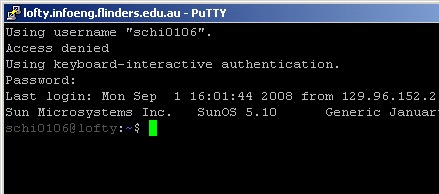
A new window will appear, which will ask you for your InfoEng password. You’ll need to enter it just this one time.
lofty_ssh.png

What we need to do is create a private/public key pair. One of these will live on lofty, the other on your local computer.

Before we do that, create the correct location to store this on lofty:

mkdir .ssh

Note that there is a dot before the ssh!

Now issue the command:

ssh-keygen -b 1024 -t rsa

Use the default location: ~/.ssh/id_rsa

Use an empty passphrase, and you’ll need to press enter twice. It then saves the file into this location, and creates a public key as well.

Enter the .ssh directory, and type in the following command. (Even if you already have keys in the file it copies them to, it will still be safe!):

cat id_rsa.pub >> authorized_keys

This copies the public key into the authorized_keys file, appending it to the file if it already exists.

We now need to get the private key onto your home machine. The easiest way is to type in:

cat id_rsa

and copy and paste the text into a new Text Document. Rename this to something sensible (id_rsa again is a good choice). Don’t ever let anyone else access this file, as if they do, they can get into your InfoEng account!

Now, run puttygen.exe. Click on Load, and select the file you just created in Notepad. You may need to turn on “All Files” in the file chooser. You’ll now need to save the private key. It’s a good idea to use the same filename, but with the ppk extension.

Now run another instance of putty.exe.

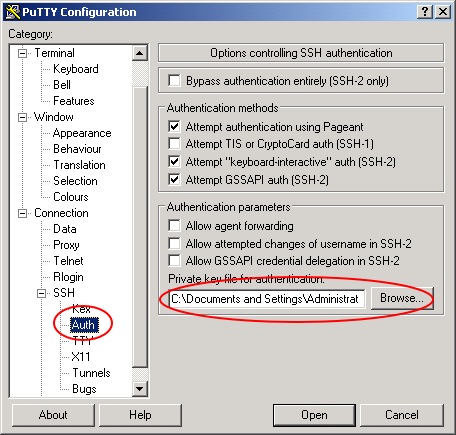
Click on the lofty Saved Session, and press Load. Then choose the SSH/Auth option, as shown.
putty_SSH_Auth.png

Use the Browse… button to select your keyfile. (The one with a .ppk extension, not the one you created first).

Before you click Open, go back to the Session page and click Save again. Otherwise your selection of the keyfile will not be saved next time you try to connect (but it will work this time).

Finally, click Open to test the connection. You should log in without having to enter your password.

That’s all of the Putty stuff we need to do. You can’t uninstall it, and it’s worth keeping around in case you need to SSH into the Uni machines again. When you do, it’s almost the same as opening a Command Shell on the Solaris machines, so you can do most of your work from home.

If you haven’t, install TortoiseSVN now.

Go to the directory that you want to keep your local copy of the SVN repository in. Right-click and select SVN Checkout… from the menu.
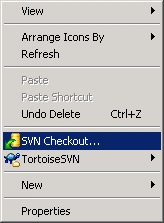
SVN_Checkout_Menu.png

The only things you’ll need to change are the URL, and possibly the last component of the Checkout directory. It’s currently called SVN, but you can call this last bit whatever you want.
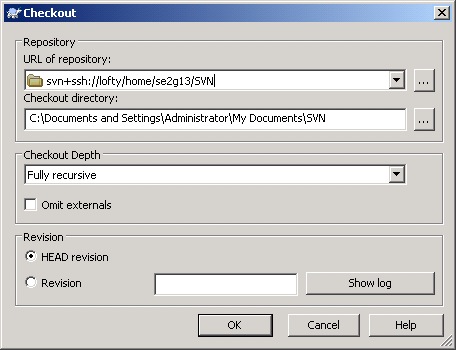
Checkout_Window.png

Press OK. It will, in a fairly short amount of time, get all of the data.

The contents of the directory you checked out now have Badges, showing if they are up-to-date, Modified, or so on. I’ve created a Sandbox directory for you to play around in, but the good thing about SVN and other systems is that you can’t really break anything. Someone can always revert any changes you have made if you break a file, even if you accidentally delete it. It’s obviously better if you don’t but don’t stress if you do.

Badge_Icons.png

You’ll want to play around to see how to add files to the repository, and commit any changes you do make. Please make sure you Commit changes regularly, and Update often too. You may find that you have to Merge changes if two of us have modified a file at around the same time - there is a program called TortoiseMerge that you can use to do this. I’d really encourage you to play around and do this (you can even checkout two versions of the repository to your hard disk and make changes to the same file in each one, and they try to commit, just to see how it works).

Can't access wp-admin on my blog

Aargh! I don’t seem to be able to get past the wp-login.php page. It keeps redirecting to there.

I am logged in, and using the correct password, but I can’t get through to the admin pages.

I can post entries via ecto, too!

Update: ck has a fix: http://ckon.wordpress.com/2008/07/15/fix-for-wordpress-26-cant-login/

Prolog v Java

One program I tend to get around to writing in any new language I learn is a Sudoku solver. I originally wrote one in python, that solved every puzzle I could throw at it (although it had to guess and backtrack on failure in some cases).

Recently, I wrote one in Java. It was three classes plus a Driver/Main class. It took hours to write (at least the whole length of Phar Lap), and eventually it worked. I spent quite a while fixing up all of the syntactic errors I make in Java after programming in better languages again.

I then wrote one in Prolog. It was amazingly simple - it just defines a sudoku puzzle as a list of lists (each of which is 9 elements long), states that each element in each of the lists must be unique, and that each element in the first position of each list (columns) must be unique. Next, it states that each 3x3 grid must be unique, and that each element must be an integer of range 1-9.

That’s it. Solved.

My unique/1 predicate takes a list of items, and succeeds only if each item in the list is unique. This is simple:

  1. An empty list is unique.
  2. A list of one item is unique.
  3. A list of the form [A,B|X] is unique if A and B are different, and [A|X] and [B|X] are also unique-lists.

I also use a predicate that indicates a variable should be of the value 1-9, it’s possible to use advanced techniques and something called “Domains”, but I couldn’t get this figured out.

The only trick then is in the definitions. The simplest to understand, but messiest is to define the elements in the sudoku puzzle as each having unique names ([[A1,A2,...,A9],[B1,...]] and so on), and then passing some lists to unique, ie all ‘Ax’ elements, all ‘X1’ elements, and so on.

The coolest thing about Prolog is that you don’t need to say how things will happen, but just what the desired outcomes are. This can be dangerous - it’s rather easy to write something that will be executed in a ridiculous amount of time, so you often need to think about how to narrow the search space as quickly as possible. In Java, I needed to have methods that would remove elements from a possibles list, and then check to see if there was only one element, in which case it’s the actual value that belongs there, and so on. This is all error-prone code, wheras Prolog’s backtracking does all of this for you.

The biggest benefit is that in a puzzle that is fiendishly hard, Prolog will still come up with a solution, wheras some other languages, using the algorithm I defined above may not. And, in Prolog, you will automatically get multiple solutions to a problem if they exist.

Can you tell I love Prolog?

Using Photographs to Enhance Video

Using Photographs to Enhance Videos of a Static Scene.

Wow.

Via Daring Fireball.

Navicat now does Oracle.

According to an item that just popped into my feed, there is now a version of Navicat that connects to Oracle DBs.

Cool. I like Navicat.

Panasonic, your logic is full of fail.

Heard on a TV ad just now:

Because the Olympics are filmed using Panasonic video technology, then it makes sense that you watch them on a Panasonic Plasma or LCD TV.

Clearly, someone at Panasonic can’t figure out that tricky logic stuff.

“Because you shit food out of your arse, it only makes sense that to eat it you should shove it up there too!”

Idiots surround me.

I’m currently sitting in a café in King William Road, trying to get some coding done. I’m not achieving much, and there’s one simple reason.

There are a pair of absolute fuckwits sitting next to me, and they haven’t stopped talking for about an hour.

The guy, very gay, seems to be a drama teacher. If you are Australian, think of that show “Summer Heights High” - it’s Mr G. all over. I mean seriously.

The woman apparently has something to do with the arts - I haven’t been able to figure out exactly what skills she has, as whilst she’s been yapping non stop she hasn’t really said much of substance.

The last straw was when they were talking about some drama awards night, and she called it “wanky”. I was about to lean over and explain to her about irony - she hasn’t stopped wanking for about an hour!

Pretentious idiots annoy me. I’ll put up with snobbiness or aloofness in people who have real skills or talent. But these people are driving me nuts. I nearly bought my headphones, I so wish I had.

Aha! She’s a drama teacher too!

“It’s just like Pulteney Grammar all over again!”

I’ve never wanted Jaq to hurry up and pick me up from the café so much!

On Strong AI and the Chinese Room.

This is a post taken out of context I made to a discussion group in my AI subject. (Which another Matt and I have decided they falsely advertised, and should have called “Expert Systems”). It’s a bit vague in a couple of places, and I will probably come back to this topic at some stage and write a clearer explanation of what I mean. But this is here for now.

I did some thinking about the thought experiment where a guy sits in a room translating English into Chinese, and how “He will probably learn some characters over time.”, and how this is not the same as a machine.

I think it is the same. If a machine is able to recognise a word/character, that is still the same as the man learning it, rather than just memorising it. (I’d actually counter that memorising meanings and symbols is still a type of learning, and I come from an educational background, so I do know a little about learning).

But I want to push even further. A human isn’t the same as a translating program because it can learn new information that wasn’t there when the program was written. If a program is able to incorporate new facts, develop new pathways, and perhaps even rewrite it’s own program, then this is a much closer analogy to what we define is learning.

There are system out there that allow for dynamic reprogramming (I think some derivatives of Smalltalk are pretty good at this), and many systems that allow for dynamic alteration of code (perhaps by an outside source). Even the OLPC project is based on a system which can be changed while it is running.

Our brains are a machine that can alter it’s physical structure in response to the environment - indeed that is how we learn - and the pathways that are used often eventually end up working better than those that are used infrequently. A program could work the same way. Evolutionary programming is another example - an algorithm can be seeded, and then a variety of mutations are generated, and an “overseer” selects the mutations which result in a better algorithm.

I can’t provide any hard quotes, but I know this has been used to some extent to develop novel programs.

I know this is verging on Strong AI, which Darius says is a no-no, but consider this post as having taken place in a pub or cafe. In fact, I’m off to the pub now.

Fighting with ssh.

It’s still relatively unusual for me to have to work on a system that I don’t have superuser status on - at home I am the administrator of all of the machines, and at work I have sudo privs on both the development and production servers.

At Uni, however, I have to play by some other dude’s rules.

And, that means sometimes not having software installed that I need.

Take mercurial, for instance. I use this as my exclusive RCS, because it is simple to set up a repo, easy to clone, plays nice with OS X, and with Trac. It’s extensible, and easy to merge changes from clones.

But it isn’t installed as standard, or even at all on the Solaris machines at Uni. SVN is, but I’m not about to go through the whole rigamarole of setting up an svn server again. It just doesn’t do anything for me that mercurial doesn’t but it’s more setup work.

And I create new repos all of the time. I have one for each of my topics, and every time I start a new project, I create a new repository. It’s just that simple: hg init.

So, I tried installing it as a general user. I have it so that it works to some extent: I have the ability to change my environment variables, so I can add ~/bin to my path, stick all of the hg files in there, and then the mercurial/ directory into ~/.python, which I then make my PYTHONPATH.

Then, I can happily use hg while ssh’d in (or logged in to one of the SparcStation machines).

But, I can’t use the remote access.

See, ssh <machine> hg <command> will not work unless a) hg is in the system path, and b) mercurial is in the system python directory. You can fudge the first part (by explicitly telling the local hg where to look for the remote hg) but then I can’t figure out how to tell it where to load the python classes from.

So, my solution is this: mount the folder using sshd (or in my case, ExpanDrive). Then clone the repository from the local machine. You can then happily work away on either machine, but to push/pull you need to have the folder mounted.

Bit of a bummer. I’ve asked for mercurial to be installed, but we’ll see if that happens or not…

Why do that? Really?

I have been searching for cheaper ways to buy textbooks (it’s crazy to pay $120 for a text, IMHO). I’ve chanced across www.textbookexchange.com.au. Let’s examine the workflow when trying to find a book there.

  1. Visit the site.
  2. Type in the name of the book or author.
  3. Press “Search”
  4. Be redirected to a login page.
  5. Have to type in the name again because you were redirected back to the home page, rather than your search results.

I mean, seriously. It’s not that hard to keep some handle on state and redirect to the search results.

If I hadn’t saved so much money buying my books this way I wouldn’t use their stupid site!