Review: Awake! March 22, 1993

I got onto a bus today, and found a rather old (I actually didn’t realise it was this old until I just typed the date in) edition of one of the Jehovah’s Witnesses magazines, Awake! Published in 1993, it probably contains virtually the same stuff as a recently published edition. However, it is interesting to examine it in a little bit of detail. The covers were missing, as were a couple of the outer pages, and the first “story” was A Composite Sign of Many Parts: The World’s End - How Near? Having read (and watched) White Teeth, by Zadie Smith, which deals in some detail with the continued prediction of the end of the world by the JWs, I thought this might be worth reading. It starts out with the old parable about the six blind men who “saw” an elephant, and depending on which part of it’s body they touched, came away with a different idea about what an Elephant is like. Thus, only seeing part of the picture often paints a false image of the whole. I’m not sure if it was an acceptance that each other time they have predicted the end of the world they were wrong, but it sounds an awful lot like it. It then goes on to discuss how immediately after the Great War, there has been a worsening of the various signs that the bible says predict the second coming of Jesus Christ, and on first reading (thinking that this was a recent edition) it sounded about right. So, “We got it wrong last time, but this time the end of the world really is nigh!” seems to be the gist of the piece. This becomes even more ironic when you consider that this was published almost exactly 13 years ago. Students I teach were not even born then, and clearly the JWs were believing (hoping?) that the world would end at the Millenium. Bad luck for that, hey? What amuses me is that there is a significant amount of scientific reference in the magazine. There is a (as far as I can tell) accurate single page article about Shooting Stars, which they correctly refer to as meteors, although no mention as to the difference between them and meteorites. There is also a nice story about music, with a definite undertone of the evils of popular music - but to their credit they aren’t saying that our parent’s music was alright. Only our distant forefathers. However, finishing this article is a blatant advertisement for Kingdom Melodies, put out by the Watch Tower Society. So even JWs aren’t afraid of advertising. Another article: Drawing Close to God Helped Me Cope begins with the line:

I had no interest in religion. All organized religion seemed hypocritical to me. I couldn’t see that it did much for other people, except make them intolerant of other people.

Now, this just seems to be a formula start, like the beginning of Penthouse letters:

I never thought I’d be writing a letter to Penthouse Forum. I always thought those stories were made up, either by the editors, or by people writing in. That was, until one day…

Don’t even ask how I can quote the start of a letter from a pornography magazine by heart… Anyway, that was all I read of that one. Even for the sake of a review, I knew I’d rather give up than have my mind explode (like a hand grenade) because of too many cliches. Flicking through, the next thing that caught my attention was on page 25 (for those playing along at home, or in church) Where Man and Turtle Meet, by Awake! correspondent in Australia. It’s a reasonable guide to the nocturnal habits of Queensland turtles, and doesn’t even mention God at all. The article would not be out of place in a nature magazine, or any other type of magazine, with a single change of word in the last sentence:

As more people become aware of these hazards and learn to take greater care of the environment, increased opportunities will undoubtedly come for man and turtle to meet - impressing and enthralling humankind with yet one more marvel of creation’s amazing reproductive cycle.

Can you pick where I might have used the work nature instead? The final page in my little magazine is entitled Watching the World, and it appears to be some sort of a news update. These 5 short articles are all dripping with mis-guided, or outright wrong conclusions. They are so much fun, I’ll deal with almost all of them:

  • Infectious Disease Comeback. This one is just gold. It correctly provides evidence that indeed infectious diseases are on the comeback, but doesn’t provide all of the right reasons. No mention of the fact that many of these diseases are only new to Western society, and that they have existed in sub-saharan Africa for a lot longer. And then the kicker:

Although many drugs and antibiotics have been developed over the past three decades, microbes have developed resistance to them in various ways.

This sounds like they are accepting evolution, without really saying so! The example that is given is that bacteria can exchange genetic material, which is true. It is also interesting that they chose this one, as back in 1993, this was still a controversial topic amongst scientists. It goes against much of the perceived knowledge on the way DNA works, and I’m sure anti-evolutionists would have use this even then as an argument “against evolution.” What they are missing however, is that this still is evolution, it’s just not natural selection through random mutation, although that is indeed where the original resistance to the antibiotics must have come from. Unless God gave the chosen few “microbes” resistance, and they then just shared it around.

  • Pastoral Symphonies. Cows who had music played to them before being fed would then come back in from the paddock when said music was played, even months later. Okay, hands up who went to University, or even High School. Keep your hand up if you studied Psychology in any form. So you’ll remember Pavlov’s dogs, and Classical Conditioning then. Good, so I don’t need to say any more. If not, consult the Wikipedia, link previously given.
  • Well-Kept Medical Secret. Apparently around 5-8% of Danish children aren’t sired by who they think they are. I love the final sentence:

The men are not told of the discovery, however, lest the family be disrupted.

Nice to know. Harmony over truth, right?

  • “Tragedy Within the Tragedy.” I’m not going to joke about this one, mainly because it’s probably still much the same. Emergency aid to disaster areas, and general aid to third world countries is often misguided: out of date medicine, incorrect types of shelter and that many supplies never even make it to the people who desperately need it the most. I’m not sure if this article is implying that such charity is a waste of time and money, but that’s how I’ll take it. I think things like this still happen, but will take this opportunity to harp on my favourite comment from the Asian Tsunami: the amount of money donated by governments and private individuals was amazing, but caused many other charities to miss out. That is, the total amount of money given in aid for the full year still stayed about the same. The lower profile causes just got a whole lot less.

I’ve read the Watch Tower, and Awake! before, and came to the same conclusions. Call me biased, but these magazines provide a generally adequate description of things, and then go and draw the completely wrong conclusion. Anyone with any understanding of logical processes should be able to see the faults in their reasoning. I’ll continue to chase the JWs away when they come to my house. Or rather, as I did last time, totally ignore them. I was mulching some branches, and had my ear muffs on, and pretended not to realise they had walked right up behind me. The stood there for about a minute (I could see their shadows), before walking off. Worked a treat.
Links in this Post:

I just thought of a great addition to a sidebar: links in this post. Thus, a user would see a list of all off-site (or even on-site) links, and be able to follow one or all of these without having to go through all of the post. Probably going to be more useful on posts that are really long. Easy to do in JavaScript, but could be done in Smarty too.

Rewrite using Framework

I think I might rewrite all of this site’s scripting using a framework. Probably Yahoo’s stuff, that looks very cool: YUI.

Changing Scroll Wheel Speed under MacOS X

Apparently, the following command changes the scroll speed under MacOS X when using a scroll wheel mouse: write -globalDomain com.apple.scrollwheel.scaling _x.x_ Where x.x is replaced by a float, I use 2.5 I’m not sure how much of a difference it makes, but I’ll keep playing with it. Maybe it only changes it after a login.

Logitech Laziness

I’ve just purchased, and started using a Logitech USB Optical mouse. It was pretty cheap, only AU$20, and I’ve wanted a scroll mouse for the iMac forever… So, I installed it, and downloaded the Logitech driver, to see if I could configure it to make it a bit better. And it looks like I can - there is an option to accelerate the scroll, so that scrolling faster scrolls more than the same distance slower. Then I looked in the readme:

Q: My LCC settings are gone after switching user with “Fast User Switching”, what happened?

A: LCC does not support “Fast User Switching”. In order to enjoy the different LCC configurations for multiple users, one has to log out and log in the system instead of using “Fast User Switching”. To log out and log in the system:

  • Select Apple Menu on the upper left corner.
  • Select “Log Out”.
  • Click “Log Out” button when prompted.
  • Select your log-in name or type in the log-in name. Then, enter your password.
  • Click “Log In”.

What is this crap? Are you that lazy that you didn’t bother building some sort of support for FUS into the system? Don’t you think that anyone actually uses FUS? Uninstall. Very nearly take it back to the store to return it (doesn’t do what it says, isn’t fully supported under OS X), before deciding that that’s not worth the effort, and I was already pretty happy with how it works without the extra features! Still, angry with Logitech.

Transparency and Fading

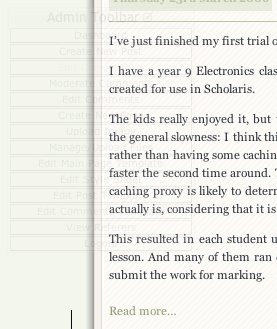
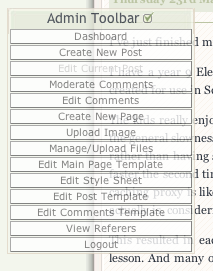
I’ve gotten frustrated with the fact my Admin Toolbar, which most of you won’t ever see, obscures some of the page at times: I’m really happy with how much time this saves me, however, so I don’t want to kill it. If only I could make it only appear when I’m actually hovering over it… And then I chanced upon the opacity: selector:
 1
 2
 3
 4
 5
 6
 7
 8
 9
10
    #adToolbar{
        opacity:0.1;
        -moz-opacity:0.1;
        filter:alpha(opacity=10);
    }
    #adToolbar:hover{
        opacity:0.8;
        -moz-opacity:0.8;
        filter:alpha(opacity=80);
    }

(The second entry is for older versions of Firefox, the third for IE). Now, it looks more like: The only thing I’d like to do is make it so it fades in and out, which I might be able to do with the original JavaScript, or perhaps so that only the actual item that is being hovered over is more opaque. However, I’m struggling with the CSS to to this, so I’ll leave it out. I do like the idea of a fade in-out, however.

First Student Scholaris Trial

I’ve just finished my first trial of Scholaris with real students. I have a year 9 Electronics class, who attempted to complete a single activity on Diodes I had created for use in Scholaris. The kids really enjoyed it, but there were a few technical issues we came across. The first was the general slowness: I think this was because everything needed to be downloaded for each kid, rather than having some caching in place. Once each kid got onto the right stuff, it seemed to be faster the second time around. This would result in a fairly serious amount of data transfer, as a caching proxy is likely to determine that https: data is different for each user - and it probably actually is, considering that it is encrypted! This resulted in each student using up about 6Mb of their download allowance for one double lesson. And many of them ran out of internet data during that lesson, so only two were able to submit the work for marking. And that’s when the real problem started. Because I hadn’t assigned a FrameworkID, since previously there had been no inclusion of Design & Technology SACSA Framework data, the work that was submitted didn’t come through properly, and I wasn’t able to assess and then return the data to even these two students. I did spend the last 15 minutes having a group debrief, which was really valuable. Basically, the class came up with the following

Problems encountered:

  • Too slow in loading up.
  • Some issues with not loading for some students
  • Lots of Internet usage – which students had to pay for.
  • Work lost when ran out of internet.
  • Want more fonts to choose from.
  • Spell check
  • Feedback as to when page is finished loading

Advantages of this system:

  • Don’t lose your homework
  • Don’t have to carry books everywhere
  • Typing easier than writing (and neater)
  • Don’t forget to bring homework to school.
  • Easier for teachers to check/mark
  • Helps with knowing when work is due.

Disadvantages of the system:

  • Some people might not have internet access at home
  • Disadvantages people without broadband
  • Sometimes internet breaks
  • Power loss is damaging
  • Internet costs money

Ideas for improvement:

  • Reminders of when work is due
  • Automatic saving of work while working

I’ll repeat what I think I said last time I’d spent any time doing Scholaris work: they should be using AJAX, like Gmail does, rather than relying on page refreshes when sending data to the server. Gmail does this, and then it allows for autosaves, which can be life-savers. The same with the content creation process. It’s too cumbersome, with different dialog boxes and windows opening up, and then waiting for these to load. I’d almost rather the flexibility of coding in raw HTML, rather than their user-friendly format. At least some sort of an offline content creator. Export from Word? Actually, I’ll take that last one back. I just tried Word’s _Web Page Preview _option, and the code it generated was cluttered. I didn’t have any changes of fonts, or any styling other than just plain bulleted lists, and yet it managed to create style and class tags on each element. At least this is better than the font tags I remember seeing on other web page export/previews.

Changing Languages

There isn’t a way to tell Blogsome you are writing in a different language, but with things like dates, that are generated using Smarty tags, there is a way to replace the English words with those of your chosen language. Where you’d normally use a tag like: {the_time d='l, j F Y'}, which would generate something like: Thursday, 23rd March 2006, you can set up your template with:

1
    {capture name=the_date}{the_time d='l, j F Y'}{/capture}

Then, assign this captured text to a new variable, after translating each word you know might appear in the text using |replace:"old":"new", which you can repeat for each word. For example, to replace all of the day names with their Spanish equivalent, and assign the result to $la_fecha, I used:

1
    {assign var=la_fecha value=$smarty.capture.the_date|replace:"Monday":"Lunes"|replace:"Tuesday":"Martes"|replace:"Wednesday":"Miércoles"|replace:"Thursday":"Jueves"|replace:"Friday":"Viernes"|replace:"Saturday":"Sábado"|replace:"Sunday":"Domingo"}

Then, wherever you want to use {the_date} in the Spanish format: {$la_fecha}. Obviously, you’ll need to repeat this for month names as well, which I will leave as an exercise to the reader.

Other AJAX/Blogsome functions

Really, I don’t like the term AJAX. However, technically, I think that’s what my DeleteComment function does. It sends a request to the server, and updates the current DOM to reflect this. There’s no reason why normal Comments can’t be added or edited in the same way. Instead of the Edit Comment/Post opening up a new page, I might just make them turn the area into a textarea, and allow editing. Then, when clicking out (or perhaps, Save), the data is uploaded back to the server, and the page updated. This would make it very cool to edit posts in-place. For this, I might be better off investigating other options rather than re-building my own. Although that is kind of fun.

Post Page Comment Deleting

I’ve implemented the ability to delete a Comment while viewing it on a normal (user) post page. It will only appear if you are an admin. There are some issues: the first is that it doesn’t work under Internet Explorer. I didn’t realise until I read Using the XML HTTP Request object that IE uses a different way of initialising the XMLHttpRequest() object. I’ll build that in later. The second is that any user can (try to) delete a Comment when logged in - currently this script doesn’t check to see what is returned, and removes the Comment from the Post page regardless. What I need to do is examine the resulting HTML code, and find out if the request to delete the comment was successful. I’ll need to do some experiments to check this, but an xmlhttp.status might do the trick. To use it, just include <script type="text/javascript" src="http://schinckel.net/images/toolbox.js"> </script> in your <head>, and have a button/link with class="delete", inside your Comment <li> definition. Else, you can download the script, and examine how it works: http://schinckel.net/images/toolbox.js. The actual function that deletes the comment is:

 1
 2
 3
 4
 5
 6
 7
 8
 9
10
11
12
13
    function DeleteComment(e){
        li = parentWithTagName(eventTarget(e),'LI');
        id = li.id.split('-')[1];
        if (!getById(li.id)) return true; //Fallback to Link!
        if (!confirm("Delete Comment #"+id+"?\nCannot be undone.")) return false;  
        var admin = "http://" + document.domain + "/wp-admin/";
        var delreq = new XMLHttpRequest();
        delreq.open("GET",admin+"post.php?action=deletecomment&comment="+id);
        delreq.setRequestHeader("Referer",admin);
        delreq.send("");
        li.parentNode.removeChild(li);
        return false; //Stop Link being followed
    }

With the function:

1
2
3
4
5
    function parentWithTagName(node, tagName){
        if (node==document) return false;
        if (node.tagName==tagName) return node;
        return parentWithTagName(node.parentNode, tagName)
    }

existing elsewhere, and being used in this case. I like the neatness of this recursive function, which I originally wrote for finding a parent <form> element. I’ve also got a function getById(), which is a cross-browser wrapper for document.getElementById(), and eventTarget() which is the same for finding the target of an event. To add the function to the button, I use a script that just finds all elements with class="delete", and add onclick=DeleteComment. That’s all that needs to be done!