Using moGenerator as part of the Build Process (XCode)

Using Core Data is awesome.

moGenerator makes it even better, as you can have Entitites defined as being of a particular class, and this code generator creates two classes for each Entity - a machine-readable one which is updatable by running the script again, and a human readable one that you can safely edit - it won’t be changed once it has been created.

You can easily make this tool a part of you build process.

First, create a new directory inside your project folder, I called mine MO. Then, cd to that directory, and run:

$ mogenerator -m ../*_DataModel.xcdatamodel

Then add the folder MO to your project.

Now add a new build phase script, and put into it:

cd MO
mogenerator -m ../*_DataModel.xcdatamodel

It’s not quite perfect - if you add a class, it won’t be added to your project automatically. You might be able to get around this by including the -includem switch, but then you won’t be able to have the .m files located in your project, else you will get duplicate symbol errors.

Sometimes, you just have to use a Microsoft Program.

Ugh. Ecto just stole my post. Oh well, time to start again.

I pride myself on being almost 100% Microsoft free. I don’t use Windows on a day-to-day basis. I have to test a Windows program against a server I write, but that is it. I used to have to use Windows to run AutoDesk Inventor and a custom MS Access Database, but that was in my prior life as a teacher.

Lately, I’ve been using Pages for all of my Word Processing needs, and I think it works better than MS Word. It is snappier, performs more reliably (doesn’t make stuff jump around randomly), and has all of the features I need and use.

I’ve also been using Numbers as a Spreadsheet. It, unfortunately, doesn’t hold up to the competition, Excel, nearly as well. Firstly, it doesn’t have Pivot Tables, which are a great invention that I just could not live without if I was doing any sort of collation of data. Like the custom Excel Spreadsheet I built for my partner’s expenses and tax purposes. However, she is likely to shift over to MYOB anyway.

My problems with Numbers are mainly to do with Charting. I had to collate data that had run times of various algorithms, as they were implemented using different techniques across different programming languages and paradigms. Most of the data was easy to compare, but as I went to present all of the tests I found an issue.

There is no way to do an X-Y, or Scatter Plot in Numbers.

Your data will be okay if you have the same values for all of your X values for every column, but, if you have the situation I came across where I had some data sets that were increasing by an order of magnitude, and some data sets that were doubling (and, one data set that was incrementing).

Thus, I wasn’t able to obtain the following plot, and had to use Excel.

200806111038.jpg

Pleased to say I used Apple Remote Desktop and a machine that already had it on it, rather than install in on my laptop!

Oh, and before anyone says anything, I tried Tables (which I bought a license to before Apple brought out Numbers), and OpenOffice.

Now, don’t get me started on OpenOffice. I think I’d rather use Microsoft Office. I mean, all they have done is clone it, and haven’t really gotten everything to work. At least there is a Cocoa/Aqua version, but it is clunkier and slower than Excel.

I might actually try Excel 2008 and see how that goes if I need to do some more number crunching.
That's Neat, Changes.app!

One of the best things about having a laptop as my primary machine is that I generally don’t have to worry about synchronising issues any longer. For instance, I used to have a USB Drive that was my “transfer device”, and I was endlessly copying data to and from it. This meant I had three or more copies of my data, but I sometimes wasn’t sure which was the most recent.

I bought Changes.app to use with my Source Control system(s), as it is nicer than FileMerge.app. And it meant I could support an independent MacOS X Developer. And I’ve been using it, sometimes “in anger” where some data has been corrupted.

Today, I wasn’t able to get onto the Wireless network properly, and had my data on my Laptop, but needed to run some SQL queries on a database on a Uni machine. I copied the files across (in a location where the WiFi worked), and then ran the queries on the Uni Machine, but made some changes to both sets of files at the same time.

When I sat down to merge them all, I happened to think to use Changes. I dragged both folders onto Changes, and it gave me a list of files that differed.

I was able to choose which parts of each I wanted to keep, and save them, and it made both files the same as the merged version.

I wasn’t really expecting this - I naïvely thought that it was a read-only process, but Changes made it pleasant.

Getting the largest ID in a database

I ♥ SQL Alchemy.

I’m currently rewriting a database so that the schema definition is in SQL Alchemy, allowing for us to deploy it across a range of platforms with a bit more ease.

We had been using some sequence types to automatically set the primary key to a new unique integer. Think Autoincrement in Access, if that’s where you’ve done some database stuff, or in MySQL I believe it’s AUTO_INCREMENT.

In SQL Alchemy, you get to define Tables in python, like this:

log_table = Table(’log’, metadata,
Column(‘IP’, String(15), primary_key=True),
Column(’timestamp’, DateTime, primary_key=True),
Column(‘reqSize’, Integer),
Column(‘resSize’, Integer),
Column(’time’, Float),
Column(‘reqName’, String(256)),
Column(‘reqData’, String(4096)),
Column(‘resData’, String(4096)),
Column(‘reqObj’, String(4096)),
Column(‘resObj’, String(4096)))

Now, if you need a sequence type, then you can use a Sequence() object. But what if you have existing data, which may or may not have holes, and you need to ensure you don’t have any collisions?

db.query(Person).order_by('id').all()[-1].id + 1

This will query and get the Person object with the highest id, and add one to it.

You can then use this as an argument to the Sequence() object, and it will only generate the sequence from that value onwards.

OpenVPN and default gateway

I rarely have to use a VPN, usually ssh does the trick for what I need. However, for one subject I need to access a server from within a variety of applications, and that server is not exposed outside of the campus network, even though it has a global DNS entry.

I can use Tunnelblick to VPN into the system, and then access the server as if I were on campus. The downside of this is that with the default settings, it routes all traffic through the VPN, which then would either slow everything down, or in this case, prevents anything from getting to the outside internets.

This is not really acceptable: if I am working on a problem and I need to access something I don’t have locally, like some documentation, then I have to disconnect the VPN, look up the data and then reconnect the VPN.

There is a line near the bottom of the .ovpn file that sets up the default gateway:

# Make the VPN the default route. redirect-gateway def1

It’s somewhat tricky to understand how to fix this - I had to restart a couple of times because I had screwed up the routing table.

You need to replace that line with one like the following:

route <address-inside-network> <netmask> <gateway>

In my case, to access barker.infoeng.flinders.edu.au, I needed to have:

route 129.96.22.79 255.255.255.255 129.96.59.73

Restarting the VPN connection then means I can access barker.infoeng.flinders.edu.au, and the wider internets.

I’ve also written a script that gets a new authentication keyfile, since the one that is provided doesn’t work very well. I’ve even made it so that it will automatically grab a new keyfile when the old one is out of date.

iCal and Attachments

I use iCal for all of my time management needs, and I mostly like it. It allows me to keep my timetable well organised, and with some of the new features, it makes it quick and easy for me to find information as well.

In a recent incarnation, iCal obtained the capability of storing attachments as well as URLs. In the past, I just used to drag a document from the Finder to the URL area, and it creates an ugly-looking but still functional link to the document. Thus, for a Tutorial, I can have the answers in a PDF document, and easily get access to it directly from iCal.

Attachments are better, as you can have more than one of them. But there is a problem. Whilst you can have a document as an attachment, if you have a document bundle, it doesn’t work. You can create the attachment, but you cannot open it.

It took me some time to figure this out.

So, you can have many single-file documents as attachments, but only one bundle, as a URL.

The other issue with attachments is that they are copies. If you have an attachment, and you edit it, it doesn’t edit the original file you dragged there, only the one that is stored with that calendar entry. Thus, URLs are actually more useful, as this creates a link to the original document.

If only you could have multiple URLs stored in one calendar entry or to do item.

Input Managers and the Leopard Firewall

I’d figured out some time ago that an Input Manager or two that I was using was interfering to some extent with the MacOS Leopard Firewall.

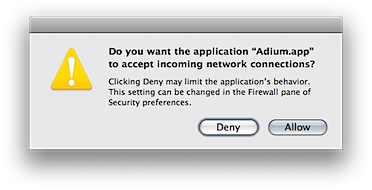
When you have the firewall in “Set access for specific services and applications” mode, and you start an application which tries to open a TCP or UDP port, then you get a message like:

openPorts.png

When you click one of the buttons, an entry is added to the preferences list:

firewallprefs.png

However, the application’s executable code is checked by the system to see that it is the same application as was run when this choice was approved. So, if you have something like an Input Manager, which alters the executable code as it is run, then you have this message appear every time you launch.

This was a real problem for me, using Inquisitor with Safari. Sure, it’s a great little tool to get the pre-search results in the browser before you press enter, but I decided it wasn’t worth the annoyance of having to click Allow each time I start up the application.

So, if you are having issues with the Firewall dialog appearing each time you start an application, and you haven’t installed a new version, consider removing any unneeded Input Mangers. You’ll probably need to remove them all to get it to stop, but that might just be worth it.

When are you starting your assignment...?

Had a funny thing happen today. Tomorrow we have an assignment due for the one topic that is actually somewhat challenging: Programming Language Concepts. The task is to write a QuickSort program in c-like Java, and implement it using both a recursive and an iterative design. There is an extension task due next week, to do the same for a MergeSort program.

I’ve been working on this since about the second week. It hasn’t consumed all of my time, but it has taken a significant number of hours of coding time, testing time, and finally several hours of run-time to gather average data. This is even before writing up the assignment, although I’ve probably done way more work than was required in this aspect.

So, when it a lab session today (which I had done before-hand, something that few students in any of my topics appear to have grasped is probably the best way to work…), one of the students mentioned he hadn’t started his yet. This had myself and another student, who have bounced several ideas and problems off one another, aghast with jaw-dropping splendour (!).

I know he was for real, as an hour or so later, in a different lab room, he was asking another student for assistance with his development. This other student was someone who had done the topic in the past, and was giving him some assistance with his algorithm development. But I don’t possibly see how he can come close to finishing a program, let alone the other stuff, by 5pm tomorrow.

It occurs to me that I was like this other student, a long time ago. No I wasn’t, I wouldn’t have even bothered.

Oh dear, I’ve turned into an annoying mature-age student who gets work done ahead of time, and answers all of the questions in class.

Alanis Morissette

I’m currently sitting in my new favourite place - the Flinders Uni Tavern.

It’s been a long time since I was a regular at a Uni Bar, but it looks like it will be starting again. I can sit in this place, view lectures I’ve missed, or even just seen, and drink beer. And do my work, while Alanis Morissette plays in a double-play.

Feels like the early 90s again. Except I have money, and a laptop.

And I plan on finishing this degree.

Mac OS X hostnames

I run a DHCP/DNS server on my home network, which allocates addresses for all of my machines, and provides them with DNS when connected. Because my development machine, a MacBook Pro also sometimes has to run a web server, and provide varying responses according to the hostname by which she is currently being addressed, I set up a range of VirtualHost directives in apache, and entries in m own /etc/hosts file. This was fine as long as I was the only person accessing these sites, but I also needed to access them from a couple of other machines (including a VM running WinXP).

So, I palmed off the /etc/hosts entry to the DHCP server, a reflashed NSLU2. This machine is just the DHCP/DNS server, which is available only via ssh. But, if I connect to my home network, then the DHCP/DNS server decides to use this hostname as my hostname. I’m still tweaking to see if there is a way around it (have the correct hostname specified earlier in the file springs to mind).

It’s fairly annoying to have the wrong hostname showing in my Terminal when I open up a bash session, or look at the console.log. Something I really can’t live with.