Vhosts setup with Leopard

I’ve been setting up my various VirtualHosts under Leopard, which uses Apache2.

I’d blogged before about ensuring that you set up the hosts line before you restart the apache daemon, but this time around I came across something even odder.

If you use the regular line in /etc/hosts, ie:

127.0.0.1    hostname

Then it fails under the VirtualHost setup. Instead, you need to use:

::1    hostname

Which is the IPv6 address. Which works under Virtual Hosts.

Welcome, Leopard

Well, I’ve bitten the bullet and installed Leopard onto my main machine. I did have it already on a Mac Mini, but that’s not a machine I use other than via eyeTV or Front Row.

So, how is it so far? Well, I’ve really only just gotten partway through reinstalling the apps I really need - I’m taking the approach that I’ll just install the stuff I use as I use it, and try not to do what I usually do which is install just about everything I think I might ever use.

I’m not keen on the shape of the new menus, I really don’t like the rounded bottoms. I’ve moved the dock to the left, but skill don’t really like the look of that, either. And I’ve killed off the annoying default desktop background image. That is really too busy for my taste.

Everything seems to be flying along nicely. iCal almost didn’t import my data, but closing it, removing the entire Calendars directory from Library and restarting it fixed it up nicely. It starts much faster than under Tiger.

Took me a while to get networking going with the spastic system we have here at work. But eventually did. I’m hoping that it won’t keep asking me to trust a certificate that is untrustworthy like Tiger did. That got old quickly.


Ikea Masque

And yes, that is a Movember.

Licorne

Back in 1970, the French Government tested a heap of Nuclear weapons on atolls in the pacific. This photograph is allegedly one test on the island of Licorne.

This photograph looks so much like a painting it is amazing.

(From Licorne (Monoscope))

Exporting Keynote takes ages.

Not everyone uses Keynote. Some people don’t even use MacOS X!

So, in preparation for me not being at my job next year, I’ve had to convert the dozens of presentations I created for my Stage 2 IT Studies class into PowerPoint, and since PPT doesn’t always have all of the features, an SWF version as well.

And, it takes about 3 minutes to convert each one. Most of which is the progress bar at 99%.

Using MarcoPolo differently

I’ve started to use MarcoPolo slightly differently. Instead of having it monitor which Airport networks are nearby, which causes OS X to no longer automatically join networks other than the first one, I’ve turned off AirPort monitoring. Instead, I choose location based upon the IP address range that gets given to me.

This works because the three networks I connect to all use different numbering ranges. Which is lucky.

It’s not quite a nice a solution (It has to wait until I connect to the network before changing locations) but in some ways works better. For instance, it no longer tries to change SMTP server before the network is ready. And the change in proxy servers only happens when the network is actually connected.

I was having some issues with it not picking up the changed IP address, and I may have to tweak it a little, but I’ll see how it goes. It’s certainly better than having to manually connect to airport networks.

Odd CAPTCHA

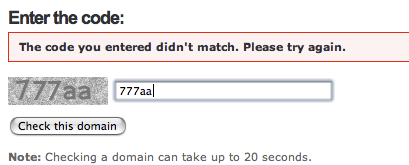
While troubleshooting a DNS issue for a domain I do technical support for (as it turned out, the problem was partially an OpenDNS issue, I think), I got the following as the CAPTCHA image:

(Ignore the error, that was from the previous page).

Mail.app got worse

Well, Mail.app got worse. Instead of just downloading a few, then one message at a time, it then refused to download any messages. And when I went into the web interface, there were a heap of messages there.

I changed around some GMail settings, so that it forced it to download the messages again. All 500+. And I have to delete the duplicates.

(Actually, I changed the POP username to recent:email@domain, and there are 500 messages in the past 30 days. Much better than getting all of them…)

Grr.

The New Wild West • This Way • Jewel ★★

Optus not using Telstra DSLAM ports?

According to Optus, they are not using Telstra DSLAM ports for new connections, but have their own hardware installed in exchanges.

This was the reason given to a friend why her ADSL could not be connected.

Mail.app only grabbing one message

I’ve got a strange issue at the moment where Mail.app only downloads one email message at a time from my Gmail POP server.

Fairly annoying.

I haven’t been able to find anything on the Google about it, and I don’t know if it’s an issue related to Gmail, or to Mail.app. Might have to try another email client. Or another service.