WiFi ate my RSS bookmarks

I have around about 120 feeds in my NetNewsWire subscription list. And I love reading all of them.

Just recently, I had noticed I seemed to be getting less and less news than before. This was odd, but I just put it down to everyone else being as busy as me.

Then, tonight I noticed when I refreshed my feeds manually, most of them had generic icons, instead of the usual favicons that appear.

When viewing the properties, all of these feeds had the default address that pages get redirected to when using one of the various Wireless networks I use daily is accessed without authenticating.

Thus, some of them pointed at www.vpn.infoeng.flinders.edu.au, and some had the IP address of the authentication router that one of the other APs points me at.

So, I spent the first half hour of my free time this evening double-clicking each item in the feeds list, and re-subscribing to the feed, and then deleting the original feed entry, which is pointed to the wrong site.

I then spent the next few hours catching up on the feeds that had obviously been modified by the lovely WiFi router over the past few months. 455 unread articles.

I’m not quite sure how the feeds addresses got changed, whether it is a NNW issue, or something that is idiosyncratic of the way that HTTP redirects work. I’m thinking it’s just a side effect of the way the router redirects all pages. But it is a pretty crappy one. I have looked at a method of trying to automatically authenticate on an unsecured wireless network that uses web-based authentication, but it failed last time.

Using Dynamic DNS as (partial) authentication.

One thing that you can do with Apache is limit access to particular domains. For instance, you can have a process running on a Server that handles internal requests as well as external requests, and have the internal site never exposed to the outside internet. This can be done using the apache Allow and Deny directives.

But, sometimes I need to work remotely, and still have access to the intranet data, such as the company wiki and bugzilla database. But I don’t know which IP addresses I will be using, and whilst I can open it up to allow a range of IP addresses in, this means that someone else could see the data.

So, set up a dynamic DNS for your laptop, and put in an Allow for this DNS entry. Then, you just have to update the address whenever you want to access it - or even better, update it whenever your IP address changes. That means, even if someone comes on to the same IP address after you, as long as you have a new IP address, they won’t be able to get in.

This does point out the flaw in the system: if you log off, and don’t log back on (or don’t renew your IP address), then that person can access your intranet data. So, you should not use this as a sole means of authentication. Instead, use http authentication, or preferably, some other method of protecting access. But as a lightweight (ie, no VPN) system, this looks pretty good. It should even work if you are behind a firewall that prevents VPN access. And adding a new user requires a bit of work - creating a new Dynamic Hostname and adding this to the httpd.conf file - or wherever your server config data is stored.

It strikes me you could use sub-domains to do this, too, and have userxx.company.dyndns.org, or whatever. Then an allow of company.dyndns.org should allow anyone using a subdomain. I don’t know how you can do subdomains with DynDNS, but it may be possible with some other system. (Or, if you run your own DNS, you could come up with a method of doing it there, which gives you more flexibility. However, if you have a DNS, you can probably stretch to a VPN too).

zsync

zsync is a file transfer program. It allows you to download a file from a remote server, where you have a copy of an older version of the file on your computer already. zsync downloads only the new parts of the file.

From zsync

Noted for future reference.

Remote Support: TeamViewer for Mac

Doing support isn’t that much fun, however, at times it needs to be done. Until today, I used to have to either fire up a VMWare session, or run Darwine (or CrossOver) in order to run TeamViewer on my Mac. But today, when I went to the TeamViewer website, and they have a beta version of their client for OS X.

I haven’t had the chance to use it in anger yet, I nearly had to today, but managed over the phone instead.

What I did do for the first time yesterday is use IM for work specific purposes. That was kind of fun. And the cool thing about Adium is that it keeps logs of my chat with my minion, so when I bill my boss for the time spent on the tasks, I have evidence.

FFFFOUND!

I ffffound a wwwwebsite today. It hhhhas llllots of ppppictures on it. Ssssome of them aaaare vvvvery ffffunny!

noisydecentgraphics.typepad.com_design_images_2008_03_11_yourproduct.jpg

200803142223.jpg 200803142224.jpg 200803142224.jpg 200803142224.jpg 200803142225.jpg 200803142225.jpg

Tunnelblick and the rest of the internet.

I have access via an OpenVPN tunnel to my University, and can access files located on the server there using Tunnelblick. This provides access through an insecure wireless network, as well as over the internet.

However, if I connect using Tunnelblick from home, I can either view my files, or view stuff on the rest of the internet.

It took me a while, but I figured out how to change the openVPN settings so that only a subset of IP addresses go through the VPN.

Assuming you are on a Mac, your settings file will be similar to ~/Library/openvpn/connection_name.conf, but with connection_name being something else. You need to edit this file, which is probably write protected. I’m not going to tell you how to fix that problem - if you can’t do that you have no business hacking with routing tables!

Find the entry near the bottom that looks like:

redirect-gateway def1

Comment this out (put a # at the start).

Now add in a line that looks somewhat like this:

route <network-address> <netmask> <gateway-address>

For example:

route 1.2.3.4 255.255.0.0 5.6.7.8

For Flinders Uni Infoeng, it should be:

route 129.96.6.0 255.255.255.0 129.96.59.73

You may need to authorise your Mac after saving the file. But when you connect with Tunnelblick, you should now be able to access addresses within the desired range, and the rest of the googlenet at the same time. Happy surfing!

IMDb Data and iTunes

Using python, it’s easy to get data from IMDb into your iTunes database.

You’ll need a few tools to get this working. appscript, py-IMDb and CocoaDialog. Install each of these, and for the latter, note where you store it. I’m not going to go through the code, as it is fairly well commented. If you can’t get it to work, leave a comment and I’ll see if I can help.

IMDB2iTunes.py

Note that you will need to save the file above, and rename it so it has a .py extension.

Compressing Compressed Files

I’ve ranted about this type of thing before, but one thing that really pisses me off is when people attempt to compress already compressed files. I love the BBC program Spooks, but because they are still showing a series that is about 3 years old in my country, I’ve been forced to download the series via slightly shady means.

So, I’ve just grabbed the first few episodes of series 6. And the joker who made the first episode decided to rar th avi file. And split it into 15MB chunks. Why would you do this? At best, it is just slightly annoying (you have to unrar the file before you can use it), at worst it means you can’t access the file. If I were unable to snarf the entire torrent, then I would not be able to unrar the file, meaning I could not view any of the video. To put that in perspective, when I grabbed a Grand Designs episode I had missed on local TV, I only got 99.3% of the file. But I can still watch it in a viewer, and I can’t even see where the data is missing. I would not be able to do this with the Spooks episode.

Luckily, the whole thing downloaded, so it isn’t a big issue. Not this time.

Petabytes

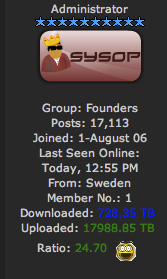
And I thought me (almost) reaching my quota every month was making me a heavy user of the internet. I came across this on a torrent site:

Yes, that’s what it says. He’s downloaded 730 Terabytes, and uploaded 18,000 Terabytes. In about 18 months. That’s uploading about 1,000 TB/month.

Or another way, about 33TB uploaded every day. Which cannot possibly be right. 3TB per hour. 1TB every 20 minutes. 50GB per minute. Just under 1GB every second.

I put it that this is false.

Savings & Loans - Internet Banking - Information

Internet Banking uses industry-standard encryption to help keep you safe online, while our Factor2 Personal Icons help protect you from unauthorised transfers from your account. The first time you transfer money to another financial institution or use BPAY, you will be asked to choose three secret icons that you’ll need to select every time you use these services.

(From Savings & Loans - Internet Banking - Information)

Okay, so let me get this straight. You have introduced a second set of paswords, right?

Each time you use BPAY or transfer funds to another financial institution, you will be prompted with nine icons, including your three chosen icons, in a random order. You will need to select your secret icons in the correct order before you can BPAY or transfer funds.

Okay, I have some issues with this.
Firstly, if someone already has access to my login details, they have breached security. They can look at personal details about me, including the address my credit union has on file. But not my date of birth. Which they might be able to get by google.
Okay, you are trying to do something nice and stop someone stealing all of my money if they happen to get my PCLink access details. And you give me a system where I need to click on three icons.
Surely shoulder-surfing is easier to do if you just have to see the three icons someone clicks on, rather than try to see what keys they have pressed on the keyboard.

If you forget your Factor2 Personal Icons, you will need to call our Member Contact Centre on 13 11 82 to have them reset.

Okay, so someone could get my login, pretend to forget my icons, and ring and get them reset. So the system can fairly easily be bypassed. But then I wouldn’t be able to get in myself. Granted, it is a level of security that didn’t exist before, but I don’t really see that it is any more secure. If they have gotten in, it stops them transferring all of my money out.
Until they ring, read off my address, google my date of birth, and then they can steal all of my money. Now, it happens I have been pretty good at keeping my date of birth private. I even use a faked D.O.B. for lots of online sites. Which I have to remember when I have used that fake.
It’s just lucky I don’t have much money in there…