iSync Menu Item

For some reason, iSync appears in the menu bar after a reboot sometimes, even though I have unchecked “Show status in menu bar”.

Picture 1.png

When I reload iSync, the setting has reverted back to being checked. This doesn’t seem to happen all of the time, just sometimes.

Why I won't use anything but Keychain

Since I got my laptop, I no longer need to use either the same password for everything, or the same ‘head’, and contextual ’tails’ for each site. (For instance, a head of ‘foobar’ and a tail like ‘macosxhints’ results in a password of ‘foobarmacosxhints’ for the MacOS X Hints website).

Instead, I can rest assured that I can type any random sequence of characters into the password box, and have the keychain remember them. It has the side effect that I don’t use Firefox, only Safari (or Camino, which also accesses the Keychain, like a good OS X application should).

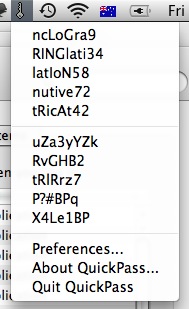
It gets even better when you use something like QuickPass, which lives in the menu bar, and every time you need a password, it generates a whole stack of random ones for you:

QuickPass.png

Note, that since I didn’t actually choose any of these, they aren’t used for any of my passwords. Selecting one puts it into the clipboard, which is the only real security issue. If someone else got access to my clipboard, then they could see my password.

Since no one else gets hold of my laptop at all, then I’m fairly secure.

I will not use any other password storage system, since not only does it save my web passwords, but passwords for dozens of other applications too. Ecto stores it’s passwords for blogs there. Airport Utility stores passwords for the wireless routers I manage, as well as WPA keys for networks I use. These passwords are all secured (with the keychain protected by my login password), and yet I don’t need to copy-paste them, since the application(s) that need access are granted access on a need-to-know basis by the system.

I think this is one of the best features of the OS. No longer do I need to remember passwords, nor store them in a text file. As long as the browser I use accesses keychain, then I have all of my web passwords available in each browser.

So, the idea of Gorilla Password doesn’t appeal to me at all. Not least that I don’t have to use other machines (other than one unix system, which I only use at Uni, and then only store one password on, to access the Uni learning web-app), but the fact it doesn’t use system-provided services. That’s one of the main issues of cross-platforminess.

AdiumX 1.3.1

I have, courtesy of MkConsole, the data from some of my log files displayed on my desktop. This is really useful, as I notice stuff that gets logged there.

It’s less useful when applications write more stuff to the system logs than is strictly necessary. For instance:

Picture 1.png

That’s just a small segment of the issue, but it clearly shows that the latest release of AdiumX, 1.3.1 is dumping two lines to the console or system log every minute.

For google, the logfile data that is coming out is:

> 11/09/08 6:41:18 PM [0x0-0x48048].com.adiumX.adiumX[828] INFO cmdproc.c:98:show_debug_cmd() S: 000: QNG 42  
> 11/09/08 6:41:37 PM [0x0-0x48048].com.adiumX.adiumX[828] INFO cmdproc.c:98:show_debug_cmd() C: 000: OUT  

Time to go without IM for a little while.

Might get more work done anyway. But only if I kill Twitterific too, I suspect.

Navicat now does Oracle.

According to an item that just popped into my feed, there is now a version of Navicat that connects to Oracle DBs.

Cool. I like Navicat.

configd Kernel Panic

First KP in ages today.

Tue Jul 29 13:50:14 2008
panic(cpu 0 caller 0x00192FD4): "pmap_flush_tlbs() timeout: " "cpu 1 failing to respond to interrupts, pmap=0x6b58ae0 cpus_to_signal=2"@/SourceCache/xnu/xnu-1228.5.20/osfmk/i386/pmap.c:4570
Backtrace, Format - Frame : Return Address (4 potential args on stack) 
0x628bfa18 : 0x12b0fa (0x4592a4 0x628bfa4c 0x133243 0x0) 
0x628bfa68 : 0x192fd4 (0x45f414 0x1 0x6b58ae0 0x2) 
0x628bfad8 : 0x1932b8 (0x6b58ae0 0x200000 0x0 0x0) 
0x628bfb88 : 0x195721 (0x6b58ae0 0x215000 0x0 0x14160a8) 
0x628bfbe8 : 0x169e6f (0x6b58ae0 0x215000 0x0 0x216000) 
0x628bfd08 : 0x16a437 (0x216000 0x0 0x0 0x0) 
0x628bfd48 : 0x182517 (0x1b32618 0x215000 0x0 0x216000) 
0x628bfd78 : 0x159209 (0x1b32618 0x215000 0x45 0x11d992) 
0x628bfdb8 : 0x12d17e (0x12a66d9c 0x874e0a0 0x0 0x0) 
0x628bfdf8 : 0x126257 (0x12a66d00 0x0 0x28 0x628bfee4) 
0x628bff08 : 0x1973dd (0x628bff44 0x0 0x0 0x0) 
0x628bffc8 : 0x19f3b3 (0x6b61820 0x0 0x1a20b5 0x12b56f20) 
No mapping exists for frame pointer
Backtrace terminated-invalid frame pointer 0xbffff508

BSD process name corresponding to current thread: configd

Doesn’t really give me much info, does it.

From the Xcode-Users list...

How do you pronounce XIB?

I’d say it as ZIB. You know, like xylophone?

XCode 3.1 and "Availability"

You can’t have a class with the name “Availability” in a project built with XCode 3.1.

You can with XCode 3.0, but CFNetwork, and I assume a heap of other classes use a class called “Availability” to define if objects are available in a particular version of the OS.

Missing NSButton Type

I’m trying to make a control that allows me to indicate when a record in my application is synced with the AddressBook person of the same name - I have made it so that I can only enable syncing when a person with the exact same name exists in both places, but to indicate it, I want to use a button that shows a pressed-in state, but also alters the image.

I want the image to be black-and-white by default, but when pressed in, it becomes coloured.

Apparently, this isn’t possible. You can either have a button which changes it’s image, or displays a pressed in look.

Might have to subclass it.

Update: You can subclass it, but there’s no need to. Just give yourself a reference to it (myButton, for instance), and then:

1
[[myButton cell] setShowsStateBy:NSPushInCell | NSCellLightsByContents | NSCellLightsByBackground];

Automatic Updates?

I’m about to create a small application that uses Sparkle to do updates - not to publish anything, but just to see how it works, and make sure I can. I read a couple of things before beginning. One was an argument against Sparkle, or rather, an argument for an Independent Software Update…

ISU would allow all applications to be upgraded at once

From Stoneship > Thoughts on Sparkle

Now, I have quite a few applications on my machine that I don’t use very often. Even something like Acorn, which I use maybe once a week, right down to stacks of apps I almost never use.

Some of these get updated quite often. I don’t really care to download every update on a regularly updated application, when I’m probably going to have multiple updates before I use the application again. So, I quite like that it checks for updates about as often as I use it.

Which means applications like Changes.app, which I use virtually every day, and ExpanDrive, which I use virtually every hour, are kept up to date, whilst Acorn, which I just used a couple of minutes ago for the first time for ages, are only updated infrequently.

This can be taken with a grain of salt - I don’t know much about Sparkle other than it is pretty cool.

EyeTV and ScreenRecycler

Or how to make a single-display Mac Mini Media Center even better.

I have a Mac Mini that records all of my favourite programs (almost) automatically. It runs EyeTV (by default), and can play movies stored on either a local FireWire hard drive, or a LAN server (running OpenSolaris, and using ZFS, incidentally).

One annoying thing is that to set up a new smart playlist, or edit a movie, or do anything on the machine, whilst I can remote in and do stuff, this all displays on the TV.

However, using ScreenRecycler, it seems like I can trick the Mac Mini into thinking he (his name is jens!) has two monitors. Thus, with some swizzling, I can have the EyeTV full-screen display on the “real” monitor, and the desktop on the other one.

Doing this means that I can happily edit a movie (say, to remove advertisements), whilst the TV still displays the live TV (or being viewed video).

Run ScreenRecycler on the Media machine. You may need to restart if this is the first time you have run it, as it installs some driver. I’m hoping it’s pretty safe…

After running ScreenRecycler when the system has the driver installed, I needed to run JollysFastVNC to get ScreenRecycler to give me a second display. I was using ARD (and still do), which when I then reconnected showed me the whole desktop, with a menu enabling me to choose which display (or both) to view. I chose to view both displays for now.
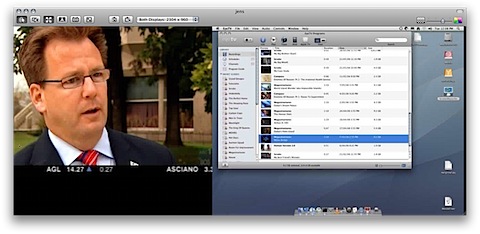
Picture 1.png

I then loaded up the Displays preference pane, and moved the menu bar to the ScreenRecycler display.
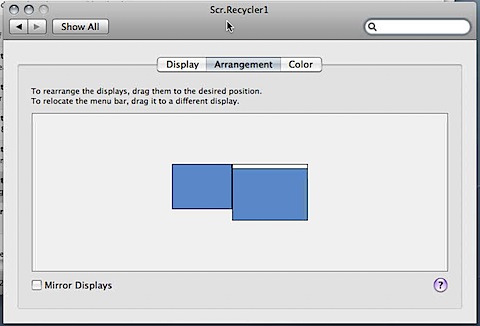
MoveMenubar.png

I made the ScreenRecycler display run in a higher resolution (1280x960, so that it fits nicely onto my external monitor on my laptop at full-size). I then went to the EyeTV preferences, and made sure the full-screen display went onto the “real” monitor. This apparently has the side effect that quicktime movies will also play on this monitor, so that’s quite good.
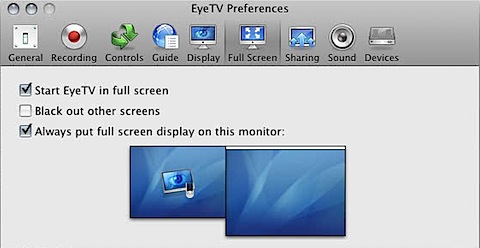
EyeTVFullscreen.png

Finally, I made new Live TV and Recording open in a new window. This enables me to edit a movie while Jaq is watching another. It does, however, mean that it is a little cumbersome to switch between tuners (need to view both monitors, and do some more swizzling), but it’s workable. It was always hard to switch tuners anyway, at least with the Apple Remote.

This makes for a fairly cool setup. I’m fiddling a little more before I buy ScreenRecycler (like, does it work better upon startup?), but it looks pretty promising.