The World According To Matt

I can’t quite remember how I came up with the title of this blog, but I know it had something to do with “The World According to Garp”, which I remembered as “Life According To Garp”. I’m glad I got it wrong, because there is another site with the title The World According To Matt. I did a bit of a look, and he started it well before I started mine, so I’m going to do the honourable thing and come up with a new title. I might go by a Google Search referer I got today: Monkey Female Names According To Matt. Doesn’t quite have the ring I’m after… Here’s my top options:

  • I don’t like your trousers
  • Barely Respectable, Rarely Bespectacled
  • Mistaken at the top of my voice
  • hateful AND boring
  • Paint the Tiger/Carve the Swan
  • Afterisms (Inc)

Vote for which one you like most in the comments. Here are some more options:

  • part of the precipitate
  • vanilla won ton soup
  • Chewing Gum For Your Eyes (thanks to Frank Lloyd Wright)
  • Not An Actual Emergency
  • At night, the ice weasels come
  • I’ll have a pie, thanks!
  • Segmentation Fault: Core Dumped taken
  • Proto-Nasal-Philosophy (Inc)
  • Not Company Policy
  • The Global Dictator
  • Still safe to eat, just
  • A thousand measure of rice
  • You can’t polish a turd
  • Thinking of a Flannelette Shirt
  • Like a fortune cookie, only without a witty fortune, or a cookie
  • Footprints in my hair
  • Counting Thoughts: 1…
  • Old enough to conform
  • Intolerable Bryl Cream
  • Always Rely on Miracles
  • Believe the Donkey, for he Brays
  • Taste the Fat
  • Impermanently Confused
  • Love is no excuse
  • Not Evil. Lively.
  • Youth is a Curse
  • They kill people for less than that
  • Twatology
  • Damn this Childproof Cupboard!
  • Everyone Likes Berries
  • Power, without responsibility
  • Adequately Competent
  • Whatever you do it ends up raining
  • Ghandara, Indiana
  • Are we there yet?
  • Simultaneous Noise Production

Referers deciding post topics

I regularly check my Referers list in the WP backend - it’s interesting to see who has visited my site, or rather, where they came from. I really like a couple of features - especially how it points out Google referers. It struck me as a useful way to see how my site ranks in terms of Google searches. A couple of terms return a page from my site as the first hit. For example: [Google: probability of our existence][1] This in itself is interesting - and it’s accurate. The post in question is about the Probability of our Existence. But more interesting is what people have searched on, found my site and visited about, where the topic is not quite right. To increase user satisfaction, I could write posts about what they were searching for initially. For example:

  • How to rate song with itunes
  • Old postsecret posts
  • Easiest way to resize pictures
  • 1 itunes library for multiple users
  • resizing the length of songs in itunes

The thing I think is most interesting is that most of my hits come from searches for sudoku - and I only ever wrote one post on it! (And it doesn’t really tell how to solve them…but details how I wrote a program to solve them.)

[1]: http://www.google.com/search?hl=en&q=probability of our existence&spell=1

Front Porch

Jaq spent a bit of time this weekend (while I was at the Greenhill Road Touch Fields) emptying out the planter boxes on the front porch, sealing the post that supports the roof, and then we filled the gaps with concrete. Then, we planted some plants! A heap of Snake Plants (Sansevieria trifasciata)__, and a couple of Agave (Agave attenuata). They were all plants we had from the old house, and they look great.

Dsc00008-2 Dsc00009 Dsc00014-1 Dsc00012

State Touch Trials

This weekend was the SASSSA/TouchSA Touch trials. I coach the 15s Girls’ team, and we had a great turnout again. More than 40 girls, with most of those of an extremely high standard. We’ve selected a squad of 20 girls who I’ll train over the next month or so, before choosing my final team of 14 and shadows. I’m looking forward to the trip to Darwin in mid-September…

Notification from AppleScript Studio

Christoph asked me for some advice on how to get notification on iTunes track changes in a comment, I said I would write a bit of a tutorial on how I got it to work. First thing was to create an AppleScript Studio program - you will need to have the Developer Tools installed for this. Now, open the main.m file. It should look something like the following:

 1
 2
 3
 4
 5
 6
 7
 8
 9
10
11
12
13
14
15
16
17
18
19
20
21
    #import <mach-o/dyld.h>
        
    extern int _NSApplicationMain_(int argc, const char *argv[]);
        
    int main(int argc, const char *argv[])
    {
        if (NSIsSymbolNameDefined("_ASKInitialize"))
        {
        NSSymbol *symbol = NSLookupAndBindSymbol("_ASKInitialize");
        if (symbol)
        {
        void (*initializeASKFunc)(void) = NSAddressOfSymbol(symbol);
            if (initializeASKFunc)
        {
        initializeASKFunc();
        }
        }
        }
        
    return _NSApplicationMain_(argc, argv);
    }

The file needs to have the following elements. At the start, the following imports are required:

1
2
3
    #import <Foundation/NSDistributedNotificationCenter.h>
    #import <Foundation/NSString.h>
    #import <AppKit/NSAppleScriptExtensions.h>

This should be all of the imports that are required - although I also had stdio.h for a while for testing. After the declaration of the NSApplicationMain, I put the following in:

 1
 2
 3
 4
 5
 6
 7
 8
 9
10
11
12
13
14
15
16
17
18
19
20
21
    @interface iTunesConnection : NSObject
     - (id) init;
    @end
    
    @implementation iTunesConnection
     - (id) init {
        NSDistributedNotificationCenter *nc = [NSDistributedNotificationCenter defaultCenter];
        [nc addObserver:self
               selector:@selector(updateNow:)
                   name:@"com.apple.iTunes.playerInfo"
                 object:nil];
    
        return self;
    }
    
     - (void) updateNow:(NSNotification *)notification {
        NSString *updateScript = [NSString stringWithFormat:@"tell application \nend tell"];
        NSAppleScript *as = [[[NSAppleScript alloc] initWithSource:updateScript] autorelease];
        [as executeAndReturnError:nil];
    }    
    @end

Copy and paste the stuff above - there is some that goes over the line in my browser, but it’s all there if you drag out the selection. You may need to change a couple of things depending on what you want to do. For instance, the @"tell application \nend tell" section needs to be the applescript code that is run whenever a new iTunes track is started, or iTunes is paused. You could fit the entire application into this place, but what I did was have a hidden button that this script “presses”, triggering the update process. Finally, I added the following declaration just after the first brace in the main function declaration:

1
2
    iTunesConnection *connection;
    connection = [[iTunesConnection **alloc**] init];

This gets everything running. I would suggest putting the following into the applescript string to test it and see that it works:

1
    @"tell application \"Finder\"\ndisplay dialog \"iTunes Changed\"\nend tell"

You need to have \" whenever your script would have a ", and \n wherever it would have a newline.

RSS icons as CSS code.

I found a few sites around that give instructions on how to use CSS code to create those classy RSS icons. Using CSS is good for a couple of reasons - if you decide to change the style you only need to do it once, even if the code was used in a post, or page, not just a template. Secondly, some people live some of their life behind crappy corporate firewalls that block images from certain sources, and people using text-only browsers, or using text-to-speech features, will still be able to view what it was you intended them to see. This is what I have in my stylesheet:

 1
 2
 3
 4
 5
 6
 7
 8
 9
10
11
12
13
14
15
16
17
18
19
20
21
    .rss
    {
        color:#FFFFFF;
        background-color:#FF6600;
        border-color:#FF6600;
        border-style:outset;
        text-decoration:none;
        margin:2em 0em 0em 0em;
        padding:0em 0.5em 0em 0.5em;
        border-width:1px;
        font-family:Arial;
        font-size:0.8em;
    }
    .rss:hover
    {
        background-color:#FF9900;
    }
    .rss:active
    {
        border-style:inset;
    }

Then, whenever or wherever you have a link that needs to look like an RSS button, just use class="rss" inside the a tag, and it will look classy! It is also possible to format a whole paragraph using a p tag with the class="rss". If it doesn’t work, then it’s likely that another CSS statement is vying with the class tag for precedence - for instance if your links are inside the sidebar, as part of a list, then the list, sidebar and a tags from the CSS may take precedence. In my case, removing the links from the list item (leaving them in the unordered list to keep positioning) fixed the problem. Note: I was originally using #rss in the stylesheet, and id="rss" in the pages, but should have been using .rss and class="rss" to be more compatible. The one I was using is intended that each tag appears only once in a document, I think.

More PostSecret Gems.

PostSecret. Gotta Love It. Absent

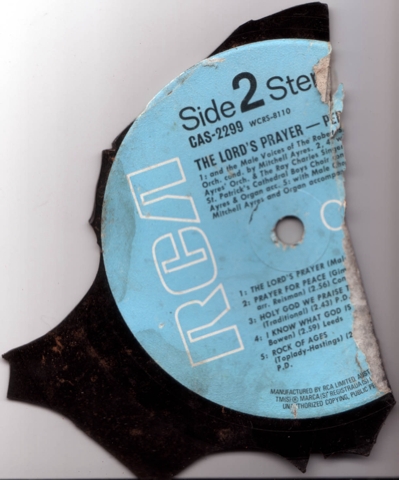
The Lord's Prayer

If you’ve been to church, you probably heard the Lord’s Prayer. If you go every week (I don’t, something about having to believe in God keeps me away), it might be beginning to sound like a broken record. Brokenrecord Okay, poor joke. I found this on the way to school yesterday morning, and it made me laugh. Perry Como is actually quite a good artist, other than in this case… Magic Moments • The Look Of Love: The Burt Bacharach Collection • Perry Como

I'm a CSS Star! (Almost)

I’ve played around with CSS for the last couple of hours, and have finally got my RSS/RDF links to be rendered like icons (with a border and so on). It took me ages to figure it out, but I was only able to change the background colour, until I removed the <li> tags from the links - that was overriding the ability to change border and text colour. I then spent a couple more hours trying to make the same thing happen for the Search and Post Comment buttons, before discovering that Safari, and Camino, don’t support changing the look of form buttons. And I’m not going to bear using IE to test it under…I’ll live with the images I’ve made (for now). What would be cool is to make all of the elements of Connections work in CSS - like the top and bottom bits of the sidebar boxes, and so forth. Well, the bits than can be made by CSS, anyway.

Fighting Cats

Stupid cats fightin’ outside our window again. Seems to be happening most nights now. I went outside, and they were literally right outside the bedroom window. If it gets to be a problem, I may have to kill them. Seriously, when I went out with the torch, they just stopped, mid fight, like schoolkids. And walked away. “We weren’t doing anything, sir.” (I’ve disabled Trackbacks & Pingbacks on this post, it has been getting hammered lately.)