Latest WebKit Build.

I’ve just downloaded the latest WebKit build of Safari, from the Surfin’ Safari weblog, and great news! Finally, Safari/WebKit supports finding the selection in a TextArea. I can now use Safari in the WordPress Dash, and use the quicktags. I don’t need to code my JavaScript for comments to ignore Safari… Yay! This post posted using Safari, and all tags put in by the Quicktags.
Safari Rendering 0em Text.

Safari spits the dummy when it comes across a text-size:0em; clause in a CSS file. Which is kind of annoying, as it was nice to have zero-sized text, which naturally doesn’t appear, and replace it with an image, which does appear. Saves having to do a node.style.display = "block"; Oh well.

MIT OpenCourseWare

MIT OpenCourseWare | OCW Home This is kind of nice: MIT is now putting a whole lot of their courses online for free. Looks to be some interesting stuff in there, not sure how much detail there is in the courses though. Will report when I’ve downloaded and played around with one or two…

Tiger man page for bash dodgy?

I recently upgraded to Tiger, and just yesterday I noticed some strange behaviour from ManOpen, a great little tool for viewing man pages outside of a Terminal. Most man pages still work okay, but openman bash results in a long load time, followed by a crash. Every time. man bash still works fine. I might have to look back into the piping through Preview solution I was using a while ago. • Okay, there is a new version of ManOpen available. I’ll just use that.

GPGMail causes Mail.app to Crash

Not that I get a lot of PGP encrypted email, but I had GPGMail installed, and I upgraded to Tiger (I missed the chance to do an Archive & Install, apparently - they hid that a bit too well). Mail complained on startup that GPGMail wouldn’t run, but apparently it still was trying to render the emails through it, as every email I tried to view caused Mail.app to crash. A cursory inspection of the Crash Report told me this was the cause. Disabling it fixed it alright.

DVDs not mounting properly

I have a couple of DVDs a friend gave me, and I have noticed some interesting things occurring with them. Firstly, I thought the DVD he gave me was bad, as it would not mount in my iMac G4. It’s an HFS or HFS+ disc, so will not mount in a PC either. I then asked him for another copy, which he gave to me. It won’t mount either. Thinking something weird was going on, I tried it in an iMac G5, with a DVD-ROM/CD-RW drive. Mounted first time. I then tried it in another iMac G5, this time with a DVD-RW (specifically, a Pioneer DVR-K04F) drive, and it wouldn’t mount. So, it seems like this DVD will mount in DVD-ROM drives, but not DVD-RW drives. And I cannot make another copy, as the only drives it will mount in are not Recordable drives! Every other disc I have tried in my iMac has worked. I am stumped.

Back from Darwin

For anyone who noticed, I’ve been out of town for a little over a week. I’ve got a couple of posts to write: one about why I was away. I’ll get onto them soon. This is just a post to let you know I’m still alive, and will return you to your regular service soon…

OSX Application Startup Issues

I upgraded to iTunes 5, and also ran the latest Panther Security/System upgrade, and now my Finder, iTunes, and a couple of other random applications take ages (like about 5 minutes) to load. One of the programs that took a long time to load (and appeared to hang) was Quicktime Player: I traced this issue down to a dodgy QuickTimeStreaming.component bundle: I’ve moved it out of the /System/Library/Quicktime folder, and now Quicktime starts up super fast. I have tried the following techniques:

  • Repairing permissions. Apparently iTunes did have a file with dodgy permissions, but this wasn’t what was causing the slow loading.
  • Updated executable library prebindings. This did make every other app load much faster.
  • Cleaned the system and application caches. Again, other apps load faster.
  • Remove a heap of potential Finder problem cache files. I suspect that most of these were deleted by the above step, but I tried it again anyway. No joy.

I’m about to upgrade to Tiger anyway, so I’ll just backup everything and do that, I think.

Unwell

Those of you who actually know me may know I’ve been off work for nearly a week: I’ve had some sort of a viral infection, which resulted in me having horrible head and body aches, sweating and coughing fits. I’m almost all better now (was about to leave for work this mornng at 7:30 when I got all lightheaded and needed to call in sick. Daily Manager wasn’t happy - supposed to call in by 7:00am when not coming in), but it really held me down. To the extent I wasn’t able to write anything on my blog. For 5 days!

Internet Explorer Blocking

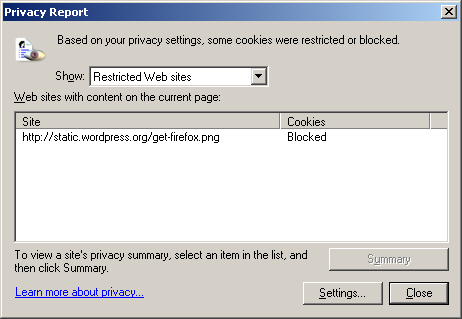
I just noticed a lovely little “Privacy Report” icon in the corner of my Blogsome Dashboard pages. Clicking it revealed the following: MS IE 6 Privacy Report: Blogsome Dashboard. I wonder what the rule is: is it to stop anything with the word Firefox in it?