Server Upgrade Time

I’m severely tempted to upgrade my local server. It’s a Dell Dimension 4600, running Ubuntu and with just under 1TB of disk space.

And I’m just not that happy with it. Occasionally it still crashes, and I can’t figure out why. I don’t know if it’s to do with VMWare, or something else.

It’s not so much a running out of disk space thing. It’s more that it just doesn’t cut the mustard. Perhaps I’ve been spoiled by OS X, but things just aren’t that easy to do on Linux. For instance, it took ages to get AFP sharing working, and even now it isn’t perfect. For instance, I have two shares that allow me access to some of the same files (the root directory of one share is inside another share’s directory). If I view a particular directory inside the share, then it shows me less files than actually exist in that directory, but the other share shows them all. Even if I disable the ‘outer’ share, the inner one still only shows the smaller number of files.

I found a shop today that sells 500GB SATA drives, which would allow me to migrate data without any loss, by plugging into one of the two spare slots, and installing a new OS onto that drive. I might be tempted to reinstall OS X onto the machine, but I think it was just a bit unstable too. Perhaps it is just the box.

I’d really like to move to a Mac Mini, but I don’t think I’d like to have to put a heap of external drives hanging off that again. Perhaps I should look for a cheap second hand Mac that will run OS X.
MacBook Pro Kernel Panic WPA Enterprise

Well, I love my MacBook Pro. Except for one little thing. If I connect to a WPA Enterprise network, and I am running on battery power, then I get a Kernel Panic. Every time, within a couple of minutes. Plugging into power means no panic, using WPA personal (at home) also means no panic. Although, apparently the lack of panic at home may be more to do with the fact I’m running an Airport Express router. I’ll switch over to my other router (b-only, still WPA) and see if it panics then. Apparently, Apple is aware of the problem.

Installing Fedora 7

With the purchase of my MacBook Pro, now called arne, I’ve decided to move all of my file serving from the NSLU2 to the Dell. Rather than run Windows on this box, I decided to install Fedora. OS X just wasn’t that stable on the old thing, unsurprisingly, since it was a severely hacked version. So, I bought a new hard drive (so I can keep the OS X and Windows installations on their original disks in case I need to go back), and installed it. I made my first mistake in installing it as the Secondary Slave, since that was the only available channel. I installed Fedora, and it wouldn’t boot. So I tried again. By this time, I had figured out that it was something to do with the GRUB bootloader not being installed, so I moved the hard drives around, but still no joy. I spent ages trying to get it to work, including using a (very) old Debian CD I had lying around (which, by the way, I’d never actually installed on anything!). No joy here, as this only recognised the first 8 GB of the 320GB hard disk! Finally, I almost gave up. I started to install Windows, just to get the disk reformatted (I’d accidentally hit the power at some stage, and nothing else was recognising it). So, I let it get through the formatting stage, and then reinstalled Fedora. And finally, it worked. Now, I just need to get everything on there I need: Samba, AppleShare Filing Protocol, mDNS (Bonjour), and Print/Scan/Fax sharing. It already comes with some cool stuff, like virtualisation (I’m going to compare this to Parallels and VMWare, and choose the best), and a torent server/client. Oh, and the name of that machine is now poul. I’ve gone down the road of four letter machine names, which are also the first names of designers. Finally, this is my first offline blog post, on the train on the way home. It’s not like I could do any real work on the short trip…

DoubleCommand

The first hassle I had with the MacBook Pro is to do with the keyboard. I spend a lot of time in the Terminal, and use Control sequences (^C to break, ^A to jump to start of line, etc). However, the fn key is where I expect the ctrl key to be. Luckily, DoubleCommand can change this. You can also map something useful, like Forward Delete to the extra enter key (which I hadn’t even noticed existed!). Speaking of forward delete, you can also map Shift-Delete to this keystroke too.

Airport Express draft-n superfast!

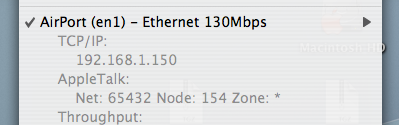
I use the excellent Menu Meters to view some important system information, including network traffic. I noticed this in the popup menu tonight: Network speed That’s right. It’s 30% faster than my wired network. I never thought the cable would be the bottleneck. Time to purchase some gigabit ethernet cards for stuff…

Apache • Scripture • Café Del Mar • Volume 8

Transfer Errors? Check the cable!

Just spent about twenty minutes trying to transfer a file from a computer to my iPod. Errors, input/output from the Finder. Lockups when transferring via the Terminal. Occasional disconnections of the device. Thought it might be to do with the fact it was a 2.7G disk image. Tried splitting it into smaller chunks. Unplugged it, and plugged it in without the extension USB cable. Transfer of file was successful first time. Either the cable, or that USB port was damaged!

New MacBook Pro

As I sit here, home from work with a back issue (funny story about that: remember how teachers always told students off about pulling out a chair from behind someone as they are about to sit down is dangerous? I can confirm that indeed it is. One of my students did it to me on Monday, and my back, including bits which are nowhere near the impact points, is totally screwed. And I’ve got State selections this weekend… but I digress), at least I have a light shining at the end of the tunnel. MacBook Pro, 15“; 2.16GHz/2GB/200GB On order now. My first laptop computer. Not a moment too soon. OS X on a Dell is better than Windows, but there are still some issues (random application crashes, inability to run VMWare Fusion and CrossOver Office properly, Missing Sync doesn’t run at all).

The Key The Secret (Glamourously Developed Edit) • Urban Cookie Collective • The Key : The Secret ★★

Wacom Tablet

Well, this is a new experience. I’m writing this very blog post with a Wacom graphics tablet. It’s taking me a while to get the hang of Mac OS’s handwriting recognition software, Ink, and I’m not yet sure how to edit words after I’ve Started writing them, but ‘it’s working, and that’s a start. Some tips for setting it up. I’ve got the Intuos 3 version, which has four buttons and a scroller in the top left and right corners. I’ve set one button up to switch between Ink and Mouse, and another for backspace, leaving the bottom one as space. My biggest hassle is that I’ve got some serious muscle memory issues going on - I’m treating it like it’s my Palm Zire, which means I do a backwards dash to delete a character. And it keeps picking up my ‘S’s as upper case. If they are at the start of a word, anyway. It’s not really that useful for me, for data entry, anyway, as I can type much faster than I can write. And my hand gets sore because of the way I hold a pen. I’m going to have a bit of a play in Photoshop, since the one I have is Pressure Sensitive, so that might be fun. And, I do have to give it back tomorrow, which is a bit of a bugger.

Superstylin’ • Groove Armada • Goodbye Country (Hello Nightclub) ★★

How to Make a RJ45 Cable Tester

How to Make a RJ45 Cable Tester circuit layout for rj45 tester Note to self: make one of these. Second Note to self: make one better, that cycles through each of the lines…and does bi-directional display.