iPod update
- Comments:
- here.
I haven’t updated the iPod in a while, and I noticed after doing it tonight that it gives it a nice new icon, and when restarting the iPod it gives a progress bar, just like booting up a Mac.
I haven’t updated the iPod in a while, and I noticed after doing it tonight that it gives it a nice new icon, and when restarting the iPod it gives a progress bar, just like booting up a Mac.
I hate when that happens. The problem I mentioned (OSX Application Startup Issues) is gone. Magically, every application launches fast. And I didn’t actually do anything to fix it.
I’m still kinda bummed out over how long it takes to scan through all of the playlists in iTunes and grab the details of each song, and write it all out to a file. I’m talking about Smart Playlists here, since it would be a trivial exercise to just grab the songs from the XML file that iTunes so nicely provides for normal playlists. Since I don’t use normal playlists (except when looking for missing album art - darn iTunes’s inability to search on missing artwork!), Bery Rinaldo’s Export Playlist to M3U didn’t necessarily do what I am doing any better.
But, I did pinch some ideas from him - the first was a snippet on how to get the name of the currently selected playlist:
|
|
The second I haven’t implemented yet, is having settings, and a setup wizard.
Anyway, the updated version is Export Playlists.scpt, put it in ~/Library/iTunes/Scripts (User only) or /Library/iTunes/Scripts (System-wide).
I can’t use iTunesMusicStore (I live in Australia), and I don’t listen to podcasts (dialup connection, besides I’d much rather listen to something from my Classical Music collection on the train anyway, chills me out nicely…), so I don’t need either of these in the Source list under iTunes 5. The setting for disabling the iTMS has moved to Parental Controls, and there wasn’t a Disable Podcasts one before, but there is now. I used to use the arrows that appeared for searching my library, but the functionality of this seems to have vanished under iTunes 5, so I’ll leave it off for now.
I’m not sure if this is new for version 5 of iTunes, but I hated how if I listened to an album where the tracks are supposed to be played together, like most of the tracks on Ministry of Sound Chillout Sessions 4, there was a gap between tracks. When, like after Disc 2, Track 18: De Nuit • All That Mattered, and leading into track 19: 2 Heads • Out of the City, it should be unnoticeable when one track ends and the other begins. Solution: set up iTunes âžž Preferences… (⌘,) Playback as shown below: 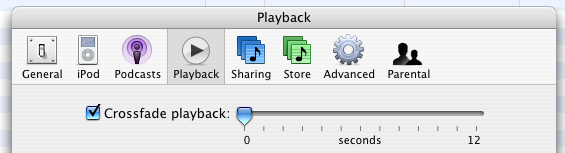
I’ve started phase one of the iTunes controller bot: I’m downloading the jabber server for MacOS X. $ sudo port install jabberd Phase Two will soon be underway: I’ve also downloaded the source of a Python bot… more to come soon! Actually, getting the jabber server to work wasn’t as easy as it should have been: I’m using a private jabber account on a server only I know about, but I’ll post more stuff as I get it working. Python looks to be an easy way of getting the bot to work: it would be nice to be able to do it all in AppleScript though. I can’t believe I just said that!
Well, I’ve been doing a whole lot of iTunes and iPod listening lately, and my playcounts are up!
6908 songs, 20:18:37:17 total time
And, I’ve rated 3551 of my 6171 tracks, or around 57%.
I uploaded my XML file last night, and it’s analysed it, and given me some useful feedback.
You appear to like Chillout the most, with Wicked Beat Sound System your favorite, which makes sense, since they have the most playtime in this genre. Chillout is your favorite common genre, and you have more Rock songs than anything else. Honey is your favorite overall artist, but you listen to BBC Philharmonic the most. Jet ain’t too bad, either.
**Genres **22; **Artists **1,381; **Albums **2,050; **Tracks **6,039; Total Time 18.46 days **Last Played **Cotton Fields, by _Beach Boys _ **Playcount **6,498 **Total Playtime **19.54 days You can see what it’s like now, by visiting Schinckel’s iTunes Registry. I might make a script/program that checks to see if the computer is online, and if it is, gzips the XML library file and uploads it. That way, these would be updated regularly.
Found a nice site/idea today when checking referrer logs: http://www.itunesregistry.com/about.php Basically, it allows you upload your iTunes XML library file, and it analyses it and compares it to others’ libraries. It is a great idea - much better than connecting to a database and sending individual queries/messages. I’m not sure how it would go with matching up artists/albums where there are slight differences (spelling errors made by tools who can’t spell Adagio, or think it’s _The _Eagles, not just Eagles.) Still, as a note to self, I’ll have to check it out. (And it should be cross-platform, since both versions of iTunes export an XML file).
In iTunes 4.9, the library file is no longer called iTunes 4 Music Library, but just plain old iTunes Library. Broke my cron entry for backing it up…