iTunes and Podcasts

I won’t deny at times I am late to the party. I’ve just discovered listening to Podcasts - mainly ABC programs, as it turns out, but nonetheless, it’s a start. Anyway, being on dialup means it can take an age to download longer podcasts. And if iTunes decides it’s going to give up on a Podcast, it cannot just do a resume on the transfer. It must start all over again. Bad news, from where I’m listening.

Blind Eye • [Hunters & Collectors][1] • [Collected Works][2] ★½

[1]: http://www.google.com/search?q=%22Hunters & Collectors%22 [2]: http://www.google.com/search?q=%22Collected Works%22

iTunes Half-Star Ratings

I recently performed an experiment to examine how iTunes handles 0-100 ratings - the result was “Not very well.” Something made me repeat the experiment, but this time with just tracks rated 0,10,20,…,90,100. That is, no stars, half a star, one star, and so on. For those playing at home: I just used a Smart Playlist where name contains 0, and used the procedure in the previous linked post. Here is a graph showing the results. I’ve annotated it in a couple of places. The first thing to notice is that the yellow line shows the relative frequency of tracks played with whole star ratings, excepting no stars. As expected, this is a linear relationship. The interesting thing is that the zero-rated track does not lie on this line. Instead, the half-star track does. This becomes even more interesting, when considering this: one-half star is the only one where the frequency differs from the rounded down full star rating. The moral of this story: rate your songs as 0-5 stars, or ½-star only. Don’t bother about the other values…

iPod Use Count

From the comments to the hint about how to find out the serial number of the last connected iPod, I came across the following CLI/Terminal command. defaults read com.apple.iPod The program will then provide various information, such as this one: “Use Count” = 143; It also shows the date the iPod(s) was/were last connected. I’d forgotten about the 40Gb iPod I bought from OfficeWorks, before getting it home and finding out it was an older one, still full of music (and in a new box, meaning someone had bought a new one, and returned the old one…). I returned it the next day, but here are it’s details:

000A2700026661B2 = {
            Connected = 2004-10-09 10:42:14 +0930; 
            "Firmware Version" = 307; 
            ID = 000A2700026661B2; 
            "Serial Number" = JQ410859PNU; 
            "Software Version" = 35684352; 
            "Use Count" = 9; 
        };

I didn’t realise it was quite that long ago… September 10th 2004. By the way, a Google of that Serial Number returns no hits. Maybe I should report it stolen…

Split Screen Sadness • [John Mayer][2] • [Heavier Things][3] ★

[2]: http://www.google.com/search?q=%22John Mayer%22 [3]: http://www.google.com/search?q=%22Heavier Things%22

iTunes Ratings

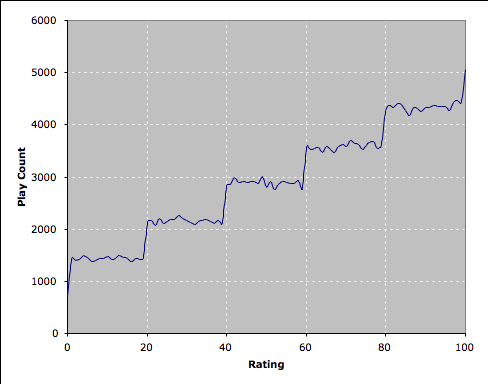
From OmniNerd: Playing Favourites, I decided to run my own version of the experiment that compares how often songs with different ratings get played by iTunes. The difference with my experiment is that it has 101 tracks, each with a different rating (0, 1, …, 99, 100). To start with, I created a new user, so I wouldn’t have to muck around with my own iTunes library. I recorded a short empty track with Sound Studio. That is, I started the application, pressed Record, then Stop, and saved this. Then, I imported this track into iTunes, and made it so it was only 0.01 seconds in length (use Info, Options, Stop Time). This will make the experiment much faster than the previous one, which had 1 second tracks. I’m not that concerned it’s an AIFF, as I made this script to create the 101 empty tracks, as AAC or MP3:

 1
 2
 3
 4
 5
 6
 7
 8
 9
10
    tell application "iTunes"
    	set i to 0
    	set base to first item of selection
    	repeat 101 times
    		set trk to first item of (convert base)
    		set name of trk to i
    		set rating of trk to i
    		set i to i + 1
    	end repeat
    end tell

This will duplicate the selected track (or the first track of the selection, if you have more than one) 101 times. It will then give a name to each of these, 0-100, and assign the same rating as the name. Since doing this also seemed to play the tracks once, I used the following script to reset the play count. The bonus is that it can be used to reset the play counts and run the experiment again, with different parameters.

1
2
3
4
5
    tell application "iTunes"
    	repeat with trk in selection
    		set played count of trk to 0
    	end repeat
    end tell

It’s now time to run the experiment. I set the Party Shuffle to use the Library, and to play higher rated songs more often. Then I clicked play, and went away for about 12 hours. • When I came back, I could see what the data was starting to look like, but I grabbed the data using this script anyway:

 1
 2
 3
 4
 5
 6
 7
 8
 9
10
11
12
13
14
15
16
17
18
    tell application "iTunes"
    	set theData to {}
    	repeat with trk in selection
    		set theRating to name of trk
    		set theCount to played count of trk
    		set thisData to {theRating, theCount}
    		copy thisData to the end of theData
    	end repeat
    end tell
    
    get theData
    
    tell application "TextEdit"
    	set theDoc to make new document
    	repeat with thisData in theData
    		set text of theDoc to text of theDoc & (first item of thisData) & "," & (second item of thisData) & return
    	end repeat
    end tell

Then, I saved this file as a CSV file, and imported it into Excel, which when plotted, gives the following graph: To me, the results look pretty clear. iTunes does not take into account the actual rating, only the star value. Even the new half-stars aren’t notably different. I’ll continue to run the experiment, and put up another post later. I may change some things, and rerun the original experiment, just to confirm it, although my results seem to do this already.
iTunes Ratings now support half-stars

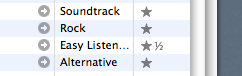
I updated to iTunes 6.0.2, and looky what I found: Now, the trick is that it needs to be exactly 10, 30, 50, 70 or 90 in order to be a half-star. A rating of 75 will still appear to be three stars. I think this is a bug. I’ve written some code that does it better:

 1
 2
 3
 4
 5
 6
 7
 8
 9
10
11
12
13
14
15
16
17
18
19
20
21
    property star : «data utxt2605» as Unicode text
    property half : «data utxt00BD» as Unicode text
    property quarter : «data utxt00BC» as Unicode text
    property threeq : «data utxt00BE» as Unicode text
    
    on myRating(theRating)
    	set theResult to ""
    	repeat 5 times
    		if theRating > 20 then
    			set theResult to theResult & star
    		else if theRating > 15 then
    			set theResult to theResult & threeq
    		else if theRating > 10 then
    			set theResult to theResult & half
    		else if theRating > 5 then
    			set theResult to theResult & quarter
    		end if
    		set theRating to theRating - 20
    	end repeat
    	return theResult
    end myRating

I’m currently using this to get the ratings data to add to my blog posts: at the moment it’s a FastScript that just inserts the data via the clipboard, but when Blogsome gets XMLRPC working again, it will be an ecto script.

It’s Still Rock And Roll To Me • [Billy Joel][2] • [Greatest Hits][3] ★★¼

[2]: http://www.google.com/search?q=%22Billy Joel%22 [3]: http://www.google.com/search?q=%22Greatest Hits%22

Telling iTunes Audiobooks are not Music

I’ve just converted an Audio Book to AAC - I’m ashamed to say it’s The Da Vinci Code, but, well… Anyway, I was a bit peeved that it doesn’t show up as an Audiobook when you use the search feature of iTunes. And none of the tips I came across seemed to fix it:

  • Rename the file so it’s *.m4b instead of *.m4a
  • Use the Make Bookmarkable script from Doug’s AppleScripts
  • Set the Type Code to “M4B "

Then I read this, at macintouch (iPod: File Management):

If I remember correctly, an iTunes audio book is little more than a renamed AAC file. The steps necessary for making your own are pretty simple:

  1. Convert the file to AAC format (if it isn’t already)
  2. Make sure it’s not in the iTunes library. (Otherwise iTunes may not recognize the change.)
  3. Set the file type to “M4B " if you’re on a Mac (only necessary if you’re using a Mac)
  4. Rename the file to have an “.m4b” extension
  5. Add it back to the iTunes library

Look at #2. That does the trick. Now, I just need to see if the Join Together and Chapterize script will ever finish…

Copy Controlled CDs?

I have a CD, Talkie-Walkie, by Air, that has a sticker on it labelled:

Copy Controlled: See reverse for details.

On the back is a largish label, which says (amongst other things, including system requirements):

On some equipment, for example car CD players playback problems may be encountered.

(This is also repeated in several languages). This is an EMI CD, and with some trepidation, I put it into my iMac, to rip to my iTunes library. It gave me no problems at all. Ripped perfectly. Pretty effective copy control system, EMI.

iTunes Signature

Paul’s Time Sink | iTunes Signature This is kinda cool. It generates a nice little file that is a conglomeration of the music you typically listen to. I set it so it didn’t choose tracks from the same artist or album, and found some nice stuff:

  • Tim Rogers • You’ve Been So Good To Me So Far

    No surprises here - one of my favourite songs.

  • Paul Kelly • Look So Fine, Feel So Low

    This one raised an eyebrow. Great song, but not the PK song I’d choose as my favourite.

  • 3 Different versions of Pachelbel’s Canon, by different orchestras

  • Gymnopédie No. 1 • Satie (Composer): A fabulous tune!

  • Mel C & Left Eye • Never Be The Same: the song that outed Mel C, or something like that. An alltime great Lesbo song.

  • Two Antonio Carlos Jobim songs, but only one of them performed by him: Quiet Nights (Corçovado), and Inütil Paisagem (Useless Landscape).

  • Hanson • MMMBop

This was not all of the tracks, but a pretty good selection, nonetheless. You can hear my signature here.

iTMS.au

iTunes Music Store Australia is here. Since you need to sign up to even get access to the free music, I had to enter my Credit Card Number. It didn’t work. Three times. Apparently you need to actually have money in there for it to work.

Spooky iTunes Coincidences

I just listen to random music most of the time. But every now and then a weird series of tracks come up. The normal thing is that tracks that we currently have in the car CD player play. But this one tops everything. The Eagles, New Kid In Town comes on, and I switch over to iTunes Rater to rate it, as I like that song. Then I notice this: The title of the previous song was “Johnny Come Lately”, words that are part of the chorus of “New Kid In Town”. Almost as spooky as the bit in Metal Gear Solid 2 where stuff starts going bunkum, and the voice says:

You’ve been playing this video game for too long. Turn the console off now.

This occurred at around 4am, so I was totally freaked. It was right, I had been playing the game for too long. Although this was actually part of the plot (trying to make Raiden(?) believe he is not real), I was convinced.

The Night Is A Blackbird • [Augie March][2] • [Strange Bird][3]

[2]: http://www.google.com/search?q=%22Augie March%22 [3]: http://www.google.com/search?q=%22Strange Bird%22