Disabling Menus

All of the cool kids are talking about Joel Spolsky’s post about disabling menus.

I agree with Gruber et. al., he’s dead wrong. Disabling a menu is a simple, yet powerful method of implicitly informing the user what she can or cannot do at the moment. Hiding menus, a-la Windows/Office “Show only recently used items”, however, it truly evil. This is not even hiding disabled items, just hiding ones that haven’t been used recently. Now, if I use one machine, and then go to another, it doesn’t know which ones I have used recently. Bullshit Incarnate!

Anyway, real users don’t use menus. Other than to learn the keyboard shortcuts.

The Old New Thing had a post way back in 2004, which has a mostly sensible answer: When do you disable an option and when do you remove it? Not strictly dealing with just menu items, but regardless, still logical.

N Queens

There is a mathematical problem called the Eight Queens problem, which one of my teachers mentioned in passing in a Lecture the other day. I was mainly surprised as I hadn’t heard of it before.

The theory is thus. Imagine you have an 8x8 chessboard, and 8 queens. Is it possible to place each queen on the chessboard so that it cannot be taken by (and therefore not take) any other queen?

Graham mentioned it was interesting to do with a recursive method.

I thought it was something that was a good candidate for Logic Programming.

To begin with, I broke the problem down a little. For instance, there is one unique and trivial solution with a 1x1 chessboard and one queen.

With a 4x4 chessboard, there are two solutions that are just mirrors of one another, one of which I found almost immediately by just thinking about it:

4queens.png

Notice here that as long as you do not put the first queen in a corner, you will get a solution.

Doing this gave me some thoughts as to how to automate the process. Each queen has an X and a Y coordinate, and in each case, every queen must have a unique X coordinate, and a unique Y coordinate. This prevents them being on the same row or column as another queen.

Then, some quick calculations showed that in each of these cases, the difference of the X and Y coordinates is unique also. This prevents them appearing on the same down-right diagonal. Note here that not every diagonal has a queen on it - in fact, only one more than half of the possible number of diagonals does.

Further along the same lines of thought, we need a way to test if they appear on the same down-left diagonal. Some further calculations showed this is given by the sum of the X and Y coordinates.

So, we have four simple rules for determining if a queen can take another queen.

In my prolog solution, I call this unsafe/2.

1
2
3
4
5
    unsafe([X1,Y1],[X2,Y2]) :-
        X1 = X2;
        Y1 = Y2;
        X1 is Y1 + X2 - Y2;
        X1 is (X2 + Y2) - Y1.

We can then reverse this rule to find a safe pair:

1
    safe(A,B) :- \\+unsafe(A,B).  

To find if a set of queens are all safe together, we have a nice recursive predicate, queens/1:

1
2
3
4
5
    queens([_]).  
    queens([Q1, Q2|Qlist]) :-
        safe(Q1, Q2),
        queens([Q1|Qlist]),
        queens([Q2|Qlist]).

All that we need now is a method of generating permutations, and we are done. I’ll not post my perm/2 solution, since it is widely known.

1
2
3
    queens8([[1,A],[2,B],[3,C],[4,D],[5,E],[6,F],[7,G],[8,H]]) :-
        perm([1,2,3,4,5,6,7,8],[A,B,C,D,E,F,G,H]),
        queens([[1,A],[2,B],[3,C],[4,D],[5,E],[6,F],[7,G],[8,H]]).

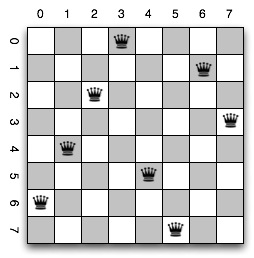
Calling queens8(X) will return every possible combination that fulfils the requirements of the Eight Queens problem. There are 92, but these are not all rotation- and reflection-unique.

One solution is shown below.

8queens.png

This is not the first solution I found, just a nice one :)

The only thing I haven’t yet figured out is how to automate the extension of this to any size board. At the moment I also have a queens4, queens5, and so on set of predicates. It would be nice to generalise this to queens(N,X). It would also be kind of cool to show the number of solutions, rather than each solution. And a clever way to show only rotation- or reflection-unique solutions would be even better.

Procedural Programming

A big thing is made about teaching Java, and using Object Oriented techniques. “You can only program using Object Oriented methodologies in Java.”

Crap.

You can, and I have noticed it happening more, easily fudge up a procedural programming paradigm in Java.

Static methods appear as procedures and functions.

In CP2A, this is exactly what is starting to happen. Instead of building on the OO crap, stuff is being done in public static void main(String[] args), which is all procedural.

This is fine, but why bother teaching OO under Java first, and then this after? Just skip the middle man and start with the procedural stuff. I’d rather have done Pascal again… nah, just kidding.

On Teaching Programming

Before I begin, I’ll recap my qualifications, and why I think I can write this article, and have it stand as meaning something.

I have spent the last 9 years teaching. I know how to teach. I haven’t always managed to have the best results, but I have a solid understanding of educational theories and principles. I have taught a little bit of programming, somewhat unsuccessfully, although I have written programs of one sort or another consistently over the past 20 years. Most of my programming has not been for commercial purposes, in fact quite a lot of it has been programming for programming’s sake.

This year has so far been a huge eye-opener for me. I returned to study after a 9-year hiatus, and it was 4 years since my previous study in Computer Science/Engineering. As mentioned before, I haven’t exactly done nothing related to Computer Science in that time, but haven’t been in a formal education setting related to programming in about 13 years.

One of the things that stopped me from returning to study was that all three Universities in the city I live in have only taught Java in the introductory courses for the past god-knows-how-many-years. I’d tried a couple of times to learn Java from various books, but always returned to python, or other more productive languages. I’d studied C, and done quite well at that, a long time ago, so it wasn’t that I was afraid of “real” languages, but more that Java just had no appeal for me. I think the first time I tried I gave up at “primitives and objects are totally different.” I certainly remember thinking “You are joking!?” when this came up again at the start of this year when I learned Java.

So, now I’m studying full-time at Flinders University, doing Computer Science. A lot of what I’m about to say may be perceived to be somewhat critical of that institution, but please bear in mind that some of what I’m studying is useful, advanced and interesting. It’s just that some of it isn’t.

The introductory programming topic is all Java. But not even real Java. See, they are using the fantastic IDE called BlueJ, which removes a lot of the complexity of Object Oriented programming. By fantastic, I mean fucking shit. The whole point of programming is that it is somewhat complex, but I’ll get to that later. So this BlueJ thing takes a different approach. Instead of writing code, and seeing how that works, the first stuff you tend to do is graphical, and you instantiate classes by right-clicking on them, and selecting from a menu. In fact, for the first week’s work (or the first day, since I did the course intensively), I don’t think we wrote a line of code at all.

And the students who suffered through this, and the running of the same topic in normal semester last year, are really feeling it now. We are (almost) doing some real programming, and in many cases these students haven’t grasped what I consider to be the basics of programming. They haven’t totally understood selection and iteration, let alone recursion.

I think Object Oriented programming is a great paradigm. I mean, I wrote an Object Oriented chess game (without the artificial intelligence) in less than 10 hours of coding time. That’s a game, complete with GUI, that allows users to click-click to move pieces. It checks validity of moves, redraws the screen, and so on. Doing it procedurally would really suck.

But I went into that with a solid grounding in imperative programming. I learned how to construct loops and selection statements in BASIC back in the 80s. I used to criticise BASIC and Pascal, but I think I’m starting to see the value in having those type of languages, the ones that are really limited and limiting, but allow you to learn in a safe environment. By safe I mean less-threatening, because you can still, if you try hard enough, break things.

I think more importantly though, the first language people learn should be interpreted. For starters, it removes the barrier to entry of having to understand the compile/execute cycle. More so, it provides immediate feedback on what you type in.

Back to educational-land. I have studied a significant amount of Psychology, and know one thing. The sooner after an action you receive feedback, the more likely you will take away the lesson from the situation. If you type in a command, it will fail immediately, and you can then try to get it right.

Interpreted languages don’t need to be restricted to type-in-command : get-feedback styles of programming. They can be used in batch mode, but being able to experiment with the code as you go along makes a big difference to learning how stuff works. I’ll repeat the example I used last November. When I had a Commodore 128D (think of a C=64, but with a separate keyboard, a larger case, a floppy drive, and more memory: 128kb!)I remember at first being stumped by the error message that appeared when you moved the cursor up over the READY. prompt and pressed return.

OUT OF DATA ERROR.

(Apologies for the all caps, that was the way it was back then…)

It wasn’t until I started programming on that machine, which had a low entry cost since there was a built-in basic interpreter which was basically the access point to the OS. When you deal with data structures on C= BASIC, you use a command called READ, which works in conjunction with DATA. Because you could sometimes have a READ when there wasn’t a corresponding DATA statement (or argument), then you would run out of data. And the error message shown above would appear.

The first time I saw the error message on one of my own programs something clicked. I finally understood what the computer meant when I did the whole READY. thing. But more than that, I realised that computers are in many senses contextually insensitive. The computer had no idea that I wasn’t writing a program. It was inside the BASIC interpreter, therefore it was a program.

That’s the key. With computers, you need to spell stuff out instruction by instruction. In the early days, this was done with setting switches to reflect binary values. As we go on, we abstract this process. Next it was machine code, then assembly language, then higher-level languages.

In some ways, you lose something at each level. What you gain, however, in most cases exceeds that which you lose. I’d hate to try to write anything significant in assembler, let alone machine code. Being able to grasp the full idea that you are working on, being able to fit one concept in a screen, and not having to worry about things that are at a higher or lower level of abstraction enables you to better write bug-free code.

•

It is possible that the current limit of reasonable abstraction will be extended in the future - natural language processing and diagram-based programming tools may someday become the norm. At this point in time, however, syntax is still important, perhaps even more so than semantics. Programmers must still spell every keyword correctly. Compilers and interpreters aren’t smart enough to determine which else clause goes with which if determinant without some sort of structure, be it braces or indentation. They can’t just guess, and get it right, nor can they make sound judgements based on context.

So, it’s still important for beginning programmers to learn how to structure a loop, or several types of loop. More important, IMHO, than knowing about objects and inheritance. Yet the current trend towards OO as the be-all and end-all of learning coding means that these ideas are given precedence.

I think the saddest reflection of this is that students are not capable or interested in advanced programming topics. With 120 students at Flinders University doing Computer Programming 2A, this drops to 10 doing Programming Language Concepts. And PLC is going to make those 10 much better programmers. Because it teaches them about the structure and interpretation of computer programs. Not just how to knock together a few classes that kind-of work and get the job done.

But I rant.

ulimit and time

For a Uni project, I have to write the same algorithm different ways, and in different programming paradigms. I also need to collect data on the execution of said programs. Since some algorithms may run in large time on large data sets, I need to stop execution after 30 minutes of run time. And, since there needs to be between 50 and 64 runs of each data size, I wanted to automate the process.

Using the $ time `other-command` is the most obvious way to time execution of any command line application on any decent operating system. However, the time that comes with OS X is somewhat limited - from the man page:

NAME

time – time command execution

SYNOPSIS

time [-lp] utility

It only has two options, and they aren’t that useful. However, it is possible to use this command to time execution.

Because it outputs it’s timings to stderr, then you need to do some tricky python to capture it and save it to a file. I used sys.popen3(), and then read from the stderr stream. Which worked okay, but there isn’t really a way to stop execution after a certain time frame. You can try to use TimeoutFunctionException - which I can’t remember where I got it from, but it’s cool. It doesn’t work in this case, since the sys.popenX calls run in a sub-process, and thus continue to run after the exception is raised. Fail.

About this time in my thought process, I came across a better time. GNU time allows you to select the output format (excellent, no need to parse the output quite so much!), and to output to a file instead of stderr/stdout (even better). It also allows to append to a file instead of overwriting, and some other cool stuff.

But it doesn’t solve the issue of commands running too long. This was a killer, since the process continues to run, but worse than this, new processes are started. So the machine clogs to a virtual halt.

Then I came across ulimit. This handy tool can limit the resources a user or process is able to use.

$ ulimit -t X; time -f %U -a -o {DATAFILE} {COMMAND} {ARGS}

This command will limit a command to X seconds (or slightly less, since the time command itself uses some time. It will then execute COMMAND, with arguments ARGS, and time the execution, appending the run time only, on a seperate line, to the file DATAFILE.

Note that this is no excuse for not using code profiling. I have already run profile.run() on my code to work out where the slowdowns are in the python versions, and then optimised them. This is more like the last phase, actual comparisons.

Hillegass/Cocoa Programming for Mac OS X

I bought a copy of this fantastic textbook on Friday.

I won’t write a review, suffice to say it is the book to use to learn how to program on the Mac.

Learning to Program

I learned programming originally, I think, on an Apple //. We had some of these at my primary school, and I clearly remember doing something like programming, even if it was only Logo, in class time. Or perhaps it wasn’t in class time, but at lunch and recess. I had a C=128 at home, and did lots of programming in Commodore Basic, most notably the more advanced basic that they shipped with the 128. Very little of the stuff was to do with peeks and pokes, but there was a little of this more assembly-level stuff.

At high school we did some programming, I think, on the BBC micros. I’ll have to check with the two guys I still keep in contact with, on WoW of all places, but I remember doing some programming on the machines at my first high school.

When I went away to boarding school I ‘moved on’ from computer programming in some senses, and went more into the hard sciences and mathematics. I think a big part of this was me not having any respect for (a) the machines we were forced to use in IT, and (b) the teacher we had for IT, who we also had for Religious Education. (!)

In actuality, I failed year 10 IT. Not because it was hard, but because it was easy. I did all of the work, and then gave it to the girls I fancied to hand in. (Hi Catie, Moose and co!) This wasn’t programming at all, but using computer applications. The stuff that is really boring. Learning how to use Excel, Word and the like. And, note, this was pre-windows.

During this phase, I was into Amiga. I didn’t actually have one, I still only had the C128D, I think. We had a choice between the BBC micros and the dodgy XT PCs. Both of which were limited to monochrome screens. I was, in the boarding house, barely living with the glory (!) of 256 colours, while my friends at home were basking in 4096 colours. And at school, the dull orange on black of the PCs.

I think I got an Amiga 500 while I was still at school. It was awesome, and I loved it. Games were much better on it, and it had a real windowed operating system, that actually multitasked better back then with a slow CPU and 512k of memory than the much more powerful machines in my lab pool do with Windows XP.

My learning of different computer programming languages began in earnest when I started University. Finally, I had proper instruction in several languages, and I was first forced to learn Pascal. We were taught using Turbo Pascal on the PC lab at Uni, but I think I downloaded and installed a pascal compiler on the VAX/VMS terminals we also had access to, but everyone only used for email. I used them for reading usenet, and learning how to push the limits of what the sysadmins allowed us to do.

Second semester of Uni was better - we did C. Finally, a real language. Again, Borland was the platform of choice, but I was different. As well as using the VAX/VMS machines, I managed to get myself an account on the Unix server, lux. I didn’t bother attending lectures (the room wasn’t large enough for all of the students, the lecturer wasn’t a good communicator), and I got enough out of the tutorials.

I submitted all of my work to the tutor via email, and obtained, IIRC, 97% for the subject. I think he was impressed that the rest of the drones were using Turbo C, and I was doing it the real way.

All of this coding was done without a windowing environment. Even though I had a lux account, I wasn’t allowed to actually go into the lab that had the X-Windows terminals in it. I did spend a bit of time in at Adelaide Uni, and got some exposure to X-Windows there, but not much.

Third semester, and things started to go a bit shaky for me. The programming subject was called “Data Structures in Pascal”, and I must say I wasn’t so keen on diving back into this toy language. I got hold of the C++ books for the second semester, and started teaching myself a bit of this.

However, all good things come to a close, and with my rather poor performance overall, I was forced to choose something else to do.

After a couple of years, I came across python. I don’t think it was even while I was still at Uni - I think it was something I picked up on my own while teaching. I do remember printing out all of the 1.5.2 documentation (I think I still have it in a filing cabinet somewhere). I may have started while at Uni in my Education degree, I can’t recall.

Why GUIs make us dumber.

I’ve been teaching a Year 12 Information Technology course this year. In some ways I’ve enjoyed it (it’s the first time I’ve actually ever been paid for doing something to do with computer programming, and it has helped me to make the decision to go back to Uni and complete my degree in this area), but in lots of ways I really haven’t.

I don’t know how much the students are to blame (and I’m game making a statement like that, since some of them read this blog). I’m thinking more and more that perhaps there is something else that isn’t making them succeed as much as I would have liked. It may be that the group of students I have just aren’t motivated in the way I was as a student, or perhaps even I wasn’t at their age. This may be true, since I was busy dropping out of Uni when I was about 18, after all.

But I was still teaching myself stuff to do with programming at that age. Whether it was logo or Basic at school, Pascal C or C++ at University, or Python, JavaScript and AppleScript since then, I’ve continued to learn stuff related to coding my whole life. I even taught myself Amiga E back when I had an A1200.

Perhaps there is an overstatement with the title to this post. I’m not sure that GUIs do indeed make us dumber. It’s a little more complicated than that.

Back in the 70s, 80s, and even the early 90s, computers really weren’t that universal. You could do all sorts of things without having to use a computer. Now, computers are everywhere. The idea that everyone would rely on a world-wide computer network for a significant amount of their social interaction was something that was limited to science fiction books. And even they mostly underestimated just how much the internet, and computers, would affect our lives.

Because computers weren’t so widespread, only a small fraction of the population were using them. Those people were likely to be, perhaps I’d suggest with a touch of smugness, smarter than those who weren’t. At least, they were a different type of people. Perhaps the type of people to whom a regimented, logical way of thought was more natural. A group of people who are prepared, and able to memorise strange, obscure sequences of characters and numbers.

Because, back then, that was the only way to interact with computers. I mean, anyone could remember:

load "*",8,1

to load and run a game on a commodore 64. But figuring out why, when you pressed up onto the line labelled READY. and pressing return yielded an arcane “Out Of Data Error” perhaps required more thought. Being able to grasp the concepts behind programming: the various looping and decision structures was easy to people who saw the world through binary glasses.

Users of computers now don’t have to worry any more about getting the command exactly right. You don’t have to even remember the dir command, or the C64 load “$",8 to get a listing of a directory. You just double-click an icon that looks like a folder, and you get an automatic list of whatever files and folders are inside of it.

This has taught users that remembering arcane commands isn’t important. Until you have to write programs yourself.

This is the biggest thing my students struggle with. Not understanding that a spelling error or typo can have a totally bizarre impact on the execution of a program (or even display or behaviour of a web-page, for those that have only ever used DreamWeaver or FrontPage). This takes the basest manifestation that False has a different meaning in virtually every programming language from false, to not recognising that not having quotes around a string causes the language to attempt to execute it.

I do blame GUIs for these shortfalls in the skills and knowledge of younger people. When the user interface prevents you from making mistakes in data entry, then you don’t develop the problem-solving skills to overcome errors in other contexts when they do appear.

And computer programming is all about problem solving. Being able to logically approach an error message, interpret the likely causes and fix the issue requires perhaps more skills than I had anticipated these students would have. Would things have been better for my teaching of this subject if I had students more like myself, who are all busy doing Physics-Chemistry-double-Maths? Perhaps. But I think they too would lack some of the skills required.

Autolinking URLs

I use ecto for posting, which is pretty cool. I’d like to be able to have it so that it creates links automatically from URLs that I happen to write in. Thus http://www.google.com automatically becomes http://www.google.com enabling me to just enter a URL in a post. The best method for doing this would have to be regex:

((?<!(<a href="))(?<!(>))((https?|ftp://)|((mailto|aim|svn):)|(file:///)|((?<!://)www\.))[a-zA-Z0-9_$!&%?,#@'/.*+;:=~-]+\w)\.{0}

This will match a URL that isn’t already in an href link. Took me ages to work out. This will also match www.google.com. And not the dot at the end. I’m still working on code that will create links. I think a seperate regex for each type of URL might be useful.

Hamoa Beach • Gomez • How We Operate

Git vs. svn

I’d love to move to Git, even though I’ve really only just started using svn. There’s only one thing holding me back: the fact that all of the tools I use support Subversion, but not Git. I’d probably settle for just one non-CLI tool, like SCPlugin. I’ve even downloaded the source code, and I will have a bit of a look at how that works, and if it is possible to translate that into Git-speak. I really like how Komodo and Xcode will also display the SCM status of a file - it’s just those little extra features that make it kinda easy to remember to commit changes from time to time.