autoTorrent.py

I’ve written a bit of code that works to automatically start any number of torrents placed into a specific directory. The way it’s set up at the moment is that it will only start the next one on the list, and you need to call it iteratively to start all of them. That’s mainly because on my NSLU2 I get some CPU usage issues if I start more than one at a time. Just have this script called every 5 mins or so in a crontab, and it will start every .torrent added to the source directory. */5 * * * * root /path/to/script/autoTorrent.py I could make a resident version, that uses a time.sleep() to call the main function every 5 minutes. Then this could be added to the /opt/etc/init-d/ directory.

 1
 2
 3
 4
 5
 6
 7
 8
 9
10
11
12
13
14
15
16
17
18
19
20
21
22
23
24
25
26
27
28
29
30
31
32
33
34
35
36
37
38
39
40
41
42
43
44
45
46
47
48
49
50
51
52
53
54
55
56
57
58
    #! /usr/bin/env python
    
    import os, time
    
    # Any .torrent file placed in $base/source will be downloaded.  
    # When it's complete, it will be moved from $base/work to $base/target
    
    base_dir = "/home/user/torrent"
    source_dir = os.path.join(base_dir,"source")
    target_dir = os.path.join(base_dir,"target")
    work_dir = os.path.join(base_dir,"work")
    
    torrent_cmd = "enhanced-ctorrent"
    torrent_args = "-S localhost:2780 >/dev/null &"
    
    def getTorrents(path):
        os.chdir(path)
        data = os.popen("ls -1 *.torrent").read()
        torrents = data.split("\n")[:-1]
        for i in range(len(torrents)):
            torrents[i] = os.path.join(path, torrents[i])
        return torrents
    
    def getNewTorrents(path, oldTorrents):
        allTorrents = getTorrents(path)
        newTorrents = []
        for each in allTorrents:
            if each not in oldTorrents:
                newTorrents.append(each)
        return newTorrents
    
    def startTorrent(torrent):
        os.chdir(work_dir)
        cmd = " ".join((torrent_cmd, os.path.join(source_dir,torrent), torrent_args))
        os.system(cmd)
        #print cmd
    
    def getRunningTorrents():
        # do'h, ps on nslu2 is broken.  Had to install procps.
        cmd = "ps axwwo command | grep enhanced"
        data = os.popen(cmd).readlines()
        runningTorrents = []
        for each in data:
            if each.split()[0] == "enhanced-ctorrent":
               runningTorrents.append(each.split()[1])
        return runningTorrents
    
    def startIdleTorrents():
        torrents = getNewTorrents(source_dir, getRunningTorrents())
    
        # since we get some CPU usage issues on starting several torrents at the same time, 
        # just start the first torrent in the list.  Then we can rely on the idea we'll
        # be called by a cron-job or something to start the next.
        
        startTorrent(torrents[0])
    
    if __name__ == "__main__":
       startIdleTorrents()

Anygui Redux

Years ago, I was involved in the development of Anygui, a GUI development wrapper designed for python. Basically, it was supposed to be like anydbm is for accessing database modules from python. That is, it was intended to make it into the standard library, and use the best GUI available from it’s list on a given system. I was responsible for the BeOS components, using Donn Cave’s excellent Bethon package. Today, I noticed a referer in my backend from someone searching for PyMail on Google. I had a look on Google as to what else is found on this search, and came across a site with the following content (I’ve reformatted it, since the site was gone, and this is from the cache):

 1
 2
 3
 4
 5
 6
 7
 8
 9
10
11
12
13
14
15
16
17
18
19
20
21
22
23
24
25
26
27
28
29
30
31
32
33
34
35
36
37
38
39
40
41
42
43
44
45
46
47
48
49
50
51
52
53
54
55
56
57
58
    #!/usr/bin/env python
    #pyMail 0.1 
    #my first program with python and anygui interface 
    #coded by teknux ~ teknux@ustc.edu 
    #2002/11/4 
    #copyright 2002 under GPL
    
    from anygui import *
    import smtplib 
    from email.MIMEText import MIMEText 
    import sys as sys
    
    #edit these fields with your informations
    mail_sender = "teknux@localhost"
    mail_from = "teknux@localhost" 
    
    #initialize window 
    app = Application() 
    win = Window(title="pyMail 0.1",size=(460,385)) 
    app.add(win) 
    opt = Options(left=5, width=21, height=30) 
    banner = Label(size=(70,25), position=(385,10), text="pyMail 0.1") 
    to = Label(opt, text="To:") 
    to_text = TextField(size=(230,25)) 
    win.add((to,to_text), position=(0,10), direction="right", space=5) 
    win.add(banner) subject = Label(size=(51,25), text="Subject:") 
    subject_text = TextField(size=(398,25)) 
    win.add((subject,subject_text), position=(0,45), direction="right", space=5) 
    body = TextArea(size=(450,250)) 
    win.add(body, position=(5,80)) 
    btn_send = Button(left=5, size=(100,30), text="Send message") 
    btn_exit = Button(left=5, size=(100,30), text="Exit") 
    status = Label(size=(240,25), text="...status...") 
    win.add((btn_send,btn_exit,status), position=(5,350), space=6) 
    
    def statbar(stat_msg):
        status.text = stat_msg status.refresh() 
    
    def sendmail(**args): 
        msg = MIMEText(body.text) 
        msg["Subject"] = subject_text.text 
        msg["From"] = mail_from 
        msg["To"] = to_text.text 
        mail_to = to_text.text 
        mail = smtplib.SMTP() 
        statbar("connecting to SMTP") 
        mail.connect() 
        statbar("sendin message") 
        mail.sendmail(mail_sender, mail_to, msg.as_string()) 
        statbar("done")
        mail.close() 
        
    def exit(**args): 
        sys.exit(2) 
        
    link(btn_exit, exit) 
    link(btn_send, sendmail) 
    app.run()

I don’t have Anygui anymore, and the old site appears to be gone, so I can’t test this out! I do love the cleanliness of this system, however. It’s almost as easy to create a UI in this as in Interface Builder. Amd the coolest thing from my perspective was that this was so easy to implement in BeOS/Bethon. I did write a few of the modules for Donn, and these two bits were probably the first bits of Open Source code I wrote, and that other people might have used.

iTunes Rating Distribution

As an adjunct to another project I am working on (basically an extended version of the experimental writeup I did about iTunes Ratings), I had cause to wonder as to the distribution of ratings in my iTunes library, and in other peoples. I may be unusual in that when I import an album, I grab the whole lot. Even if I really only like one track. I just feel some day I may want to listen to the whole lot! Anyway, I came up with the following script to get the data. Mac only, I’m afraid. Possible to write a much slower version that scans the XML file manually, but I’ll leave that as an extension to the avid reader.

 1
 2
 3
 4
 5
 6
 7
 8
 9
10
11
12
13
14
15
16
17
18
19
20
21
22
23
24
    #! /usr/bin/env python
    
    import Foundation # Required PyObjC installation.
    import os
    
    library =  os.path.expanduser('~/Music/iTunes/iTunes Music Library.xml')
    
    db = Foundation.NSDictionary.dictionaryWithContentsOfFile_(library)
    tracks = db[u'Tracks'].itervalues()
    
    ratingcount = {}
    for i in range(101):
        ratingcount[i]=0
    
    for track in tracks:
        try:
            ratingcount[int(track[u'Rating'])] += 1
        except KeyError:
            ratingcount[0] += 1
    
    fp = open('RatingData.csv','w')
    for i in range(101):
        fp.write(str(i)+","+str(ratingcount[i])+'\n')
    fp.close()

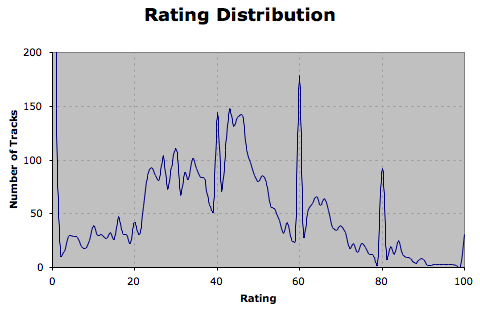
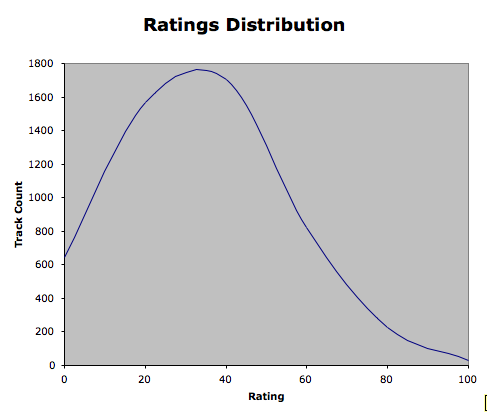
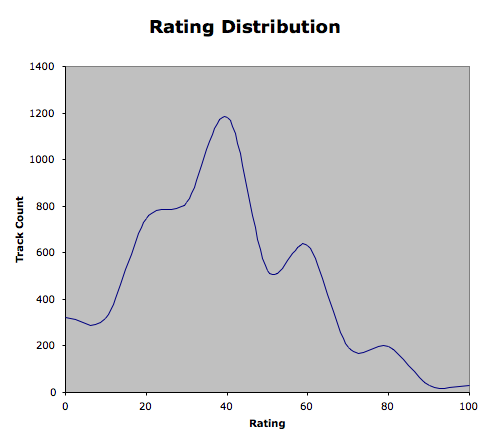
Plotting this data gives the following graph: Clearly, there are a couple of spikes, most likely from having rated tracks initially on a normal iTunes scale (0-5 stars). I’ve changed the plot scale so you don’t see the zero-rated tracks, as they skew the data totally, and most of them are in fact unrated, rather than zero rated. If I scale my ratings down to full stars (and discard all of the unrated tracks), then my data looks more like: Which is what I expected. And shows that I am probably pretty harsh on my music library - or I dislike most music a bit. • The final plot shows when rating as half-stars, that is, rounding down to the nearest 10, and discarding unrated tracks.
Metakit for Python

Metakit for Python Apparently, this is the system that Address Book is made on. It would be nice to be able to hook straight into the Address Book database via this, but I’d still need a GUI for adding/editing the Player data.

(kind of) Fix for XMLRPC bug.

I’ve been playing around with the version of the WP-mu source that’s used on Blogsome’s servers, trying to find the exact point where the bug is that escapes apostrophes and quotes.

Basically, the XMLRPC client contacts the server, and sends the data in. According to the console, the content of the post is actually in a field called description.

Searching through the XMLRPC file I find only five references to the word description. Two of these are in functions to do with posting. Both are basically the same, one is for blogger, the other metaweblog type connections:

1
    $post_content = apply_filters('content_save_pre', $content_struct['description']);

Now, a bit of research showed up that apply_filters is a function that allows plugins and their ilk to access the data before it gets saved to the database. Now, I’m fairly sure it is not a plugin doing this.

I also discovered that it is likely that the update to XMLRPC.php that happened was accompanied by a change to another file, that calls stripslashes(), another WP function. The XMLRPC update was, after all, a fix that removed the ability for XMLRPC calls to run unescaped code. So it makes sense that it escapes stuff.

In the short term, I discovered ecto has the ability to automatically run a script as you post: in the New Post window, make sure Options are showing, and choose the Formatting tab. (Incidentally, if you are only using double-quotes, it seems the Smarten Quotes will help, but it may mess with code).

I use a script that is like this to fix everything up:

1
2
3
4
5
6
7
import sys
data = open(sys.argv[1]).read()

data = data.replace(“'”,“'”)
data = data.replace('“',”“”)

open(sys.argv[1],'w').write(data)

This on its own is not enough - I seemed to have to go into the HTML editing mode before it would work. I think ecto does its own conversion of certain HTML entities to real characters.

This post is a test post to see how it all goes with <pre> tags and the like.

Python Scripts inside AdiumScripts package

I’ve got some stuff to do that will be easier with python, so I’m wondering if it’s possible to package a python script up, and use it from within an AppleScript, without having to have it in the path. It may not be, since AppleScript’s

do shell script “pwd”

returns "/", indicating it is running at the root directory. Well, back to pipes and awk/sed. (Actually, I think I’d just used awk & sed inside the python script).

iTunes Library Checker 2.0

I’ve rewritten most of iTunes Library Checker to use some neater import code, it should also be a bit faster. Not quite complete yet, but close to the previous functionality.

 1
 2
 3
 4
 5
 6
 7
 8
 9
10
11
12
13
14
15
16
17
18
19
20
21
22
23
24
25
26
27
28
29
30
31
32
33
34
35
36
37
38
39
40
    #! /usr/bin/env python
    
    import Foundation
    import os
    import struct
    
    library =  os.path.expanduser('~/Music/iTunes/iTunes Music Library.xml')
    db = Foundation.NSDictionary.dictionaryWithContentsOfFile_(library)
    libpath = Foundation.NSURL.URLWithString_(db[u'Music Folder']).path()
    
    tracks = db[u'Tracks'].itervalues()
    
    findstr = "find '"+libpath+"' -type f -not -name .aacgained -not -name ._* -not -name .DS_Store | sort"
    treedata = os.popen(findstr).readlines()
    
    missing = []
    other = []
    missing_files = []
    other_files = []
    surplus = treedata[:]
    
    for track in tracks:
        location = Foundation.NSURL.URLWithString_(track[u'Location']).path()
        if not os.path.exists(location):
            missing.append(track)
            missing_files.append(str(location))
        else:
            try:
                surplus.remove(str(location)+'\n')
            except ValueError:
                other.append(track)
                other_files.append(str(location))
        
    missing_files.sort()
    other_files.sort()
    surplus.sort()
    
    open('surplus.txt','w').writelines(surplus)
    open('missing.txt','w').writelines(missing_files)
    open('other.txt','w').writelines(other_files)

Sub-Pages don't work in Blogsome

There you go. Visit http://schinckel.net/software/, and then visit http://schinckel.net/software/acronymmerpy/ No difference, even though there is a page in acronymmerpy/ I’ll put this in the blogsome forums when I get a chance.

acronymmer.py final (?)

Taking into account the comments on PhotoMatt’s acronymit page (where I shamelessly stole some ideas, including the list of words!), I’ve modified acronymmer.py so that it:

  1. Does not apply <acronym> tags to instances that have been acronymmed already.
  2. Does not apply tags to instances that are inside href or title strings.
  3. Does not save the file if no changes have been made.

Here it is, including my current acronym list. (I know some of these are Abbreviations, but ecto, and some browsers do not handle this tag). Also, this code needs to be re-pasted - I was trying to make it (XHTML) valid, and it’s broken now.

 1
 2
 3
 4
 5
 6
 7
 8
 9
10
11
12
13
14
15
16
17
18
19
20
21
22
23
24
25
26
27
28
29
30
31
32
33
34
35
36
37
38
39
40
41
42
43
44
45
46
47
48
49
50
51
52
53
54
55
56
57
58
59
60
61
62
63
64
65
66
67
68
69
70
71
72
73
74
75
76
77
78
79
80
81
82
83
84
85
86
87
    #! /usr/bin/env python
        
    'A script for ecto that adds abbr and acronym tags to the text'
        
    acronyms = {
    'WYSIWYG' : 'what you see is what you get',
    'XHTML' : 'eXtensible HyperText Markup Language',
    'IIRC' : 'if I remember correctly',
    'HDTV' : 'High Definition TeleVision',
    'LGPL' : 'GNU Lesser General Public License',
    'MSDN' : 'Microsoft Developer Network',
    'WCAG' : 'Web Content Accessibility Guidelines',
    'SOAP' : 'Simple Object Access Protocol',
    'OPML' : 'Outline Processor Markup Language',
    'MSIE' : 'Microsoft Internet Explorer',
    'FOAF' : 'Friend of a Friend vocabulary',
    'GFDL' : 'GNU Free Documentation License',
    'XSLT' : 'eXtensible Stylesheet Language Transformation',
    'HTML' : 'HyperText Markup Language',
    'IMAP' : 'Internet Message Access Protocol',
    'RAID' : 'Redundant Array of Independent Disks',
    'MPEG' : 'Motion Picture Experts Group',
    'JPEG' : 'Joint Photographic Experts Group',
    'CSTA' : 'Central Scorpions Touch Association',
    'CDDB' : 'Compact Disc DataBase (Gracenote)',
    'XBMC' : 'Xbox Media Centre',
    'VNC' : 'Virtual Network Computing',
    'URL' : 'Uniform Resource Locator',
    'W3C' : 'World Wide Web Consortium',
    'MSN' : 'Microsoft Network',
    'USB' : 'Universal Serial Bus',
    'P2P' : 'Peer To Peer',
    'PBS' : 'Public Broadcasting System',
    'RSS' : 'Really Simple Syndication',
    'SIG' : 'Special Interest Group',
    'RDF' : 'Resource Description Framework',
    'AOL' : 'American Online',
    'PHP' : 'PHP Hypertext Processor',
    'SSN' : 'Social Security Number',
    'JSP' : 'Java Server Pages',
    'DOM' : 'Document Object Model',
    'DTD' : 'Document Type Definition',
    'DVD' : 'Digital Versatile Disc',
    'DNS' : 'Domain Name System',
    'CSS' : 'Cascading Style Sheets',
    'CGI' : 'Common Gateway Interface',
    'CMS' : 'Content Management System',
    'FAQ' : 'Frequently Asked Questions',
    'FSF' : 'Free Software Foundation',
    'API' : 'Application Interface',
    'PDF' : 'Portable Document Format',
    'IIS' : 'Internet Infomation Server',
    'XML' : 'eXtensible Markup Language',
    'XSL' : 'eXtensible Stylesheet Language',
    'GPL' : 'GNU General Public License',
    'KDE' : 'K Desktop Environment',
    'STB' : 'Set Top Box',
    'MP3' : 'Mpeg Layer 3',
    'PVR' : 'Personal (Digital) Video Recorder',
    'GUI' : 'Graphical User Interface',
    'CLI' : 'Command Line Interface',
    'AAC' : 'Advanced Audio Coding',
    'IE' : 'Internet Explorer',
    'CD' : 'Compact Disk',
    'GB' : 'Gigabyte',
    'MB' : 'Megabyte',
    'KB' : 'Kilobyte',
    'TV' : 'TeleVision',
    'PC' : 'Personal Computer',
    'NSLU2':'[Linksys] Network Storage Link (USB) 2.0'
    }
    
    
    import sys, re
    data = open(sys.argv[1]).read()
    olddata = data
    
    # replace only the first instance of each acronym/abbreviation
    for each in acronyms:
        d = re.search(r'(?!<.*(title|href)='*>)?\b%s\b(?!(.*'>|</acronym>))' % each, data)
        if d:
            data = data[:d.start()] + '<acronym title='' + \
                   acronyms[each] + '>' + \
                   each + '</acronym>' + data[d.end():]
        
    if data <> olddata:
        open(sys.argv[1],'w').write(data)

Updated: acronymmer.py for ecto

I’ve improved acronymmer.py, my script for adding acronym tags to posts in ecto. It will work with any file, however, that is passed as an argument to the script. There is one issue with ecto, and that is that abbr tags are not recognised by the Rich Text parser, so I’ve just set it to convert tags to acronym only for the time being. (Note to Adriaan: You should fix this!) Don’t run this script over the same text twice: it will re-tag them, resulting in messy (but still legal) code. Also, this needs a little fixing: the dictionary of items needs to return keys in size order, rather than just randomly.

 1
 2
 3
 4
 5
 6
 7
 8
 9
10
11
12
13
14
15
16
17
18
19
20
21
22
23
24
25
    #! /usr/bin/env python
        
    'A script for ecto that adds abbr and acronym tags to the text'
    
    import sys, re
        
    acronyms={'WYSIWYG':'What You See Is What You Get', 
              'DOM':'Document Object Model',
              'XHTML':'eXtensible HyperText Markup Language',
              'NSLU2':'[Linksys] Network Storage Link (USB) 2.0'
             }
        
    # get input data - depends on implementation.  For ecto:
    data = open(sys.argv[1]).read()
        
    # replace only the first instance of each acronym/abbreviation
    for each in acronyms:
        d = re.search(r'\b%s\b' % each, data)
        if d:
            data = data[:d.start()] + '&lt;acronym title="' + \
                   acronyms[each] + '"&gt;' + \
                   each + '&lt;/acronym&gt;' + data[d.end():]
        
    #return data to ecto
    open(sys.argv[1],'w').write(data)