Automatically expire rows in Postgres

Here’s a fun idea: how to make a database table where the data is kept only for a certain period of time?

One solution could be to have a column updated_at, which is set to the current timestamp each time a row is updated. Then you need a scheduled task that periodically clears out rows older than the threshold.

We can do this in a single trigger function:

CREATE OR REPLACE FUNCTION keep_for() RETURNS TRIGGER AS $$
  DECLARE
    primary_key_name TEXT = (
        SELECT attname
        FROM pg_index
        JOIN pg_attribute ON
            attrelid = indrelid
            AND attnum = ANY(indkey)
        WHERE indrelid = TG_RELID AND indisprimary
    );
    primary_key_value TEXT;
  BEGIN
    IF TG_WHEN <> 'BEFORE' THEN
      RAISE EXCEPTION 'keep_for() may only run as a BEFORE trigger';
    END IF ;

    IF TG_ARGV[0]::INTERVAL IS NULL THEN
      RAISE EXCEPTION 'keep_for() must be installed with an INTERVAL to keep data for';
    END IF;

    NEW.updated_at = now();

    IF TG_OP = 'INSERT' THEN
      EXECUTE 'DELETE FROM ' || quote_ident(TG_TABLE_NAME) || ' WHERE updated_at < now() - INTERVAL ' || quote_literal(TG_ARGV[0]::TEXT) || ';';
    ELSIF TG_OP = 'UPDATE' THEN

      EXECUTE 'DELETE FROM ' || quote_ident(TG_TABLE_NAME)
                             || ' WHERE updated_at < now() - INTERVAL ' || quote_literal(TG_ARGV[0]::TEXT)
                             || ' AND ' || quote_ident(primary_key_name) || ' <> ' || quote_literal(row_to_json(NEW) ->> primary_key_name) || ';';
    END IF;

    RETURN NEW;
  END;
$$ LANGUAGE plpgsql;

Now, we can install this on a table (that has a single primary key column):

CREATE TRIGGER keep_for_one_week
BEFORE UPDATE OR INSERT ON <target_table>
FOR EACH ROW
EXECUTE PROCEDURE keep_for('1 week');

This only works on tables that are updated somewhat regularly, and that are not too big. You’ll also want an index on that updated_by column.

This was a thought experiment (which I did implement), until my co-worker pointed out that there was no reason to actually store this data in the database to begin with, since we already use Redis we can just set the TTL on the key when we set it, and it will automatically expire without us having to do extra work.

Locking rows in PostgreSQL

Someone asked a question today in #postgresql about locking rows for a long running task, where multiple tasks could be updating rows. There is a flag in each row that indicates whether a row has been processed, but not one indicating if it is currently being processed.

One solution is to use advisory locks to mark that we are currently working on a given row. The advantage of this over having a column that indicates it is currently being processed (or mis-using the “processed” column by setting it before we’ve finished building the data) is that if our task that generates the data fails, the lock is released when the session is closed.

So, let’s look at the things we need to make this happen. We’ll start with something that represents our long-running process:

CREATE OR REPLACE FUNCTION expensive_operation(INTEGER)
RETURNS JSONB AS $$
​
  BEGIN
    PERFORM pg_sleep(10);
    RETURN JSONB_BUILD_OBJECT(
        'foo', 'bar',
        'baz', $1
    );
  END;
​
$$ LANGUAGE plpgsql;

And we need our table to put the tasks in (and some unprocessed rows):

CREATE TABLE tasks (
    id SERIAL PRIMARY KEY,
    processed BOOLEAN DEFAULT FALSE,
    data JSONB
);
​
INSERT INTO tasks (data) VALUES (NULL), (NULL), (NULL);

Finally, we are ready to process our tasks.

WITH next_task AS (
  SELECT t.id, pg_advisory_lock(t.id)
    FROM (
      SELECT id
        FROM tasks
       WHERE NOT processed
         AND id NOT IN (SELECT objid
                          FROM pg_locks
                         WHERE locktype = 'advisory')
       LIMIT 1
    ) t
)
UPDATE tasks
   SET data = expensive_operation(id),
       processed = true
 WHERE id IN (SELECT id FROM next_task)
   AND NOT processed;

The CTE will get a task.id that has not been processed (and is not currently being processed). It will take an advisory lock on that value, which marks the task as in-progress.

Then, when it has the lock, it performs the expensive operation and updates the data (and the processed status).

I’m not totally sure if the AND NOT processed at the bottom of the query is necessary - it seems to me that there could be a situation where two workers try to get the lock at the same time (and therefore are both asking for the same lock), and one of them gets it. The other one, when it finally gets the lock, would now see that row as processed, and so would not update anything.

I’m happy to see a better way to do this.

Preventing Model Overwrites in Django and Postgres

I had an idea tonight while helping someone in #django. It revolved around using a postgres trigger to prevent overwrites with stale data.

Consider the following model:

class Person(models.Model):
    first_name = models.TextField()
    last_name = models.TextField()

If we had two users attempting to update a given instance at around the same time, Django would fetch whatever it had in the database when they did the GET request to fetch the form, and display that to them. It would also use whatever they sent back to save the object. In that case, the last update wins. Sometimes, this is what is required, but it does mean that one user’s changes would be completely overwritten, even if they had only changed something that the subsequent user did not change.

There are a couple of solutions to this problem. One is to use something like django-model-utils FieldTracker to record which fields have been changed, and only write those back using instance.save(update_fields=...). If you are using a django Form (and you probably should be), then you can also inspect form.changed_data to see what fields have changed.

However, that may not always be the best behaviour. Another solution would be to refuse to save something that had changed since they initially fetched the object, and instead show them the changes, allow them to update to whatever it should be now, and then resubmit. After which time, someone else may have made changes, but then the process repeats.

But how can we know that the object has changed?

One solution could be to use a trigger (and an extra column).

class Person(models.Model):
    first_name = models.TextField()
    last_name = models.TextField()
    _last_state = models.UUIDField()

And in our database trigger:

CREATE EXTENSION "uuid-ossp";

CREATE OR REPLACE FUNCTION prevent_clobbering()
RETURNS TRIGGER AS $prevent_clobbering$

BEGIN
  IF NEW._last_state != OLD._last_state THEN
    RAISE EXCEPTION 'Object was changed';
  END IF;
  NEW._last_state = uuid_generate_v4();
  RETURN NEW;
END;

$prevent_clobbering$
LANGUAGE plpgsql STRICT IMMUTABLE;

CREATE TRIGGER prevent_clobbering
BEFORE UPDATE ON person_person
FOR EACH ROW EXECUTE PROCEDURE prevent_clobbering();

You’d also want to have some level of handling in Django to capture the exception, and re-display the form. You can’t use the form/model validation handling for this, as it needs to happen during the save.

To make this work would also require the _last_state column to have a DEFAULT uuid_generate_v4(), so that newly created rows would get a value.


This is only a prototype at this stage, but does work as a mechanism for preventing overwrites. As usual, there’s probably more work in the application server, and indeed in the UI that would need to be required for displaying stale/updated values.

What this does have going for it is that it’s happening at the database level. There is no way that an update could happen (unless the request coming in happened to guess what the new UUID was going to be).

What about drawbacks? Well, there is a bit more storage in the UUID, and we need to regenerate a new one each time we save a row. We could have something that checks the other rows looking for changes.

Perhaps we could even have the hash of the previous row’s value stored in this field - that way it would not matter that there had been N changes, what matters is the value the user saw before they entered their changes.

Another drawback is that it’s hard-coded to a specific column. We could rewrite the function to allow defining the column when we create the trigger:

CREATE TRIGGER prevent_clobbering
BEFORE UPDATE ON person_person
FOR EACH ROW EXECUTE PROCEDURE prevent_clobbering('_last_state_');

But that requires a bit more work in the function itself:

CREATE OR REPLACE FUNCTION prevent_clobbering()
RETURNS TRIGGER AS $prevent_clobbering$

BEGIN
  IF to_jsonb(NEW)->TG_ARGV[0] != to_jsonb(OLD)->TG_ARGV[0] THEN
    RAISE EXCEPTION 'Object was changed';
  END IF;
  NEW._last_state = uuid_generate_v4();
  RETURN NEW;
END;

$prevent_clobbering$
LANGUAGE plpgsql STRICT IMMUTABLE;

Modelling a residential battery in Postgres

Having five-minute interval generation and consumption data from my PV system means that, in theory at least, I should be able to do some predictive modelling of what adding a battery to the system will do to my import and export levels, and more importantly, determine how much money having a battery of a specific capacity and efficiency would save me.

There are several approaches that could be used to model a battery. They all boil down to the same main idea:

  • The battery has a fixed capacity
  • The battery has a current level
  • If generating more power than consuming, this excess could be fed into the battery (assuming the battery is not full)
  • If the battery is full, any excess generation is exported
  • If we are consuming more power than generating, and we have battery level > 0, then we draw power from the battery
  • Any power we are drawing from the battery is divided by the round-trip efficiency of the battery
  • Any excess consumption that cannot be supplied by the battery results in imports

There are some assumptions that this model makes.

  • There is no current (as in Amperes, not “now”) limit to either exporting or importing
  • If we are both importing and exporting, the battery can handle both of these. In practice, most batteries take some time to switch between charging and discharging
  • The usable capacity is the same as the battery capacity

In all of these cases, the limitations we are not addressing would more than likely result in a poorer outcome than the model will predict.

So, on to the technical details of creating the model. In the first instance, I tried using a recursive view (using in this case the 13.5kWh/90% efficient Tesla Powerwall):

CREATE OR REPLACE RECURSIVE VIEW battery_status(
  timestamp,
  capacity,
  efficiency,
  level,
  import,
  export
) AS

SELECT '2019-03-07'::TIMESTAMP,
       13500 AS capacity,
       0.90 AS efficiency,
       0::NUMERIC AS level,
       0::NUMERIC AS import,
       0::NUMERIC AS export

 UNION ALL

SELECT battery.timestamp + INTERVAL '5 minutes',
       battery.capacity,
       battery.efficiency,
       GREATEST(
         0,
         battery.level + delta.amount_to_battery - delta.amount_from_battery
       )::NUMERIC(12, 3) AS level,
       (summary.import - delta.amount_from_battery)::NUMERIC(8, 3) AS import,
       (summary.export - delta.amount_to_battery)::NUMERIC(8, 3) AS export
  FROM battery_status battery
  LEFT OUTER JOIN summary ON (summary.timestamp = battery.timestamp + INTERVAL '5 minutes')
 INNER JOIN LATERAL (
   SELECT LEAST(summary.import, battery.level / battery.efficiency) AS amount_from_battery,
          LEAST(summary.export, battery.capacity - battery.level) AS amount_to_battery
 ) delta ON (true)

Whilst this sort-of worked, it was unsatisfactory in a couple of ways. Firstly, it took ages to run. Way longer than I expected, even when I used materialised views, and changed the interval to hourly instead of 5 minutely.

Additionally, because I have some gaps in my data (for instance, when my power was disconnected, or the inverter was off because I was cleaning the panels, or whatever), the view stopped recursing at this point, so I was never actually able to get a result that went for more than a couple of months. Even generating missing values seemed to be insufficient, so at some point I gave up on this.

I even tried the same approach on a daily summary - this was never going to give me anything close to an accurate result, but at that point I was stretching thin, so tried a bunch of things.

It seemed unusual that it was taking a long as it did (dozens of seconds, and that was only to build a few months of data). It should only need to pass over the summary data once, and store…that gave me an idea. I could write a fairly simple python generator function to perform the modeling.

def battery_status(capacity, efficiency):
    result = plpy.execute('SELECT * FROM summary')
    energy = 0

    for row in result:
        export_amount = row['export']
        if export_amount and energy < capacity:
            energy += export_amount
            if energy > capacity:
                export_amount = energy - capacity
                energy = capacity
            else:
                export_amount = 0
        import_amount = row['import']
        if import_amount and energy > 0:
            energy -= import_amount / efficiency
            if energy < 0:
                import_amount = -energy * efficiency
                energy = 0
            else:
                import_amount = 0
        yield (row['timestamp'], energy, import_amount, export_amount)

Following it through, we can see some benefits to this approach. We don’t need to pass the capacity and efficiency (or the current energy level in the battery) through to each iteration: because this is a generator, the state remains in the function, and those variables are just re-used over and over again.

The only thing that might be unusual there is the plpy.execute('SELECT * FROM summary'): this hints that this code is actually going inside a plpythonu function and living inside the database. We can use a composite type to make the return values easier to deal with:

CREATE TYPE battery_status AS (
    timestamp TIMESTAMP,
    stored NUMERIC,
    import NUMERIC,
    export NUMERIC
);

CREATE FUNCTION battery_status(capacity NUMERIC, efficiency NUMERIC)
RETURNS SETOF battery_status AS $$

result = plpy.execute('SELECT * FROM summary')
energy = 0

for row in result:
    export_amount = row['export']
    if export_amount and energy < capacity:
        energy += export_amount
        if energy > capacity:
            export_amount = energy - capacity
            energy = capacity
        else:
            export_amount = 0
    import_amount = row['import']
    if import_amount and energy > 0:
        energy -= import_amount / efficiency
        if energy < 0:
            import_amount = -energy * efficiency
            energy = 0
        else:
            import_amount = 0
    yield (row['timestamp'], energy, import_amount, export_amount)

$$ LANGUAGE plpythonu STRICT IMMUTABLE;

Again, I’ll reiterate that in this context, we apply both charging and discharging in the same period (which could happen), but assumes that there is zero turnaround time required between charge and discharge, and that there is no limit to the charge and discharge rate. We could probably improve the model to take those two into account fairly easily though.

To revisit what the other data stores look like, let’s have a look at my summary view:

CREATE OR REPLACE VIEW summary AS

SELECT "timestamp",
       COALESCE(generation.energy, 0::double precision) AS generation,
       COALESCE(import.energy, 0) AS import,
       COALESCE(export.energy, 0) AS export,
       import.energy::double precision
           + generation.energy
           - export.energy::double precision AS consumption
  FROM generation
  JOIN import USING ("timestamp")
  JOIN export USING ("timestamp")

My generation table just contains the generation for each interval: the import and export are both views that use the cumulative import/export totals and calculate the value by subtracting the previous row:

CREATE OR REPLACE VIEW import AS

SELECT import_cumulative."timestamp",
       import_cumulative.energy
           - lag(import_cumulative.energy, 1) OVER (ORDER BY import_cumulative."timestamp")
           AS energy
  FROM import_cumulative
 ORDER BY import_cumulative."timestamp";

We can create a materialised view of the battery status per-day, since that’s all we will need for the purposes of cost calculations:

CREATE MATERIALIZED VIEW daily_summary_battery AS

SELECT battery_status."timestamp"::date AS "timestamp",
       sum(battery_status.import) AS import,
       sum(battery_status.export) AS export
  FROM battery_status(13500::numeric, 0.9)
       battery_status("timestamp", stored, import, export)
 GROUP BY (battery_status."timestamp"::date)
 ORDER BY (battery_status."timestamp"::date);

So, lets have a look at what results we get.

Refreshing the materialised view takes me around 9 seconds (this is quite stable), and I currently have about 106000 records (370 days of data, 288 records per day if we got them all). This is nice: it’s not immediate, but not going to be a deal-breaker if I need to run a bunch of different models of different battery capacity or efficiencies.

I can use the same cost functions from my actual cost calculator to look at what this battery model will do to my costs:

CREATE VIEW daily_battery_cost AS
SELECT daily_summary_battery."timestamp" AS date,
       daily_summary_battery.import,
       daily_summary_battery.export,
       cost(retailer.*,
            daily_summary_battery.import::integer,
            daily_summary_battery.export::integer) AS cost,
       billing_periods.period
  FROM daily_summary_battery
  JOIN billing_periods ON daily_summary_battery."timestamp" <@ billing_periods.period
  JOIN retailer ON retailer.name = billing_periods.retailer
 ORDER BY daily_summary_battery."timestamp";

And for comparisons in my billing periods:

CREATE VIEW billing_period_battery_costs AS
SELECT daily_battery_cost.period,
       sum(daily_battery_cost.cost) AS cost
  FROM daily_battery_cost
 GROUP BY daily_battery_cost.period
 ORDER BY daily_battery_cost.period;

CREATE VIEW billing_period_battery_savings AS
SELECT costs.period,
       costs.cost - battery.cost AS savings
  FROM billing_period_costs costs
  JOIN billing_period_battery_costs battery USING (period)
 ORDER BY costs.period;
solar=# SELECT * FROM billing_period_battery_savings ;
         period          |            savings
-------------------------+-------------------------------
 [2019-03-07,2019-06-01) | 101.6372820000000000000000000
 [2019-06-01,2019-06-24) |      15.592432500000000000000
 [2019-06-24,2019-07-24) |  20.4731725000000000000000000
 [2019-07-24,2019-08-24) |      17.898683500000000000000
 [2019-08-24,2019-09-24) |  18.5995855000000000000000000
 [2019-09-24,2019-10-24) |  35.1526490000000000000000000
 [2019-10-24,2019-11-24) |  38.4160700000000000000000000
 [2019-11-24,2019-12-24) |  37.7519350000000000000000000
 [2019-12-24,2020-01-24) |  39.2153900000000000000000000
 [2020-01-24,2020-02-24) |  39.5369135000000000000000000
 [2020-02-24,2020-03-24) |  21.2207440000000000000000000
(11 rows)

And for a per-day saving: it works out to around $1.05 per day.

Which is ~$380 per year.

A Tesla Powerwall 2 battery would cost me (excluding installation, but including the SA battery rebate), in excess of $5000. That’s still almost a 15 year payback time.


What’s quite amusing is that I distinctly remember calculating what I thought a battery would save me shortly after getting my PV system installed. I have such a strong recollection of it that I can remember exactly where I was: I was out running at lunch time, and was partway up the hill at the back of Flinders Uni.

And my in-head calculations were that it would save me $1 per day.


I’m actually more interested in a DC coupled battery system, partly because of the reduction in round-trip efficiency losses, but more so because I should be able to stick more panels in that would just feed the battery. I’m especially interested in the Fronius Gen24 inverters and a compatible battery, however there aren’t clear details on what that would cost. The benefit of this is that in SA there is currently a 10kW inverter limit; this includes the inverter in an AC coupled battery like the Tesla Powerwall.

These are likely to come midway through this year. I’ll be interested to see the pricing.

I think I’ll need to do a bit more on my calculations to be able to model this: my panel_factor calculations have a 5kW limit - this goes away, and instead the limit applies after taking the battery charging into account. But this can wait for another day.

QuerySets of various models

In general, the first thing we try to do to reduce the load time of a page in Django is to reduce the number of queries we are making to the database. This often has the greatest impact, sometimes orders of magnitude greater than other improvements.

One problem I recently hit with a specific set of pages was that there are potentially seven different models that may have zero or more items for a given request. This could mean we do seven queries that are all empty.

These are for all distinct models, but in this case, they are used for the same purpose, and this case, we always need all of them, if there are any relevant records. Whilst there are seven models, there may be more in the future.

Each of these models has a specific method, that validates some data against the rules that are applicable to that model, and the stored attributes. But each model has a different set of attributes, and future models will more than likely have different attributes.

There are at least three different ways we could have solved this problem. It turns out we have solved similar problems in the past the first two ways, and the third one is the one I’ve used in this case.


Solution 1: Store all data in the same model, and use a JSON field to store the attributes specific to this “class”.

This also requires a “type” field of some sort. Then, when loading data, we have the model use this type field to work out which attributes should apply.

This has a bunch of problems. First and foremost is that it becomes far more difficult to get the database (postgres, in this case) to apply integrity constraints. It’s not impossible, but it is much harder to read a constraint that checks a field and performs a JSON expression constraint. Changing a constraint, assuming it’s done using a check constraint and not a trigger, is still possible, but is likely to be harder to understand.

Secondly, it no longer becomes “automatic” to get Django Model Form support. It’s not impossible to use a Django Model Form, but you need to work a bit harder to get the initial data in, and ensure that the cleaned data for the fields is applied to the JSON field correctly.

Finally, as hinted above, using a “type” field means the logic for building the checks is more complex, unless you use class swizzling and proxy models or similar to have a different class for each type value. If an instance was accidentally updated to the wrong type, then all sorts of things could go wrong.

This was the first solution we used for our external integrations, and whilst convenient at some level, turned out to be much harder to manage than distinct model classes. It is not subject to the problem that is the basis of this article: we can always fetch objects of different logical types, as it’s all the same model class. Indeed, to only fetch a single class, we need to perform extra filtering.


Solution 2: Use concrete/multi-table inheritance.

This is the solution we moved to with our external integrations, and has been much nicer than the previous solution. Instead of having a JSON field with an arbitrary blob of data in it, we have distinct fields. This makes it much easier to have unique constraints, as well as requiring values, or values of a specific type. Knowing that the database is going to catch us accidentally putting a text value into the external id field for a system that requires an integer is reassuring.

This overcomes the second problem. We can now just use a Django ModelForm, and this makes writing views much easier. The validation for a given field or set of fields lives on the model, and where possible also in the database, as an exclusion or check constraint.

It also overcomes the third problem. We have distinct classes, which can have their own methods. We don’t need to try to use some magical proxy model code, and it’s easy for new developers to follow.

Finally, thanks to django-model-utils InheritanceManager, we can fetch all of our objects using the concrete parent model, and the .select_subclasses() method to downcast to our required class.

There are a couple of drawbacks to using concrete inheritance. Any fetch of an instance will perform a JOIN in your database, but more importantly, it’s impossible to perform a bulk_create() for models of these types.


Solution 3: Use a Postgres VIEW and JSONB to perform one query, and reconstruct models.

In the problem I’ve recently solved, we had a bunch of different models that, although being used in similar ways, didn’t have that much similarity. They were pre-existing, and it wasn’t worth the effort to move them to concrete inheritance, and using JSON fields for all data is not something I would repeat.

Instead, I came up with an idea that seems novel, based on some previous work I’ve done converting JSON data into models:

CREATE VIEW combined_objects AS

SELECT 'foo.Foo' AS model,
       foo.id,
       foo.tenant_id,
       TO_JSONB(foo) AS data
  FROM foo

 UNION ALL

SELECT 'foo.Bar' AS model,
       bar.id,
       baz.tenant_id,
       TO_JSONB(bar) AS data
  FROM bar
 INNER JOIN baz ON (baz.id = bar.baz_id)

 UNION ALL

SELECT 'qux.Qux' AS model,
       qux.id,
       tenant.id,
       TO_JSONB(qux) AS data
  FROM tenant
  JOIN qux ON (true)

This builds up a postgres view that contains all of the data from the model, but in a generic way. It also contains a tenant_id, which in this case was the mechanism that we’ll be using to filter the ones that are required at any given time. This can be a field on a model (as shown in the first subquery), or a field on a related model (as shown in the second). It could even be every object in a table for every tenant, as shown in the third.

From there, we need a model that will recreate the model instances correctly:

class CombinedObjectQuerySet(models.query.QuerySet):
    def for_tenant(self, tenant):
        return self.filter(tenant=tenant)

    def as_model_instances(self):
        return [x.instance for x in self]


class CombinedObject(models.Model):
    model = models.TextField()
    tenant = models.ForeignKey('tenant.Tenant')
    data = JSONField()

    objects = CombinedObjectQuerySet.as_manager()

    class Meta:
        managed = False
        db_table = 'combined_objects'

    def __str__(self):
        return '%s wrapper (%s)'.format(self.model, self.instance)

    def __eq__(self, other):
        return self.instance == other.instance

    @property
    def model_class(self):
        return apps.get_model(*self.model.split('.'))

    @cached_property
    def instance(self):
        return self.model_class(**self.data)

This works great, as long as you don’t apply additional annotations, typecast to python values, or want to deal with related objects. That is where it starts to get a bit tricky.

We can handle annotations and typecasting:

@cached_property
def instance(self):
    data = self.data
    model_class = self.model_class
    field_data = {
        field.name: field.to_python(data[field.name])
        for field in model_class
        if field.name in data
    }
    instance = model_class(**field_data)
    for attr, value in data.items():
        if attr not in field_data:
            setattr(instance, attr, value)
    return instance

There’s still the issue of foreign keys in the target models: in this case I know the code is not going to traverse these and trigger extra database hits. We could look at omitting those fields to prevent that being possible, but this is working well enough for now.

Postgres VIEW from Django QuerySet

It’s already possible, given an existing Postgres (or other database) VIEW, to stick a Django Model in front of it, and have it fetch data from that instead of a table.

Creating the views can currently be done using raw SQL (and a RunSQL migration operation), or using some helpers to store the SQL in files for easy versioning.

It would be excellent if it was possible to use Django’s ORM to actually generate the VIEW, and even better if you could make the migration autodetector generate migrations.

But why would this be necessary? Surely, if you were able to create a QuerySet instance that contains the items in your view, that should be good enough?

Not quite, because currently using the ORM it is not possible to perform the following type of query:

SELECT foo.a,
       foo.b,
       bar.d
  FROM foo
  INNER JOIN (
    SELECT baz.a,
           ARRAY_AGG(baz.c) AS d
      FROM baz
     GROUP BY baz.a) bar ON (foo.a = bar.a)

That is, generating a join to a subquery is not possible in the ORM. In this case, you could probably get away with a correlated Subquery, however that would probably not perform as well as using a join in this case. This is because a subquery in a SELECT is evaluated once for each row, whereas a subquery join will be evaluated once.

So, we could use a VIEW for the subquery component:

CREATE OR REPLACE VIEW bar AS

SELECT baz.a,
       ARRAY_AGG(baz.c) AS d
  FROM baz
 GROUP BY baz.a;

And then stick a model in front of that, and join accordingly:

SELECT foo.a,
       foo.b,
       bar.d
  FROM foo
 INNER JOIN bar ON (foo.a = bar.a)

The Django model for the view would look something like:

class Bar(models.Model):
    a = models.OneToOneField(
        'foo.Foo',
        on_delete=models.DO_NOTHING,
        primary_key=True,
        related_name='bar'
    )
    d = django.contrib.postgres.fields.ArrayField(
        base_field=models.TextField()
    )

    class Meta:
        managed = False

The on_delete=models.DO_NOTHING is important: without it, a delete of a Foo instance would trigger an attempted delete of a Bar instance - which would cause a database error, because it’s coming from a VIEW instead of a TABLE.

Then, we’d be able to use:

queryset = Foo.objects.select_related('bar')

So, that’s the logic behind needing to be able to do a subquery, and it becomes even more compelling if you need that subquery/view to filter the objects, or perform some other expression/operation. So, how can we make Django emit code that will enable us to handle that?

There are two problems:

  • Turn a queryset into a VIEW.
  • Get the migration autodetector to trigger VIEW creation.

The other day I came across Create Table As Select in Django, and it made me realise that we can use basically the same logic for creating a view. So, we can create a migration operation that will perform this for us:

class CreateOrReplaceView(Operation):
    def __init__(self, view_name, queryset):
        self.view_name = view_name
        self.queryset = queryset

    def database_forwards(self, app_label, schema_editor, from_state, to_state):
        queryset = self.queryset
        compiler = queryset.query.get_compiler(using=schema_editor.connection.alias)
        sql, params = compiler.as_sql()
        sql = 'CREATE OR REPLACE VIEW {view} AS {sql}'.format(
            view=schema_editor.connection.ops.quote_name(self.view_name),
            sql=sql
        )
        schema_editor.execute(sql, params)

    def state_forwards(self, app_label, state):
        pass

We can then have this operation (which needs to be passed a queryset).

This doesn’t really solve how to define the queryset for the view, and have some mechanism for resolving changes made to that queryset (so we can generate a new migration if necessary). It also means we have a queryset written in our migration operation. We won’t be able to leave it like that: due to loading issues, you won’t be able to import model classes during the migration setup - and even if you could, you shouldn’t be accessing them during a migration anyway - you should use models from the ProjectState which is tied to where in the migration graph you currently are.

What would be excellent is if we could write something like:

class Bar(models.Model):
    a = models.OneToOneField(
        'foo.Foo',
        on_delete=models.DO_NOTHING,
        primary_key=True,
        related_name='bar',
    )
    d = django.contrib.postgres.fields.ArrayField(
        base_field=models.TextField()
    )

    class Meta:
        managed = False

    @property
    def view_queryset(self):
        return Baz.objects.values('a').annotate(d=ArrayAgg('c'))

And then, if we change our view definition:

@property
def view_queryset(self):
  return Baz.objects.values('a').filter(
      c__startswith='qux',
  ).annotate(
      d=ArrayAgg('c')
  )

… we would want a migration operation generated that includes the new queryset, or at least be able to know that it has changed. Ideally, we’d want to have a queryset attribute inside the Meta class in our model, which could itself be a property. However, that’s not possible without making changes to django itself.

In the meantime, we can borrow the pattern used by RunPython to have a callable that is passed some parameters during application of the migration, which returns the queryset. We can then have a migration file that looks somewhat like:

def view_queryset(apps, schema_editor):
    Baz = apps.get_model('foo', 'Baz')

    return Baz.objects.values('a').filter(
        c__startswith='qux'
    ).annotate(
        d=ArrayAgg('c')
    )


class Migration(migrations.Migration):
    dependencies = [
        ('foo', '0001_initial'),
    ]

    operations = [
        migrations.CreateModel(
            name='Bar',
            fields=[
                ('a', models.OneToOneField(...)),
                ('d', ArrayField(base_field=models.TextField(), ...)),
            ],
            options={
                'managed': False,
            }
        ),
        CreateOrReplaceView('Bar', view_queryset),
    ]

We still need to have the CreateModel statement so Django knows about our model, but the important bit in this file is the CreateOrReplaceView, which references the callable.

Now for the actual migration operation.

class CreateOrReplaceView(migrations.Operation):
    def __init__(self, model, queryset_factory):
        self.model = model
        self.queryset_factory = queryset_factory

    def database_forwards(self, app_label, schema_editor, from_state, to_state):
        model = from_state.apps.get_model(app_label, self.model)
        queryset = self.queryset_factory(from_state.apps, schema_editor)
        compiler = queryset.query.get_compiler(using=schema_editor.connection.alias)
        sql, params = compiler.as_sql()
        sql = 'CREATE OR REPLACE VIEW {view_name} AS {query}'.format(
            view_name=model._meta.db_table,
            query=sql,
        )
        schema_editor.execute(sql, params)

The backwards migration is not quite a solved problem yet: I do have a working solution that steps up the stack to determine what the current migration name is, and then finds the previous migration that contains one of these operations for this model, but that’s a bit nasty.


There’s no (clean) way to inject ourself into the migration autodetector and “notice” when we need to generate a new version of the view, however we can leverage the checks framework to notify the user when our view queryset is out of date compared to the latest migration.

from django.apps import apps
from django.core.checks import register

@register()
def check_view_definitions(app_configs, **kwargs):
    errors = []

    if app_configs is None:
        app_configs = apps.app_configs.values()

    for app_config in app_configs:
        errors.extend(_check_view_definitions(app_config))

    return errors

And then we need to implement _check_view_definitions:

def get_out_of_date_views(app_config):
    app_name = app_config.name

    view_models = [
        model
        # We need the real app_config, not the migration one.
        for model in apps.get_app_config(app_name.split('.')[-1]).get_models()
        if not model._meta.managed and hasattr(model, 'get_view_queryset')
    ]

    for model in view_models:
        latest = get_latest_queryset(model)
        current = model.get_view_queryset()

        if latest is None or current.query.sql_with_params() != latest.query.sql_with_params():
            yield MissingViewMigration(
                model,
                current,
                latest,
                Warning(W003.format(app_name=app_name, model_name=model._meta.model_name), id='sql_helpers.W003'),
            )


def _check_view_definitions(app_config):
    return [x.warning for x in get_out_of_date_views(app_config)]

The last puzzle piece there is get_latest_queryset, which is a bit more complicated:

def get_latest_queryset(model, before=None):
    from django.db.migrations.loader import MigrationLoader
    from django.db import connection

    migration_loader = MigrationLoader(None)
    migrations = dict(migration_loader.disk_migrations)
    migration_loader.build_graph()
    state = migration_loader.project_state()
    app_label = model._meta.app_label
    root_node = dict(migration_loader.graph.root_nodes())[app_label]
    # We want to skip any migrations in our reverse list until we have
    # hit a specific node: however, if that is not supplied, it means
    # we don't skip any.
    if not before:
        seen_before = True
    for node in migration_loader.graph.backwards_plan((app_label, root_node)):
        if node == before:
            seen_before = True
            continue
        if not seen_before:
            continue
        migration = migrations[node]
        for operation in migration.operations:
            if (
                isinstance(operation, CreateOrReplaceView) and
                operation.model.lower() == model._meta.model_name.lower()
            ):
                return operation.queryset_factory(state.apps, connection.schema_editor())

This also has code to allow us to pass in a node (before), which limits the search to migrations that occur before that node in the forwards migration plan.

Since we already have the bits in place, we could also have a management command that creates a stub migration (without the queryset factory, that’s a problem I haven’t yet solved). I’ve built this into my related “load SQL from files” app.


This is still a bit of a work in progress, but writing it down helped me clarify some concepts.

Do I Need More Panels?

Last time, I showed how it’s possible to do some analysis of different retailers and pricing, based on actual consumption and generation: or more specifically, actual feed-in and feed-out. But this is all stuff that is possible to do using a spreadsheet: indeed, until I finally got around to putting this into some nice SQL views, I was using a spreadsheet, and manually updating the values every day to keep it up to date. Whilst this was a fun thing to do every morning, it really was something I needed to automate. It is not necessary to have more than daily totals for the purposes of calculating costs: indeed all retailers use daily totals (or monthly averages) to determine the tariffs that need to apply.

But, if you want to examine your solar generation, and determine if you should have more (or fewer) panels, then you need more granular information.

In my specific case, I have panels that are covering around 1/5 of my roof space. My roof is almost flat, so I can fairly safely state that if I had twice as many panels (or 5 times as many panels), then I’d have generation that increases by that factor. I understand that this is not the case for many homes: anyone who has a highly raked roof, and especially someone who has to deal with an East-West split of panels is not going to be able to make the same assumptions.

However, even in the case of my flat roof, there’s complications. I only have single phase power, and SA Power Networks limits the export per-phase to 5kW. That’s the size of my inverter, so, if I was generating full power, and not using any, then it would appear at first glance to be not worth having any extra panels.

But there are two assumptions in that paragraph that almost never hold true. Firstly, there is almost always someone home at my house during the day, so we use a reasonable amount of energy. This is actually beneficial: we can have the dishwasher and washing machine (and sometimes even the oven) on during the day, and my Fronius Dashboard makes it easy to see if we are generating surplus. So this means we can make better use of the power we are generating, rather than running those appliances at night or when we are not generating enough energy.

The other one is about maximum generation. Whilst today when I looked, we were actually generating 5kW, for much of the year, we don’t get that close to that value at all, let alone for the full day. Especially during winter (when at times we do not even generate enough to supply our heating needs during the daylight hours). So, we could have more panels to generate more energy during winter, and also during summer, when we may find we run the Air Conditioner during the peak time.

However, with more than 5kW of generation, it is possible at times we would be generating more energy than we were using, and have a surplus of more than 5kW. This would mean we would only be able to export 5kW, and the rest would be wasted.

It would be interesting, though, to see what having twice as many panels did to our annual import/export amounts.

The process of calculating this requires us to know the generation and consumption values: for the purposes of these calculations, the import and export values are irrelevant: we will be calculating new values. It is possible to ask the inverter for generation values, and depending upon your local hardware, you can get the import and export values: from this we can calculate the consumption. Alternatively, you could get the import and export values from your retailer or supplier, and perform the same calculations based on your generation:

consumption = import + generation - export

Once we have that value for every interval, we can look at something that gives us “what if?” capacity.

CREATE OR REPLACE VIEW consumption AS
SELECT timestamp,
       import.energy + generation.energy - export.energy AS energy
  FROM generation
 INNER JOIN import USING (timestamp)
 INNER JOIN export USING (timestamp);

Since we do not care about shorter-than-daily intervals for the purposes of cost calculations, my function will return per-day values: specifically they will use the fact that postgres can define functions that return a set of values of a specific type; that type can even be the implicit type that is created for each table or view. I have a view called daily_summary, that looks like (including the summary view for reference):

CREATE OR REPLACE VIEW summary AS (
    SELECT timestamp,
           generation.energy AS generation,
           import.energy AS import,
           export.energy AS export,
           import.energy + generation.energy - export.energy AS consumption
      FROM generation
     INNER JOIN import USING (timestamp)
     INNER JOIN export USING (timestamp)
);

CREATE OR REPLACE VIEW daily_summary AS (
    SELECT timestamp::DATE AS date,
           SUM(generation) AS generation,
           SUM(import) AS import,
           SUM(export) AS export,
           SUM(consumption) AS consumption
      FROM summary
     GROUP BY timestamp::DATE
);

As such, I can write my function so it returns a set of daily_summary:

CREATE OR REPLACE FUNCTION panel_factor(FLOAT)
RETURNS SETOF daily_summary AS $$

WITH raw AS (
    SELECT timestamp,
           generation * $1 AS generation,
           consumption
      FROM summary
),
limited AS (
    SELECT timestamp::DATE AS date,
           generation,
           GREATEST(0, consumption - generation)::INTEGER AS import,
           CASE WHEN generation <= consumption THEN 0
                WHEN generation - consumption < 5000 / 12  THEN generation - consumption
                ELSE 5000 / 12 END::INTEGER AS export,
           consumption
      FROM raw
)
SELECT date, SUM(generation), SUM(import), SUM(export), SUM(consumption)
FROM limited
GROUP BY date
;

$$ LANGUAGE SQL;

This takes an argument that is a floating point value (I may want to increase my PV size by 50%, for instance), and multiplies the generation for each interval by this factor. It then works out what the import and export values would likely be for each interval. This is probably the least accurate part, because it’s possible that the initial data had both export and import during a given interval. However, I’ve ignored this, and just assumped that the generation and consumption for each interval are approximately stable.

Then we truncate our export to 5000 / 12, because my data is 5 minute intervals, so 5kW for an hour would be 5kWh, so 5kW for 5 minutes would be 5000 / 12 = 416.67kWh. This would necessarily change if you had different export limits, or a different time interval. Keep in mind that the larger the time interval, the less safe the assumption about consumption and generation stability across the period is.

From there, we add these values up for each day.

We can run this function and see what it does for our import/export amounts for some days. In my case, I can see that having 2x panels makes a fairly small difference during December, however having 2.5 times as many panels in June would mean I was exporting about as much as I would import: compared to last June when I imported almost 5x as much energy as I exported.

Interesting.

However, we can’t just look at import/export amounts: I only get paid 50% for a kWh I export compared to how much I import for, and then there are daily tariffs too. So, we want a function that compares costs: and to make it easier to look at, we will just use one that calculates costs over the whole period:

CREATE OR REPLACE FUNCTION compare(factor FLOAT)
RETURNS TABLE (name TEXT, cost INTEGER, difference INTEGER) AS $$

WITH old_costs AS (
    SELECT name,
           SUM(cost) AS cost
      FROM (
          SELECT retailer.name, cost(retailer, import::INTEGER, export::INTEGER)
            FROM daily_summary, retailer
      ) _
     GROUP BY name
), new_costs AS (
    SELECT name,
           SUM(cost) AS cost
      FROM (
          SELECT retailer.name, cost(retailer, import::INTEGER, export::INTEGER)
            FROM panel_factor(factor), retailer
      ) _
     GROUP BY name
)

SELECT name,
       new_costs.cost::INTEGER AS cost,
       (new_costs.cost - old_costs.cost)::INTEGER AS difference
  FROM old_costs INNER JOIN new_costs USING (name)


$$ LANGUAGE SQL STRICT;

And we can run this a few times with different values, to see what that does to our costs.

SELECT * FROM compare(2) ORDER BY cost;
name cost difference
AGL Essentials 210 -688
AGL Solar Savers 234 -763
Origin Energy 276 -695
AGL Residential Essentials 302 -615
Click Banksia Solar 303 -726
Lumo Basic 323 -643
SA Simply RAA VPP 334 -645
Power Direct Residential Saver 427 -554
Energy Australia Total Plan Home 437 -664
Powerband Home Flat + Solar FIT 447 -510
Red Energy Living Energy Saver 547 -547
PowerShop Shopper Market 650 -418
Kogan 702 -377
Alinta Energy No Fuss (Single Rate) 714 -466
Origin Energy Econnex 728 -431
Diamond Energy Everyday Renewable Saver 732 -573
Blue NRG DMO - General Usage 1476 -460

Interesting: AGL is still cheapest. What about if we had 3x the panels:

name cost difference
AGL Solar Savers -120 -1117
AGL Essentials -109 -1007
Origin Energy -45 -1017
Click Banksia Solar -33 -1062
AGL Residential Essentials 18 -899
Lumo Basic 26 -940
SA Simply RAA VPP 36 -944
Energy Australia Total Plan Home 132 -970
Power Direct Residential Saver 173 -808
Powerband Home Flat + Solar FIT 212 -745
Red Energy Living Energy Saver 297 -798
PowerShop Shopper Market 460 -608
Diamond Energy Everyday Renewable Saver 472 -834
Alinta Energy No Fuss (Single Rate) 503 -677
Kogan 533 -547
Origin Energy Econnex 534 -625
Blue NRG DMO - General Usage 1277 -659

Oh, AGL is still cheapest: however it’s now a different plan that wins out.

And if I had 5x the panels?

name cost difference
AGL Solar Savers -505 -1502
AGL Essentials -457 -1354
Click Banksia Solar -398 -1427
Origin Energy -395 -1366
Lumo Basic -297 -1264
AGL Residential Essentials -290 -1207
SA Simply RAA VPP -288 -1268
Energy Australia Total Plan Home -199 -1300
Power Direct Residential Saver -101 -1082
Powerband Home Flat + Solar FIT -41 -998
Red Energy Living Energy Saver 27 -1067
Diamond Energy Everyday Renewable Saver 194 -1112
PowerShop Shopper Market 258 -810
Alinta Energy No Fuss (Single Rate) 279 -901
Origin Energy Econnex 329 -830
Kogan 353 -727
Blue NRG DMO - General Usage 1074 -862

Neat. Still AGL Solar Savers. That does have the highest feed-in tariff, so that makes sense.

Now, that gives me the amount I would save on that plan, but how much would it save me compared to my current plan? Well, that’s around $890 so far, so that’s about $2400.

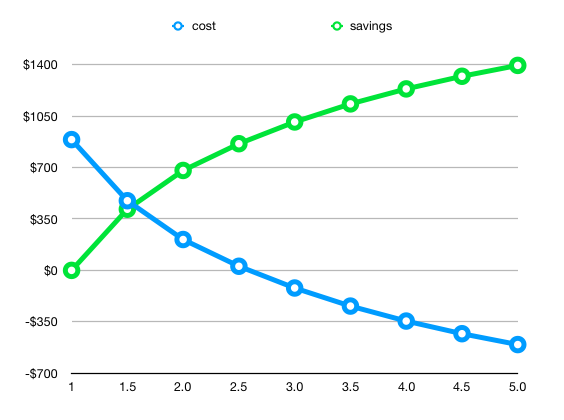
So, we can aggregate this into a table showing us how much we would save by having different increases in panel amounts:

SELECT factor,
       MIN(cost) AS cost,
       890 - MIN(cost) AS saving
  FROM generate_series(1, 5, 0.5) factor, compare(factor)
 GROUP BY factor
 ORDER BY factor;
factor cost saving
1 890 0
1.5 474 416
2.0 210 680
2.5 28 862
3.0 -120 1010
3.5 -243 1133
4.0 -345 1235
4.5 -431 1321
5.0 -505 1395

We can plot this:

cost-savings

That certainly shows the diminishing returns!

But what about looking at how many years a given system of that size would take to pay off given this level of saving?

Using a fairly conservative value of $5000 for doubling my panel/inverter amount (6.6kW/5kW inverter), this gives me a payback table that looks something like:

Panel factorPayback years
1.56
2.07
2.59
3.010
3.511
4.012
4.513
5.014

That is interesting. It is worth noting that this is based on costs since March, so it doesn’t take into account the peak solar generation time (summer) here in Australia. But it does mean that doubling my panels could take twice as long to pay back as I believe my initial investment is going to take.


So, should I get more panels?

Probably.

I’m going to wait until I have a full year of proper data, and then re-evaluate. I always planned to get more at some point - it seems to me that the over time FITs will begin to drop (I mean, they have already: I have a friend who is grandfathered in to a $0.40c FIT, but she can’t make her system larger without losing that tariff), and the prices of batteries will drop even further.

Having a battery added into the mix could reduce even further the import costs, but at an obvious reduction of export energy too: and the big concerns about batteries right now are that they are marginal in reducing power bills by enough to break even: their payback time currently exceeds their warranty period; and more worryingly, battery chemistry suggests their performance will degrade significantly over that period too.


Oh, and the other thing I can do is run a simulation of what my power bill would look like without any PV generation. Pretty much every retailer would have been well over $2000, which means I really have saved a bunch of money (even though, as already mentioned, I haven’t had the system for a whole summer). Perhaps the most interesting thing is that my power bills from last year were still several hundred dollars more than what these calculations show - that means that even having the panels means as a household we have been far more aware of how much power we are using (even during the day).

PV Solar panel analysis in postgres

Australian (and especially South Australian) electricity is expensive. That is probably part of the reason that SA is leading the world in residential rooftop solar.

But it is hard to negotiate the electricity retail market. Knowing your daily usage and feed-in enables you to determine which retailer you should choose, but only if you have the tools available to you to compare what your costs would have been with each retail plan.

And this does not even begin to address the question of if it is cost-effective to increase the size of your PV generation system: most supply companies (who, as it turns out, are different entities to the retailers) have per-phase limits of 5kW: that is, you may never feed back into the grid more than 5kW at any point in time.

Since I had my Fronius Smart Meter installed, I have been able to run reports and get my daily import and export values: these are also available through my retailer, and even through SA Power Networks, the distributor.

I have my data stored in three tables:

REATE TABLE generation (
  "timestamp" TIMESTAMP UNIQUE PRIMARY KEY,
  "energy" FLOAT
);

CREATE TABLE import_cumulative (
  "timestamp" TIMESTAMP UNIQUE PRIMARY KEY,
  "energy" INTEGER
);

CREATE TABLE export_cumulative (
  "timestamp" TIMESTAMP UNIQUE PRIMARY KEY,
  "energy" INTEGER
);

This is really only necessary because I need to take the cumulative values in the import and export tables, and turn them into absolute values for that period:

CREATE OR REPLACE VIEW import AS (
  SELECT timestamp,
         energy - LAG(energy, 1) OVER (ORDER BY timestamp) AS energy
    FROM import_cumulative
   ORDER BY timestamp
);

CREATE OR REPLACE VIEW export AS (
  SELECT timestamp,
         energy - LAG(energy, 1) OVER (ORDER BY timestamp) AS energy
    FROM export_cumulative
   ORDER BY timestamp
);

Now, from these views, it is possible to do some modelling of what different retailers would cost, but they generally need stuff per-day, so we can create a view that combines them. Since I will be doing stuff later that also needs consumption and generation, I will also include them:

CREATE OR REPLACE VIEW consumption AS
SELECT timestamp, 
       import.energy + generation.energy - export.energy AS energy
  FROM generation
 INNER JOIN import USING (timestamp)
 INNER JOIN export USING (timestamp);

And our summary (for each interval):

CREATE OR REPLACE VIEW summary AS (
    SELECT timestamp,
           generation.energy AS generation,
           import.energy AS import,
           export.energy AS export,
           import.energy + generation.energy - export.energy AS consumption
      FROM generation
     INNER JOIN import USING (timestamp)
     INNER JOIN export USING (timestamp)    
);

Getting close to having some usable data there now. What about daily summaries?

CREATE OR REPLACE VIEW daily_summary AS (
    SELECT timestamp::DATE AS date,
           SUM(generation) AS generation,
           SUM(import) AS import,
           SUM(export) AS export,
           SUM(consumption) AS consumption
      FROM summary
     GROUP BY timestamp::DATE
);

That gives us per-day summaries of our generation, import and export.

Here are some values from my system:

SELECT * FROM daily_summary LIMIT 10;
date generation import export consumption
2019-03-07 29851.915 7587 24191 13247.915
2019-03-08 14033.2047222222 7578 9156 12455.2047222222
2019-03-09 28074.8316666667 5746 20961 12859.8316666667
2019-03-10 15239.6936111111 7669 9144 13764.6936111111
2019-03-11 21101.1441666667 6528 12657 14972.1441666667
2019-03-12 28231.4280555556 5955 22382 11804.4280555556
2019-03-13 22880.3077777778 6040 17411 11509.3077777778
2019-03-14 30440.8319444444 6658 24791 12307.8319444444
2019-03-15 30141.3888888889 6576 26227 10490.3888888889
2019-03-16 29286.4413888889 7336 22224 14398.4413888889

(10 rows)

Right. So now we want to be able to look at costs for different retailers. There is a magnificent resource for getting this data: Energy Made Easy. The rates differ for different postcodes (WAT): I’m not sure if they are the same across a whole state or not. Probably not.

Anyway, it turns out that there are some retailers who have three different rates, depending upon your usage during a day. It’s not clear to me if this value is averaged across the whole month when you are on a smart meter: I know it is when you are on one of the old spinning disk meters. I assume it would be calculated on each day, as I think that works out as more expensive for the customer. Diamond Energy appears to have per-month limits, and four different rates, so I just pro-rated them to a 30 day month. I did not bother modelling the fourth rate, as I established fairly early on that they are not going to be close to being the cheapest. I may implement that later, just for completeness.

So, to be able to calculate costs for all retailers, we need to store up to three rates, and the two kWh thresholds that trigger those limits. Note that the second

CREATE TABLE retailer (
    name TEXT PRIMARY KEY,
    supply_charge NUMERIC NOT NULL,
    kWh_rate_1 NUMERIC NOT NULL,
    kWh_limit_1 NUMERIC,
    kWh_rate_2 NUMERIC,
    kWh_limit_2 NUMERIC,
    kWh_rate_3 NUMERIC,
    pay_on_time_discount NUMERIC,
    feed_in_tariff NUMERIC NOT NULL
);

ALTER TABLE retailer 
    ADD CONSTRAINT rate_2_requires_limit_1 
        CHECK (kWh_rate_2 IS NULL OR kWh_limit_1 IS NOT NULL),
    ADD CONSTRAINT rate_3_requires_limit_2 
        CHECK (kWh_rate_3 IS NULL OR kWh_limit_2 IS NOT NULL),
    ADD CONSTRAINT rate_3_requires_rate_2 
        CHECK (kWh_rate_3 IS NULL OR kWh_rate_2 IS NOT NULL);

The three check constraints just ensure that we do not accidentally insert a rate where there is no lower tier rate, or no limit in place to apply it from.

Here is a query that inserts values for the retailers for my postcode:

INSERT INTO retailer (
  name, supply_charge, 
  kWh_rate_1, kWh_limit_1, 
  kWh_rate_2, kWh_limit_2, 
  kWh_rate_3, 
  feed_in_tariff, 
  pay_on_time_discount)
VALUES 
  ('AGL Essentials', 0.8855, 0.3575, NULL, NULL, NULL, NULL, 0.1630, NULL),
  ('Origin Energy', 0.9033, 0.4002, 4, 0.4272, NULL, NULL, 0.1800, 0.10),
  ('AGL Solar Savers', 0.8910, 0.4038, NULL, NULL, NULL, NULL, 0.1800, NULL),
  ('Click Banksia Solar', 0.9966, 0.3941, NULL, NULL, NULL, NULL, 0.1700, NULL),
  ('Power Direct Residential Saver', 0.8910, 0.4038, NULL, NULL, NULL, NULL, 0.1420, 0.13),
  ('SA Simply RAA VPP', 0.9863, 0.3600, NULL, NULL, NULL, NULL, 0.1500, NULL),
  ('Kogan', 0.9566, 0.3154, NULL, NULL, NULL, NULL, 0.0748, NULL),
  ('PowerShop Shopper Market', 1.1912, 0.3760, NULL, NULL, NULL, NULL, 0.1020, 0.15),
  ('AGL Residential Essentials', 0.7752, 0.3512, NULL, NULL, NULL, NULL, 0.1420, NULL),
  ('Diamond Energy Everyday Renewable Saver', 0.9565, 0.3659, 3.33, 0.3948, 11.1, 0.4285, 0.12, NULL),
  ('Red Energy Living Energy Saver', 0.9790, 0.3641, NULL, NULL, NULL, NULL, 0.1200, NULL),
  ('Blue NRG DMO - General Usage', 0.7810, 0.3736, 10.96, 0.5775, NULL, NULL, 0.0680, NULL),
  ('Energy Australia Total Plan Home', 0.8580, 0.4070, NULL, NULL, NULL, NULL, 0.15, NULL),
  ('Alinta Energy No Fuss (Single Rate)', 0.9130, 0.3317, 3.29, 0.3695, NULL, NULL, 0.0950, NULL),
  ('Lumo Basic', 1.0120, 0.3539, NULL, NULL, NULL, NULL, 0.15, NULL),
  ('Powerband Home Flat + Solar FIT', 1.0322, 0.3066, 10.95, 0.3139, NULL, NULL, 0.1150, NULL),
  ('Origin Energy Econnex', 0.9081, 0.4024, 10.96, 0.4294, NULL, NULL, 0.1000, 0.15)
  ON CONFLICT DO NOTHING
;

To calculate the cost for a day, we need to add the daily supply charge, and the amount of import that applies at each rate multiplied by that rate, minus the FIT (feed-in tariff) for the export amount. Because some retailers have a “pay on time discount” (which is really just a late-payment penalty, but that is another blog post waiting to happen), it’s important to note that this discount applies to the whole bill - meaning it needs to be applied after the feed-in tariff has been subtracted.

Here is a function that calculates a daily cost, given a retailer record and import and export values:

CREATE OR REPLACE FUNCTION cost(retailer RETAILER, import INTEGER, export INTEGER)
RETURNS NUMERIC AS $$

SELECT COALESCE(1 - retailer.pay_on_time_discount, 1.0) * (retailer.supply_charge +
       -- rate 3
       CASE WHEN retailer.kWh_limit_2 IS NULL THEN 0
            WHEN import <= retailer.kWh_limit_2 THEN 0
            ELSE import - retailer.kWh_limit_2
       END / 1000.0 * COALESCE(retailer.kWh_rate_3, 0) +
       -- rate 2: hours between limit 1 and limit 2
       CASE WHEN retailer.kWh_limit_1 IS NULL THEN 0
            WHEN retailer.kWh_limit_2 IS NULL THEN GREATEST(import - retailer.kWh_limit_1, 0)
            WHEN import < retailer.kWh_limit_1 THEN 0
            ELSE LEAST(import, retailer.kWh_limit_2) - retailer.kWh_limit_1
       END / 1000.0 * COALESCE(retailer.kWh_rate_2, 0) +
       -- rate 1: up to limit 1
       CASE WHEN retailer.kWh_limit_1 IS NULL THEN import
            ELSE LEAST(import, retailer.kWh_limit_1)
       END / 1000.0 * retailer.kWh_rate_1 -
       retailer.feed_in_tariff * export / 1000.0);

$$ LANGUAGE SQL STRICT;

It is a little hard to follow, and if the daily amount was negative, it decreases that value (instead of ignoring the discount), but it will do for now. I would prefer not to choose a retailer that hides a penalty behind a so-called discount anyway, so they would have to be significantly cheaper to attract my custom.

Using this function, we can now calculate the total costs for all retailers, and compare them:

SELECT retailer.name,
       '$ ' || lpad(
         TRUNC(SUM(cost(retailer, import::INTEGER, export::INTEGER)), 2)::TEXT,
         9
       ) AS cost
  FROM daily_summary, retailer
 GROUP BY retailer.name
 ORDER BY cost ASC;

There is a bunch of code in there to make the output prettier: some of that is lost by the HTML output I have used to generate this table. In an SQL view, those decimal points would all line up…

name cost
AGL Essentials $ 897.87
AGL Residential Essentials $ 916.85
Powerband Home Flat + Solar FIT $ 955.59
Lumo Basic $ 965.56
Origin Energy $ 971.44
SA Simply RAA VPP $ 978.81
Power Direct Residential Saver $ 979.84
AGL Solar Savers $ 997.31
Click Banksia Solar $ 1028.43
PowerShop Shopper Market $ 1065.24
Kogan $ 1075.74
Red Energy Living Energy Saver $ 1092.32
Energy Australia Total Plan Home $ 1100.55
Origin Energy Econnex $ 1155.60
Alinta Energy No Fuss (Single Rate) $ 1176.65
Diamond Energy Everyday Renewable Saver $ 1302.24
Blue NRG DMO - General Usage $ 1929.36

(17 rows)

Which brings me to my conclusion: my current retailer is the cheapest for my current generation and consumption patterns.


But we can go further. We can always go further.

We can look at different months, and see if it’s always the case that a given retailer is the best option. Perhaps it is worthwhile shopping around, and switching between retailers at different times of the year.

CREATE OR REPLACE VIEW monthly_cost_comparisons AS

SELECT retailer.name, 
       to_char(date, 'YYYY-MM') AS month,
       SUM(cost(retailer, import::INTEGER, export::INTEGER)) AS cost
  FROM daily_summary, retailer
  GROUP BY retailer.name, to_char(date, 'YYYY-MM');

That by itself is not that useful, but we can use the crosstab feature to view it in a more readable manner.

CREATE EXTENSION IF NOT EXISTS crosstab;

SELECT * 
  FROM crosstab(
    $$SELECT name, month, '$ ' || lpad(cost::INTEGER::TEXT, 4)
       FROM monthly_cost_comparisons ORDER BY name$$, 
    'SELECT DISTINCT month FROM monthly_summary ORDER BY month'
) AS (
    "retailer" TEXT, 
    "2019-03" TEXT,
    "2019-04" TEXT,
    "2019-05" TEXT,
    "2019-06" TEXT,
    "2019-07" TEXT,
    "2019-08" TEXT,
    "2019-09" TEXT,
    "2019-10" TEXT,
    "2019-11" TEXT,
    "2019-12" TEXT
);

Frustratingly, this function requires enumerating the columns.

retailer 2019-03 2019-04 2019-05 2019-06 2019-07 2019-08 2019-09 2019-10 2019-11 2019-12
AGL Essentials $ 14 $ 41 $ 128 $ 200 $ 209 $ 223 $ 90 $ 1 $ 1 $ -10
AGL Residential Essentials $ 19 $ 45 $ 127 $ 196 $ 204 $ 219 $ 93 $ 10 $ 9 $ -5
AGL Solar Savers $ 15 $ 45 $ 143 $ 223 $ 233 $ 249 $ 100 $ 1 $ 0 $ -11
Alinta Energy No Fuss (Single Rate) $ 46 $ 72 $ 147 $ 216 $ 225 $ 242 $ 122 $ 47 $ 46 $ 13
Blue NRG DMO - General Usage $ 91 $ 125 $ 226 $ 329 $ 341 $ 371 $ 203 $ 103 $ 102 $ 38
Click Banksia Solar $ 20 $ 50 $ 144 $ 222 $ 232 $ 248 $ 104 $ 8 $ 8 $ -7
Diamond Energy Everyday Renewable Saver $ 47 $ 76 $ 166 $ 246 $ 256 $ 276 $ 135 $ 45 $ 45 $ 11
Energy Australia Total Plan Home $ 28 $ 57 $ 149 $ 228 $ 237 $ 255 $ 112 $ 19 $ 19 $ -2
Kogan $ 47 $ 69 $ 132 $ 191 $ 198 $ 213 $ 112 $ 49 $ 49 $ 16
Lumo Basic $ 22 $ 49 $ 134 $ 203 $ 212 $ 227 $ 98 $ 12 $ 12 $ -4
Origin Energy Econnex $ 46 $ 71 $ 143 $ 211 $ 219 $ 236 $ 120 $ 48 $ 47 $ 14
Origin Energy $ 17 $ 45 $ 136 $ 213 $ 222 $ 238 $ 98 $ 5 $ 5 $ -8
Power Direct Residential Saver $ 27 $ 52 $ 131 $ 198 $ 207 $ 222 $ 100 $ 21 $ 21 $ 1
PowerShop Shopper Market $ 44 $ 67 $ 133 $ 193 $ 201 $ 215 $ 111 $ 44 $ 44 $ 13
Powerband Home Flat + Solar FIT $ 31 $ 55 $ 126 $ 187 $ 195 $ 208 $ 98 $ 26 $ 26 $ 4
Red Energy Living Energy Saver $ 36 $ 63 $ 142 $ 212 $ 221 $ 237 $ 112 $ 32 $ 32 $ 6
SA Simply RAA VPP $ 23 $ 50 $ 135 $ 206 $ 215 $ 230 $ 99 $ 13 $ 13 $ -4

From this, I can see that nothing is really going to save me more than a few bucks a month: and this does not take into account the $200 “bonus” I get from AGL if I stick with them for a year (or something like that).

I’d also like to look at actual billing periods, because then I can see that everything matches up to what my actual bills are (and then I can add in the bonuses at the times they applied).

My billing periods went to monthly on a specific date, so from then on they are regular one-month periods, but prior to that they were a little all over the place:

CREATE OR REPLACE VIEW billing_periods AS 

SELECT 'AGL Essentials'::TEXT AS retailer,
       DATERANGE(start::DATE, (start + INTERVAL '1 month')::DATE) as period
  FROM generate_series('2019-06-24'::DATE, now()::DATE, INTERVAL '1 month') start
  
 UNION ALL
 
 VALUES ('AGL Essentials'::TEXT, '[2019-03-07,2019-06-01)'::DATERANGE),
        ('AGL Essentials', '[2019-06-01,2019-06-24)')
  
  ORDER BY period DESC;

We can model the retailer bonuses in a way that only applies them when they apply, and if we are calculating the costs for that retailer:

CREATE TABLE retailer_bonus (
  retailer TEXT, 
  billing_period DATERANGE, 
  bonus NUMERIC
);

INSERT INTO retailer_bonus(retailer, billing_period, bonus)
     VALUES ('AGL Essentials', '[2019-08-24,2019-09-24)', 25);

And now some views for calculating the actual costs for each day, and then aggregating within the billing periods (and a pretty version).

CREATE OR REPLACE VIEW actual_costs AS

SELECT retailer,
       billing_periods.period,
       daily_summary.date,
       cost(_ret, import::INTEGER, export::INTEGER),
       generation
  FROM billing_periods
 INNER JOIN retailer _ret ON (_ret.name = billing_periods.retailer)
 INNER JOIN daily_summary ON (daily_summary.date <@ billing_periods.period);
 
 
CREATE OR REPLACE VIEW billing_period_costs AS
 
SELECT retailer, 
       period, 
       SUM(cost) - COALESCE((SELECT SUM(bonus) 
                               FROM retailer_bonus 
                              WHERE billing_period = period
                                AND retailer_bonus.retailer = retailer.name), 0) AS cost, 
       SUM(generation) AS generation
  FROM actual_costs
 GROUP BY retailer, period
 ORDER BY period DESC;
 
 
CREATE OR REPLACE VIEW billing_period_costs_pretty AS 
SELECT retailer, 
       period,
       '$ ' || LPAD(TRUNC(cost, 2)::TEXT, 7, ' ') AS cost,
       LPAD(TRUNC(generation::NUMERIC / 1000, 1)::TEXT, 6, ' ') || ' kWh' AS generation
  FROM billing_period_costs
 ORDER BY period DESC;
 

And now, we can look at the actual bills, with generation for that period:

 SELECT * FROM billing_period_costs_pretty;
 

[[local]:5432] matt@solar =# SELECT * FROM billing_period_costs_pretty ;

retailer period cost generation
AGL Essentials [2019-11-24,2019-12-24) $ -9.50  595.4 kWh
AGL Essentials [2019-10-24,2019-11-24) $ -1.20  879.0 kWh
AGL Essentials [2019-09-24,2019-10-24) $ 12.80  757.3 kWh
AGL Essentials [2019-08-24,2019-09-24) $ 104.30  610.6 kWh
AGL Essentials [2019-07-24,2019-08-24) $ 224.27  374.2 kWh
AGL Essentials [2019-06-24,2019-07-24) $ 210.24  302.8 kWh
AGL Essentials [2019-06-01,2019-06-24) $ 148.31  244.8 kWh
AGL Essentials [2019-03-07,2019-06-01) $ 183.65 1495.9 kWh

Note that the first row is the current month: it’s only partway through, so I will end up with even more of a credit than that, with any luck.

These values are all within a dollar or two of the amounts I was actually billed, so that is nice.


But wait, there is more!

We can use this, with just a couple more functions, to make fairly good estimates of what our outputs and costs would be if we had more panels.

But that one will have to wait for another day.
asyncpg and upserting bulk data

I’ve been doing some work on analysing the output of my PV system, and needed a mechanism for inserting large numbers of rows of data pulled from the Fronius API. Since I mostly work in python, I decided to use a python script to get the data from the inverter, but I needed a clean way to insert potentially lots of rows (every 5 minute period from every day: batched in 16 day blocks).

I’d normally just use psycopg2, but since I was using Python 3, I thought I’d try out asyncpg.

The API is quite nice:

import asyncio
import asyncpg

async def write():
    conn = await asyncpg.connect('postgres://:@:/database')
    await conn.execute('query', [params])
    await conn.close()

asyncio.get_event_loop().run_until_complete(write())

So, that part was fine. There are more hoops to jump through because async, but meh.

But I had an interesting case: I wanted to do a bulk insert, and I didn’t know how many records I was going to be inserting. It seemed like it was going to be a bunch of work to build up placeholder strings based on the number of rows, and the number of columns in each row.

But no, there is a function that works perfectly (and turned out to be even better, because it takes an argument as to the name of the table):

    conn = await asyncpg.connect(...)
    await conn.copy_records_to_table(table, records=values)
    await conn.close()

That was really easy. It’s a requirement that each row of values is in the same order as the table definition, but my tables in this case were simple.

But there’s one catch: this works great for inserting data, but what about when some of that data is already present. We want to insert some rows, but update others: upsert. Postgres supports this using the ON CONFLICT ... DO ... syntax. So, how can this work with the bulk insert (that uses the Postgres COPY command under the hood)?

    # Our table just contains two columns: timestamp and value.
    await conn.execute('''CREATE TEMPORARY TABLE _data(
        timestamp TIMESTAMP, value NUMERIC
    )''')
    await conn.copy_records_to_table('_data', records=values)
    await conn.execute('''
        INSERT INTO {table}(timestamp, value)
        SELECT * FROM _data
        ON CONFLICT (timestamp)
        DO UPDATE SET value=EXCLUDED.value
    '''.format(table=table))

Sweet.

We can use the string formatting tools here because the table name is controlled by us, so there is not an SQL injection vector to worry about. You should not do this if that value could be coming from a user though.

But there is one problem. We are updating rows, even if the value has not changed. If you don’t think too hard, that’s probably fine. But the way postgres works is that it rewrites every row that has “changed”, even if it hasn’t really changed. It marks the old row as superseded, and that space will not be reclaimed until the table is vacuumed.

Instead, we should be able to just ignore those rows that have the same value (which, in my case, should be all rows except the last one, as that is the only one that should have different data).

    await conn.execute('''
        INSERT INTO {table}(timestamp, value)
        SELECT * FROM _data
        ON CONFLICT (timestamp)
        DO UPDATE SET value=EXCLUDED.value
        WHERE {table}.value <> EXCLUDED.value
    '''.format(table=table))

Oh nice: Postgres also supports a WHERE clause on the DO UPDATE clause.

Models from JSON(B)

One of the things we’ll often try to do is reduce the number of database queries. In Django, this is most often done by using the select_related queryset method, which does a join to the related objects, thus returning the data from those, and then automatically creates the instances for those objects.

This works great if you have a foreign key relationship (for instance, you are fetching Employee objects, and you also want to fetch the Company for which they work).

Tt does not work if you are following the reverse of a foreign key, or a many-to-many relation. You can’t select_related to get all of the employee’s locations at which she can work, for instance. In order to get around this, Django also provides a prefetch_related queryset method, that will do a second query and fetch all of the related objects for all of the objects in the initial queryset. This is evaluated at the same time as the initial queryset, so works pretty well during pagination, for example.

But, we don’t always want all of the objects: sometimes we might only want the most recent related object. Perhaps we have a queryset of Employee objects, and we want their most recent EmploymentPeriod. If we just want one field from that object (their start date, for instance), then we can do that using a subquery:

employment_start = EmploymentPeriod.objects.filter(
    employee=OuterRef('pk'),
).order_by('-start').values('start')[:1]

employees = Employee.objects.filter(
    company=company,
).annotate(
    start_date=Subquery(employment_start)
)

We can go a little bit further, and limit to only those currently employed (that is, they have no termination date, or their termination date is in the future).

employment_start = EmploymentPeriod.objects.filter(
    employee=OuterRef('pk'),
).filter(
    models.Q(finish__isnull=True) |
    models.Q(finish__gte=datetime.date.today())
).order_by('-start').values('start')[:1]

employees = Employee.objects.filter(
    company=company,
).filter(
    # New Django 3.0 feature alert!
    Exists(employment_start)
).annotate(
    start_date=Subquery(employment_start)
)

We could rewrite this to remove the OR, perhaps by using a DateRange annotation and using an overlap: but we’d want to ensure there was an index on the table that postgres would be able to use. Alternatively, if we stored our employment period using a date range instead of a pair of date fields, but that makes some of the other queries around this a bit more complicated.

But this does not help us if we want to get the whole related object. We could try to use a Prefetch object to obtain this:

Employee.objects.filter(
    company=company,
).prefetch(models.Prefetch(
    'employment_periods',
    queryset=EmploymentPeriod.objects.order_by('-start')[:1], to_attr='current_employment_periods',
))

But this will not work: because the filtering to the employee’s own employment periods is not applied until after the slice. We could do the ordering, and then just select the first one as the current employment period, but we would then still be returning a bunch of objects when we only need at most one.

It would be excellent if we could force django to join to a subquery (because then we could use select_related), however that’s not currently possible (or likely in the short term). Instead, we can turn our EmploymentPeriod into a JSON object in tha database, and then turn that JSON object into an instance of our target model.

class ToJSONB(Subquery):
    template = '(SELECT to_jsonb("row") FROM (%(subquery)s) "row")'
    output_field = JSONField()


current_employment_period = EmploymentPeriod.objects.filter(
    employee=OuterRef('pk')
).order_by('-start')[:1]

employees = Employee.objects.filter(
    company=company
).annotate(
    current_employment_period=ToJSONB(current_employment_period)
)

This gets us part of the way, as it turns our employment period into a JSON object. Let’s try turning that JSON object into an instance:

class EmployeeQuerySet(models.query.QuerySet):
    def with_current_employment_period(self):
        current_employment_period = EmploymentPeriod.objects.filter(
            employee=OuterRef('pk')
        ).order_by('-start')[:1]

        return self.annotate(
            current_employment_period=ToJSONB(current_employment_period)
        )


class Employee(models.Model):
    # field definitions...

    objects = EmployeeQuerySet.as_manager()

    @property
    def current_employment_period(self):
        return getattr(self, '_current_employment_period', None)

    @current_employment_period.setter
    def current_employment_period(self, value):
        if value:
          self._current_employment_period = EmploymentPeriod(**value)

And now we can query and include the current employment period (as an instance), without having to have an extra query:

>>> Employee.objects.with_current_employment_period()[0].current_employment_period
<EmploymentPeriod: 2019-01-01 → ∞>

To improve this further, we could allow assigning an EmploymentPeriod object to the value (instead of just the dict), and if that is the case, we could write that value to the database, but that’s probably going to play havoc with constraints that would prevent overlaps.