New Phone: Nokia 6101

Well, my contract with B Clear and Simple finally ran out, so I ran out and got a new phone, and a new contract. Luckily, a few years back the Australian Government decided to make it possible to port your number to a new Service Provider, so I’m keeping the same one. And for some reason to get this legislation through, they didn’t have to make up some bullshit about clear and present danger of terrorist threat on home soil… Anyway, the first OptusWorld shop I went to didn’t have any 6101 phones, so I went to another, and they did. Took about an hour (or so it seemed) for all of the paperwork to be done. Then the guy said it would take about 4-5 hours for my old SIM card to stop working, and my new Optus account to be up and running. I wandered 100m down the mall, went into a sushi bar and unpacked my phone. Battery nearly fully charged, and SIM card already working! So, I really like the phone so far. Especially since the old phone was starting to have some issues: buttons weren’t registering properly on a click, and so on. I’ll write more when I’ve actually used it for some time.

Updated iSync loses devices

I bought a new phone yesterday, and was partway through the process of sending all of my contacts from my Palm Zire through to the new phone (a Nokia 6101), when I noticed that the contact details were not current. I’d just imported a whole lot more contacts into Address Book, and modified a fair chunk of the rest of them, and these changes weren’t reflected on the Zire. As it turned out, one of the System updates I’d done recently had updated iSync, and in doing this it removed the Zire from the synching devices list. Because Missing Sync doesn’t run iSync unless there are devices there it needs to sync with, and with Missing Sync/Palm Desktop you don’t explicitly run iSync either, I had no idea this had happened. Running iSync manually fixed the problem - it ran a little helper that re-added the Zire to the devices list. Of course, now I have to re-copy all of the contact I’d already transferred. Grr.

$smarty.get.*

I don’t know how I never found this before… You can use {$smarty.get.<var>} to get the URL variable you want. For instance, you can use the following ones in WordPress MultiUser:

  • year
  • monthnum
  • day
  • name
  • paged/page
  • category_name
  • wpblog

Unfortunately, these variables don’t seem to be set with Pages, rather than Posts. However, this has given me some tips as to how to fix the .htaccess RewriteRule problems causing Blogsome not to display subsequent pages of monthly archives. Possibly something to do with the fact it uses page, rather than paged, and that for some reason it parses the word page as the name of the post. This looks like not a .htaccess bug at all, now that I think of it.

Toolbox Script Issues

This is more of a personal note, rather than a blog post, but still…

  • timemods.js parts do not work in IE 5.5
  • quicktags.js does not remove some text (as required) in IE 5.5
  • floater.js has some issues with IE - clicking the shrink/grow checkbox when not at the top of the page is buggy. It then moves the box down too far, and keeps moving it down when scrolling
  • In IE, the buttons are too wide. This might actually be a CSS issue, rather than a script issue.

Unfortunately, I don’t have an installation of IE 5.5 to figure out why the first one is so. I’m not that worried about it as it is a modification that can be lived without. Ditto for the second: it just removes the info about what tags are acceptable, and the buttons are just for these. The third one is the one that annoys me - I spent a fair bit of time getting the floater code to work properly, and I thought I had ironed out all of the bugs. It’s also very frustrating that IE doesn’t respect the position:fixed CSS attribute. That makes everything so much easier. (I think this is the section with the code bug. It may not be an IE specific bug, but since IE is the only browser that actually uses the object.makeFixed(); method, it’s the only browser that displays this bug). The final one may have something to do with Installed Fonts. I’m not that sure. And since in general text is a little too wide in IE (such as in the sidebar, where some stuff wraps onto a second line) this looks to be the case.

Moving from Blogsome

Luis Suarez, over at elsua.net wanted to know how to get his posts out of Blogsome. It’s really quite simple - all you need to do is use any XMLRPC offline composer that can get an arbitrary number of posts. ecto is a great example. Then set it to get more posts than you have, and it will grab them all from the server. You may need to learn how to set it all up - I won’t go through that here, but if enough people comment, I will write a tutorial. You can then re-post these entries to another server. IIRC, there isn’t a way to say ‘post all of these entries to another server for me’, so I wrote an AppleScript to do this when I migrated to Blogsome. Basically, it grabbed all of the posts from an Account, and cycled through them, posting each one to Blogsome (after changing the date to match the original, I think - there was an issue where it thought each post was a ’new’ post, rather than using the old date). If you are on a Windows box, there is a version of ecto for Win, but obviously no AppleScript, so you may wish to investigate other solutions. It should be possible to write a simple program that just does this (copies posts from one host to another, via XMLRPC), but I don’t have the need, so I won’t write one ;) As it turns out, Louis asked for, and received a zipped file of all his posts anyway, but incase anyone else needs to do it fast… Oh, and Louis, I didn’t write a Comment because I didn’t want to have to create yet another account somewhere. Maybe you could consider turning on Comments, and using some sort of Spam protection other than requiring logging in. Casual commenters will be quickly turned off this. All of my Comment Spam is gone, just by using a simple JavaScript - now all I get is Trackback Spam.

Post Time Bug

A bug seems to have slipped through my JavaScript of Human Time Posts. The post before this was definitely posted in the wee hours, yet they are being treated as posted around lunchtime. Must fix that. And the fact I’m now running under daylight savings. (Fixed, needed to update the Options).

Custom Address Book Fields

Creating custom Address Book fields wasn’t quite as painless as I’d hoped. At least, not in a form that doesn’t look like being broken in future updates. The simplest method is to choose a field you aren’t already using. I chose Related Names, since I didn’t know until that point that this field existed! The other fields that were available weren’t really appropriate: Maiden Name does not allow for duplicates, and Dates is designed, for, well, dates. The next step is to set up the template. Go to Preferences, and choose the Template tab. Choose Related Names from the Add Field popup menu, and alter the label to whatever you want it to be. Now, you can go and add data of the type you require. Some caveats: the items in the Template will only appear if the record (person) you are editing does not have any items in the ‘Related Names’ field(s). If they do, you can add extras, but the ones you added to the Template do not appear in the list. Might file this as a bug.

Cable Management

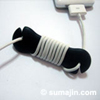
Hold that last post! I just saw these designs for cable management, over on Sumajin. Plan for tomorrow. 1. Create something like this out of acrylic. 2. Enjoy not having dangly cords everwhere.
Headphone Cable Length

I really like my headphones I use for my iPod. I blogged about how good they were back in July, but I’ve decided there really is something I don’t like about them. Basically, the cable is too long. If I just plug them in, and put the iPod into my pocket, the cable hangs down to my knees. The weight of the cable at this length means that they are almost pulled out of my ears, and don’t feel comfortable. If I wrap the cable around the iPod, it’s much better, but I have to ensure I get exactly the right number of loops, as either the cable is then too short (and is pulled out of my ears if I turn my head), or is still too long. And having the cable wrapped around the iPod means it’s harder to get into my pocket, and harder to control when it’s in there. (I’ve discovered you can change the volume through fabric, as well as skip tracks). I’m considering buying some of the Apple branded in-ear phones I saw in the AppleCentre the other day. I might just try replacing the plug with another one, and shortening the cable, first. All I have to do is find a nice looking 3.5mm plug, now…

Address Book Smart Groups

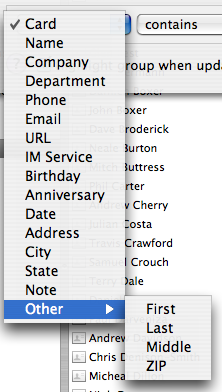
Smart Groups in Address Book are crap. You are limited to less than 20 options. And Related Names isn’t in them, so I can’t do a lot with the data I have, in terms of Smart Groups. I need to be able to say:

People who (are in Group CSTA Database) and (Related Names: Referee > 0) Or, even simpler: People who (are in Group CSTA Database) and (Related Names: Gender is Male) I can get away with (Card contains Male), but this will also pick up anyone who happens to have Male in their name. At least it doesn’t pick up Females, that’s a start. Otherwise I’d just have to have a does not contain Female clause. However, the biggest kicker is not being able to refer to groups. I’d like to be able to have lists that get people who are in a particular group, but also have some other attribute. Oh, and I suspect that you cannot search using Spotlight, as this would require seperate files. Oh for the joyful days of BeOS, where people files existed, and you could just add extra attributes, as you chose. And then use queries (which, by the way, are much faster than Spotlight searches!) to find what you want. And it had the ability to create really complicated queries, really simply. And modify them easily to get exactly what you want. • While I’m on bitching about Address Book: I just looked through all of the Package Contents, and the HTML exporter seems to still use font tags. Ugh!