Comment Preview for Blogsome!

I’ve implemented Comment Previewing from Blogsome blogs. There is no way to install 3rd party plugins in WordPress MultiUser, so everything has to be done in JavaScript. But really, the plugin is just JavaScript packaged up nice anyway. You need four code fragments, all in your comments.html file. The first one I suggest goes after the line: {if 'open' == $post->comment_status} Because it is a JavaScript that uses { and }, you need to remember the {literal} tags. {literal}<script type="text/javascript"> <!-- function ReloadTextDiv() { var UseInstantPreview = document.getElementById("use_instant_preview").checked; if( UseInstantPreview == true ) { var NewText = document.getElementById("comment").value; splitText = NewText.split(/\n/).join("<br />"); var DivElement = document.getElementById("commentpreview"); DivElement.innerHTML = splitText; } } // --> </script>{/literal} It probably doesn’t matter exactly where it goes, but having it after the {if} clause means it will only be included in the file if comments are open. The second code fragment is: onkeyup="ReloadTextDiv();" And it goes in the <textarea id=comment … > tag. In context, mine is: <textarea name="comment" id="comment" cols="60" rows="12" tabindex="4" onkeyup="ReloadTextDiv();"></textarea> The third fragment is the checkbox for enabling or disabling Comment Preview. It can go wherever looks good. <input onclick='ReloadTextDiv();' name="use_instant_preview" type="checkbox" id="use_instant_preview" value="1" checked /> <label for='use_instant_preview'>Use Instant Preview</label> The final fragment tells the browser where the Comment Preview goes: <div><p id="commentpreview"></p></div> And it goes where you want the Comment Preview to actually go. I suggest just after the Submit button, or other instructions. Righto, all of that in there, and it should work. You may need to add an entry to your Site Style Sheet to make the Comment Preview box look the same as your actual comments box. • If you wanted to, you can also have a Preview button that will preview what is in the text area then, rather than having Live Preview. This is good for a couple of reasons: I find that long comments slow down when trying to update every keypress. The big problem is that you cannot have a normal input field inside the form set to do this, it will just try to submit it (or at least, mine did!). So, I’ve replaced my input tags in my form with the following (You may need to insert name='commentform' into the form start tag.): <a class='button' href='javascript:document.commentform.submit();'> Post Reply </a> <a class='button' href='javascript:ForceReloadTextDiv();'> Preview </a> You’ll also need to add the following in just after the ReloadTextDiv function definition: function ForceReloadTextDiv() { var NewText = document.getElementById("comment").value; splitText = NewText.split(/\n/).join(" "); var DivElement = document.getElementById("commentpreview"); DivElement.innerHTML = splitText; }
Quicktags for Comments

Note: The seperate Quicktags toolbar is not supported. Please use the full toolbox script, or hack it any way you like. The remainder of this post remains for posterity only.

•

This was easier than I thought.  Alex King has done most of the work by having the Quicktags info already in a JavaScript file. I just grabbed my copy of the file (from /wp-admin/quicktags.js) and tweaked it.  To upload to the Blogsome server I had to call it quicktags.jpg, but that is allowed, since you tell the browser explicitly that it is a text/javascript file. So, you can get my quicktags.js file (Right-click and download it!), and upload it to your server, and use the following code in your comments.html. Where you want the toolbar to appear, insert this:

1
2
    <script src="/images/quicktags.jpg" type="text/javascript"></script> 
    <script type="text/javascript">edToolbar();</script> 

After the <textarea>, insert the following code:

1
2
3
    <script type="text/javascript"> 
        <!-- edCanvas = document.getElementById('comment'); //--> 
    </script>

Note: you may need to chage the argument of getElementById to whatever your textarea id is. I’ve also tweaked the JavaScript file so it includes abbr, acronym and strike tags, and doesn’t include the tags that aren’t valid for comments.  And I’ve added a button for inserting < and >, but I’m not totally happy with this.  If anyone wants to edit it so it works better (try it out to see what I mean), then feel free.

I’ve also created another version that uses links instead of buttons (since Camino doesn’t render buttons with style, only as Mac-buttons), but it’s not quite as nice: the labels don’t update. Still, if anyone wants to play around with it, you can get it here. Remember to right-click and download it, it’s not really an image!

Next task: Live Preview.

One Man, One Vote?

The Conservative Philosopher: One Man, One Vote I don’t normally read conservative websites, but I cam across this one as part of some fault-finding I was doing for another Blogsome user.

Suppose you have two people, A and B. A is intelligent, well-informed, and serious. He does his level best to form correct opinions about the issues of the day. He is an independent thinker, and his thinking is based in broad experience of life. B, however, makes no attempt to become informed, or to think for himself. He votes as his union boss tells him to vote. Why should B’s vote have the same weight as A’s?

I think it’s interesting the term “He votes as his union boss tells him to vote.” It shows the clear bias in this piece: that uneducated people are unionists (and implies vice-versa). Would the article read differently if it read: “He votes as the radio shock-jocks tell him to vote.”

It is self-evident that B’s vote should not count as much as A’s.

No, it is not self-evident. It is self evident that you believe that less educated people are lesser human beings. I am all for education: I am a teacher, and believe that education is the key to most of societies ills, but disenfranchising people who are less advantaged than you is not the way to democracy. With ’lesser people’ not being able to vote, the balance of political power stays firmly in the hands of those who are already advantaged, and will never leave. Why should they vote for someone who wants to educate the poor? It will cost them more than it costs the poor, and it’s all money they wouldn’t otherwise have to pay, since they are sending their children to a private school already. Ideas like this entrench inherited poverty. I used to teach at a less advantaged school, and taught many students from lower Socio-Economic Backgrounds who showed more intelligence than their ‘richer’ counterparts (like those I went to school with, incidentally), and who showed far more moral fibre. Without a reasonable public education system these students would not have had the opportunity to attend university: and most of them are doing far better in their first degree than I did. Now for some straw man:

Comment Policy I (KBJ) have configured the PowerBlogs software so that only those who have (1) registered and (2) been approved (by me) may post comments. Please note that comments do not appear immediately, even by approved users; they must be approved individually. My aim in adopting this policy is to discourage incivility. If you want your comment to appear, it should be civil, coherent, and relevant to the post to which it is attached.

I had a quick read of the site and some comments, and I think the author may only allow comments that (a) support his views on the subject or (b) he already has a rebuttal prepared for, so he can answer straight back.

Smarty: Insert / Comment Tags

Smarty This may have some use: {insert}. I noticed it when backing up my templates tonight… • Also, I’d like to make buttons that act like the quicktags in the Blogsome backend for commenting: so it inserts the relevant tags in. Will require some JavaScript, I assume…

Disabling Unneeded Source Items

I can’t use iTunesMusicStore (I live in Australia), and I don’t listen to podcasts (dialup connection, besides I’d much rather listen to something from my Classical Music collection on the train anyway, chills me out nicely…), so I don’t need either of these in the Source list under iTunes 5. The setting for disabling the iTMS has moved to Parental Controls, and there wasn’t a Disable Podcasts one before, but there is now. I used to use the arrows that appeared for searching my library, but the functionality of this seems to have vanished under iTunes 5, so I’ll leave it off for now.

Seperating Trackbacks and Comments

I can’t recall if this came up on the Blogsome forums or not, but some people are keen to seperate Trackbacks and Comments in the comment list. Sometimes, and especially for people new to blogs, Trackbacks don’t seem to make that much sense, so I thought I would try doing this on Blogsome. Googling seperate trackbacks comments wordpress turned up several sites, the first one I visited was from way back in July 2004, and was way to complicated to bother with.

The second one was better, and gave me the idea of how to do it. Then I remembered that there is a Template Tag called comment_type. I duplicated the main comment: the commentlist and the {foreach} that cycles through each comment, and used the following bit of code to get the {comment_type} into a variable (so I can test it):

1
    {capture name=comment_type}{comment_type}{/capture}

It’s a simple matter to test this against a known value:

1
    {if $smarty.capture.comment_type != 'Comment'}

And you know that you are working with a Trackback or Pingback. The first iteration of the commentlist only displays non-comments, the second only displays comments (it uses == 'Comment' instead). The last tricky bit was to figure out how to show Trackbacks from my own site in the class='owner' format (on here, in a reddish box rather than green). This required a little trick I had discovered earlier today:

1
    {capture name=author_trackback}trackback@{bloginfo show='url'}{/capture}

And then the test is:

1
    {if $smarty.capture.reader == $smarty.capture.author_trackback|replace:'http://':''}

(This assumes you have used my previous method for styling your own comments differently). The full text of my comments.html template then:

    <div id="commentarea">
    {if $post->ping_status}
        <p class='indented'>{_e text='The <acronym title="Uniform Resource Identifier">URI</acronym> to TrackBack this entry is:'} <em>{trackback_url}</em></p>
    {/if}
    
    <p class='indented'>{comments_rss_link link_text='<span class="rss"><abbr title="Really Simple Syndication">RSS</abbr></span> feed for comments on this post.'}</p>
    
    <h3 class="comments">{comments_number zero="Responses" one="1 Response" more="% Responses"} to &#8220;{the_title}&#8221;
    {if $post->comment_status == 'open'}
    <a href="#postcomment" title="{_e text='Leave a comment';}">&raquo;</a>
    {/if}
    </h3>
    
    {if $comments != ''}
      {capture name=author}{the_author_email}{/capture}
      {capture name=author_trackback}trackback@{bloginfo show='url'}{/capture}
    
      <h3 class="comments">Trackbacks / Pingbacks</h3>
      <ol class="commentlist">
      {foreach from=$comments key=key item=comment}
        {globalvar var='comment' value=$comment}
        {capture name=comment_type}{comment_type}{/capture}
        {if $smarty.capture.comment_type != 'Comment'}
            {capture name=reader}{comment_author_email}{/capture}
            {if $smarty.capture.reader == $smarty.capture.author_trackback|replace:'http://':''}
            <li class="owner" id="comment-{comment_ID}">
            {else}
            <li class="alt" id="comment-{comment_ID}">
            {/if}
            From the site {comment_author_link}:
        {comment_text}
            Posted on {comment_date} at {comment_time}.
            {edit_comment_link text="Edit this trackback", before='<span class="button">' after="</span>"}
        </li>
        {/if}
      {/foreach}
      </ol>
    
      <h3 class="comments">Comments</h3>
      <ol class="commentlist">
      {foreach from=$comments key=key item=comment}
        {globalvar var='comment' value=$comment}
        {capture name=comment_type}{comment_type}{/capture}
        {if $smarty.capture.comment_type == 'Comment'}
            {capture name=reader}{comment_author_email}{/capture}
            {if $smarty.capture.reader == $smarty.capture.author}
        <li class="owner" id="comment-{comment_ID}">
            {else}
        <li class="alt" id="comment-{comment_ID}">
            {/if}
                <script type="text/javascript">document.write('<div class="right"><img src="http://www.gravatar.com/avatar.php?gravatar_id='); document.write(hex_md5("{comment_author_email}")); document.write('&size=50" /><\/div>'); </script>
                On <a href="#comment-{comment_ID}">{comment_date} at {comment_time}</a>, {comment_author_link} said: 
              {comment_text}
                {edit_comment_link text="Edit this comment", before='<span class="button">' after="</span>"}
        </li>
         {/if}
      {/foreach}
      </ol>
    
    {else} _<!-- this is displayed if there are no comments so far -->_
        <p class='indented'>{_e text="No comments yet."}</p>
    {/if}
    
    <h3  class="comments">{_e text="Leave a Reply"}</h3>
    {if 'open' == $post->comment_status}
         <form action="{$siteurl}/wp-comments-post.php" method="post" id="commentform">
        <p>
          <input type="text" name="author" id="author" class="textarea" value="{insert name=var var=comment_author}" size="28" tabindex="1" />
           <label for="author">{_e text="Name"}</label> {if $req != ''} {_e text='(required)'} {/if}
        <input type="hidden" name="comment_post_ID" value="{$post->ID}" />
        <input type="hidden" name="redirect_to" value="{$redirect_to}" />
        </p>
    
        <p>
          <input type="text" name="email" id="email" value="{insert name=var var=comment_author_email}" size="28" tabindex="2" />
           <label for="email">{_e text="E-mail"}</label> {if $req != ''} {_e text='(required)'}{/if}
        </p>
    
        <p>
          <input type="text" name="url" id="url" value="{insert name=var var=comment_author_url}" size="28" tabindex="3" />
           <label for="url">{_e text="<acronym title='Uniform Resource Identifier'>URI</acronym>"}</label>
        </p>
    
        <p>
          <label for="comment">{_e text="Your Comment"}</label>
        <br />
          <textarea name="comment" id="comment" cols="60" rows="12" tabindex="4"></textarea>
              <input type="hidden" id="textarea_next_time" name="textarea_next_time" value="60,12" />
        </p>
    
        <p>
          _<!--input disabled name="preview" type="image" tabindex="5" src="/images/preview.png" size="75%" /-->_
          <input name="submit" type="image" tabindex="6" src="/images/post_comment.png" size="75%" />
        </p>
    
    <p>{_e text="Line and paragraph breaks automatic, e-mail address never displayed, <acronym title='Hypertext Markup Language'>HTML</acronym> allowed:"} <code>{allowed_tags}</code>, 'Smart' Smileys.</p>
    
    
    </form>
    {else} _<!-- comments are closed -->_
    <p>{_e text="Sorry, the comment form is closed at this time."}</p>
    {/if}
    </div>

Using CSS to replace tables.

Using some classy CSS, you can make text flow nicely around images, rather than having to set stuff up using tables, and demonstrated in this post. Basically, you just put the following into your CSS file:

1
2
3
4
5
6
7
    .left {
        float:left;
    }
    
    .right {
        float:right;
    }

And then wrap the image in <div class='left'> ... </div> tags (or class='right' to make it sit on the right of the text). You can use margin:15 0 15 25; for example to put a margin of 15 on the top, 0 on the right, 15 on the bottom and 25 on the left, so that the text does not come right up against the image. I also change some text properties in my CSS, so I can include a caption inside the <div class='left/right'> ... </div> tags and it will be italic, centred and so on. I’ll leave these as an exercise to the reader. If you just use the code above, you can also use this whenever you have post-links, or page-links, so that one always appears on the left, and the other on the right. I have now removed every table from the site, except the one on the page this article links to.

Lemmings

DHTML Lemmings That’s right: the great old favourite, Lemmings, implemented in DHTML. Luckily you can turn the music off. “Oh No!” Kaboom

Archive and Links Pages

It would be nice to be able to have a links and/or archive page under blogsome: that just had a list of all links, or a list of all posts/months/days (whatever). The problem is that Pages cannot use template tags, and it is not much fun to update these pages by hand. A solution presented itself to me today, and it goes like this:

    {if $smarty.server.REQUEST_URI == '/links/'}
        {get_links_list}
    {elseif $smarty.server.REQUEST_URI == '/archives/'}
        {get_archives type='postbypost' limit='' format='html'}
    {/if}

This code can go into the Main Page template, just after {content}, or into the post.html template if you’ve used my previous hack to get Pages processed by the post template. You’ll also need to create Pages: Links and Archives (if you use different names, be sure to ensure the page-slug is the one that is listed in the code above). I had to put a <br /> into each Page in order to get rid of all errors. You can see the results here: Archives, Links. It’s more than likely that a similar solution exists for categories: I’ll do that too. Update: Categories, Pages. Note: Make sure you have the slash following the URL when you try to access them. It may be possible to have a double {if} clause (with slash and without), but I’m not sure yet… later works a treat:

     {if $smarty.server.REQUEST_URI == '/links/' || $smarty.server.REQUEST_URI == '/links'}
        {get_links_list}

And so on…

If I dig a very deep hole, where I go to stop?

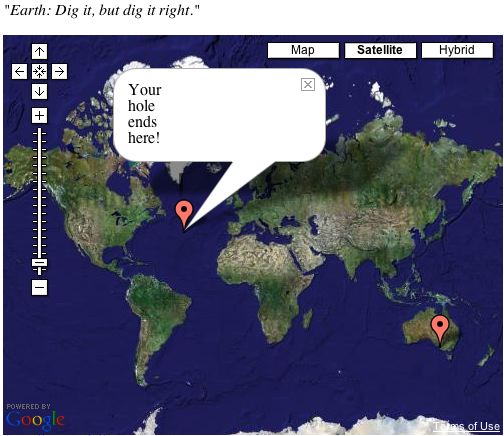
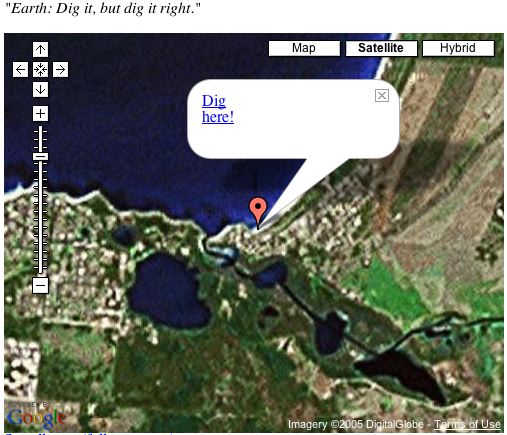
If I dig a very deep hole, where I go to stop? This is something I needed as a kid. Remember digging holes at the beach, and wondering whether you could “dig right through to China”. Well, if you dig straight down from Robe, South Australia, you end up in…the middle of the ocean. Oh well. Nice idea while it lasted. Won’t be able to pull the wool over little Jack’s eyes in the future…