More of the Same -> Reinstall

I’ve reinstalled Leopard - hopefully that will fix the problem I was discussing yesterday. I really don’t know if it’s a software or hardware issue, though.

Getting rid of the cruft I had installed seems to make my machine boot up a whole lot faster, but.

iSync Menu Item

For some reason, iSync appears in the menu bar after a reboot sometimes, even though I have unchecked “Show status in menu bar”.

Picture 1.png

When I reload iSync, the setting has reverted back to being checked. This doesn’t seem to happen all of the time, just sometimes.

Repeat. Rinse.

After my last post, I has kinda bummed when the same thing happened again. Luckily, the same process fixed it, but I really don’t know why it occurred to begin with. I think the same fault was fixed by fsck, so that might have something to do with it.

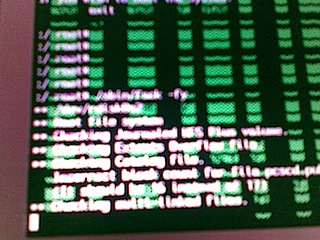
Anyway, I took some snaps this time.

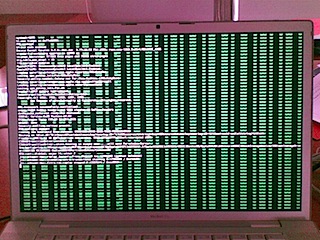
16092008.jpg

I wasn’t able to take a shot of the initial boot screen (ironically, it caused my phone to crash. Twice).

16092008(001).jpg

This second one shows how the text is now overwriting the green corruption. Sorry about the blurriness, but if you look carefully you may notice that the file with the incorrect block count is pcscd.pub, or something. This appears to be the file /var/run/pcscd.run, but I don’t really know what this does.

Close to Danger...

Something almost bad happened to my MacBook Pro today.

I’d been using the machine all day, on and off, on both battery and power. I showed some code to a lecturer, and then closed my laptop and moved to another lecture theatre. It was there that, after about half an hour, when I was bored, I decided to open my laptop and check my email.

Screen was black. I’ve had some issues with the graphics card not always working properly (it’s related to a garbage display when scrolling issue), so I thought that might have reappeared. I don’t remember why, but I pressed the power button. I wasn’t expecting anything (if the display was disabled, then at most I should get a beep).

The screen came on (or, as I later figured out, the whole machine came on), but the display was overlaid with a pink pixelated pattern. Initially I thought something was odd, and I force-restarted it, since it didn’t appear to be responding.

The next time it booted up, it had the same pattern. Leaving it a little longer, I noticed that it displayed the grey screen with the darker apple logo, and the spinner underneath. After about a minute, it had a kernel panic.

Restarting it always had the same result. Zapping the PRAM, resetting the SMC, booting off a system DVD all had the same result.

I even tried swapping out the RAM, but nothing looked to fix it.

Finally, I tried booting up in safe mode. ⌘S will do this, and when this kicked in, the screen turned black, as expected. The areas that were pink now turned green. I got to a command prompt, but when I typed “exit” to continue booting, it seemed to hang on the WindowServer loading. (I must confess I restarted quite early, since I wasn’t having any keyboard response, even though it may not respond at this point).

Same deal for Verbose mode (⌘V). Stuck at WindowServer.

Rebooting again in Safe mode, I did an fsck -fy. About halfway through this I noticed that the text that was appearing was overwriting the green graphics glitches. When it completed (and it did find one error), I restarted, and the machine appears to be back to normal.

I wouldn’t have lost much data (I do have backups), but I would have lost work time. Or blogging time, or whatever!

Postscript: Interestingly, checking the panic.log shows me that it was WindowServer that was causing the panic. I don’t know why, but I hope it ceases to occur!

Curse of Competence

200809131658.jpg

Yes, I think I have the Curse of Competence.

Yeah, that's public, Java.

Having to program in Java is a real eye-opener. It’s really not something I enjoy, mainly because I know there are better ways to do just about everything other than “the Java way”.

Take visibility, for instance. You can declare attributes and methods as private, protected or public. But if you have two objects of a particular class, they can access each others private variables. How fucking crazy is that? I mean, something is hardly private is a different object can still access it!

Another place where visibility is fucked up is in terms of methods and availability of these. If I have a class that is not defined as a public class, and I have an instance of this class, I can find out what it’s declared methods are. But I cannot invoke them, even if they are public!

I’ve got a project where I have to build a parser, and evaluate expressions. Sometimes there is a statement that can affect the state of the afore-mentioned object (which is in turn a sub-class of JFrame).

One of the statements is to resize the JFrame, which I can do by using the .setSize() method on this object. However, I cannot declare my own methods, even as public ones, and then call then from the client class.

Seriously, this is shit. All I want to do is basically pass a message to this object, and there’s no way for me to do so without changing the visibility of the class. I have a reference to the fucking object, I just can’t really do much with it.

Drop Box

Yeah. Thanks a Fucking lot, Drop Box. Next time, before you decide to quit the Finder, maybe check I’m not copying a heap of files somewhere.

Fail.

Why I won't use anything but Keychain

Since I got my laptop, I no longer need to use either the same password for everything, or the same ‘head’, and contextual ’tails’ for each site. (For instance, a head of ‘foobar’ and a tail like ‘macosxhints’ results in a password of ‘foobarmacosxhints’ for the MacOS X Hints website).

Instead, I can rest assured that I can type any random sequence of characters into the password box, and have the keychain remember them. It has the side effect that I don’t use Firefox, only Safari (or Camino, which also accesses the Keychain, like a good OS X application should).

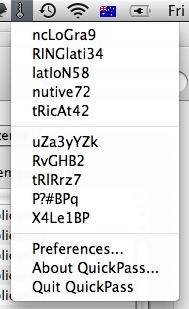
It gets even better when you use something like QuickPass, which lives in the menu bar, and every time you need a password, it generates a whole stack of random ones for you:

QuickPass.png

Note, that since I didn’t actually choose any of these, they aren’t used for any of my passwords. Selecting one puts it into the clipboard, which is the only real security issue. If someone else got access to my clipboard, then they could see my password.

Since no one else gets hold of my laptop at all, then I’m fairly secure.

I will not use any other password storage system, since not only does it save my web passwords, but passwords for dozens of other applications too. Ecto stores it’s passwords for blogs there. Airport Utility stores passwords for the wireless routers I manage, as well as WPA keys for networks I use. These passwords are all secured (with the keychain protected by my login password), and yet I don’t need to copy-paste them, since the application(s) that need access are granted access on a need-to-know basis by the system.

I think this is one of the best features of the OS. No longer do I need to remember passwords, nor store them in a text file. As long as the browser I use accesses keychain, then I have all of my web passwords available in each browser.

So, the idea of Gorilla Password doesn’t appeal to me at all. Not least that I don’t have to use other machines (other than one unix system, which I only use at Uni, and then only store one password on, to access the Uni learning web-app), but the fact it doesn’t use system-provided services. That’s one of the main issues of cross-platforminess.

AdiumX 1.3.1

I have, courtesy of MkConsole, the data from some of my log files displayed on my desktop. This is really useful, as I notice stuff that gets logged there.

It’s less useful when applications write more stuff to the system logs than is strictly necessary. For instance:

Picture 1.png

That’s just a small segment of the issue, but it clearly shows that the latest release of AdiumX, 1.3.1 is dumping two lines to the console or system log every minute.

For google, the logfile data that is coming out is:

> 11/09/08 6:41:18 PM [0x0-0x48048].com.adiumX.adiumX[828] INFO cmdproc.c:98:show_debug_cmd() S: 000: QNG 42  
> 11/09/08 6:41:37 PM [0x0-0x48048].com.adiumX.adiumX[828] INFO cmdproc.c:98:show_debug_cmd() C: 000: OUT  

Time to go without IM for a little while.

Might get more work done anyway. But only if I kill Twitterific too, I suspect.

iTunes Genius and Stuff

I’ve downloaded iTunes 8, mainly because I was a bit interested in Genius. More from a technical perspective than anything else right now, although it may end up replacing Party Shuffle (especially since lately I’ve been skipping tracks lots…)

So, I’ve heard mixed reports about it so far - that it doesn’t work with Classical music, for instance. I can verify that it does, for instance Canon in D major brings up a selection of other classical music. I can’t vouch for how good a job it does, since I’m still somewhat of a naïve listener of classical music.

I do think it’s funny that the Beatles cannot be used for Genius, but for Badly Drawn Boy, it seems to do a pretty good job of choosing similar music. I’m not sure how much is Genre-based, since I have fairly well genre-d tracks.

As for the new UI - I don’t mind it too much. I do miss the view that had the album art and tracks grouped by album, since that was the main view I used, except for when in Party Shuffle.

The Genius Sidebar annoys me a little that it is trying to get me to buy stuff - I think it’s just a rebadging of the Mini store, which I didn’t use anyway. Thankfully, you can turn this off. At least Apple got it right with the explicit asking of permission this time before sending your iTunes library data back to the mothership.