Speeding up Postgres using a RAM disk?

I happened to come across Speeding up Django unit tests with SQLite, keepdb and /dev/shm today. I can’t quite do that, because we use a bunch of Postgres specific things in our project, but it did make me think “Can we run Postgres on a RAM disk?”

Following up on this, it turns out that using a TABLESPACE in postgres that is on a RAM disk is a really bad idea, but it should be possible to run a seperate database cluster (on a different port) that could have the whole cluster on the database.

It’s possible to create a RAM disk on macOS, and init a cluster there:

#! /bin/sh

PG_CTL=/Applications/Postgres.app/Contents/Versions/10/bin/pg_ctl

new_disk=$(hdid -nomount ram://1280000)
newfs_hfs $new_disk
mkdir /tmp/ramdisk
mount -t hfs $new_disk /tmp/ramdisk
mkdir /tmp/ramdisk/pg

PG_CTL initdb -D /tmp/ramdisk/pg

This needs to be run once, after bootup (and probably before Postgres.app starts it’s servers). You’d also need to do the setup in Postgres.app to show where it is (alternatively, you could just start it on the port you want in the script above).

But, is it faster? Let’s look at the results. The “Initial run” is the first run of tests after deleting the test database.

Database location Initial run Keepdb runs
Disk 6m39s 0m16s
0m19s
0m15s
RAM 6m11s 0m26s
0m17s
0m15s

So, it’s probably not actually worth it. I’m guessing that the variance is more to do with just how busy my machine was at each of the times I ran the test.

Postgres ENUM types in Django

Postgres has the ability to create custom types. There are several kinds of CREATE TYPE statement:

  • composite types
  • domain types
  • range types
  • base types
  • enumerated types

I’ve used a metaclass that is based on Django’s Model classes to do Composite Types in the past, and it’s been working fairly well. The current stuff I have been working on made sense to use an Enumerated Type, because there are four possible values, and having a human readable version of them is going to be nicer than using a lookup table.

In the first iteration, I used just a TEXT column to store the data. However, when I then started to use an enum.Enum class for handling the values in python, I discovered that it was actually storing str(value) in the database, rather than value.value.

So, I thought I would implement something similar to my Composite Type class. Not long after starting, I realised that I could make a cleaner implementation (and easier to declare) using a decorator:

@register_enum(db_type='change_type')
class ChangeType(enum.Enum):
    ADDED = 'added'
    CHANGED = 'changed'
    REMOVED = 'removed'
    CANCELLED = 'cancelled'


ChangeType.choices = [
    (ChangeType.ADDED, _('hours added')),
    (ChangeType.REMOVED, _('hours subtracted')),
    (ChangeType.CHANGED, _('start/finish changed with no loss of hours')),
    (ChangeType.CANCELLED, _('shift cancelled')),
]

Because I’m still on an older version of Python/Django, I could not use the brand new Enumeration types, so in order to make things a bit easier, I then annotate onto the class some extra helpers. It’s important to do this after declaring the class, because otherwise the attributes you define will become “members” of the enumeration. When I move to Django 3.0, I’ll probably try to update this register_enum decorator to work with those classes.

So, let’s get down to business with the decorator. I spent quite some time trying to get it to work using wrapt, before realising that I didn’t actually need to use it. In this case, the decorator is only valid for decorating classes, and we just add things onto the class (and register some things), so it can just return the new class, rather than having to muck around with docstrings and names.

from psycopg2.extensions import (
    new_array_type,
    new_type,
    QuotedString,
    register_adapter,
    register_type,
)
known_types = set()


CREATE_TYPE = 'CREATE TYPE {0} AS ENUM ({1})'
SELECT_OIDS = 'SELECT %s::regtype::oid AS "oid", %s::regtype::oid AS "array_oid"'


class register_enum(object):
    def __init__(self, db_type, managed=True):
        self.db_type = db_type
        self.array_type = '{}[]'.format(db_type)
        self.managed = managed

    def __call__(self, cls):
        # Tell psycopg2 how to turn values of this class into db-ready values.
        register_adapter(cls, lambda value: QuotedString(value.value))

        # Store a reference to this instance's "register" method, which allows
        # us to do the magic to turn database values into this enum type.
        known_types.add(self.register)

        self.values = [
            member.value
            for member in cls.__members__.values()
        ]

        # We need to keep a reference to the new class around, so we can use it later.
        self.cls = cls

        return cls

    def register(self, connection):
        with connection.cursor() as cursor:
            try:
                cursor.execute(SELECT_OIDS, [self.db_type, self.array_type])
                oid, array_oid = cursor.fetchone()
            except ProgrammingError:
                if self.managed:
                    cursor.execute(self.create_enum(connection), self.values)
                else:
                    return

        custom_type = new_type(
            (oid,),
            self.db_type,
            lambda data, cursor: data and self.cls(data) or None
        )
        custom_array = new_array_type(
            (array_oid,),
            self.array_type,
            custom_type
        )
        register_type(custom_type, cursor.connection)
        register_type(custom_array, cursor.connection)

    def create_enum(self, connection):
        qn = connection.ops.quote_name
        return CREATE_TYPE.format(
            qn(self.db_type),
            ', '.join(['%s' for value in self.values])
        )

I’ve extracted out the create_enum method, because it’s then possible to use this in a migration (but I’m not totally happy with the code that generates this migration operation just yet). I also have other code that dynamically creates classes for a ModelField and FormField as attributes on the Enum subclass, but that complicates it a bunch.

Testing WizardView in Django

Sometimes, you just have to resort to a multi-step view to simplify data entry for a user. Django had an “included” package for this: django.contrib.formtools, until some years ago, when it moved into it’s own repository. It’s still very useful though, although there is a bit of a learning curve.

I have some multi-step wizard views, for things where there are a bunch of different (sometimes dependent, but not necessarily) things we need to get from the user, and commit in an all-or-nothing way.

Writing tests for these views is quite cumbersome, but I’ve recently come up with a couple of things that can make this less painful. The reason it’s somewhat difficult is that the wizard, and the current step form both have form data, so to ensure there are no clashes between name fields, the forms are all prefixed. However, prefixes on forms mean that the data you need to pass to the form must also be prefixed in the correct way.

class TestWizard(TestCase):
    def test_wizard_view(self):
        # user has been created...

        self.client.force_login(user)

        # url is the url for this wizard view.

        response = self.client.get(url)
        self.assertEqual(200, response.status_code)

        response = self.client.post(url, {
            'wizard-current_step': 'first',
            'first-field_a': 'value',
            'first-field_b': 'value',
            'first-field_c': 'value',
        })
        self.assertEqual(200, response.status_code)
        # Because django by default returns a 200 on a form validation error,
        # we need another way to check this. If this is a re-rendering of the
        # same form it will be bound, otherwise it will not be.
        self.assertFalse(response.context['form'].is_bound)
        self.assertEqual(
            response.context['wizard']['management_form']['current_step'].value(),
            'second'
        )

        # This next one has a formset instead of a form!
        response = self.client.post(url, {
          'wizard-current_step': 'second',
          'second-0-field_a': 'a',
          'second-0-field_b': 'a',
          'second-1-field_a': 'a',
          'second-1-field_b': 'a',
          'second-INITIAL_FORMS': '0',
          'second-TOTAL_FORMS': '2'
        })
        self.assertEqual(200, response.status_code)
        self.assertFalse(response.context['form'].is_bound)
        # Okay, I'm bored with this already!

It would be much nicer if we could just do something like:

class TestWizard(TestCase):
    def test_wizard_view(self):
        # ...
        self.client.force_login(user)

        test_wizard(self, url, 'wizard', [
          ('first', {'field_a': 'value', 'field_b': 'value', ...}),
          ('second', [
            {'field_a': 'a', 'field_b': 'b'},
            {'field_a', 'a', 'field_b': 'a'},
          ])
        ])

The last part, the formset handling stuff is something I have touched on before, and I’m not sure if I’ll get to that bit now, but the first part is still useful.

def test_wizard(test, url, name, data):
    """
    Using the supplied TestCase, execute the wizard view installed at
    the "url", having the given name, with each item of data.
    """

    test.assertEqual(200, test.client.get(url).status_code)
    for step, step_data in data:
      step_data = {
        '{}-{}'.format(step, key): value
        for key, value in step_data.items()
      }
      step_data['{}-current_step'.format(name)] = step
      response = test.client.post(url, step_data, follow=True)
      test.assertEqual(200, response.status_code)
      if 'form' in response.context:
          test.assertFalse(response.context['form'].errors)

We might come back to the formset thing later.


But what about when we have a bunch of steps where we already have initial data, and we mostly just want to click next in each page of the wizard, possibly altering just a value here or there?

def just_click_next(test, url, override_data):
    response = test.client.get(url)
    while response.status_code != 302:
        form = response.context['form']
        test.assertFalse(form.errors)

        wizard = response.context['wizard']
        current_step = wizard['steps'].current

        # If we have a formset, then we need to do custom handling.
        if hasattr(form, 'forms'):
            current_step_data = step_data.get(current_step, [])
            data = {
                '{}-{}'.format(current_step, key): value
                for key, value in form.management_form.initial.items()
            }
            for i, _form in enumerate(form.forms):
                current_form_data = current_step_data[i] if len(current_step_data) > i else {}
                data.update({
                    '{}-{}'.format(_form.prefix, field): current_form_data.get(
                        field,
                        _form.initial.get(field)
                    )
                    for field in _form.fields
                    if field in current_form_data or field in _form.initial
                })
        else:
            current_step_data = step_data.get(current_step, {})
            data = {
                '{}-{}'.format(form.prefix, field): current_step_data.get(
                    field,
                    form.initial.get(field)
                )
                for field in form.fields
                if field in current_step_data or field in form.initial
            }

        # Add the wizard management form step data.
        data['{}-current_step'.format(wizard['management_form'].prefix)] = current_step

        response = test.client.post(url, data)

    return response

Those paying attention may notice that this one actually does handle formsets in a fairly nice way.

So how do we use it?

class TestViews(TestCase):
    def test_new_revision_wizard(self):
        # Setup required for wizard goes here.
        just_click_next(self, url, {
            'date': {'start_date': '2019-01-01'},
            'confirm': {'confirm': 'on'}
        })
        # Make assertions about the wizard having been run.

This replaces some 80 lines of a test: which actually becomes important when we need to test this with a bunch of subtly different preconditions.

Subquery and Subclasses

Being able to use correlated subqueries in the Django ORM arrived in 1.11, and I also backported it to 1.8.

Quite commonly, I am asked questions about how to use these, so here is an attempt to document them further.

There are three classes that are supplied with Django, but it’s easy to write extensions using subclassing.

Let’s first look at an example of how you might want to use the included classes. We’ll consider a set of temperature sensors, each with a name and a code, both of which are unique. These sensors will log their current temperature at some sort of interval: maybe it’s regular, maybe it varies between devices. We want to keep every reading, but want to only allow one reading for a given sensor+timestamp.

class Sensor(models.Model):
    location = models.TextField(unique=True)
    code = models.TextField(unique=True)


class Reading(models.Model):
    sensor = models.ForeignKey(Sensor, related_name='readings')
    timestamp = models.DateTimeField()
    temperature = models.DecimalField(max_digits=6, decimal_places=3)

    class Meta:
        unique_together = (('sensor', 'timestamp'),)

Some of the things we might want to do for a given sensor:

  • Get the most recent temperature
  • Get the average temperature over a given period
  • Get the maximum temperature over a given period
  • Get the minimum temperature over a given period

If we start with a single sensor instance, we can do each of these without having to use Subquery and friends:

from django.db.models import Avg, Min, Max

most_recent_temperature = sensor.readings.order_by('-timestamp').first().temperature
period_readings = sensor.readings.filter(
    timestamp__gte=start,
    timestamp__lte=finish,
).aggregate(
    average=Avg('temperature'),
    minimum=Min('temperature'),
    maximum=Max('temperature'),
)

We could also get the minimum or maximum using ordering, like we did with the most_recent_temperature.

If we want to do the same for a set of sensors, mostly we can still achieve this (note how similar the code is to the block above):

sensor_readings = Reading.objects.filter(
  timestamp__gte=start,
  timestamp__lte=finish
).values('sensor').annotate(
  average=Avg('temperature'),
  minimum=Min('temperature'),
  maximum=Max('temperature'),
)

We might get something like:

[
    {
        'sensor': 1,
        'average': 17.5,
        'minimum': 11.3,
        'maximum': 25.9
    },
    {
        'sensor': 2,
        'average': 19.63,
        'minimum': 13.6,
        'maximum': 24.33
    },
]

However, it’s not obvious how we would get all of the sensors, and their current temperature in a single query.

Subquery to the rescue!

from django.db.models.expressions import Subquery, OuterRef

current_temperature = Reading.objects.filter(sensor=OuterRef('pk'))\
                                     .order_by('-timestamp')\
                                     .values('temperature')[:1]

Sensor.objects.annotate(
    current_temperature=Subquery(current_temperature)
)

What’s going on here as that we are filtering the Reading objects inside our subquery to only those associated with the sensor in the outer query. This uses the special OuterRef class, that will, when the queryset is “resolved”, build the association. It does mean that if we tried to inspect the current_temperature queryset, we would get an error that it is unresolved.

We then order the filtered readings by newest timestamp first; this, coupled with the slice at the end will limit us to a single row. This is required because the database will reject a query that results in multiple rows being returned for a subquery.

Additionally, we may only have a single column in our subquery: that’s achieved by the .values('temperature').

But maybe there is a problem here: we actually want to know when the reading was taken, as well as the temperature.

We can do that a couple of ways. The simplest is to use two Subqueries:

current_temperature = Reading.objects.filter(sensor=OuterRef('pk'))\
                                     .order_by('-timestamp')[:1]

Sensor.objects.annotate(
    current_temperature=Subquery(current_temperature.values('temperature')),
    last_reading_at=Subquery(current_temperature.values('timestamp')),
)

However, this will do two subqueries at the database level. Since these subqueries will be performed seperately for each row, each additional correlated subquery will result in more work for the database, with possible performance implications.

What about if we are using Postgres, and are okay with turning the temperature and timestamp pair into a JSONB object?

from django.db.models.expressions import Func, F, Value, OuterRef, Subquery
from django.contrib.postgres.fields import JSONField


class JsonBuildObject(Func):
    function = 'jsonb_build_object'
    output_field = JSONField()


last_temperature = Reading.objects.filter(sensor=OuterRef('pk'))\
                                  .order_by('-timestamp')\
                                  .annotate(
                                      json=JsonBuildObject(
                                          Value('timestamp'), F('timestamp'),
                                          Value('temperature'), F('temperature'),
                                      )
                                   ).values('json')[:1]

Sensor.objects.annotate(
    last_temperature=Subquery(last_temperature, output_field=JSONField())
)

Now, your Sensor instances would have an attribute last_temperature, which will be a dict with the timestamp and temperature of the last reading.


There is also a supplied Exists subquery that can be used to force the database to emit an EXISTS statement. This could be used to set a boolean field on our sensors to indicate they have data from within the last day:

recent_readings = Reading.objects.filter(
    sensor=OuterRef('pk'),
    timestamp__gte=datetime.datetime.utcnow() - datetime.timedelta(1)
)
Sensor.objects.annotate(
    has_recent_readings=Exists(recent_readings)
)

Sometimes we’ll have values from multiple rows that we will want to annotate on from the subquery. This can’t be done directly: you will need to aggregate those values in some way. Postgres has a neat feature where you can use an ARRAY() constructor and wrap a subquery in that:

SELECT foo,
       bar,
       ARRAY(SELECT baz
               FROM qux
              WHERE qux.bar = base.bar
              ORDER BY fizz
              LIMIT 5) AS baz
  FROM base

We can build this type of structure using a subclass of Subquery.

from django.contrib.postgres.fields import ArrayField
from django.core.exceptions import FieldError
from django.db.models.expressions import Subquery

class SubqueryArray(Subquery):
    template = 'ARRAY(%(subquery)s)'

    @property
    def output_field(self):
        output_fields = [x.output_field for x in self.get_source_expressions()]

        if len(output_fields) > 1:
            raise FieldError('More than one column detected')

        return ArrayField(base_field=output_fields[0])

And now we can use this where we’ve used a Subquery, but we no longer need to slice to a single row:

json_reading = JsonBuildObject(
    Value('timestamp'), F('timestamp'),
    Value('temperature'), F('temperature'),
)

last_five_readings = Reading.objects.filter(
    sensor=OuterRef('pk')
).order_by('-timestamp').annotate(
    json=json_reading
).values('json')[:5]

Sensor.objects.annotate(last_five_readings=SubqueryArray(last_five_readings))

Each sensor instance would now have up to 5 dicts in a list in it’s attribute last_five_readings.

We could get this data in a slightly different way: let’s say instead of an array, we want a dict keyed by a string representation of the timestamp:

sensor.last_five_readings = {
    '2019-01-01T09:12:35Z': 15.35,
    '2019-01-01T09:13:35Z': 14.33,
    '2019-01-01T09:14:35Z': 14.90,
    ...
}

There is a Postgres aggregate we can use there to do that, too:

class JsonObjectAgg(Subquery):
    template = '(SELECT json_object_agg("_j"."key", "_j"."value") FROM (%(subquery)s) "_j")'
    output_field = JSONField()


last_five_readings = Reading.objects.filter(
    sensor=OuterRef('pk')
).order_by('-timestamp').annotate(
    key=F('timestamp'),
    value=F('temperature'),
).values('key', 'value')[:5]

Sensor.objects.annotate(last_five_readings=JsonObjectAgg(last_five_readings))

Indeed, we can wrap any aggregate in a similar way: to get the number of values of a subquery:

class SubqueryCount(Subquery):
    template = '(SELECT count(*) FROM (%(subquery)s) _count)'
    output_field = models.IntegerField()

Since other aggregates need to operate on a single field, we’ll need something that ensures there is a single value in our .values(), and extract that out and use that in the query.

class SubquerySum(Subquery):
    template = '(SELECT SUM(%(field)s) FROM (%(subquery)s) _sum)'

    def as_sql(self, compiler, connection, template=None, **extra_context):
        if 'field' not in extra_context and 'field' not in self.extra:
            if len(self.queryset._fields) > 1:
                raise FieldError('You must provide the field name, or have a single column')
            extra_context['field'] = self.queryset._fields[0]
        return super(SubquerySum, self).as_sql(
          compiler, connection, template=template, **extra_context
        )

As I mentioned, it’s possible to write a subclass like that for any aggregate function, although it would be far nicer if there was a way to write that purely in the ORM. Maybe one day…

Graphs in Django and Postgres

I have written a bunch of posts about dealing with trees in Postgres and Django, and Funkybob used some of this to start the package django-closure-view.

Today, someone was looking for similar functionality, but for a graph. Specifically, a Directed Acyclic Graph. Now, not every graph, or even every DAG is a tree, but every tree is a DAG.

So, the difference between a tree and a graph in this context is that a given node may have an arbitrary number of parents. But, and this is worth noting now, none of it’s parents may also be dependencies.

The first part of this tells us that we can no longer just use a simple self-relation in our model to store the relationship: because there could be multiple parents. Instead, we will need to have a many-to-many relation to store that.

from django.db import models


class Node(models.Model):
    node_id = models.AutoField(primary_key=True)
    name = models.TextField(unique=True)
    parents = models.ManyToManyField(
        'self',
        related_name='children',
        symmetrical=False,
    )

We can put some meaningful data into this graph to make it a little more obvious if our queries are sane:

django, pytz, sqlparse, asgiref = Node.objects.bulk_create([
    Node(name='django'),
    Node(name='pytz'),
    Node(name='sqlparse'),
    Node(name='asgiref'),
])

django.parents.add(pytz, sqlparse, asgiref)

graph_demo, psycopg2 = Node.objects.bulk_create([
    Node(name='graph_demo'),
    Node(name='psycopg2')
])

graph_demo.parents.add(psycopg2, django)

Let’s have a bit of a look at some of the queries we might need to think about.

-- All root nodes
SELECT node_id, name
  FROM graph_node
  LEFT OUTER JOIN graph_node_parents ON (node_id = from_node_id)
 WHERE to_node_id IS NULL;

As expected, this gives us back all packages that have no dependencies (parents):

 node_id │   name
─────────┼──────────
       6 │ psycopg2
       2 │ pytz
       4 │ asgiref
       3 │ sqlparse
(4 rows)

And now, all packages which are not depended upon by any other packages (no parents):

SELECT node_id, name
  FROM graph_node
  LEFT OUTER JOIN graph_node_parents ON (node_id = to_node_id)
 WHERE from_node_id IS NULL;

We should only have one package here: graph_demo.

From each of these, we can build up a recursive query to get all descendants, or all ancestors of each root/leaf node.

WITH RECURSIVE ancestors AS (
  SELECT node_id, '{}'::INTEGER[] AS ancestors
    FROM graph_node
    LEFT OUTER JOIN graph_node_parents ON (node_id = from_node_id)
   WHERE to_node_id IS NULL

   UNION

  SELECT node.from_node_id,
         ancestors.ancestors || ancestors.node_id
    FROM ancestors
   INNER JOIN graph_node_parents node
           ON (ancestors.node_id = to_node_id)
) SELECT * FROM ancestors;

From here, we can annotate on the names to double check:

WITH RECURSIVE ancestors AS (
  SELECT node_id, '{}'::INTEGER[] AS ancestors
    FROM graph_node
    LEFT OUTER JOIN graph_node_parents ON (node_id = from_node_id)
   WHERE to_node_id IS NULL

   UNION

  SELECT node.from_node_id,
         ancestors.ancestors || ancestors.node_id
    FROM ancestors
   INNER JOIN graph_node_parents node
           ON (ancestors.node_id = to_node_id)
)
SELECT node_id,
       node.name,
       ancestors,
       ARRAY(SELECT name
               FROM unnest(ancestors) node_id
              INNER JOIN graph_node USING (node_id)
       ) AS ancestor_names
  FROM ancestors
  INNER JOIN graph_node node USING (node_id);

So that has given us all ancestor chains: but what about if we just want the closure table: all ancestor/descendant pairs?

WITH RECURSIVE closure_table AS (
  SELECT from_node_id AS descendant,
         to_node_id AS ancestor
    FROM graph_node_parents

   UNION

  SELECT descendant,
         to_node_id AS ancestor
    FROM closure_table
   INNER JOIN graph_node_parents ON (from_node_id = ancestor)
)
SELECT * FROM closure_table

Okay, that was even easier than the previous query.

Once we have our closure table query, then we can look at preventing cycles.

CREATE OR REPLACE RECURSIVE VIEW
graph_closure_table (descendant, ancestor) AS (

  SELECT from_node_id AS descendant,
         to_node_id AS ancestor
    FROM graph_node_parents

   UNION

  SELECT descendant,
         to_node_id AS ancestor
    FROM graph_closure_table
   INNER JOIN graph_node_parents ON (from_node_id = ancestor)
);

And we can now use this in a function to prevent cycles

CREATE OR REPLACE FUNCTION prevent_cycles()
RETURNS TRIGGER AS $$

BEGIN
  IF EXISTS(SELECT 1
              FROM graph_closure_table
             WHERE ancestor = NEW.from_node_id
               AND descendant = NEW.to_node_id
           ) THEN
    RAISE EXCEPTION 'cycle detected';
  END IF;
  RETURN NEW;
END;

$$ LANGUAGE plpgsql STRICT;

CREATE TRIGGER prevent_cycles
BEFORE UPDATE OR INSERT ON graph_node_parents
FOR EACH ROW EXECUTE PROCEDURE prevent_cycles();

And this will prevent us from being able to set an invalid dependency relationship: ie, one that would trigger a cycle:

>>> django.parents.add(graph_demo)
Traceback (most recent call last):
  File "...django/db/backends/utils.py", line 84, in _execute
    return self.cursor.execute(sql, params)
psycopg2.errors.RaiseException: cycle detected
CONTEXT:  PL/pgSQL function prevent_cycles() line 9 at RAISE

It’s not totally ideal, but it does show how it protects against saving invalid relationships.


Interestingly, if we drop that constraint, we can still run the closure table query: it doesn’t give us an infinite loop, because the view uses a UNION instead of a UNION ALL: it’s going to drop any rows that are already in the output when it deals with each row - and since there are not an infinite number of combinations for a given set of dependencies, it will eventually return data.

So, where from here? I’m not sure. This was just something that I thought about while answering a question in IRC, and I felt like I needed to explore the idea.

Handling overlapping values

One of the things that I enjoy most about Postgres are the rich types. Using these types can help reduce the amount of validation that the application needs to do.

Take for instance anything which contains a start date and a finish date. If you model this using two fields, then you also need to include validation about start <= finish (or perhaps start < finish, depending upon your requirements).

If you use a date range instead, then the database will do this validation for you. It is not possible to create a range value that is “backwards”. Sure, you’ll also need to do application-level (and probably client-side) validation, but there is something nice about having a reliable database that ensures you cannot possibly have invalid data.

Django is able to make good use of range types, and most of my new code seemingly has at least one range type: often a valid_period. So much so that I have a Mixin and a QuerySet that make dealing with these easier:

class ValidPeriodMixin(models.Model):
    valid_period = DateRangeField()

    class Meta:
        abstract = True

    @property
    def start(self):
        if self.valid_period.lower_inc:
            return self.valid_period.lower
        elif self.valid_period.lower is not None:
            return self.valid_period.lower + datetime.timedelta(1)

    @property
    def finish(self):
        if self.valid_period.upper_inc:
            return self.valid_period.upper
        elif self.valid_period.upper is not None:
            return self.valid_period.upper - datetime.timedelta(1)

    @property
    def forever(self):
        return self.valid_period.lower is None and self.valid_period.upper is None

    def get_valid_period_display(self):
        if self.forever:
            message = _('Always applies')
        elif self.start is None:
            message = _('{start} \u2092 no end date')
        elif self.finish is None:
            message = _('no start date \u2092 {finish}')
        else:
            message = _('{start} \u2092 {finish}')

        return message.format(
            start=self.start,
            finish=self.finish,
        )


def ensure_date_range(period):
    """
    If we have a 2-tuple of dates (or strings that are valid dates),
    ensure we turn that into a DateRange instance. This is because
    otherwise Django may mis-interpret this.
    """
    if not isinstance(period, DateRange):
        return DateRange(period[0] or None, period[1] or None, '[]')
    return period


class OverlappingQuerySet(models.query.QuerySet):
    def overlapping(self, period):
        return self.filter(valid_period__overlap=ensure_date_range(period))

    def on_date(self, date):
        return self.filter(valid_period__contains=date)

    def today(self):
        return self.on_date(datetime.date.today())

As you may notice from this, it is possible to do some filtering based on range types: specifically, you can use the && Postgres operator using .filter(field__overlap=value), and the containment operators (<@ and @>) using .filter(field__contains=value) and .filter(field__contained_by=value). There are also other operators we will see a bit later using other lookups.


If you have a legacy table that stores a start and a finish, you would need to have a validator on the model (or forms that write to the model) that ensures start < finish, as mentioned above. Also, there is no way (without extra columns) to tell if the upper and lower values should be inclusive or exclusive of the bounds. In Postgres, we write range values using a notation like a mathematical range: using ‘[’, ‘]’ and ‘(’, ‘)’ to indicate inclusive and exclusive bounds.

SELECT '[2019-01-01,2020-01-01)'::DATERANGE AS period;

One caveat when dealing with discrete range types (like dates and integers) is that Postgres will, if it is able to, convert the range to a normalised value: it will store (2019-01-01,2019-12-31] as [2019-01-02,2020-01-01). This can become a problem when showing the value back to the user, because depending upon context, it’s likely that you will want to use inclusive bounds when showing and editing the values.

You can manage this by using a form field subclass that detects an exclusive upper bound and subtracts one “unit” accordingly:

import datetime

from django.contrib.postgres.forms.ranges import (
    DateRangeField, IntegerRangeField
)


class InclusiveRangeMixin(object):
    _unit_value = None

    def compress(self, values):
        range_value = super().compress(values)
        if range_value:
          return self.range_type(
              range_value.lower,
              range_value.upper,
              bounds='[]'
          )

    def prepare_value(self, value):
        value = super().prepare_value(value)
        value = [
            field.clean(val)
            for field, val in zip(self.fields, value)

        ]
        if value[1] is not None:
            value[1] = value[1] - self._unit_value
        return value


class InclusiveDateRangeField(
    InclusiveRangeMixin, DateRangeField
):
      _unit_value = datetime.timedelta(1)


class InclusiveIntegerRangeField(
    InclusiveRangeMixin, IntegerRangeField
):
    _unit_value = 1

Back on to the topic of storing two values instead of a range: it’s possible to add an expression index on the table that uses DATERANGE:

CREATE INDEX thing_period_idx
          ON thing_thing (DATERANGE(start, finish));

You would be able to annotate on this value, do some querying, and it should use the index, allowing you to build querysets like:

Thing.objects.annotate(
    period=Func(
      F('start'),
      F('finish'),
      function='DATERANGE',
      output_field=DateRangeField())
).filter(period__overlap=other_period)

Range types show their full power when used with exclusion constraints. These allow you to prevent writing rows that violate the constraint. For instance, consider this model (and some largely irrelevant other models, Team and Player):

class TeamMembership(ValidPeriodMixin):
    ployer = models.ForeignKey(
        Player,
        related_name='team_memberships',
        on_delete=models.CASCADE,
    )
    team = models.ForeignKey(
        Team,
        related_name='player_memberships',
        on_delete=models.CASCADE,
    )

A player may only belong to one team at a time: that is, we may not have any overlapping valid_periods for a player.

You can do this using an exclusion constraint, but it does need the btree_gist extension installed:

CREATE EXTENSION IF NOT EXISTS btree_gist;

ALTER TABLE team_teammembership
        ADD CONSTRAINT prevent_overlapping_team_memberships
    EXCLUDE USING gist(person_id WITH =, valid_period WITH &&)
 DEFERRABLE INITIALLY DEFERRED;

Since this type of constraint is not yet supported in Django, you’ll have to do it in a RunSQL migration.

From here, we can attempt to write conflicting data, but the database will forbid it. You will still need to write code that checks before writing - this enables you to return a ValidationError to the user when you detect this conflict in a form, but having the exclusion constraint means that we can avoid the race condition where:

  • Check for overlapping ranges
  • Other process creates a range that will overlap
  • Save our data

You could possibly also use select_for_update in this context, but I prefer adding database constraints.

Note that the DEFERRABLE INITIALLY DEFERRED clause is important: it allows you, within a transaction, to write conflicting data, and it’s only when the transaction commits that the constraint is checked. This makes rewriting a bunch of values in one transaction much simpler: if you do not have this flag enabled then you will need to ensure you update them in an order that maintained no overlaps at each stage. I’m pretty confident this is always possible, but it’s a bunch of work (and it is possible that you might need to write some rows multiple times to maintain that).


So, now we can store range values (with database validation), and prevent overlapping data (with database validation).

What about a process that enables us to say “this row should replace, trim or split any that overlap with it”? I’m glad you asked.

It turns out given two rows, where one should “supersede” the other, there are five different conditions we need to take into account:

  • The rows do not overlap: no action required
  • The new row completely covers the old row: remove the old row
  • The old row has bounds that exceed the new row in both directions: split the old row into two rows
  • The old row has a lower bound that is smaller than the new row: trim the old row at the upper end
  • The old row has an upper bound that is larger than the new row: trim the old row at the lower end

It turns out we can perform this query with the Django range field lookups:

class OverlappingQuerySet(models.query.QuerySet):
    def with_overlap_type(self, period):
        period = ensure_date_range(period)
        return self.annotate(
            overlap_type=Case(
                # The objects do not overlap.
                When(~Q(valid_period__overlap=period,
                        then=Value(None))),
                # The existing value is covered by the new value
                When(valid_period__contained_by=period,
                     then=Value('replace')),
                # The existing value has no values
                # less than the new value
                When(valid_period__not_lt=period,
                     then=Value('trim:lower')),
                # The existing value has no values
                # greater than the new value
                When(valid_period__not_gt=period,
                     then=Value('trim:upper')),
                # The existing value contains the new value
                When(valid_period__contains=period,
                      then=Value('split')),
                output_field=models.TextField()
            )
        )

This works because a CASE WHEN stops evaluating when it finds a match: technically a trim:lower value could also match on containment (split), so we need to test that one earlier.

We are going to have to (possibly) perform multiple queries when writing back the data. If there are any than need to be “removed”, they will need a DELETE. Any that have a “trim” operation will require an UPDATE.

new_instance = Thing(valid_period=('2019-01-01', '2019-02-09'))
overlapping = Thing.objects.overlapping(
  new_instance.valid_period
).with_overlap_type(new_instance.valid_period)

overlapping.filter(overlap_type='replace').delete()
overlapping.filter(
    overlap_type__in=('trim:upper', 'trim:lower')
).update(
    valid_period=valid_period - new_instance.valid_period
)

But the tricky part is that any that are “split” will require at least two: either a DELETE followed by an INSERT (that inserts two rows), or a single UPDATE and a single INSERT. The tricky part here is that we also need to read the values first, if we are going to manipulate them in python. Instead, we can look at how to do it in raw SQL, with the benefit that we can perform this in a single operation.

WITH new_period AS (
  SELECT %s AS new_period
),
split AS (
  SELECT thing_id,
         valid_period,
         other_field,
         new.new_period
    FROM thing_thing old
    INNER JOIN new_period new ON (
          LOWER(old.valid_period) < LOWER(new.new_period)
      AND UPEER(old.valid_period) > UPEER(new.new_period)
    )
), new_rows AS (
  SELECT other_field,
         DATERANGE(LOWER(valid_period),
                   LOWER(new_period)) AS valid_period
    FROM split

   UNION ALL

  SELECT other_field,
         DATERANGE(UPPER(new_period),
                   UPPER(valid_period)) AS valid_period
),
removed AS (
  DELETE FROM thing_thing
   WHERE thing_id IN (SELECT thing_id FROM split)
)
INSERT INTO thing_thing (other_field, valid_period)
SELECT other_field, valid_period FROM new_rows;

This is less than ideal, because we need to enumerate all of the fields (instead of just other_field), so this code is not especially reusable as-is.

Let’s look at alternatives:

# Fetch the existing items.
splits = list(overlapping.filter(overlap_type='split').values())
to_create = []
to_delete = []
for overlap in splits:
    to_delete.append(overlap.pop('thing_id'))
    valid_period = overlap.pop('valid_period')
    to_create.append(Thing(
        valid_period=(valid_period.lower, new_instance.valid_period.lower),
        **overlap
    ))
    to_create.append(Thing(
        valid_period=(new_instance.valid_period.upper, valid_period.upper),
        **overlap
    ))
overlapping.filter(pk__in=to_delete).delete()
Thing.objects.bulk_create(to_create)

We can stick all of that into a queryset method, to make it easier to manage.

import copy


class OverlappingQuerySet(models.query.QuerySet):
    def trim_overlapping(self, period):
        """
        Trim/split/remove all overlapping objects.

        * Remove objects in the queryset that are
          "covered" by the period.
        * Split objects that completely cover the
          new period with overlap at both sides
        * Trim objects that intersect with the new
          period and extend in one direction or the
          other, but not both.

        This will do a single query to trim object that need
        trimming, another query that fetches those that need
        splitting, a single delete query to remove all
        split/replaced objects, and finally an optional query
        to create replacement objects for those split.

        That means this method _may_ perform 3 or 4 queries.

        This particular algorithm should work without a
        transaction needing to be present, but in practice
        this action and the create of a new one should be
        in the same transaction, so they can all roll-back
        if anything goes wrong.
        """
        period = ensure_date_range(period)

        overlapping = self.overlapping(period)\
                          .with_overlap_type(period)

        # Easy first: update those that we can just update.
        overlapping.filter(
            overlap_type__startswith=('trim')
        ).update(
            valid_period=models.F('valid_period') - period
        )

        # Create the new objects for each of the ones that
        # extend either side of the new value.
        # There will alwasy be two of them: one for the lower
        # section, and one for the upper section.
        to_create = []
        for instance in overlapping.filter(overlap_type='split'):
            # Setting the primary key to None will trigger a new
            # instance.
            instance.pk = None
            # We need to create two instances, each with a different
            # valid_period.
            valid_period = instance.valid_period
            # The one _before_ the new value.
            instance.valid_period = DateRange(
                valid_period.lower, period.lower, bounds='[)'
            )
            to_create.append(instance)
            # And a new copy to go _after_ the new value.
            instance = copy.deepcopy(instance)
            instance.valid_period = DateRange(
                period.upper, valid_period.upper, bounds='(]'
            )
            to_create.append(instance)


        # Now clean up any that we need to get rid of.
        overlapping.filter(
            overlap_type__in=('replace', 'split')
        ).delete()

        # And finally add back in any replacement objects
        # that extended either side of the new value.
        if to_create:
            self.model._default_manager.bulk_create(to_create)

Yeah, I think that will do for now.

Fallback values in Django

It’s not uncommon to have some type of cascading of values in a system. For instance, in our software, we allow a Brand to have some default settings, and then a Location may override some or all of these settings, or just fallback to the brand settings. I’m going to have a look at how this type of thing can be implemented using Django, and a way that this can be handled seamlessly.

We’ll start with our models:

class Brand(models.Model):
    brand_id = models.AutoField(primary_key=True)
    name = models.TextField()


class Location(models.Model):
    location_id = models.AutoField(primary_key=True)
    brand_id = models.ForeignKey(Brand, related_name='locations')
    name = models.TextField()


WEEKDAYS = [
  (1, _('Monday')),
  (2, _('Tuesday')),
  (3, _('Wednesday')),
  (4, _('Thursday')),
  (5, _('Friday')),
  (6, _('Saturday')),
  (7, _('Sunday')),
]


class BrandSettings(models.Model):
    brand = models.OneToOneField(Brand, primary_key=True, related_name='settings')
    opening_time = models.TimeField()
    closing_time = models.TimeField()
    start_day = models.IntegerField(choices=WEEKDAYS)


class LocationSettings(models.Model):
    location = models.OneToOneField(Location, primary_key=True, related_name='_raw_settings')
    opening_time = models.TimeField(null=True, blank=True)
    closing_time = models.TimeField(null=True, blank=True)
    start_day = models.IntegerField(choices=WEEKDAYS, null=True, blank=True)

We can’t use an abstract base model here, because the LocationSettings values are all optional, but the BrandSettings are not. We might have a look later at a way we can have a base model and inherit-and-change-null on the fields. In the place where we have used this, the relationship between Location and Brand is optional, which complicates things even further.

In practice, we’d have a bunch more settings, but this will make it much easier for us to follow what is going on.

To use these, we want to use a value from the LocationSettings object if it is set, else fall-back to the BrandSettings value for that column.

Location.objects.annotate(
    opening_time=Coalesce('settings__opening_time', 'brand__settings__opening_time'),
    closing_time=Coalesce('settings__closing_time', 'brand__settings__closing_time'),
    start_day=Coalesce('settings__start_day', 'brand__settings__start_day'),
)

And this is fine, but we can make it easier to manage: we want to be able to use Location().settings.start_day, and have that fall-back, but also build some niceness so that we can set values in a nice way in the UI.

We can use a postgres view, and then have a model in front of that:

CREATE OR REPLACE VIEW location_actualsettings AS (
  SELECT location_id,
         COALESCE(location.opening_time, brand.opening_time) AS opening_time,
         COALESCE(location.closing_time, brand.closing_time) AS closing_time,
         COALESCE(location.start_day, brand.start_day) AS start_day
    FROM location_location
   INNER JOIN location_brandsettings brand USING (brand_id)
   INNER JOIN location_locationsettings location USING (location_id)
)

Notice that we have used INNER JOIN for both tables: we are making the assumption that there will always be a settings object for each brand and location.

Now, we want a model in front of this:

class ActualSettings(models.Model):
    location = models.OneToOneField(Location, primary_key=True, related_name='settings')
    opening_time = models.TimeField(null=True, blank=True)
    closing_time = models.TimeField(null=True, blank=True)
    start_day = models.IntegerField(choices=WEEKDAYS, null=True, blank=True)

    class Meta:
        managed = False

We want to indicate that it should allow NULL values in the columns, as when we go to update it, None will be taken to mean “use the brand default”.

As for the ability to write to this model, we have a couple of options. The first is to make sure that when we edit instances of the model, we actually use the Location()._raw_settings instance instead of the Location().settings. The other is to make the ActualSettings view have an update trigger:

CREATE OR REPLACE FUNCTION update_location_settings()
RETURNS TRIGGER AS $$

BEGIN

  IF (TG_OP = 'DELETE') THEN
    RAISE NOTICE 'DELETE FROM location_locationsettings WHERE location_id = %', OLD.location_id;
    DELETE FROM location_locationsettings WHERE location_id = OLD.location_id;
    RETURN OLD;
  ELSIF (TG_OP = 'UPDATE') THEN
    UPDATE location_locationsettings
       SET opening_time = NEW.opening_time,
           closing_time = NEW.closing_time,
           start_day = NEW.start_day
     WHERE location_locationsettings.location_id = NEW.location_id;
    RETURN NEW;
  ELSIF (TG_OP = 'INSERT') THEN
    INSERT INTO location_locationsettings (SELECT NEW.*);
    RETURN NEW;
  END IF;
  RETURN NEW;
END;

$$ LANGUAGE plpgsql VOLATILE;

CREATE TRIGGER update_location_settings
       INSTEAD OF INSERT OR UPDATE OR DELETE
       ON location_actualsettings
       FOR EACH ROW EXECUTE PROCEDURE update_location_settings();

And this works as expected: however it is subject to a pretty significant drawback. If you add columns to the table/view, then you’ll need to update the function. Indeed, if you add columns to the tables, you’ll need to update the view too.

In many cases, this will be sufficient: those tables may not change much, and when they do, it’s just a matter of writing new migrations to update the view and function.


In practice, having the writeable view is probably overkill. You can just use a regular view, with a model in front of it, and then use that model when you need to use the coalesced values, but use the raw model when you are setting values.

You can even make it so that as a UI affordance, you show what the brand fallback value is instead of the None value:

class SettingsForm(forms.ModelForm):
    class Meta:
        model = LocationSettings
        fields = (
            'opening_time',
            'closing_time',
            'start_day'
        )

    def __init__(self, *args, **kwargs):
        super().__init__(*args, **kwargs)
        # We'll probably want to make sure we use a select_related() for this!
        brand = self.instance.location.brand
        brand_settings = brand.settings

        for name, field in self.fields.items():
            # See if the model knows how to display a nice value.
            display = 'get_{}_display'.format(name)
            if hasattr(brand_settings, display):
                brand_value = getattr(brand_settings, display)()
            else:
                brand_value = getattr(brand_settings, name)

            # If we have a time, then we want to format it nicely:
            if isinstance(brand_value, datetime.time):
                brand_value = Template('{{ value|time }}').render(Context({
                  'value': brand_value
                }))

            blank_label = _('Default for {brand}: {value}').format(
                brand=brand.name,
                value=brand_value,
            )

            # If we have a select that is _not_ a multiple select, then we
            # want to make it obvious that the brand default value can be
            # selected, or an explicit choice made.
            if hasattr(field, 'choices') and field.choices[0][0] == '':
                field.widget.choices = field.choices = [
                    (_('Brand default'), [('', blank_label)]),
                    (_('Choices'), list(field.choices[1:]))
                ]
            else:
                # On all other fields, set the placeholder, so that no value
                # entered will show the brand default label.
                field.widget.attrs['placeholder'] = blank_label

As mentioned in a comment: this uses a couple of lookups to get to the BrandSettings, you’d want to make sure your view used a .select_related():

class LocationSettingsView(UpdateView):
    form_class = SettingsForm

    def get_object(self):
        return LocationSettings.objects.select_related('location__brand__settings').get(
            location=self.kwargs['location']
        )

Again, this is all simplified when we have the requirement that there is always a Brand associated with a Location, and each of these always has a related settings object. It’s the latter part of this that is a little tricky. You can have objects automatically created in a signal handler, but in that case it would have to use default values.


Just from a DRY perspective, it would be great if you could have all three models inherit from the one base class, and have the view and trigger function update automatically.

In order to do that, we’ll need to do a bit of magic.

class SettingsBase(models.Model):
    opening_time = models.TimeField()
    closing_time = models.TimeField()
    start_day = models.IntegerField(choices=WEEKDAYS)

    class Meta:
        abstract = True

    def __init_subclass__(cls):
        if getattr(cls, '_settings_optional', False):
            for field in cls._meta.fields:
                field.null = True
                field.blank = True


class BrandSettings(SettingsBase):
    brand = models.OneToOneField(
        Brand,
        primary_key=True,
        related_name='settings',
        on_delete=models.CASCADE,
    )


class LocationSettings(SettingsBase):
    location = models.OneToOneField(
        Location,
        primary_key=True,
        related_name='raw_settings',
        on_delete=models.CASCADE,
    )
    _settings_optional = True


class ActualSettings(SettingsBase):
    location = models.OneToOneField(
        Location,
        primary_key=True,
        related_name='settings',
        on_delete=models.DO_NOTHING,
    )
    _settings_optional

    class Meta:
        managed = False

The magic is all clustered in the one spot, and Django’s order it does things makes this easy. By the time __init_subclass__ is evaluated, the subclass exists, and has all of the inherited fields, but none of the non-inherited fields. So, we can update those fields to not be required, if we find a class attribute _settings_optional that is true.

Automatically creating or replacing the view is a bit more work.

class ActualSettings(BaseSettings):
    location = models.OneToOneField(
        Location,
        primary_key=True,
        related_name='settings',
        on_delete=models.DO_NOTHING,
    )
    _settings_optional = True

    class Meta:
        managed = False

    @classmethod
    def view_queryset(cls):
        settings = {
            attribute: Coalesce(
              'raw_settings__{}'.format(attribute),
              'brand__settings__{}'.format(attribute)
            ) for attribute in (f.name for f in cls._meta.fields)
            if attribute != 'location'
        }
        return Location.objects.annotate(**settings).values('pk', *settings.keys())

This would then need some extra machinery to put that into a migration, and then, when running makemigrations, we’d want to automatically look at the last rendered version of that view, and see if what we have now differs. However, intercepting makemigrations, and changing the operations it creates is something I have not yet figured out how to achieve.

Instead, for Versioning complex database migrations I wound up creating a new management command.

A nicer syntax might be to have some way of defining a postgres view by using a queryset.

ActualSettings = Location.objects.annotate(
    opening_time=Coalesce('_raw_settings__opening_time', 'brand__settings__opening_time'),
    closing_time=Coalesce('_raw_settings__closing_time', 'brand__settings__closing_time'),
    start_day=Coalesce('_raw_settings__start_day', 'brand__settings__start_day'),
).values('location_id', 'opening_time', 'closing_time', 'start_day').as_view()

The problem with this is that we can’t do that in a model definition, as the other models are not loaded at this point in time.

Another possible syntax could be:

class ActualSettings(View):
    location = models.F('location_id')
    opening_time = Coalesce('_raw_settings__opening_time', 'brand__settings__opening_time')
    closing_time = Coalesce('_raw_settings__closing_time', 'brand__settings__closing_time')
    start_day = Coalesce('_raw_settings__start_day', 'brand__settings__start_day')

    class Meta:
      queryset = Location.objects.all()

… but I’m starting to veer off into a different topic now.


Actually writing a trigger function that handles all columns seamlessly is something that we should be able to do. Be warned though, this one is a bit of a doozy:

CREATE OR REPLACE FUNCTION update_instead()
RETURNS TRIGGER AS $$
DECLARE
  primary_key TEXT;
  target_table TEXT;
  columns TEXT;

BEGIN
  -- You must pass as first parameter the name of the table to which writes should
  -- actually be made.
  target_table = TG_ARGV[0]::TEXT;

  -- We want to get the name of the primary key column for the target table,
  -- if that was not already supplied.
  IF (TG_ARGV[1] IS NULL) THEN
    primary_key = (SELECT column_name
                     FROM information_schema.table_constraints
               INNER JOIN information_schema.constraint_column_usage
                    USING (table_catalog, table_schema, table_name,
                           constraint_name, constraint_schema)
                    WHERE constraint_type = 'PRIMARY KEY'
                      AND table_schema = quote_ident(TG_TABLE_SCHEMA)
                      AND table_name = quote_ident(target_table));
  ELSE
    primary_key = TG_ARGV[1]::TEXT;
  END IF;

  -- We also need the names of all of the columns in the current view.
  columns = (SELECT STRING_AGG(quote_ident(column_name), ', ')
               FROM information_schema.columns
              WHERE table_schema = quote_ident(TG_TABLE_SCHEMA)
                AND table_name = quote_ident(TG_TABLE_NAME));

  IF (TG_OP = 'DELETE') THEN
    EXECUTE format(
      'DELETE FROM %1$I WHERE %2$I = ($1).%2$I',
      target_table, primary_key
    ) USING OLD;
    RETURN OLD;
  ELSIF (TG_OP = 'INSERT') THEN
    -- columns must be treated as a string, because we've already
    -- quoted the columns in the query above.
    EXECUTE format(
      'INSERT INTO %1$I (%2$s) (SELECT ($1).*)',
      target_table, columns
    ) USING NEW;
    RETURN NEW;
  ELSIF (TG_OP = 'UPDATE') THEN
    EXECUTE format(
      'UPDATE %1$I SET (%2$s) = (SELECT ($1).*) WHERE %3$I = ($1).%3$I',
      target_table, columns, primary_key
    ) USING NEW;
    RETURN NEW;
  END IF;

  RAISE EXCEPTION 'Unhandled.';
END;

$$ LANGUAGE plpgsql VOLATILE;

There are some things I learned about postgres when doing this: specifically that you can use the EXECUTE format('SELECT ... ($1).%s', arg) USING NEW syntax: the format() function makes it much neater than using string concatenation, and using the EXECUTE '...($1).%s' USING ... form was the only way I was able to access the values from the NEW and OLD aliases within an execute. There’s also a bunch of stuff you have to do to make sure that the columns line up correctly when updating or inserting into the target table.

We can then apply this to our view:

CREATE TRIGGER update_instead
INSTEAD OF UPDATE OR INSERT OR DELETE
ON location_actualsettings
FOR EACH ROW
EXECUTE PROCEDURE update_instead('location_locationsettings', 'location_id');
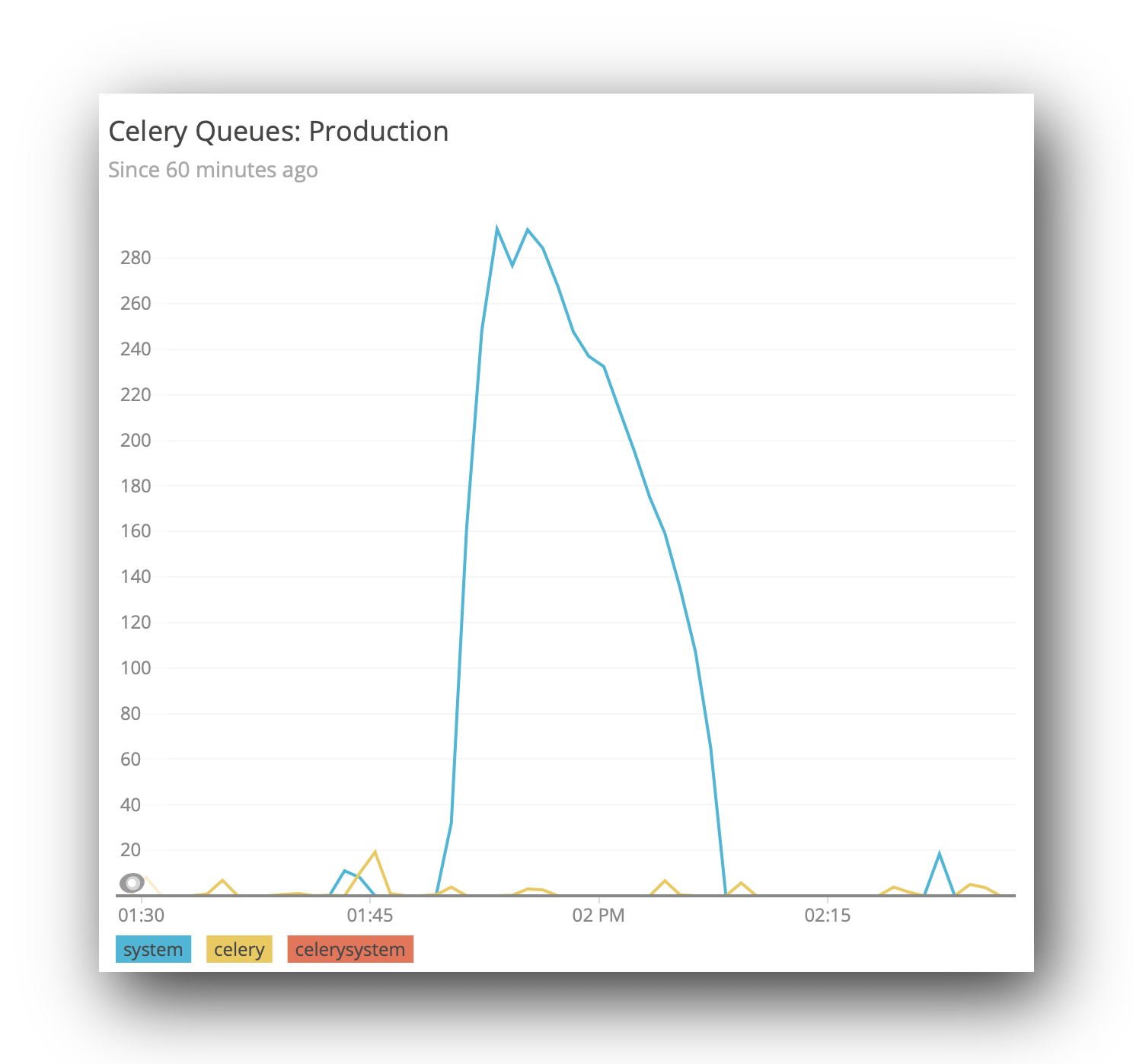
Logging Celery Queue Sizes in New Relic

Several times during the last week, I needed to know the size of one of our celery queues. In one case, it was related to my battles with celery-once, in that I needed to see if tasks were being added. Usually, however, we need to know if we have a backlog of tasks.

Whilst looking, I wound up using the curses-based celery monitor, but this shows the tasks as they are added/processed. In practice, that was actually more useful for my celery once investigations, however the other use case (how much of a backlog we currently have) is an ongoing concern.

We use NewRelic for our performance monitoring, and I’ve yet to find anything that, out of the box, will act as plugin of some sort that pushes the queue lengths to a place in NewRelic that you can then view. I had toyed with the idea of just building our own dashboard specifically for this, but that means doing things like looking at values over time would require me to (a) store the queue sizes, and (b) write visualisation tools.

NewRelic has some tools for arbitrary metrics gathering (and visualisation), under it’s Insights package. We can leverage these to get nice monitoring, without having to write any UI code.

So, it turns out we can send a JSON object (or more than one) to a specific endpoint. The data that is in here is largely arbitrary, as long as it has an eventType, and possibly an appId. The former is used to say what type of event this datum is, and the latter is useful if you have different NewRelic applications (we do). For more detail, see the documentation.

[
  {
    "eventType": "CeleryQueueSize",
    "queue": "celery",
    "length": 22,
    "appId": 12345678
  }
]

All we need now is some mechanism to (a) collect those metrics from our celery backend, and (b) send it through to NewRelic.

In our case, we are using redis, so we can client.llen(queue_name). Because I run this command on our container that runs celerybeat, and does not have very many resources, I was not able to load all of django, so made a simpler version that is just pure python:

#! /bin/env python

import os
import time

import redis
import requests

ACCOUNT_ID = 111111   # Get this from your URL in NewRelic
URL = 'https://insights-collector.newrelic.com/v1/accounts/{}/events'.format(ACCOUNT_ID)
APP_ID = 123456789    # Get this from your URL in NewRelic too.
QUEUES = ['celery', 'system']  # We have two celery queues.
API_KEY = '37a1eaba-2b8c-4f37-823d-ba4bf4391f9b'  # You will need to generate one of these.

client = redis.Redis.from_url(os.environ['CACHE_URL'])
headers = {
    'X-Insert-Key': API_KEY,
}

def send():
    data = [
        {
            'eventType': 'CeleryQueueSize',
            'queue': queue_name,
            'length': client.llen(queue_name),
            'appId': APP_ID
        } for queue_name in QUEUES
    ]
    requests.post(URL, json=data, headers=headers)


if __name__ == '__main__':
    while True:
        send()
        time.sleep(10)

Now we can have this command started automatically when our system boots (but only in one container, although you could probably have it run in multiple containers).

You’ll probably want to configure a Dashboard in Insights, but you should be able to use the Data Explorer to view the data in an ad-hoc manner.

celery queue length shown in new relic

Celery Once

Within our audit logs, which happen at the database level, we also want to be able to show the user a representation of what the object “looks like”: basically, what str(instance) is. This is shown as a supplementary thing, and often makes it easier to identify which object has been edited. Otherwise, the audit logs only show the things that have changed on the object in that event.

However, because this happens in python/django, and not in the database, we need some mechanism for fetching audit logs that don’t have this string representation, and then update those. This is the perfect use case for celery: we can have a periodic task that looks for audit logs missing this related object, and then creates them.

There are a few things that can cause problems:

  • If we run the task infrequently, then there can at times be a large number of new audit logs, which can cause this task to take a long time to run: blocking other tasks, or perhaps even timing out. We should limit the number of objects that may be handled in a given task.
  • If we run the task infrequently, there can be a big delay between an action being logged, and the representation of that action being created. This can make audit logs hard to read.
  • If we run with too few as our batch size, then we don’t deal with the backlog, or we need to run more frequently.
  • If we run too frequently, we end up spending all of our time checking for missing objects (we have tens of millions at last count), and the tasks stack up.
  • If we have multiple instances of the task running at the same time, then creation of the objects in the second finishing task can fail, because the first task has already created them. At this point, we have done a bunch of work for nothing.

The ideal behaviour is to queue a task to run somewhat frequently: perhaps every 2-5 minutes, and do a batch of a reasonable size. Then, if there are still any more objects to process, re-queue a task immediately.

But there is still the problem here of multiple tasks running at the same time. If a task has detected more missing objects, and requeued itself, and this keeps happening before the next time the scheduled task is started, we may well end up with the race condition described above. It’s possible at this time that maybe we are making more objects than we are able to process, but in our case this only happens rarely, not all of the time.

There is a project, celery-once, that will prevent multiple instances of the same task being queued at the same time. This feels like it will do exactly what we want!

@app.task(base=QueueOnce)
def fix_missing_instances(batch_size=1000):
    missing = AuditLog.objects.filter(instance_repr=None)
    InstanceRepr.objects.bulk_create([
        InstanceRepr(
            audit_log=audit_log,
            instance_repr=audit_log.build_instance_repr(),
        ) for audit_log in missing[:batch_size]
    ])

    if missing.exists():
        fix_missing_instances.apply_async(kwargs={'batch_size': batch_size}, countdown=1)

But, alas, this won’t quite work. The task is still “in the queue”, just marked as “reserved”, so celery_once will not add a new item to the queue.

As an aside, there’s actually a better pattern for knowing if there are more objects to process: we can compare the number of objects we just created to our batch size, and if they are the same, then we probably need to process more.

But, back onto the first issue. We tried to delay (using the countdown argument) our task, but this was not enough.

We can sidestep the problem using a second task, which just queues the first task:

@app.task(bind=True, base=QueueOnce)
def fix_missing_instances(self, batch_size=1000):
    missing = AuditLog.objects.filter(instance_repr=None)
    created = InstanceRepr.objects.bulk_create([
        InstanceRepr(
            audit_log=audit_log,
            instance_repr=audit_log.build_instance_repr(),
        ) for audit_log in missing[:batch_size]
    ])

    if len(created) == batch_size and not self.request.called_directly:
        requeue_fix_missing_instances.apply_async(kwargs={'batch_size': batch_size}, countdown=1)


@app.task
def requeue_fix_missing_instances(batch_size):
    fix_missing_instances.delay(batch_size=batch_size)

Note that I’ve also done the “optimisation” where it no longer does a seperate .exists() query after processing.

I also think there is a bug somewhere in celery-once related to handling the keys argument to the once dict, that can be used to limit the conditions that would indicate a task was already running (that is, with the same kwargs). But I haven’t been able to isolate this and write a test case/PR yet. In our case, we don’t really care about the task args anyway.

Postgres Generated Columns

A little while ago, I wrote about creating a nice way to have a Django ComputedField. It is pretty neat, except it needs to do some black magic to sniff up the stack to work around a limitation in the way a Ref/Col works in Django.

The way it works is that you define the expression in Python, and it evaluates it in the database, allowing you to query based on this, and have it automatically annotated on.

What it doesn’t do, however, is actually store that value in the database. Indeed, if you are actually querying on this column, you’d probably want to have a functional index that uses the same expression, so that the database can do a reasonable job of improving query times on that column.

New in Postgres 12 is a feature that really piqued my interest: Generated Columns.

These are basically what the ComputedField does, but at the database level. And, instead of it being an expression that is evaluated at query time, it is instead an expression that is evaluated at write time, and stored in an actual column (that could then have an index applied to it).

Let’s have a look at an example:

CREATE TABLE person (
  person_id integer PRIMARY KEY GENERATED BY DEFAULT AS IDENTITY,
  first_name TEXT,
  last_name TEXT,
  full_name TEXT GENERATED ALWAYS AS (
    COALESCE(first_name, '') || ' ' || COALESCE(last_name, '')
  ) STORED
);

Again, I’m aware I’m failing to note at least one of the falsehoods programmers believe about names.

Notes about this:

  • I’ve used the similar (preferred) syntax for generating the primary key.
  • You must have the keyword STORED at the end of the column definition: or more specifically, the syntax must be <column> <type> GENERATED ALWAYS AS (<expression>) STORED.
  • You may only refer to other columns within the same row: similar to how a functional index would work.
  • You may not refer to other generated columns: that would likely require parsing the expressions to determine which one to calculate first. I’d love to see postgres implement that at some point though!

So, let’s have a look at that with some data:

INSERT INTO person (first_name, last_name)
VALUES
    ('alice', 'aardvark'),
    ('bob', 'burger'),
    ('chuck', NULL),
    (NULL, 'darris');

And when we query it:

SELECT * FROM person;
 person_id │ first_name │ last_name │   full_name
 ------------------------------------------------------
         1 │ alice      │ aardvark  │ alice aardvark
         2 │ bob        │ burger    │ bob burger
         3 │ chuck      │ <NULL>    │ chuck
         4 │ <NULL>     │ darris    │  darris
(4 rows)

Oh, bother. We didn’t want the space before ‘darris’ (or the one you can’t see, after ‘chuck’). We’ll have to fix that in a sec.

So, what happens when we try to write to the full_name column?

UPDATE person SET first_name = 'dave', full_name='foo' WHERE first_name IS NULL;
ERROR:  column "full_name" can only be updated to DEFAULT
DETAIL:  Column "full_name" is a generated column.

Okay, that’s nice to know. If the error was ignored, we could have just used a custom django field and ignored the value, but we’ll need something similar to how ComputedField prevents writing values. I’ll have to investigate that further.

But, back onto the fact I forgot to trim any leading or trailing spaces. It turns out that there is no way to alter the expression that is being used in a generated column. Which, when you think a little more about it, sort-of makes sense. At the very least, it would need to write new values to each column where the new value was different to the old value.

Instead, you need to drop the column, and re-add it with the correct expression. You’ll almost certainly want to do this in a transaction:

BEGIN;
ALTER TABLE person DROP COLUMN full_name;
ALTER TABLE person ADD COLUMN full_name TEXT
      GENERATED ALWAYS AS (TRIM(
        COALESCE(first_name, '') || ' ' ||
        COALESCE(last_name, '')
      )) STORED;
COMMIT;

And now we can query our table again:

SELECT * FROM person;
 person_id │ first_name │ last_name │   full_name
 ------------------------------------------------------
         1 │ alice      │ aardvark  │ alice aardvark
         2 │ bob        │ burger    │ bob burger
         3 │ chuck      │ <NULL>    │ chuck
         4 │ <NULL>     │ darris    │ darris
(4 rows)

Sweet.