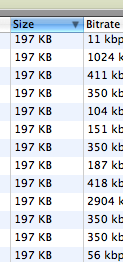
Everything is 197KB

The other day, when trying to find the old episodes of The Ricky Gervais Podcast (Series 1), I noticed something rather strange. Lots of items in the list of hits were 197KB. This made me very suspicious, as normally the podcasts were in the order of 13MB. A fairly significant difference. So I did a couple of other searches, and guess what. About 50% of everything I searched for (and I only did a couple) were 197KB. Interested, I downloaded one, and had a look inside. Aha! Setup.exe - someone is playing funny buggers. I didn’t even try to find out exactly what this file does - I’m fairly sure it isn’t really a Setup thing, just some malware. Good thing I’m on a Mac.

PostSecret

I used to work at a Swimming Pool. I can category deny ever doing the following: We used Polywaffles! Just kidding. We had to fish it out when kids shat in the pool. And then just put more chlorine in. While we are on the toilet functions theme, this one caught my eye: It’s still a bodily function week: At last, something about non-bodily functions: Damn, these pretzels are making me thirsty.

Gervais Coincidence

It still amuses me how often I come across interesting little coincidences. The other week I heard the term “Selective Service” twice in a couple of days, after not having ever heard it before, on totally different media. One was OmniNerd, the other an ABC radio podcast. And today, while listening to the latest Ricky Gervais podcast (#12), a mention was made of the story where a guy wakes up as a “Giant Beetle,” and his travails from there. And then, in this week’s PostSecret:

Weekly PostSecret

More of the best of PostSecret.

Preview Tips

MyMac.com: Macspiration 22 - Four More Hidden Preview Tricks

  1. Change the File Format. Yep, knew this one.
  2. Scan an image directly into Preview. Excellent. That’s one more reason not to have to load up Photoshop, just to scan an image!
  3. Take a Screenshot. Harder than ⌘$ (Cmd-Shift-4) for Window/Selection (Space Bar to toggle mode), or ⌘# (Cmd-Shift-3) for Screenshot. Can do timed screen, but generally don’t need this with ⌘#.
  4. Slideshow. Didn’t know it specifically, but I did know you can drag multiple documents to Preview at once and cycle through them.

So, one out of four ain’t too bad!

This Week in PostSecret

I’m continuing to archive and present the pick (IMHO) of the week’s PostSecret entries. Actually, a very similar thing happened in my family. Apparently my Dad kicked a cat, and my sister and I didn’t find out until her 21st birthday that it hadn’t been bitten by a snake. This last one is only in here for the Speeling Poleese. That’s a horde of barbarians, but people hoard things. From Apple’s Dictionary.app:


USAGE Take care not to confuse the same-sounding words hoard and horde. A hoard is ‘a secret stock or store of something’ (a hoard of treasure), while a horde is a disparaging word for ‘a large group of people’ (hordes of fans descended on the stage). One way to remember the difference is to think of ‘stashing your hoard behind the loose board’ (note the spelling likeness of hoard and board).

Invisibilia

Invisibilia Invisible Sleep I’m going to do one of these!

How not to prevent someone installing your software.

I have data in my Apple Address Book, that I’d like to merge into a Word Document (or even an AppleWorks one, if it comes to that). However, there only seems to be one way to do that - using a commercial piece of software called Office Power Pack. Which doesn’t seem to be available anymore, other than through a couple of download mirrors. So I downloaded it, just to see what it’s like. And when you go to install it, it asks for a license key. But, if you look inside the Installer.app package, you’ll find the applications that it installs. Double-clicking on one kindly informs you of where it needs to be installed to work. Dragging it there makes it work - although it doesn’t seem to be accesible from a menu within Word. • Having done this, I’m glad I didn’t pay money for this. It is limited to a subset of the Address Book data (no mobile phone, no Related Names fields, which I need), and doesn’t even keep a live query, but exports the data to a text file. Hell, I could have done this with a shell script and contacts. Or some fancy AppleScripting, almost. What I’d like to see is an ODBC connection to the Address Book. Or even better a proper link between Word and the Address Book. Perhaps Pages can do this. I might have to investigate.

Big Pile Of Metal

Driving around Wingfield, we came around the corner and saw this huge pile of Metal Rubbish. Just off Eastern Parade. Don’t know how high it was, but it was kinda scary.

Differences in Gmail

I set up a Gmail account for Jaq today - she was apparently losing some email, and this is a bit of a test to see if the problem is with our ISP, or with the forwarding service. Anyway, after setting it up, I set up Apple Mail, and noticed that some of the settings were different to how I set it up. So I switched back over to set mine up again, and looked up the settings. And my Google settings page is different, and contains vastly different information. Including using googlemail instead of gmail in the server names. And mine doesn’t have the nice pictures!

My Baby Just Cares For Me • [Nina Simone][1] • [Room Service][2] ★★

[1]: http://www.google.com/search?q=%22Nina Simone%22 [2]: http://www.google.com/search?q=%22Room Service%22