I’m pedantic about some interesting things. The one I’m best known for amongst my RealWorld™ friends is probably improper apostrophe use (I was tempted to put in apostrophe’s), although your/you’re is close! One other thing I’m a bit tetchy about is correct image format selection. Now, as far as most casual computer users are concerned, computer images are computer images. However, there is one big difference between the two main types of image format. Lossless images, which includes formats such as PNG, BMP and TIFF, and Lossy images, which includes JPEG. Perhaps to enable readers to better understand the difference, we need to understand how images are stored on a computer, or other electronic device. If you zoom in on a computer image, you will find it is made up of a series of little blocks, called pixels. Pixels are “picture elements,” and each pixel has a particular colour. The number of pixels in an image is usually very large, particularly if it’s an image from a modern digital camera, which can often exceed 7 or 8 mega- (or million) pixels. Your computer monitor, on the other hand, can probably only display 1024 pixels on each row and 768 in each column, for around 3/4 of a megapixel. Digital cameras need a higher resolution (or number of pixels) in order to enable images printed from them to be free from pixellation, or the blocky effect you see if you zoom in on a digital image.  Each pixel also has a colour, as indicated above, but it’s a little more complicated than that. An image can also have a “bit depth,” which is how many colours are “in” the picture. For a purely black and white image, this bit depth is 1 - this is how many “bits” of information are required to store the colour value, and eeach pixel is either black or white, so a bit, which can store a value of either 0 or 1, can accomodate this. For images that can have up to 8 colours, a bit depth of 3 is required. 8-bit images can store 256 colours, but even these are obviously not photographs. Full image quality is 24-bit, which can store around 16 million colours, about as many as the eye can distinguish. With 8 bits making up a byte, a full colour image from a 4 megapixel camera would take up around 12Mb in a raw format - 3 bytes for each pixel, 4 million pixels. Obviously, this is not a good way to store images. Even with cheaper memory storage, most cameras would not be able to store more than a few images. This is where Lossy compression techniques come in. JPEG, the format most people are familiar with, allows an image of this size to be compressed by around a factor of 5. That is, with an acceptable image quality, I can store 4MP images from my camera in files a bit larger than 2Mb. Note that these numbers are approximate - the quality of JPEG files can be altered by changing the compression rate. Higher compression results in smaller files, but poorer quality images. The main thing to note is that the compression technique is called Lossy for a reason. To save bytes, some image information is discarded. With a high quality setting, you might not notice it, but each time you modify and then re-save a file, you will lose some more quality. JPEG is really only designed as a final format. If you are planning on modifying files, save them in another format! Because the format is lossy, the image may not look exactly like the original. For instance, the compression algorithm isn’t designed to work with large areas of flat colour adjacent to other colours. It’s designed to cope with gradients and ranges that might appear in real life photographs, and can save heaps of space by compressing these well, but does a very poor job of compressing images that have a constant colour next to another colour, due to the way it averages out the colours in this border area. Areas of fixed colour can, on the other hand, be compressed very well by non-lossy, or lossless techniques, such as those used by PNG. Remembering that an image is a series of pixels, the compressor can instead of storing 150 bytes that are the same, store one copy of the bytes, and state that it is repeated 150 times. This is a simplification of the process, but it’s fairly representative. Lossless techniques are also found in ZIP archives. After all, when you decompress an archive of a program or text document, you want the data exactly the same, not just pretty close. The main place I see JPEGs being used where they shouldn’t be used is in screen captures. When you Cmd-Shift-3 on a Mac, or Alt-PrScr on a PC, there is a very good reason that the computer doesn’t save the image as a JPEG. For example, a screenshot from the iTunes source window, stored first as a PNG, and secondly as JPEG:
 Granted, the PNG file is 8,271 bytes, and the JPEG is 4,777 bytes, but the quality difference is obvious. The fuzziness you can see around the JPEG image is called artifacts, and I hate it! So, the moral of the story is: only use JPEGs when you really need them. Most definitely not for screenshots. I’m not bagging lossy compression. It has it’s place: it’s also very useful in music files. MPEG Layer 3 audio, or MP3, allows for about 10:1 compression, meaning files can be compressed to around 3-4Mb per song, which is very acceptable for transfer over most networks. Transferring the full amount would mean that home networks would struggle to cope with even one computer playing a song stored on another machine. Similarly, with a high quality, it’s possible to have screenshots that look acceptable. But file size savings are then not so great.
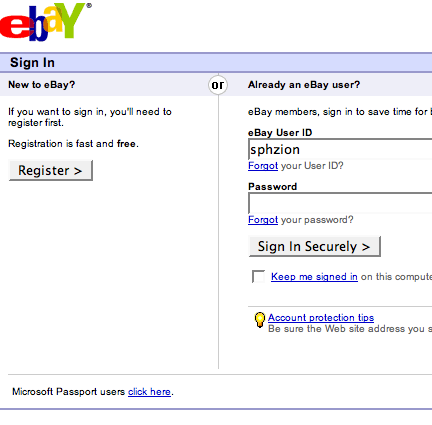 The interesting thing about this scam is that when you try to login, it fails (naturally, as the site doesn’t know your real password), but then passes you through to the real site, so that if you try again, you’ll succeed. Naturally, I entered a few fake details in, just to let him know he’s been caught. What this loser doesn’t realise is that he’s hosted this on his homepage.
 I haven’t been able to find out anything about this in the Preferences, but it seems so bizarre! Needless to say, I hadn’t been there (this was in fact from a page that was loaded by typing in the address!). A refresh on the page removes this from the referrer, so this value must be generated by Opera when a referrer doesn’t exist. I wonder if it’s a sideline business for them. Not happy, if it is. For the search engines: the address is
  What makes this one different to most that I have seen is that there aren’t any spelling or grammatical errors, or at least none I picked up on a casual read. And I tend to notice these type of errors. With no intention of putting in my real details, I copied and pasted (
 Even though there is a tipoff here: right at the bottom it says:
 Okay, so you want my Credit Card number, and the three digit authorisation code, but also my PIN? Fuck-a-duck. Anyone who puts that in there is just a wanker. Seriously, if the banks say don’t give your PIN to anyone, why would you need to give it to eBay? • I have come up with what perhaps should be the first step in testing to see if a site is a Phishing attempt or not: make up a garbage username/password combination, and see if that works. If it does, it certainly is a fake. I always try to visit Phishing sites, and create several fake usernames and passwords, in order to at least dilute the effectiveness of the attempt. If the owners have to risk noticable behaviour by typing in wrong password/username combinations, it might make the Phish less worthwhile. I’d like even more to automate scripts that hit a Phish server thousands of times, with faked usernames and passwords. One day.
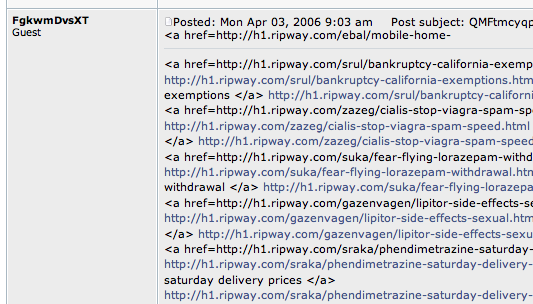 I figure that if you want to Spam forums, you should at least get the code right so it doesn’t look quite so shite. I also figured that in this thread, any link to a non-blogsome site shouldn’t really be there.