Seperating Trackbacks and Comments
- Comments:
- here.
I can’t recall if this came up on the Blogsome forums or not, but some people are keen to seperate Trackbacks and Comments in the comment list. Sometimes, and especially for people new to blogs, Trackbacks don’t seem to make that much sense, so I thought I would try doing this on Blogsome. Googling seperate trackbacks comments wordpress turned up several sites, the first one I visited was from way back in July 2004, and was way to complicated to bother with.
The second one was better, and gave me the idea of how to do it. Then I remembered that there is a Template Tag called comment_type. I duplicated the main comment: the commentlist and the {foreach} that cycles through each comment, and used the following bit of code to get the {comment_type} into a variable (so I can test it):
|
|
It’s a simple matter to test this against a known value:
|
|
And you know that you are working with a Trackback or Pingback. The first iteration of the commentlist only displays non-comments, the second only displays comments (it uses == 'Comment' instead). The last tricky bit was to figure out how to show Trackbacks from my own site in the class='owner' format (on here, in a reddish box rather than green). This required a little trick I had discovered earlier today:
|
|
And then the test is:
|
|
(This assumes you have used my previous method for styling your own comments differently). The full text of my comments.html template then:
<div id="commentarea">
{if $post->ping_status}
<p class='indented'>{_e text='The <acronym title="Uniform Resource Identifier">URI</acronym> to TrackBack this entry is:'} <em>{trackback_url}</em></p>
{/if}
<p class='indented'>{comments_rss_link link_text='<span class="rss"><abbr title="Really Simple Syndication">RSS</abbr></span> feed for comments on this post.'}</p>
<h3 class="comments">{comments_number zero="Responses" one="1 Response" more="% Responses"} to “{the_title}”
{if $post->comment_status == 'open'}
<a href="#postcomment" title="{_e text='Leave a comment';}">»</a>
{/if}
</h3>
{if $comments != ''}
{capture name=author}{the_author_email}{/capture}
{capture name=author_trackback}trackback@{bloginfo show='url'}{/capture}
<h3 class="comments">Trackbacks / Pingbacks</h3>
<ol class="commentlist">
{foreach from=$comments key=key item=comment}
{globalvar var='comment' value=$comment}
{capture name=comment_type}{comment_type}{/capture}
{if $smarty.capture.comment_type != 'Comment'}
{capture name=reader}{comment_author_email}{/capture}
{if $smarty.capture.reader == $smarty.capture.author_trackback|replace:'http://':''}
<li class="owner" id="comment-{comment_ID}">
{else}
<li class="alt" id="comment-{comment_ID}">
{/if}
From the site {comment_author_link}:
{comment_text}
Posted on {comment_date} at {comment_time}.
{edit_comment_link text="Edit this trackback", before='<span class="button">' after="</span>"}
</li>
{/if}
{/foreach}
</ol>
<h3 class="comments">Comments</h3>
<ol class="commentlist">
{foreach from=$comments key=key item=comment}
{globalvar var='comment' value=$comment}
{capture name=comment_type}{comment_type}{/capture}
{if $smarty.capture.comment_type == 'Comment'}
{capture name=reader}{comment_author_email}{/capture}
{if $smarty.capture.reader == $smarty.capture.author}
<li class="owner" id="comment-{comment_ID}">
{else}
<li class="alt" id="comment-{comment_ID}">
{/if}
<script type="text/javascript">document.write('<div class="right"><img src="http://www.gravatar.com/avatar.php?gravatar_id='); document.write(hex_md5("{comment_author_email}")); document.write('&size=50" /><\/div>'); </script>
On <a href="#comment-{comment_ID}">{comment_date} at {comment_time}</a>, {comment_author_link} said:
{comment_text}
{edit_comment_link text="Edit this comment", before='<span class="button">' after="</span>"}
</li>
{/if}
{/foreach}
</ol>
{else} _<!-- this is displayed if there are no comments so far -->_
<p class='indented'>{_e text="No comments yet."}</p>
{/if}
<h3 class="comments">{_e text="Leave a Reply"}</h3>
{if 'open' == $post->comment_status}
<form action="{$siteurl}/wp-comments-post.php" method="post" id="commentform">
<p>
<input type="text" name="author" id="author" class="textarea" value="{insert name=var var=comment_author}" size="28" tabindex="1" />
<label for="author">{_e text="Name"}</label> {if $req != ''} {_e text='(required)'} {/if}
<input type="hidden" name="comment_post_ID" value="{$post->ID}" />
<input type="hidden" name="redirect_to" value="{$redirect_to}" />
</p>
<p>
<input type="text" name="email" id="email" value="{insert name=var var=comment_author_email}" size="28" tabindex="2" />
<label for="email">{_e text="E-mail"}</label> {if $req != ''} {_e text='(required)'}{/if}
</p>
<p>
<input type="text" name="url" id="url" value="{insert name=var var=comment_author_url}" size="28" tabindex="3" />
<label for="url">{_e text="<acronym title='Uniform Resource Identifier'>URI</acronym>"}</label>
</p>
<p>
<label for="comment">{_e text="Your Comment"}</label>
<br />
<textarea name="comment" id="comment" cols="60" rows="12" tabindex="4"></textarea>
<input type="hidden" id="textarea_next_time" name="textarea_next_time" value="60,12" />
</p>
<p>
_<!--input disabled name="preview" type="image" tabindex="5" src="/images/preview.png" size="75%" /-->_
<input name="submit" type="image" tabindex="6" src="/images/post_comment.png" size="75%" />
</p>
<p>{_e text="Line and paragraph breaks automatic, e-mail address never displayed, <acronym title='Hypertext Markup Language'>HTML</acronym> allowed:"} <code>{allowed_tags}</code>, 'Smart' Smileys.</p>
</form>
{else} _<!-- comments are closed -->_
<p>{_e text="Sorry, the comment form is closed at this time."}</p>
{/if}
</div>
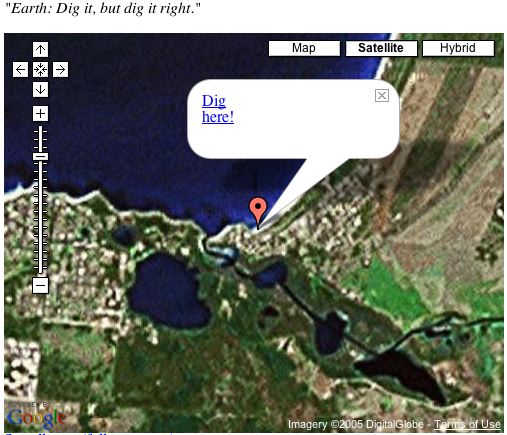 This is something I needed as a kid. Remember digging holes at the beach, and wondering whether you could “dig right through to China”. Well, if you dig straight down from Robe, South Australia, you end up in…the middle of the ocean.
 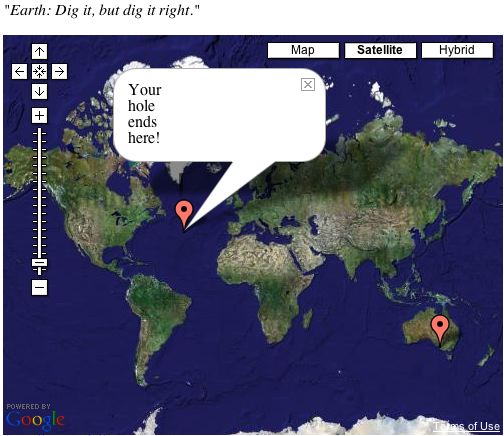 Oh well. Nice idea while it lasted. Won’t be able to pull the wool over little Jack’s eyes in the future…