Mercurial with OS X GUI tools.

Before anyone gets excited, this isn’t about the long-awaited Finder plugin that will do for hg repositories what SCPlugin does for svn repositories: adding badges to the icons and allowing operations from within the Finder.

No, this is about using two great tools, SubEthaEdit and Changes with mercurial.

Firstly, let’s look at how we can use SubEthaEdit to be the editor for commit messages.

SubEthaEdit has a command line tool, which has some useful arguments. Use man see to see them.

The first of the ones I use is -w, which waits until the file has been closed before continuing the execution of the calling program. This is a required argument, as without it your message won’t be committed properly.

The next I use is -r, which causes the application that called see to be brought to the front after closing the file. This is not completely necessary, but saves a mouse-click.

-o new-window means open the file you are planning to edit in a new window. Again, not completely necessary, and irrelevant if you don’t use tabs at all, but I find it helps me to see which file I am editing if it appears ’new'.

-m allows you to choose a particular mode to edit the file in. I have created a handy little hgCommit mode, so this can be used. I like this idea, as it means that lines that will not be committed are easily distinguished. And you can use a different background colour, so that it’s really clear what you are doing.

Finally, -j allows a custom title addition. Again, this is just a nicety, but I use it nonetheless.

The file ~/.hgrc allows you to have settings for an editor - I find that SubEthaEdit doesn’t quite work right with crontab, so I leave the EDITOR environment variable to nano. In the [ui] section of the .hgrc file, I have a line that looks like:

editor = see -w -r -o new-window -m hgCommit -j 'Mercurial Commit Message'

My hgCommit mode can also be downloaded, if you wish: hgCommit.mode.zip.

The next hint is using Changes. You’ll probably know this, if you have read the Changes WIki, but you can use the extdiff extension of Mercurial. The bit I missed is that you can also use Changes to merge by default. I wish you could do the same for diff.

To make Changes the default merge tool, create a script at /usr/local/bin/chmerge, or somewhere similar.

All that needs to go in this file is:

1
2
    #!/bin/sh
    chdiff ---wait $3 $1

And ensure it is executable. Mine is also owned by root, I think.

Then, in your .hgrc, add in the following line after your editor line:

merge = /usr/local/bin/chmerge

My final hint is how to get around errors when you have a remote filesystem mounted under sshfs, and you get an untrusted user or group error when trying to perform a mercurial operation. In my case, the files in question were owned by user 1001/group 1001. I added the following to my .hgrc:

1
2
3
    [trusted]
    users = 1001
    groups = 1001

Making EyeTV 1000x better.

One command:

defaults write com.elgato.eyetv “apple remote menu button behavior” -int 1

This made my day.

Don’t do what I did first, which was:

defaults write com.elgato.eyetv “apple remote menu button behaviour” -int 1

It still frustrates me that the world has chosen to LCD in spelling: colour and behaviour shouldn’t be spelled the USA way…

Update: this seems to cause a crash when starting Front Row. I’ve had to revert to the old behaviour. Poo.

Input Managers and the Leopard Firewall

I’d figured out some time ago that an Input Manager or two that I was using was interfering to some extent with the MacOS Leopard Firewall.

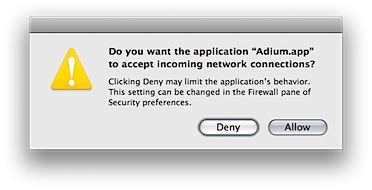
When you have the firewall in “Set access for specific services and applications” mode, and you start an application which tries to open a TCP or UDP port, then you get a message like:

openPorts.png

When you click one of the buttons, an entry is added to the preferences list:

firewallprefs.png

However, the application’s executable code is checked by the system to see that it is the same application as was run when this choice was approved. So, if you have something like an Input Manager, which alters the executable code as it is run, then you have this message appear every time you launch.

This was a real problem for me, using Inquisitor with Safari. Sure, it’s a great little tool to get the pre-search results in the browser before you press enter, but I decided it wasn’t worth the annoyance of having to click Allow each time I start up the application.

So, if you are having issues with the Firewall dialog appearing each time you start an application, and you haven’t installed a new version, consider removing any unneeded Input Mangers. You’ll probably need to remove them all to get it to stop, but that might just be worth it.

Naked Mole Rat

I swear this looks like something I have seen before. I just can’t put my penis on it…

image001.jpg

Using Dynamic DNS as (partial) authentication.

One thing that you can do with Apache is limit access to particular domains. For instance, you can have a process running on a Server that handles internal requests as well as external requests, and have the internal site never exposed to the outside internet. This can be done using the apache Allow and Deny directives.

But, sometimes I need to work remotely, and still have access to the intranet data, such as the company wiki and bugzilla database. But I don’t know which IP addresses I will be using, and whilst I can open it up to allow a range of IP addresses in, this means that someone else could see the data.

So, set up a dynamic DNS for your laptop, and put in an Allow for this DNS entry. Then, you just have to update the address whenever you want to access it - or even better, update it whenever your IP address changes. That means, even if someone comes on to the same IP address after you, as long as you have a new IP address, they won’t be able to get in.

This does point out the flaw in the system: if you log off, and don’t log back on (or don’t renew your IP address), then that person can access your intranet data. So, you should not use this as a sole means of authentication. Instead, use http authentication, or preferably, some other method of protecting access. But as a lightweight (ie, no VPN) system, this looks pretty good. It should even work if you are behind a firewall that prevents VPN access. And adding a new user requires a bit of work - creating a new Dynamic Hostname and adding this to the httpd.conf file - or wherever your server config data is stored.

It strikes me you could use sub-domains to do this, too, and have userxx.company.dyndns.org, or whatever. Then an allow of company.dyndns.org should allow anyone using a subdomain. I don’t know how you can do subdomains with DynDNS, but it may be possible with some other system. (Or, if you run your own DNS, you could come up with a method of doing it there, which gives you more flexibility. However, if you have a DNS, you can probably stretch to a VPN too).

Chess, just for fun.

We had a homework exercise the other day, that went something like this:

Consider the design a class, ChessBoard, to represent a chess board (an 8 by 8 grid of squares) where each square can have a single chess piece on it (pawn, rook, knight, bishop, king or queen) which is either black or white. Discuss the design of move methods for each type of piece. The methods should have parameters which specify where the piece currently is and where it is being moved to. Each method should check if the move is valid (the correct type of piece is on the square, the move is to a square that is on the board and it does not contain a piece of the same colour) - a proper implementation would also check that none of the other rules of chess are being violated.

Give declarations and initializations for each of the instance variables the class (ChessBoard) would need and declare any other classes necessary. Add a method to ChessBoard that will place all the pawns of a particular colour on the board. White pawns occupy the entire second row (1 pawn on each square of the second row) of the board while black pawns occupy the seventh row of the board.

Complete the implementation of the moveKnight method below and the class Position (you could just use java.awt.Point). Knights move 2 square either horizontally or vertically (along rows or columns) and then 1 square to the left or right.

boolean moveKnight(Position currentPosition, Position newPosition) { ...

Now, that was just not enough for me. So I designed and implemented, just for fun, a framework to handle all of the pieces, and all of their possible moves. I went a bit full-on: my classes are listed below.

  • ChessGame
  • ChessBoard
  • Location (each square is a Location, this makes it easy to do stuff later on)
  • Team
  • Move
  • Piece (abstract)
  • King, Queen, Bishop, Knight, Rook, Pawn

Now, most of this is fairly easy: using OO is golden for something like this, where there are stacks of cases where inheritance means you can implement it once, and this is fine for most cases, but where not you can just override it once or twice. And having this level of abstraction in each case has also been quite handy. For instance, by having a Move class, which has a Piece, and two Locations (start and finish), it’s a simple thing for me to keep a record of the game (LinkedList of Moves), and calculate things, like whether a particular piece was the last to move (for en passant).

There are actually only a couple of tricky things to worry about with Chess. Most of these are related only to the King: you have to check before each move to see that the move won’t put your team’s king into check, and if you are already in check, then ensure that the move you make takes you out of check. Otherwise, it’s a fairly simple algorithm. To set up the rules, not to actually play.

As it turns out, the Pawn is actually the hardest piece to code for, since it moves in a variety of different ways in different contexts. It’s harder to code for the normal behaviour (ignoring en passant) than it is to handle castling.

The only thing I haven’t implemented yet (apart from being able to drag and drop or click on pieces) is whether the game is in checkmate. I’m not quite sure how to do this, just yet.

Anyway, here is a screenshot of my simple chess game. It’s the biggest thing I’ve written in Java so far, and doing all of the UI code, was, as expected, a whole lot more painful than Cocoa.

Picture 1.png

I still don’t have my head around the Drag and Drop stuff to do with Java, nor really at this stage have I figured out how to make each Location clickable, and then use this to execute moves. I think I’ll make it so that a click checks to see if a piece is of the right team, and present in the chosen location, and then highlights that square so you can see what piece you are moving. Then clicking on a second Location will move that piece to there, if it is a valid move.

I guess after that, I just need to make the intelligence to play…just kidding. That might wait till I am studying AI, next semester…

Copycatting

Did you ever notice that The Gossip • Standing In The Way Of Control is a ripoff of Loverboy * Turn Me Loose?

Now, these links were obtained from the iTunes Australian Store, by right-clicking on them. But they don’t work for me when I try to use them to get back to those tracks…odd.

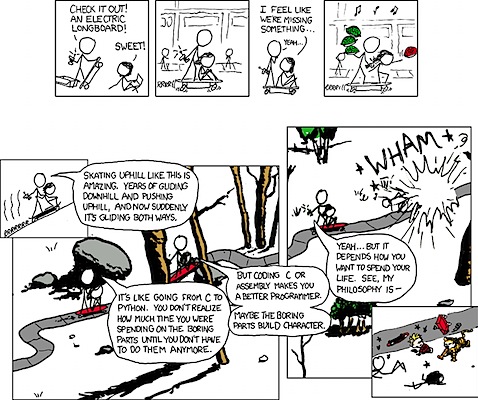
xkcd vs Calvin

electric_skateboard_double_comic.png

From xkcd - A webcomic of romance, sarcasm, math, and language - By Randall Munroe

Ah, this combines my two great loves… python and Calvin and Hobbes.

When are you starting your assignment...?

Had a funny thing happen today. Tomorrow we have an assignment due for the one topic that is actually somewhat challenging: Programming Language Concepts. The task is to write a QuickSort program in c-like Java, and implement it using both a recursive and an iterative design. There is an extension task due next week, to do the same for a MergeSort program.

I’ve been working on this since about the second week. It hasn’t consumed all of my time, but it has taken a significant number of hours of coding time, testing time, and finally several hours of run-time to gather average data. This is even before writing up the assignment, although I’ve probably done way more work than was required in this aspect.

So, when it a lab session today (which I had done before-hand, something that few students in any of my topics appear to have grasped is probably the best way to work…), one of the students mentioned he hadn’t started his yet. This had myself and another student, who have bounced several ideas and problems off one another, aghast with jaw-dropping splendour (!).

I know he was for real, as an hour or so later, in a different lab room, he was asking another student for assistance with his development. This other student was someone who had done the topic in the past, and was giving him some assistance with his algorithm development. But I don’t possibly see how he can come close to finishing a program, let alone the other stuff, by 5pm tomorrow.

It occurs to me that I was like this other student, a long time ago. No I wasn’t, I wouldn’t have even bothered.

Oh dear, I’ve turned into an annoying mature-age student who gets work done ahead of time, and answers all of the questions in class.

Revision Control as timing guide

I use Mercurial for all of my new work. It’s a great distributed revision control system. I even use it for all of my Uni programming, and other work. It allows me to easy switch back to previous checkpoints if I need to get them marked off, for instance.

The work we have been doing in one of my topics is still way to easy, although it is getting a bit better. But using Mercurial allows me to see how long each of the tasks took me to do.

Not sure how long the first Checkpoint took, as I didn’t have a commit to do then. But the next one took exactly 15 mins. The third one took 14 minutes, and the final one took 24 minutes. That last one was a fair bit of refactoring though, so that wasn’t too bad.

As for the bonus checkpoint? That can wait until morning.