iCal and Invitations

I’ve used Gmail/Calendar, and have just migrated my data back to iCal, since now I have a laptop it makes a bit more sense to have the data stored locally. There is one thing I’d like to see possible in both systems is to mark a meeting attendee as attending. It only appears to be possible to do this from the person themselves. Sometimes I speak to an attendee of a function, and they are coming, but the email or calendar system they are using does not integrate well with iCal/gCal, so the email is sent back, and I need to modify stuff manually. Google Calendar at least allows you to add “Guests”, something I haven’t yet figured out how to do with iCal. However, with iCal, it appears to be possible to script iCal, so I may be able to add this functionality.

MacBook Pro Kernel Panic WPA Enterprise

Well, I love my MacBook Pro. Except for one little thing. If I connect to a WPA Enterprise network, and I am running on battery power, then I get a Kernel Panic. Every time, within a couple of minutes. Plugging into power means no panic, using WPA personal (at home) also means no panic. Although, apparently the lack of panic at home may be more to do with the fact I’m running an Airport Express router. I’ll switch over to my other router (b-only, still WPA) and see if it panics then. Apparently, Apple is aware of the problem.

Installing Fedora 7

With the purchase of my MacBook Pro, now called arne, I’ve decided to move all of my file serving from the NSLU2 to the Dell. Rather than run Windows on this box, I decided to install Fedora. OS X just wasn’t that stable on the old thing, unsurprisingly, since it was a severely hacked version. So, I bought a new hard drive (so I can keep the OS X and Windows installations on their original disks in case I need to go back), and installed it. I made my first mistake in installing it as the Secondary Slave, since that was the only available channel. I installed Fedora, and it wouldn’t boot. So I tried again. By this time, I had figured out that it was something to do with the GRUB bootloader not being installed, so I moved the hard drives around, but still no joy. I spent ages trying to get it to work, including using a (very) old Debian CD I had lying around (which, by the way, I’d never actually installed on anything!). No joy here, as this only recognised the first 8 GB of the 320GB hard disk! Finally, I almost gave up. I started to install Windows, just to get the disk reformatted (I’d accidentally hit the power at some stage, and nothing else was recognising it). So, I let it get through the formatting stage, and then reinstalled Fedora. And finally, it worked. Now, I just need to get everything on there I need: Samba, AppleShare Filing Protocol, mDNS (Bonjour), and Print/Scan/Fax sharing. It already comes with some cool stuff, like virtualisation (I’m going to compare this to Parallels and VMWare, and choose the best), and a torent server/client. Oh, and the name of that machine is now poul. I’ve gone down the road of four letter machine names, which are also the first names of designers. Finally, this is my first offline blog post, on the train on the way home. It’s not like I could do any real work on the short trip…
DoubleCommand

The first hassle I had with the MacBook Pro is to do with the keyboard. I spend a lot of time in the Terminal, and use Control sequences (^C to break, ^A to jump to start of line, etc). However, the fn key is where I expect the ctrl key to be. Luckily, DoubleCommand can change this. You can also map something useful, like Forward Delete to the extra enter key (which I hadn’t even noticed existed!). Speaking of forward delete, you can also map Shift-Delete to this keystroke too.

Airport Express draft-n superfast!

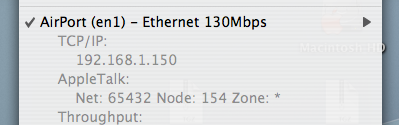
I use the excellent Menu Meters to view some important system information, including network traffic. I noticed this in the popup menu tonight: Network speed That’s right. It’s 30% faster than my wired network. I never thought the cable would be the bottleneck. Time to purchase some gigabit ethernet cards for stuff…

Apache • Scripture • Café Del Mar • Volume 8

Revision Control, or wait for Leopard?

With my new machine, it’s time to consider how I’m going to store data, and how I’m going to back it up. One thing I’ve wanted to do is have most of my data stored within an svn repository, so that I can have revision control on all of my documents. I’m not too sure how well this would work, since I’d have to remember to keep checking stuff in and out. Perhaps I’ll wait until Leopard with Time Machine arrives. Then I should be able to have revision control on all files, automatically, each time I save. In the meantime, I’ve set up a folder inside my Home directory that is called .SVN, and I’ll put all of my subversion repositories for my coding projects into there. Have considered having an external svn server, and might go this route. That way, I’d only be able to check changes in when at home, or over the internet. Might not be too useful, since I’m planning to spend lots of time coding in local Cafés, where I only have port 80 access. Perhaps I should make an ssh tunnel through port 80 at my home, so I can access my network anywhere, regardless of this restriction.

Mormon

Love this image. I can’t… I’m Mormon It looks like she really wants to, as well… (Flickr, via Limbicnutrition)

Marco...Polo!

Well, my MacBook Pro finally arrived. Sorry for not blogging about it earlier, but I had to play with it, and get a heap of stuff installed. I’ve found a heap of cool things to do with Laptop specific things, but nothing is cooler than this: MarcoPolo, which automatically chooses the Location (an OS X specific method of allowing you to have sets of settings which change depending on, well, your location), according to a user defined set of rules. Not only can you change the location, but you can also have user defined actions. So, for instance, I can have it set so that it mounts my school home directory when I get to school, and automatically mount my iTunes library server directory when I get home. You can use more than just WiFi signals to determine ‘where’ you are, such as what other devices are connected, what IP address you have, and what Bluetooth devices are nearby. The only thing I haven’t figured out is how to automatically change the Firefox proxy, which I can do with a manual action, but not yet automatically. This is why I love OS X.

WoW, or not so WOW!

Well, since I got off my arse and finally downloaded what I thought was the Burning Crusade update, but just turned out to be the original client, I’ve played about one hour, which got me to Level 6, and I’m fairly bored. I’m waiting for the extra 1.1G to download with the Burning Crusade content, but I don’t think I see myself getting back into it. Especially as most of my guild has also given it up…

Apache • Scripture • Café Del Mar • Volume 8

p2p shaping?

Well, I’ve been sitting on the 10 day demo of the Burning Crusade for a month or two, and have just started downloading the client. 3.5GB, which, maxed out will take a couple of days to download. I have to use the Blizzard Downloader program to get it, and I just discovered that turning off Peer-to-peer Downloading dramatically increases my throughput. I went from 6K/sec to 25K/sec. I wonder if this is to do with p2p shaping thatGoTalk, the people who bought out WildIT, apparently do.