Highlighting Liquid Template Blocks in Marked.app

For many years, I’ve used an old version of Jekyll to write this blog. For previewing, I use Marked.app, and one of the things I like about it is how you can get it to preprocess your Markdown files before processing by the markdown processor, or use a custom markdown processor altogether.

In my case, I use Liquid Templates, although the only part of them I use often are the syntax highlighting features. I have some neat TextMate language extensions so that I see the code blocks for Python, SQL and other languages syntax highlighted in the “proper” way for that code block.

Until recently, I think I had a custom markdown processor which used to apply the syntax highlighting so I saw them in Marked.app as I would in the browser after rendering using Jekyll, but that stopped working. So tonight, I wrote a small tool in python to use Pygments to apply the syntax highlighting.

There’s not much to it: it’s more glue code: it uses re.sub to switch out the highlight block with the syntax highlighted version. Something like:

import pathlib
import sys

from pygments import highlight
from pygments.lexers import get_lexer_by_name
from pygments.formatters.html import HtmlFormatter


def highlight_block(match):
    data = match.groupdict()
    formatter = HtmlFormatter(noclasses=True, linenos=False)
    lexer = get_lexer_by_name(data['language'], stripall=True)
    return highlight(data['code'], lexer, formatter)


re.sub(
  r'{% highlight (?P<language>.*?) %}\n(?P<code>.*?)\n{% endhighlight %}',
  highlight_block,
  pathlib.Path(sys.argv[1])
)

However, it is a bit slow to syntax highlight the files. It might be nice to cache them somewhere:

import pathlib

CACHE_DIR = pathlib.Path('/tmp/pygments-cache/')
CACHE_DIR.mkdir(exist_ok=True)


def highlight_block(match):
    data = match.groupdict()
    cache = CACHE_DIR / '{language}.{hash}.html'.format(
        hash=hash(data['code']),
        language=data['language'],
    )

    if cache.exists():
        return cache.open().read()

    formatter = HtmlFormatter(
        noclasses=True,
        linenos='linenos' in data
    )
    lexer = get_lexer_by_name(data['language'], stripall=True)
    output = pygments.highlight(data['code'], lexer, formatter)
    cache.open('w').write(output)
    return output

Now it doesn’t need to rebuild syntax highlighting for blocks that have already been highlighted, and the cache automatically invalidates when there are changes to the block.

This is almost the same solution I implemented as a Jekyll plugin to make that run a bunch faster: although this version does inline styles, which means I don’t have to use the same CSS from my blog.

This is packaged up into a command line tool, and installed using:

$ pipx install --spec \
        hg+https://hg.sr.ht/~schinckel/liquid-highlight \
        liquid_highlight

(or would be if sourcehut’s public urls worked).

Too many rows!

We had an interesting problem at work today.

It seems that the sequence on one of our tables had exceeded 231 (2147483648), and since the primary key was an SERIAL column, this was problematic. From Numeric Types, we can see that only 4 bytes were used. Not enough.

This was presenting some problems, was was only limited to two aspects of the system, neither of which meant that it was worth bringing down the rest of the system to fix it.

Since the obvious fix would have resulted in downtime of somewhere between 20 minutes and an hour, we discarded that:

ALTER TABLE big_problem_here
ALTER COLUMN id TYPE BIGINT;

We tried that on our staging database, which had far fewer rows. That took 20 minutes to rewrite the table, during which time the entire database was essentially out of order.

Instead, we came up with a different solution:

Create a new table, which is identical to the other table (including using the same sequence: this is very important), except has the bigger integer type:

CREATE TABLE big_problem_here_fixed (
  id BIGINT NOT NULL PRIMARY KEY DEFAULT nextval('big_problem_here_id_seq'::regclass),
  user_id INTEGER NOT NULL,
  ...
);

ALTER TABLE big_problem_here_fixed
ADD CONSTRAINT user_id_refs_id_6ccf0120
FOREIGN KEY (user_id) REFERENCES auth_user (id)
DEFERRABLE INITIALLY DEFERRED;

CREATE INDEX big_problem_here_fixed_user_id
ON big_problem_here_fixed(user_id);

Then, we can copy the data from the old table into the new one. This is safe, because we can’t have any new rows inserted into the old table at the moment anyway, as all writes to it occur in a transaction, and there are no cases (other than a celery task, which only runs late at night) where an update or delete is not accompanied by at least one new row.

If this happens to you: you would need to ensure that there are not any rows being updated or deleted whilst you are doing the copy, otherwise you would lose those changes.

INSERT INTO big_problem_here_fixed SELECT * FROM big_problem_here;

This part took about an hour. I’m not sure if it took longer than the staging rewrite because there is more to do in this case, or just because there is more data.

Finally, the last part. We can rename both tables in a single transaction, so there won’t be any errors from missing tables between when we rename the first and the second.

BEGIN;
  ALTER TABLE big_problem_here RENAME TO big_problem_here_replaced;
  ALTER TABLE big_problem_here_fixed RENAME TO big_problem_here;
COMMIT;

Fallback values in Django

It’s not uncommon to have some type of cascading of values in a system. For instance, in our software, we allow a Brand to have some default settings, and then a Location may override some or all of these settings, or just fallback to the brand settings. I’m going to have a look at how this type of thing can be implemented using Django, and a way that this can be handled seamlessly.

We’ll start with our models:

class Brand(models.Model):
    brand_id = models.AutoField(primary_key=True)
    name = models.TextField()


class Location(models.Model):
    location_id = models.AutoField(primary_key=True)
    brand_id = models.ForeignKey(Brand, related_name='locations')
    name = models.TextField()


WEEKDAYS = [
  (1, _('Monday')),
  (2, _('Tuesday')),
  (3, _('Wednesday')),
  (4, _('Thursday')),
  (5, _('Friday')),
  (6, _('Saturday')),
  (7, _('Sunday')),
]


class BrandSettings(models.Model):
    brand = models.OneToOneField(Brand, primary_key=True, related_name='settings')
    opening_time = models.TimeField()
    closing_time = models.TimeField()
    start_day = models.IntegerField(choices=WEEKDAYS)


class LocationSettings(models.Model):
    location = models.OneToOneField(Location, primary_key=True, related_name='_raw_settings')
    opening_time = models.TimeField(null=True, blank=True)
    closing_time = models.TimeField(null=True, blank=True)
    start_day = models.IntegerField(choices=WEEKDAYS, null=True, blank=True)

We can’t use an abstract base model here, because the LocationSettings values are all optional, but the BrandSettings are not. We might have a look later at a way we can have a base model and inherit-and-change-null on the fields. In the place where we have used this, the relationship between Location and Brand is optional, which complicates things even further.

In practice, we’d have a bunch more settings, but this will make it much easier for us to follow what is going on.

To use these, we want to use a value from the LocationSettings object if it is set, else fall-back to the BrandSettings value for that column.

Location.objects.annotate(
    opening_time=Coalesce('settings__opening_time', 'brand__settings__opening_time'),
    closing_time=Coalesce('settings__closing_time', 'brand__settings__closing_time'),
    start_day=Coalesce('settings__start_day', 'brand__settings__start_day'),
)

And this is fine, but we can make it easier to manage: we want to be able to use Location().settings.start_day, and have that fall-back, but also build some niceness so that we can set values in a nice way in the UI.

We can use a postgres view, and then have a model in front of that:

CREATE OR REPLACE VIEW location_actualsettings AS (
  SELECT location_id,
         COALESCE(location.opening_time, brand.opening_time) AS opening_time,
         COALESCE(location.closing_time, brand.closing_time) AS closing_time,
         COALESCE(location.start_day, brand.start_day) AS start_day
    FROM location_location
   INNER JOIN location_brandsettings brand USING (brand_id)
   INNER JOIN location_locationsettings location USING (location_id)
)

Notice that we have used INNER JOIN for both tables: we are making the assumption that there will always be a settings object for each brand and location.

Now, we want a model in front of this:

class ActualSettings(models.Model):
    location = models.OneToOneField(Location, primary_key=True, related_name='settings')
    opening_time = models.TimeField(null=True, blank=True)
    closing_time = models.TimeField(null=True, blank=True)
    start_day = models.IntegerField(choices=WEEKDAYS, null=True, blank=True)

    class Meta:
        managed = False

We want to indicate that it should allow NULL values in the columns, as when we go to update it, None will be taken to mean “use the brand default”.

As for the ability to write to this model, we have a couple of options. The first is to make sure that when we edit instances of the model, we actually use the Location()._raw_settings instance instead of the Location().settings. The other is to make the ActualSettings view have an update trigger:

CREATE OR REPLACE FUNCTION update_location_settings()
RETURNS TRIGGER AS $$

BEGIN

  IF (TG_OP = 'DELETE') THEN
    RAISE NOTICE 'DELETE FROM location_locationsettings WHERE location_id = %', OLD.location_id;
    DELETE FROM location_locationsettings WHERE location_id = OLD.location_id;
    RETURN OLD;
  ELSIF (TG_OP = 'UPDATE') THEN
    UPDATE location_locationsettings
       SET opening_time = NEW.opening_time,
           closing_time = NEW.closing_time,
           start_day = NEW.start_day
     WHERE location_locationsettings.location_id = NEW.location_id;
    RETURN NEW;
  ELSIF (TG_OP = 'INSERT') THEN
    INSERT INTO location_locationsettings (SELECT NEW.*);
    RETURN NEW;
  END IF;
  RETURN NEW;
END;

$$ LANGUAGE plpgsql VOLATILE;

CREATE TRIGGER update_location_settings
       INSTEAD OF INSERT OR UPDATE OR DELETE
       ON location_actualsettings
       FOR EACH ROW EXECUTE PROCEDURE update_location_settings();

And this works as expected: however it is subject to a pretty significant drawback. If you add columns to the table/view, then you’ll need to update the function. Indeed, if you add columns to the tables, you’ll need to update the view too.

In many cases, this will be sufficient: those tables may not change much, and when they do, it’s just a matter of writing new migrations to update the view and function.


In practice, having the writeable view is probably overkill. You can just use a regular view, with a model in front of it, and then use that model when you need to use the coalesced values, but use the raw model when you are setting values.

You can even make it so that as a UI affordance, you show what the brand fallback value is instead of the None value:

class SettingsForm(forms.ModelForm):
    class Meta:
        model = LocationSettings
        fields = (
            'opening_time',
            'closing_time',
            'start_day'
        )

    def __init__(self, *args, **kwargs):
        super().__init__(*args, **kwargs)
        # We'll probably want to make sure we use a select_related() for this!
        brand = self.instance.location.brand
        brand_settings = brand.settings

        for name, field in self.fields.items():
            # See if the model knows how to display a nice value.
            display = 'get_{}_display'.format(name)
            if hasattr(brand_settings, display):
                brand_value = getattr(brand_settings, display)()
            else:
                brand_value = getattr(brand_settings, name)

            # If we have a time, then we want to format it nicely:
            if isinstance(brand_value, datetime.time):
                brand_value = Template('{{ value|time }}').render(Context({
                  'value': brand_value
                }))

            blank_label = _('Default for {brand}: {value}').format(
                brand=brand.name,
                value=brand_value,
            )

            # If we have a select that is _not_ a multiple select, then we
            # want to make it obvious that the brand default value can be
            # selected, or an explicit choice made.
            if hasattr(field, 'choices') and field.choices[0][0] == '':
                field.widget.choices = field.choices = [
                    (_('Brand default'), [('', blank_label)]),
                    (_('Choices'), list(field.choices[1:]))
                ]
            else:
                # On all other fields, set the placeholder, so that no value
                # entered will show the brand default label.
                field.widget.attrs['placeholder'] = blank_label

As mentioned in a comment: this uses a couple of lookups to get to the BrandSettings, you’d want to make sure your view used a .select_related():

class LocationSettingsView(UpdateView):
    form_class = SettingsForm

    def get_object(self):
        return LocationSettings.objects.select_related('location__brand__settings').get(
            location=self.kwargs['location']
        )

Again, this is all simplified when we have the requirement that there is always a Brand associated with a Location, and each of these always has a related settings object. It’s the latter part of this that is a little tricky. You can have objects automatically created in a signal handler, but in that case it would have to use default values.


Just from a DRY perspective, it would be great if you could have all three models inherit from the one base class, and have the view and trigger function update automatically.

In order to do that, we’ll need to do a bit of magic.

class SettingsBase(models.Model):
    opening_time = models.TimeField()
    closing_time = models.TimeField()
    start_day = models.IntegerField(choices=WEEKDAYS)

    class Meta:
        abstract = True

    def __init_subclass__(cls):
        if getattr(cls, '_settings_optional', False):
            for field in cls._meta.fields:
                field.null = True
                field.blank = True


class BrandSettings(SettingsBase):
    brand = models.OneToOneField(
        Brand,
        primary_key=True,
        related_name='settings',
        on_delete=models.CASCADE,
    )


class LocationSettings(SettingsBase):
    location = models.OneToOneField(
        Location,
        primary_key=True,
        related_name='raw_settings',
        on_delete=models.CASCADE,
    )
    _settings_optional = True


class ActualSettings(SettingsBase):
    location = models.OneToOneField(
        Location,
        primary_key=True,
        related_name='settings',
        on_delete=models.DO_NOTHING,
    )
    _settings_optional

    class Meta:
        managed = False

The magic is all clustered in the one spot, and Django’s order it does things makes this easy. By the time __init_subclass__ is evaluated, the subclass exists, and has all of the inherited fields, but none of the non-inherited fields. So, we can update those fields to not be required, if we find a class attribute _settings_optional that is true.

Automatically creating or replacing the view is a bit more work.

class ActualSettings(BaseSettings):
    location = models.OneToOneField(
        Location,
        primary_key=True,
        related_name='settings',
        on_delete=models.DO_NOTHING,
    )
    _settings_optional = True

    class Meta:
        managed = False

    @classmethod
    def view_queryset(cls):
        settings = {
            attribute: Coalesce(
              'raw_settings__{}'.format(attribute),
              'brand__settings__{}'.format(attribute)
            ) for attribute in (f.name for f in cls._meta.fields)
            if attribute != 'location'
        }
        return Location.objects.annotate(**settings).values('pk', *settings.keys())

This would then need some extra machinery to put that into a migration, and then, when running makemigrations, we’d want to automatically look at the last rendered version of that view, and see if what we have now differs. However, intercepting makemigrations, and changing the operations it creates is something I have not yet figured out how to achieve.

Instead, for Versioning complex database migrations I wound up creating a new management command.

A nicer syntax might be to have some way of defining a postgres view by using a queryset.

ActualSettings = Location.objects.annotate(
    opening_time=Coalesce('_raw_settings__opening_time', 'brand__settings__opening_time'),
    closing_time=Coalesce('_raw_settings__closing_time', 'brand__settings__closing_time'),
    start_day=Coalesce('_raw_settings__start_day', 'brand__settings__start_day'),
).values('location_id', 'opening_time', 'closing_time', 'start_day').as_view()

The problem with this is that we can’t do that in a model definition, as the other models are not loaded at this point in time.

Another possible syntax could be:

class ActualSettings(View):
    location = models.F('location_id')
    opening_time = Coalesce('_raw_settings__opening_time', 'brand__settings__opening_time')
    closing_time = Coalesce('_raw_settings__closing_time', 'brand__settings__closing_time')
    start_day = Coalesce('_raw_settings__start_day', 'brand__settings__start_day')

    class Meta:
      queryset = Location.objects.all()

… but I’m starting to veer off into a different topic now.


Actually writing a trigger function that handles all columns seamlessly is something that we should be able to do. Be warned though, this one is a bit of a doozy:

CREATE OR REPLACE FUNCTION update_instead()
RETURNS TRIGGER AS $$
DECLARE
  primary_key TEXT;
  target_table TEXT;
  columns TEXT;

BEGIN
  -- You must pass as first parameter the name of the table to which writes should
  -- actually be made.
  target_table = TG_ARGV[0]::TEXT;

  -- We want to get the name of the primary key column for the target table,
  -- if that was not already supplied.
  IF (TG_ARGV[1] IS NULL) THEN
    primary_key = (SELECT column_name
                     FROM information_schema.table_constraints
               INNER JOIN information_schema.constraint_column_usage
                    USING (table_catalog, table_schema, table_name,
                           constraint_name, constraint_schema)
                    WHERE constraint_type = 'PRIMARY KEY'
                      AND table_schema = quote_ident(TG_TABLE_SCHEMA)
                      AND table_name = quote_ident(target_table));
  ELSE
    primary_key = TG_ARGV[1]::TEXT;
  END IF;

  -- We also need the names of all of the columns in the current view.
  columns = (SELECT STRING_AGG(quote_ident(column_name), ', ')
               FROM information_schema.columns
              WHERE table_schema = quote_ident(TG_TABLE_SCHEMA)
                AND table_name = quote_ident(TG_TABLE_NAME));

  IF (TG_OP = 'DELETE') THEN
    EXECUTE format(
      'DELETE FROM %1$I WHERE %2$I = ($1).%2$I',
      target_table, primary_key
    ) USING OLD;
    RETURN OLD;
  ELSIF (TG_OP = 'INSERT') THEN
    -- columns must be treated as a string, because we've already
    -- quoted the columns in the query above.
    EXECUTE format(
      'INSERT INTO %1$I (%2$s) (SELECT ($1).*)',
      target_table, columns
    ) USING NEW;
    RETURN NEW;
  ELSIF (TG_OP = 'UPDATE') THEN
    EXECUTE format(
      'UPDATE %1$I SET (%2$s) = (SELECT ($1).*) WHERE %3$I = ($1).%3$I',
      target_table, columns, primary_key
    ) USING NEW;
    RETURN NEW;
  END IF;

  RAISE EXCEPTION 'Unhandled.';
END;

$$ LANGUAGE plpgsql VOLATILE;

There are some things I learned about postgres when doing this: specifically that you can use the EXECUTE format('SELECT ... ($1).%s', arg) USING NEW syntax: the format() function makes it much neater than using string concatenation, and using the EXECUTE '...($1).%s' USING ... form was the only way I was able to access the values from the NEW and OLD aliases within an execute. There’s also a bunch of stuff you have to do to make sure that the columns line up correctly when updating or inserting into the target table.

We can then apply this to our view:

CREATE TRIGGER update_instead
INSTEAD OF UPDATE OR INSERT OR DELETE
ON location_actualsettings
FOR EACH ROW
EXECUTE PROCEDURE update_instead('location_locationsettings', 'location_id');

Logging Celery Queue Sizes in New Relic

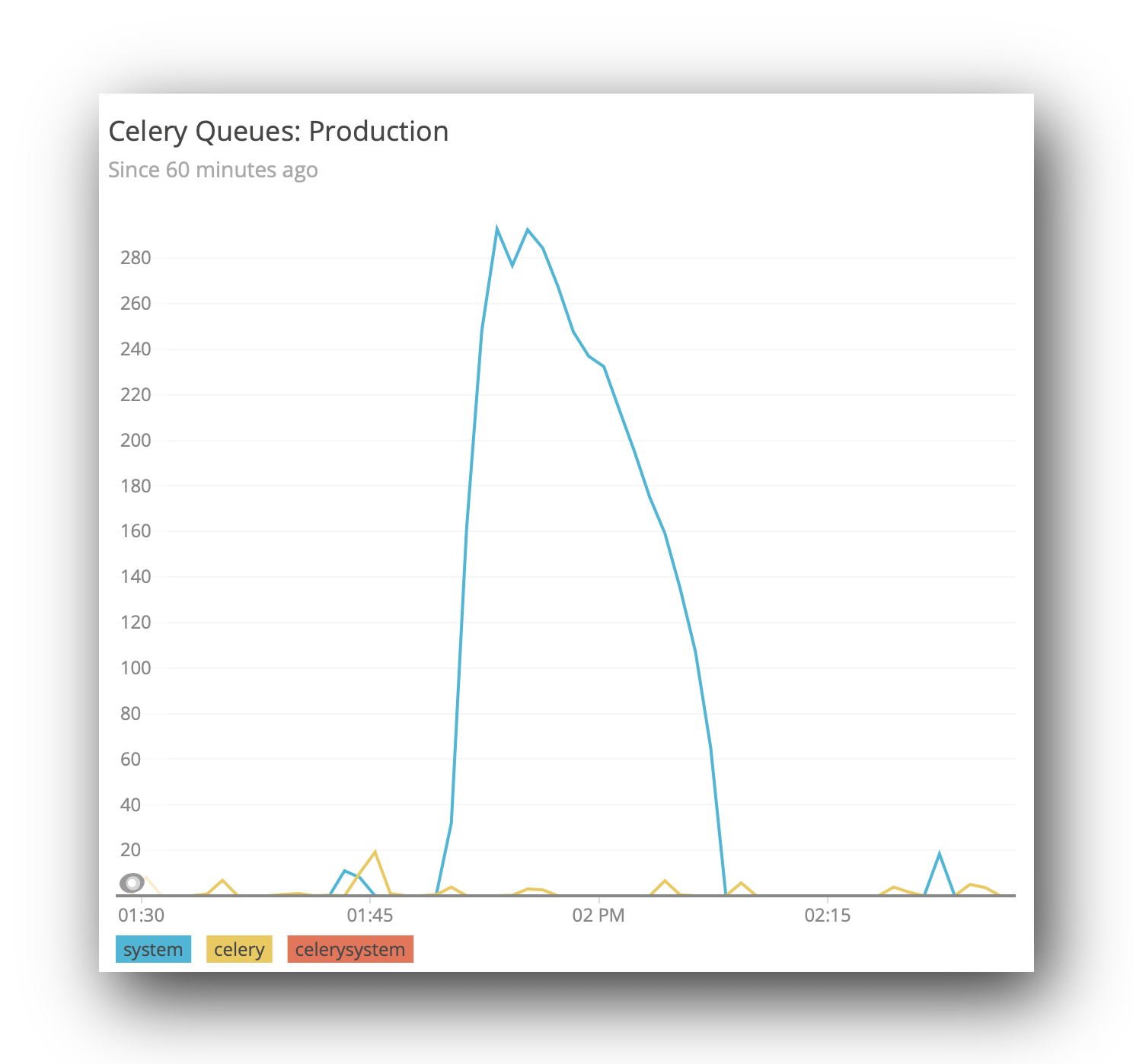
Several times during the last week, I needed to know the size of one of our celery queues. In one case, it was related to my battles with celery-once, in that I needed to see if tasks were being added. Usually, however, we need to know if we have a backlog of tasks.

Whilst looking, I wound up using the curses-based celery monitor, but this shows the tasks as they are added/processed. In practice, that was actually more useful for my celery once investigations, however the other use case (how much of a backlog we currently have) is an ongoing concern.

We use NewRelic for our performance monitoring, and I’ve yet to find anything that, out of the box, will act as plugin of some sort that pushes the queue lengths to a place in NewRelic that you can then view. I had toyed with the idea of just building our own dashboard specifically for this, but that means doing things like looking at values over time would require me to (a) store the queue sizes, and (b) write visualisation tools.

NewRelic has some tools for arbitrary metrics gathering (and visualisation), under it’s Insights package. We can leverage these to get nice monitoring, without having to write any UI code.

So, it turns out we can send a JSON object (or more than one) to a specific endpoint. The data that is in here is largely arbitrary, as long as it has an eventType, and possibly an appId. The former is used to say what type of event this datum is, and the latter is useful if you have different NewRelic applications (we do). For more detail, see the documentation.

[
  {
    "eventType": "CeleryQueueSize",
    "queue": "celery",
    "length": 22,
    "appId": 12345678
  }
]

All we need now is some mechanism to (a) collect those metrics from our celery backend, and (b) send it through to NewRelic.

In our case, we are using redis, so we can client.llen(queue_name). Because I run this command on our container that runs celerybeat, and does not have very many resources, I was not able to load all of django, so made a simpler version that is just pure python:

#! /bin/env python

import os
import time

import redis
import requests

ACCOUNT_ID = 111111   # Get this from your URL in NewRelic
URL = 'https://insights-collector.newrelic.com/v1/accounts/{}/events'.format(ACCOUNT_ID)
APP_ID = 123456789    # Get this from your URL in NewRelic too.
QUEUES = ['celery', 'system']  # We have two celery queues.
API_KEY = '37a1eaba-2b8c-4f37-823d-ba4bf4391f9b'  # You will need to generate one of these.

client = redis.Redis.from_url(os.environ['CACHE_URL'])
headers = {
    'X-Insert-Key': API_KEY,
}

def send():
    data = [
        {
            'eventType': 'CeleryQueueSize',
            'queue': queue_name,
            'length': client.llen(queue_name),
            'appId': APP_ID
        } for queue_name in QUEUES
    ]
    requests.post(URL, json=data, headers=headers)


if __name__ == '__main__':
    while True:
        send()
        time.sleep(10)

Now we can have this command started automatically when our system boots (but only in one container, although you could probably have it run in multiple containers).

You’ll probably want to configure a Dashboard in Insights, but you should be able to use the Data Explorer to view the data in an ad-hoc manner.

celery queue length shown in new relic

Celery Once

Within our audit logs, which happen at the database level, we also want to be able to show the user a representation of what the object “looks like”: basically, what str(instance) is. This is shown as a supplementary thing, and often makes it easier to identify which object has been edited. Otherwise, the audit logs only show the things that have changed on the object in that event.

However, because this happens in python/django, and not in the database, we need some mechanism for fetching audit logs that don’t have this string representation, and then update those. This is the perfect use case for celery: we can have a periodic task that looks for audit logs missing this related object, and then creates them.

There are a few things that can cause problems:

  • If we run the task infrequently, then there can at times be a large number of new audit logs, which can cause this task to take a long time to run: blocking other tasks, or perhaps even timing out. We should limit the number of objects that may be handled in a given task.
  • If we run the task infrequently, there can be a big delay between an action being logged, and the representation of that action being created. This can make audit logs hard to read.
  • If we run with too few as our batch size, then we don’t deal with the backlog, or we need to run more frequently.
  • If we run too frequently, we end up spending all of our time checking for missing objects (we have tens of millions at last count), and the tasks stack up.
  • If we have multiple instances of the task running at the same time, then creation of the objects in the second finishing task can fail, because the first task has already created them. At this point, we have done a bunch of work for nothing.

The ideal behaviour is to queue a task to run somewhat frequently: perhaps every 2-5 minutes, and do a batch of a reasonable size. Then, if there are still any more objects to process, re-queue a task immediately.

But there is still the problem here of multiple tasks running at the same time. If a task has detected more missing objects, and requeued itself, and this keeps happening before the next time the scheduled task is started, we may well end up with the race condition described above. It’s possible at this time that maybe we are making more objects than we are able to process, but in our case this only happens rarely, not all of the time.

There is a project, celery-once, that will prevent multiple instances of the same task being queued at the same time. This feels like it will do exactly what we want!

@app.task(base=QueueOnce)
def fix_missing_instances(batch_size=1000):
    missing = AuditLog.objects.filter(instance_repr=None)
    InstanceRepr.objects.bulk_create([
        InstanceRepr(
            audit_log=audit_log,
            instance_repr=audit_log.build_instance_repr(),
        ) for audit_log in missing[:batch_size]
    ])

    if missing.exists():
        fix_missing_instances.apply_async(kwargs={'batch_size': batch_size}, countdown=1)

But, alas, this won’t quite work. The task is still “in the queue”, just marked as “reserved”, so celery_once will not add a new item to the queue.

As an aside, there’s actually a better pattern for knowing if there are more objects to process: we can compare the number of objects we just created to our batch size, and if they are the same, then we probably need to process more.

But, back onto the first issue. We tried to delay (using the countdown argument) our task, but this was not enough.

We can sidestep the problem using a second task, which just queues the first task:

@app.task(bind=True, base=QueueOnce)
def fix_missing_instances(self, batch_size=1000):
    missing = AuditLog.objects.filter(instance_repr=None)
    created = InstanceRepr.objects.bulk_create([
        InstanceRepr(
            audit_log=audit_log,
            instance_repr=audit_log.build_instance_repr(),
        ) for audit_log in missing[:batch_size]
    ])

    if len(created) == batch_size and not self.request.called_directly:
        requeue_fix_missing_instances.apply_async(kwargs={'batch_size': batch_size}, countdown=1)


@app.task
def requeue_fix_missing_instances(batch_size):
    fix_missing_instances.delay(batch_size=batch_size)

Note that I’ve also done the “optimisation” where it no longer does a seperate .exists() query after processing.

I also think there is a bug somewhere in celery-once related to handling the keys argument to the once dict, that can be used to limit the conditions that would indicate a task was already running (that is, with the same kwargs). But I haven’t been able to isolate this and write a test case/PR yet. In our case, we don’t really care about the task args anyway.

Opening Hours Redux

A few years ago, I wrote up some stuff about Postgres Composite Types in Django. Holy cow, that appears to be 5 years ago.

Anyway, it’s come up a bit recently on #postgresql on IRC, and I thought I might expand a little on how I’m currently using that concept, and some ideas that could be used to do more.

The composite type itself is quite straightforward: we store two values representing the opening time, and then the length of time that the business is open. This allows us to model things that go over midnight without having to worry about a bunch of checks about (start > finish), and whatever that means.

CREATE TYPE open_period AS (
  start TIME,
  length INTERVAL
);

We could have use a DOMAIN TYPE to limit the length to less than or equal to 24 hours, however I’ll omit that for now.

From there, we can use the new type wherever we would use any other type: including in an array.

CREATE TABLE stores (
  store_id SERIAL PRIMARY KEY,
  name TEXT,
  default_opening_hours open_period[7]
);

Nothing new here since the last post.

However, let’s look at coming up with a mechanism that prevents subsequent days from overlapping with one another. Since we have all of these in an array, we can write a single function that ensures the values are acceptable together. There are a couple of different approaches we could use. One would be to “materialise” the open periods, and then compare them to one another.

CREATE OR REPLACE FUNCTION materialise(open_period, DATE)
RETURNS TSRANGE AS $$

  SELECT TSRANGE(
    ($2 || 'T' || $1.start || 'Z')::TIMESTAMP,
    ($2 || 'T' || $1.start || 'Z')::TIMESTAMP + $1.length
  );

$$ LANGUAGE SQL STRICT IMMUTABLE;


CREATE OR REPLACE FUNCTION materialise(open_period)
RETURNS TSRANGE AS $$

  SELECT materialise($1, '1979-01-01'::DATE);

$$ LANGUAGE SQL STRICT IMMUTABLE;

We have a version there that takes a specific day, but also one that just uses the epoch date. That may be useful later…

…but right now we want to be able to apply subsequent days to each item in the array, and then look for overlaps.

WITH default_opening_hours AS (
  SELECT UNNEST(ARRAY[
    ('09:00', '08:00')::open_period,  -- Monday, but we won't really use that today.
    ('09:00', '08:00')::open_period,
    ('09:00', '08:00')::open_period,
    ('09:00', '12:00')::open_period,
    ('09:00', '08:00')::open_period,
    ('10:00', '07:00')::open_period,
    ('11:00', '06:00')::open_period
  ]) AS hours
), materialised_opening_hours AS (
  SELECT materialise(hours, (now() + INTERVAL '1 day' * row_number() OVER ())::DATE) AS hours
    FROM default_opening_hours
), overlapping_periods AS (
  SELECT hours && LEAD(hours, 1) OVER () AS overlap
    FROM materialised_opening_hours
)
SELECT * FROM overlapping_periods WHERE overlap;

We don’t (at this point in time) really mind if the weekdays that the open periods refer to is the correct weekday: instead we just need to ensure that we have 7 consecutive days, with the sequence of open_periods materialised to the correct value based on the offset from the first day.

This is pretty close: it will find any overlaps between days, except for if the finish of the last day overlaps with the start of the next day. We can cheat a little to make that work:

WITH default_opening_hours AS (
  SELECT UNNEST(ARRAY[
    ('09:00', '08:00')::open_period,
    ('09:00', '08:00')::open_period,
    ('09:00', '08:00')::open_period,
    ('09:00', '12:00')::open_period,
    ('09:00', '08:00')::open_period,
    ('10:00', '07:00')::open_period,
    ('11:00', '06:00')::open_period
  ]) AS hours
), materialised_opening_hours AS (
  SELECT materialise(hours, (now() + INTERVAL '1 day' * row_number() OVER ())::DATE) AS hours
    FROM default_opening_hours

   UNION ALL

  SELECT materialise((SELECT hours FROM default_opening_hours LIMIT 1),
                     (now() + INTERVAL '8 days')::DATE
  )
), overlapping_periods AS (
  SELECT hours && LEAD(hours, 1) OVER () AS overlap
    FROM materialised_opening_hours
)
SELECT * FROM overlapping_periods WHERE overlap;

Let’s put a couple of values in there to see that the overlaps are detected:

WITH default_opening_hours AS (
  SELECT UNNEST(ARRAY[
    ('09:00', '08:00')::open_period,
    ('09:00', '08:00')::open_period,
    ('09:00', '28:00')::open_period,
    ('09:00', '12:00')::open_period,
    ('09:00', '08:00')::open_period,
    ('10:00', '07:00')::open_period,
    ('11:00', '24:00')::open_period
  ]) AS hours
), materialised_opening_hours AS (
  SELECT materialise(hours, (now() + INTERVAL '1 day' * row_number() OVER ())::DATE) AS hours
    FROM default_opening_hours

   UNION ALL

  SELECT materialise((SELECT hours FROM default_opening_hours LIMIT 1),
                     (now() + INTERVAL '8 days')::DATE)
), overlapping_periods AS (
  SELECT hours && LEAD(hours, 1) OVER () AS overlap
    FROM materialised_opening_hours
)
SELECT * FROM overlapping_periods WHERE overlap;
 overlap
─────────
 t
 t
(2 rows)

Now, we can bundle this up into a function that we can then use in a CHECK CONSTRAINT (as we cannot use a subquery directly in a check constraint):

CREATE OR REPLACE FUNCTION find_subsequent_day_overlaps(open_period[])
RETURNS BOOLEAN AS $$
  SELECT NOT EXISTS (
      WITH materialised_opening_hours AS (
        SELECT materialise(hours, (now() + INTERVAL '1 day' * row_number() OVER ())::DATE) AS hours
          FROM unnest($1) hours

         UNION ALL

        SELECT materialise($1[1], (now() + INTERVAL '8 days')::DATE)
      ), overlapping_periods AS (
        SELECT hours && LEAD(hours, 1) OVER () AS overlap FROM materialised_opening_hours
      )
      SELECT * FROM overlapping_periods WHERE overlap
    )
$$ LANGUAGE SQL STRICT IMMUTABLE;
ALTER TABLE store
ADD CONSTRAINT prevent_default_opening_hours_overlap
CHECK (find_subsequent_day_overlaps(default_opening_hours));

And, now to check:

INSERT INTO stores (name, default_opening_hours) VALUES
(
  'John Martins',
  ARRAY[
    ('09:00', '08:00')::open_period,
    ('09:00', '08:00')::open_period,
    ('09:00', '08:00')::open_period,
    ('09:00', '12:00')::open_period,
    ('09:00', '08:00')::open_period,
    ('10:00', '07:00')::open_period,
    ('11:00', '06:00')::open_period
  ]
);

And with invalid data:

INSERT INTO stores (name, default_opening_hours) VALUES (
  'Foo',
  ARRAY[('09:00', '08:00')::open_period,
        ('09:00', '08:00')::open_period,
        ('09:00', '08:00')::open_period,
        ('09:00', '12:00')::open_period,
        ('09:00', '08:00')::open_period,
       ('10:00', '07:00')::open_period,
       ('11:00', '24:00')::open_period]);

…which throws an exception:

ERROR:  new row for relation "store" violates check constraint "prevent_default_opening_hours_overlap"
DETAIL:  Failing row contains (2, Foo, {"(09:00:00,08:00:00)","(09:00:00,08:00:00)","(09:00:00,08:00:00...).

Righto, what other things might we want to do with these composite types?

Some businesses have a concept of “Day Parts”, for instance, within a single day we may want to look at a sub-set of that day. For instance, sales during Breakfast may have a different set of Key Performance Indicators than those during Lunch or Tea. So, we may want to store something like:

+------------+------------+-------------+
| Day Period | Start time | Finish time |
+============+============+=============+
| Breakfast  |    06:00   |     10:00   |
| Lunch      |    11:00   |     14:00   |
| Tea        |    16:00   |     21:00   |
+------------+------------+-------------+

Again, it might make sense to store these as an open_period instead, because they could go over midnight. We’ll also want the name to be unique per store, but that’s something we can do with a plain old unique index:

CREATE TABLE day_parts (
  day_part_id SERIAL PRIMARY KEY,
  store_id INTEGER REFERENCES stores(store_id),
  name TEXT,
  period OPEN_PERIOD
);
CREATE UNIQUE INDEX distinct_name_per_day_period ON day_parts (store_id, name)

We can use an exclusion constraint to prevent overlaps, however you may need to enable support first:

CREATE EXTENSION btree_gist;

Now, let’s see the exclusion constraint:

ALTER TABLE day_parts
ADD CONSTRAINT prevent_overlapping_day_parts
EXCLUDE USING gist(
  materialise(period) WITH &&,
  store_id WITH =
);

Turns out that is actually easier to implement than the values in the array!


The other thing we may want to do is annotate on the Day Period to an object of some sort. To do this we will need to materialise all of the day periods for the given day(s), and see which one of them our timestamp is within. We will expand on a couple of things here: specifically, we need to have a timezone within which our store is located. To make things easier to follow, we will have all of the DDL code anew. This is partly because this example will not use the concept of default opening hours.

CREATE TABLE stores (
  store_id SERIAL PRIMARY KEY,
  name TEXT UNIQUE NOT NULL,
  timezone TEXT NOT NULL CHECK (now() AT TIME ZONE timezone IS NOT NULL)
  -- Note we validate that this column contains a valid timezone by
  -- attempting to coerce now() to that timezone: this will report
  -- back an error if the timezone name is not recognised.
);

CREATE TABLE day_parts (
  day_part_id SERIAL PRIMARY KEY,
  store_id INTEGER REFERENCES stores (store_id),
  name TEXT,
  period OPEN_PERIOD,
  CONSTRAINT prevent_overlapping_day_parts EXCLUDE USING gist(
    materialise(period) WITH &&,
    store_id WITH =
  )
);

CREATE UNIQUE INDEX distinct_name_per_day_period ON day_parts(store_id, name);

CREATE TABLE transactions (
  transaction_id SERIAL PRIMARY KEY,
  store_id INTEGER REFERENCES stores (store_id),
  timestamp TIMESTAMPTZ,
  amount NUMERIC
);

And now add some data:

INSERT INTO stores (name, timezone)
     VALUES ('John Martins', 'Australia/Adelaide');

INSERT INTO day_parts (store_id, name, period)
     VALUES (1, 'Morning',   ('09:00', '02:00')),
            (1, 'Lunch',     ('11:00', '03:00')),
            (1, 'Afternoon', ('14:00', '03:00')),
            (1, 'Evening',   ('17:00', '04:00'));


INSERT INTO transactions (store_id, timestamp, amount)
     VALUES (1, '2019-05-27T01:25:22', '33.77'),
            (1, '2019-05-27T04:33:47', '724.75'),
            (1, '2019-05-27T06:00:42', '47.48'),
            (1, '2019-05-27T08:33:12', '3.44');

The first thing we want to do is show the transactions at the time it was in the store when they were completed:

SELECT transactions.*,
       transactions.timestamp AT TIME ZONE stores.timezone AS local_time
  FROM transactions
 INNER JOIN stores USING (store_id)
 transaction_id │ store_id │       timestamp        │ amount │     local_time
              1 │        1 │ 2019-05-27 01:25:22+00 │  33.77 │ 2019-05-27 10:55:22
              2 │        1 │ 2019-05-27 04:33:47+00 │ 724.75 │ 2019-05-27 14:03:47
              3 │        1 │ 2019-05-27 06:00:42+00 │  47.48 │ 2019-05-27 15:30:42
              4 │        1 │ 2019-05-27 08:33:12+00 │   3.44 │ 2019-05-27 18:03:12

Next, we want to annotate on which day part corresponds to that local time:

SELECT trans.*,
       day_part.name AS day_part
  FROM (
    SELECT transactions.*,
           transactions.timestamp AT TIME ZONE stores.timezone AS local_time
      FROM transactions
     INNER JOIN stores USING (store_id)
  ) trans
  LEFT OUTER JOIN LATERAL (
    SELECT materialise(day_parts.period, trans.local_time::DATE) AS day_part,
           day_parts.name
      FROM day_parts
     WHERE day_parts.store_id = trans.store_id
  ) day_part ON (day_part @> local_time)
 transaction_id │ store_id │       timestamp        │ amount │     local_time      │ day_part
────────────────┼──────────┼────────────────────────┼────────┼─────────────────────┼───────────
              1 │        1 │ 2019-05-27 01:25:22+00 │  33.77 │ 2019-05-27 10:55:22 │ Morning
              2 │        1 │ 2019-05-27 04:33:47+00 │ 724.75 │ 2019-05-27 14:03:47 │ Afternoon
              3 │        1 │ 2019-05-27 06:00:42+00 │  47.48 │ 2019-05-27 15:30:42 │ Afternoon
              4 │        1 │ 2019-05-27 08:33:12+00 │   3.44 │ 2019-05-27 18:03:12 │ Evening

From there, we could look at aggregation within day parts, or comparisons between different days, but only the same day part.


Those of you paying attention may notice that I used TSRANGE instead of TSTZRANGE in the materialise functions. Can we look at a version of these functions that accepts a timezone as well as a date (and open_period), and gives back a TSTZRANGE?

CREATE OR REPLACE FUNCTION materialise(open_period, DATE, timezone TEXT)
RETURNS TSTZRANGE AS $$

  SELECT TSTZRANGE(
    ($2 || 'T' || $1.start)::TIMESTAMP AT TIME ZONE timezone,
    (($2 || 'T' || $1.start)::TIMESTAMP + $1.length) AT TIME ZONE timezone
  );

$$ LANGUAGE SQL STRICT IMMUTABLE;

Now we can rewrite our last query:

SELECT transactions.*,
       day_part.name AS day_part
  FROM transactions
  LEFT OUTER JOIN LATERAL (
    SELECT materialise(day_parts.period, transactions.timestamp::DATE, stores.timezone) AS day_part,
           day_parts.name
      FROM day_parts
      INNER JOIN stores USING (store_id)
     WHERE day_parts.store_id = transactions.store_id
  ) day_part ON (day_part.day_part @> transactions.timestamp)
 transaction_id │ store_id │       timestamp        │ amount │ day_part
              1 │        1 │ 2019-05-27 01:25:22+00 │  33.77 │ Morning
              2 │        1 │ 2019-05-27 04:33:47+00 │ 724.75 │ Afternoon
              3 │        1 │ 2019-05-27 06:00:42+00 │  47.48 │ Afternoon
              4 │        1 │ 2019-05-27 08:33:12+00 │   3.44 │ Evening

Although, I think this might be a bit harder to do aggregation per-day, because you’d still need to get the “local” timestamp to put them on the same day, although, that’s actually part of the materialisation of the store’s full open period anyway.
Postgres Generated Columns

A little while ago, I wrote about creating a nice way to have a Django ComputedField. It is pretty neat, except it needs to do some black magic to sniff up the stack to work around a limitation in the way a Ref/Col works in Django.

The way it works is that you define the expression in Python, and it evaluates it in the database, allowing you to query based on this, and have it automatically annotated on.

What it doesn’t do, however, is actually store that value in the database. Indeed, if you are actually querying on this column, you’d probably want to have a functional index that uses the same expression, so that the database can do a reasonable job of improving query times on that column.

New in Postgres 12 is a feature that really piqued my interest: Generated Columns.

These are basically what the ComputedField does, but at the database level. And, instead of it being an expression that is evaluated at query time, it is instead an expression that is evaluated at write time, and stored in an actual column (that could then have an index applied to it).

Let’s have a look at an example:

CREATE TABLE person (
  person_id integer PRIMARY KEY GENERATED BY DEFAULT AS IDENTITY,
  first_name TEXT,
  last_name TEXT,
  full_name TEXT GENERATED ALWAYS AS (
    COALESCE(first_name, '') || ' ' || COALESCE(last_name, '')
  ) STORED
);

Again, I’m aware I’m failing to note at least one of the falsehoods programmers believe about names.

Notes about this:

  • I’ve used the similar (preferred) syntax for generating the primary key.
  • You must have the keyword STORED at the end of the column definition: or more specifically, the syntax must be <column> <type> GENERATED ALWAYS AS (<expression>) STORED.
  • You may only refer to other columns within the same row: similar to how a functional index would work.
  • You may not refer to other generated columns: that would likely require parsing the expressions to determine which one to calculate first. I’d love to see postgres implement that at some point though!

So, let’s have a look at that with some data:

INSERT INTO person (first_name, last_name)
VALUES
    ('alice', 'aardvark'),
    ('bob', 'burger'),
    ('chuck', NULL),
    (NULL, 'darris');

And when we query it:

SELECT * FROM person;
 person_id │ first_name │ last_name │   full_name
 ------------------------------------------------------
         1 │ alice      │ aardvark  │ alice aardvark
         2 │ bob        │ burger    │ bob burger
         3 │ chuck      │ <NULL>    │ chuck
         4 │ <NULL>     │ darris    │  darris
(4 rows)

Oh, bother. We didn’t want the space before ‘darris’ (or the one you can’t see, after ‘chuck’). We’ll have to fix that in a sec.

So, what happens when we try to write to the full_name column?

UPDATE person SET first_name = 'dave', full_name='foo' WHERE first_name IS NULL;
ERROR:  column "full_name" can only be updated to DEFAULT
DETAIL:  Column "full_name" is a generated column.

Okay, that’s nice to know. If the error was ignored, we could have just used a custom django field and ignored the value, but we’ll need something similar to how ComputedField prevents writing values. I’ll have to investigate that further.

But, back onto the fact I forgot to trim any leading or trailing spaces. It turns out that there is no way to alter the expression that is being used in a generated column. Which, when you think a little more about it, sort-of makes sense. At the very least, it would need to write new values to each column where the new value was different to the old value.

Instead, you need to drop the column, and re-add it with the correct expression. You’ll almost certainly want to do this in a transaction:

BEGIN;
ALTER TABLE person DROP COLUMN full_name;
ALTER TABLE person ADD COLUMN full_name TEXT
      GENERATED ALWAYS AS (TRIM(
        COALESCE(first_name, '') || ' ' ||
        COALESCE(last_name, '')
      )) STORED;
COMMIT;

And now we can query our table again:

SELECT * FROM person;
 person_id │ first_name │ last_name │   full_name
 ------------------------------------------------------
         1 │ alice      │ aardvark  │ alice aardvark
         2 │ bob        │ burger    │ bob burger
         3 │ chuck      │ <NULL>    │ chuck
         4 │ <NULL>     │ darris    │ darris
(4 rows)

Sweet.

Form and Formset

Sometimes, you’ll have an object that you want to save, and, at the same time, some related objects that should also be updated, created and/or deleted.

Django has really nice tools for doing both of these operations (ModelForm for the individual instance, and InlineFormSet for the group of related objects). Both of these are really well documented. However, it is nice to be able to encapsulate these operations into a single functional unit.

We can leverage the fact that all request data is passed to a form class when it is instantiated, along with some nice use of the django cached_property decorator to make this really quite neat.

Let’s consider this model structure: we have a Person, and each Person may have zero or more Addresses. Every Person has a name, and an optional date of birth. All of the fields for the address are required:

class Person(models.Model):
    name = models.TextField()
    date_of_birth = models.DateField(null=True, blank=True)


class Address(models.Model):
    person = models.ForeignKey(Person, related_name='addresses')
    street = models.TextField()
    suburb = models.TextField()
    postcode = models.TextField()
    country = django_countries.fields.CountryField()

We can have a view for updating the Person model instance that is very simple:

class PersonForm(forms.ModelForm):
    name = forms.TextInput()
    date_of_birth = forms.DateInput()

    class Meta:
        model = Person
        fields = ('name', 'date_of_birth')


class UpdatePerson(UpdateView):
    form_class = PersonForm

Likewise, we can have a view for updating a person’s addresses:

AddressFormSet = inlineformset_factory(
    Person,
    Address,
    fields=('street', 'suburb', 'postcode', 'country'),
)


class UpdateAddresses(UpdateView):
    form_class = AddressFormSet

As mentioned above, we’d like to have a page where a Person’s name, date of birth and addresses may be modified in one go, rather than having to have two seperate pages.

from django.utils.functional import cached_property
from django.utils.translation import ugettext as _


class PersonForm(forms.ModelForm):
    name = forms.TextInput()
    date_of_birth = forms.DateInput()

    class Meta:
        model = Person
        fields = ('name', 'date_of_birth')

    @cached_property
    def addresses(self):
        return inlineformset_factory(
            Person, Address, fields=('street', 'suburb', 'postcode', 'country')
        )(
            data=self.data,
            files=self.files,
            instance=self.instance,
            prefix='address',
        )

    def clean(self):
        # Just in case we are subclassing some other form that does something in `clean`.
        super().clean()
        if not self.addresses.is_valid():
            self.add_error(None, _('Please check the addresses'))

    def save(self, commit=True):
        result = super().save(commit=commit)
        self.addresses.save(commit=commit)
        return result


class UpdatePerson(UpdateView):
    form_class = PersonForm

So, how does this work?

When the form.addresses attribute is accessed, the decorator looks up to see if it has been accessed within this request-response cycle. On the first access, a new formset class is generated from the factory, which is then instantiated with the arguments as shown. Every other access will result in the cached value from the instantiation being used, keeping everything working.

Within our template, we can just render the formset normally, however, we may want to use some fancy javascript to make it dynamic. In this case, I’ll just use the default rendering as seen in the django formset documentation.

<form action="{% url 'person:update' form.instance.pk %}"
      method="POST">
  {% csrf_token %}

  {{ form }}
  {{ form.addresses }}

  <button type="submit">
    {% trans 'Save' %}
  </button>
</form>

Query Zen is no queries at all

Performing no queries is always going to be faster than performing a query.

Today I had two instances of the same problem: I have two tables, one of which essentially stores calculated data based on other data (and data in other tables, or involving a process that uses application code, and cannot be purely determined within the database).

In one case, we have an audit logging table (which is purely handled within postgres) and another related table that stores a string representation of what the audited object looked like according to the application at that point in time, which needs to be calculated after the fact in Django.

The other case stores some cached values that can be calculated in the database: basically some metadata about a shift according to the location that the shift is at. Changes to the shift table will cause this value to automatically be updated, however we have several million shifts that do not currently have this value, but we need to create items for all shifts that currently don’t have the annotation.

In both cases, we have a celery task that will create a (relatively small, to prevent locks and other performance issues) number of the related objects, but only for those that don’t already have one. The tricky bit is that we need to trigger another instance of the celery task if we still have remaining objects in the database that don’t yet have the related item.

@app.task
def update_missing_items(batch_size=100):
    missing_items = AuditLog.objects.filter(instance_repr=None)
    InstanceRepr.objects.bulk_create([
      InstanceRepr(
        audit_log=log,
        # ...
      ) for log in missing_items[:batch_size]
    ])

    if not missing.exists():
      update_missing_items.apply_async(kwargs={'batch_size': batch_size}, countdown=1)

Since we have some 15 million audit logs (so far), it turns out that this missing.exists() was taking several seconds to run. I tried to write an optimised version, but was not able to improve the performance.

Then, it occurred to me (thanks mlt- on #postgres), that we can look at the number of items we created, and see if it was the same as the batch_size. If it was smaller than the batch size, then we know we are up to date, and don’t need to reschedule our task.

@app.task
def update_missing_items(batch_size=100):
    missing_items = AuditLog.objects.filter(instance_repr=None)
    created = InstanceRepr.objects.bulk_create([
      InstanceRepr(
        audit_log=log,
        # ...
      ) for log in missing_items[:batch_size]
    ])

    if len(created) == batch_size:
      update_missing_items.apply_async(kwargs={'batch_size': batch_size}, countdown=1)

Bingo: since we needed to execute the query to fetch the objects to begin with, we are now doing no extra work to see if we need to run our task again.


The other situation can be done in the database, however a single query of several million rows will block other things from happening, so we want to run the update in batches. There is a trigger on the table so that new or updated rows will already have a value, which actually makes it the same problem, but in SQL:

WITH step_1 AS (
  SELECT shift_id, ...
    FROM shifts
    JOIN ... ON (...)
    LEFT OUTER JOIN annotations USING (shift_id)
    WHERE annotations.shift_id IS NULL
    LIMIT 1000
), step_2 AS (
  ...
),
..., step_N AS (
  ...
)
INSERT INTO annotations (shift_id, ...) SELECT * FROM step_N;

There’s actually a bunch more to this, but it’s not really important: building up the annotations hits a couple of other tables, and I’ve used a CTE because each value is based on a previous annotation.

We can put this query into a task too, but we need some way of determining how many inserts we did. Luckily, Postgres has the RETURNING clause on an INSERT. It would be really nice if we could do:

WITH step_1 AS (...)
INSERT INTO annotations (shift_id, ...)
SELECT * FROM step_N
RETURNING COUNT(*)

Alas, that’s not possible. However, we can just extend our CTE:

WITH step_1 AS (
  SELECT shift_id, ...
    FROM shifts
    ...
    LEFT OUTER JOIN annotations USING (shift_id)
    WHERE annotations.shift_id IS NULL
    -- NOTE: the LIMIT value is a parameter!
    LIMIT %s
),
...,
step_N AS (...),
inserts AS (
  INSERT INTO annotations(shift_id, ...)
  SELECT * FROM step_N
  RETURNING shift_id
)
SELECT COUNT(*) FROM inserts

Then, we can write our celery task:

from django.db import connection

@app.task
def update_missing_annotations(batch_size):
    with connection.cursor() as cursor:
        cursor.execute(QUERY, [batch_size])
        if cursor.fetchone()[0] == batch_size:
            update_missing_annotations.apply_async(kwargs={'batch_size': batch_size}, countdown=1)

Partially failing tests

$ ack unittest.expected | grep expect | wc -l
        12

I’m not proud to say it, but we have about (exactly?) a dozen tests in our system that for one reason or another are currently failing. These were determined to not be enough to block development, so they are still there. As sort-of shown in the command line above, it’s possible to mark these tests as “Expected to Fail”. From time to time, I’ll go back and revisit these, and see if there’s anything that we can fix in the short term.

Today, however, I was working on something, and since it was going to touch some of the same code that my big query performance branch is already doing, I decided to work from there. I merged it all in, and wrote some new tests, and updated the queries.

But it turns out that the query performance branch is missing some bits that are required for one of the queries. I didn’t realise this until I’d written the tests, and the migrations to update the queries.

class TestNewThing(TestCase):
    def test_new_thing(self):
        # complex set up that creates a bunch of things that are used by all assertions.

        # This assertion should be passing...and we want to be notified if it fails in the future.
        self.assertEqual('foo', bar)

        # This assertion will fail, but we don't care right now.
        self.assertEqual('baz', qux)

I was able to remove the migration easily enough, but I didn’t really want to lose the tests.

I could have just commented them out, but I thought maybe I’d just try to mark those parts as expectedFailure:

class TestNewThing(TestCase):
    def test_new_thing(self):
        # complex set up that creates a bunch of things that are used by all assertions.

        # This assertion should be passing...and we want to be notified if it fails in the future.
        self.assertEqual('foo', bar)

        with unittest.expectedFailure:
          # This assertion will fail, but we don't care right now.
          self.assertEqual('baz', qux)

However, this doesn’t work.

Hmm, I thought, what if we put that into a seperate method, not prefixed with test_:

class TestNewThing(TestCase):
    def test_new_thing(self):
        # complex set up that creates a bunch of things that are used by all assertions.

        # This assertion should be passing...and we want to be notified if it fails in the future.
        self.assertEqual('foo', bar)

        self.optional_tests()

    @unittest.expectedFailure
    def optional_tests(self):
        # This assertion will fail, but we don't care right now.
        self.assertEqual('baz', qux)

And this actually works. If you have a failure in the inner method, this will not trigger a failed build, but if you have a failure in the actual test method, then it will.